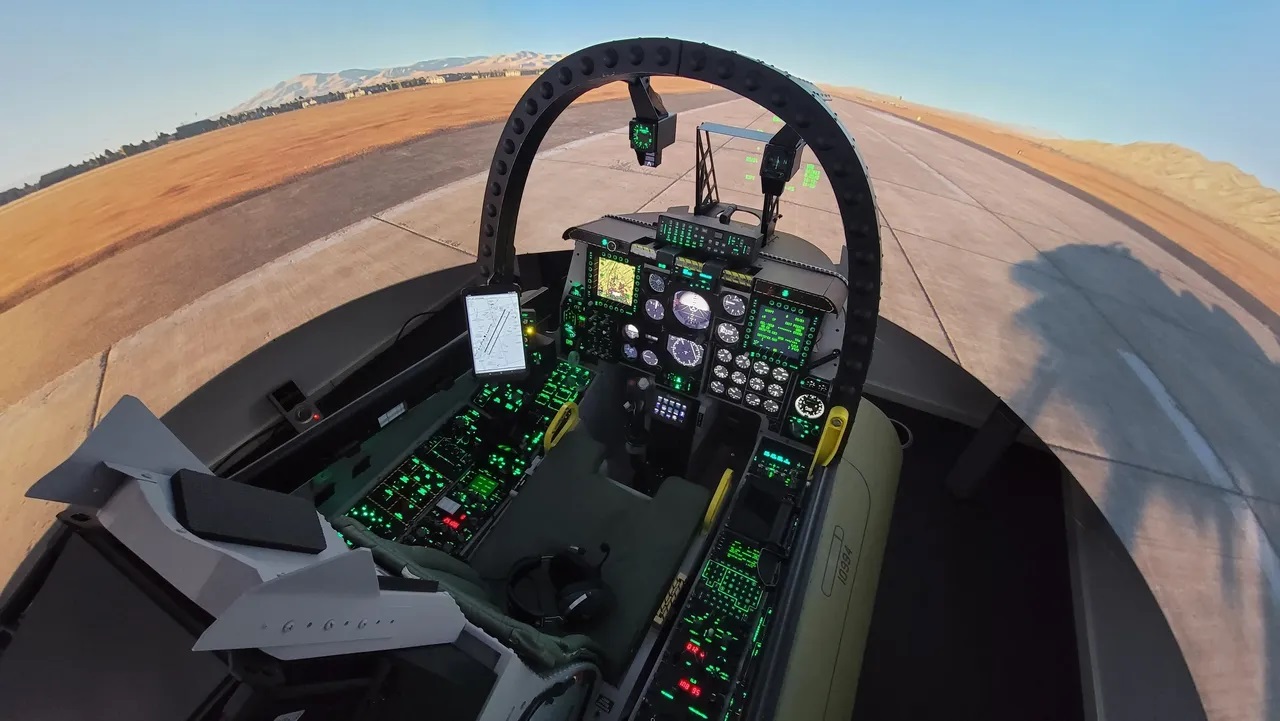

Some flight simulators are built with a joystick, a monitor, and the quiet hope that nobody notices the dining chair. Then there are projects that look less like a hobby setup and more like someone accidentally parked an A-10 Warthog cockpit in the spare room. The fully featured A-10 Warthog cockpit simulator belongs firmly in the second category: a glorious, switch-packed monument to aviation obsession, digital engineering, and the very human desire to press a real button instead of hunting for a keyboard shortcut at exactly the wrong moment.
The A-10 Thunderbolt II, better known as the Warthog, has one of the most recognizable personalities in military aviation. It is rugged, purposeful, and famously associated with the internet’s favorite aircraft sound effect: “BRRRT.” But the magic of a serious A-10 simulator is not only about noise, memes, or pretending the office carpet is a runway. It is about recreating the experience of managing a complex cockpit, interpreting instruments, coordinating controls, and feeling connected to a machine that was designed around close air support, survivability, and pilot workload.
A fully featured A-10 cockpit simulator turns Digital Combat Simulator and similar platforms into something much more physical. Instead of clicking virtual panels with a mouse, the pilot reaches for switches, panels, throttles, multifunction displays, warning lights, radios, and hands-on-throttle-and-stick controls. The result is part engineering project, part aviation museum, and part “please do not ask how many weekends this took.”
Why the A-10 Warthog Cockpit Is a Simulator Builder’s Dream
The A-10C cockpit is a near-perfect subject for a high-end home cockpit build because it combines old-school toughness with modern avionics. It is not a glass-cockpit spaceship where every task disappears into one touchscreen. It has knobs. It has guarded switches. It has panels with names that sound like they were invented by engineers who drink coffee from metal cups. For simulator builders, that is not clutter; that is treasure.
The real aircraft was designed for close air support, and its cockpit reflects that mission. The pilot must manage flight controls, navigation systems, radios, sensors, engine data, countermeasure panels, caution lights, and mission displays while staying focused on the outside world. In a simulator, this complexity becomes the fun. The more physical controls you add, the less the experience feels like playing a game and the more it feels like operating a machine.
The best A-10 Warthog cockpit simulator projects do not simply create a seat with a joystick in front of it. They recreate the workflow. The left and right consoles matter. The upfront controller matters. The multifunction color displays matter. The lighting matters. Even the awkward angles matter, because real cockpits are designed for function, not for looking cute on Instagramalthough, let’s be honest, a well-built A-10 sim pit absolutely does look cute on Instagram in a “my garage now has classified energy” kind of way.
From Desktop Sim to Full Cockpit: What Makes It “Fully Featured”?
A basic flight simulator setup usually starts with a flight stick, throttle, pedals, and one or two screens. That is already enough to enjoy flight simulation. But a fully featured A-10 Warthog cockpit moves far beyond the basics. It recreates the aircraft’s physical environment so that the pilot can interact with the simulator through real-world controls mapped to the virtual cockpit.
Physical Panels and Real Switch Logic
The heart of a serious A-10 cockpit build is the panel system. Builders often create panels for electrical power, fuel, lighting, radios, environmental controls, navigation, armament status, caution indicators, and other cockpit functions. The point is not merely decoration. The switches need to communicate with the simulator, and the simulator needs to respond in real time.
This is where interface tools such as DCS-BIOS become important. DCS-BIOS allows physical buttons, switches, encoders, and displays to talk to DCS World, making it possible for a home cockpit to mirror the virtual aircraft. Flip a switch on the panel, and the corresponding virtual control changes. Change a state in the simulator, and a display or indicator in the physical cockpit can update. That two-way communication is what separates a pretty cockpit shell from a living simulator.
HOTAS Controls That Feel Right
The A-10C is closely associated with HOTAS, or Hands On Throttle And Stick. In plain English, this means many important functions are placed on the throttle and stick so the pilot does not need to constantly reach around the cockpit. For sim pilots, a good HOTAS setup makes the aircraft feel dramatically more natural.
Commercial hardware such as the Thrustmaster HOTAS Warthog became popular because it was inspired by the A-10C control layout. In a full cockpit, that type of hardware can be combined with custom panels, pedals, displays, and seat construction to create a far more immersive environment. The controls become muscle memory. After a while, the pilot stops thinking, “Which keyboard command was that?” and starts thinking, “My hand already knows.” That is the sweet spot.
Displays, Gauges, and the Joy of Not Alt-Tabbing
The A-10 cockpit depends heavily on multifunction displays and instrument feedback. In a well-built simulator, these displays can be exported to dedicated screens or integrated behind physical bezels. That small detail changes everything. Looking down at a physical panel and seeing live simulator data is far more convincing than glancing at a flat monitor with a floating overlay.
Builders may also include caution panels, backlit labels, rotary knobs, analog-style gauges, and custom enclosures. None of this is required to fly a simulated A-10, but it transforms the user experience. It gives the cockpit a sense of place. You sit down, the panels surround you, and suddenly the computer desk has disappeared. The simulator becomes a cockpit-shaped argument against ever leaving the house.
The Warthog Project: When “Good Enough” Was Clearly Not Invited
One of the most impressive examples of an A-10C home cockpit is The Warthog Project, a deeply detailed build based on the United States Air Force A-10C Thunderbolt II. The project has attracted attention because it shows just how far home simulation can go when craftsmanship, research, patience, and a heroic tolerance for wiring meet in one place.
What makes this kind of project special is not just scale. It is the commitment to authenticity. A builder might use plywood, MDF, acrylic sheet, 3D-printed parts, electronics, custom labels, LEDs, microcontrollers, and interface software to reproduce the feel of the aircraft. That is not a weekend “IKEA but with more swearing” project. It is a long-term engineering journey, where every completed panel creates two new questions: How should it be mounted, and why is there suddenly another cable?
The result is a cockpit that lets the pilot interact with DCS in a physical, tactile way. For aviation fans, that is the dream. Instead of pretending a keyboard is a cockpit, the cockpit becomes the keyboard. Every click, switch, and display supports immersion. It is a simulator that rewards learning, patience, and the ancient builder’s ritual of measuring twice, cutting once, and then ordering another part anyway.
Why DCS A-10C II Is the Natural Software Partner
Digital Combat Simulator’s A-10C and A-10C II modules are central to the modern Warthog sim community. The A-10C module helped establish a reputation for deep systems modeling, while the A-10C II Tank Killer expanded the experience with updated cockpit visuals, additional avionics features, and a more modernized representation of the aircraft.
For a physical cockpit, detailed software matters. A shallow aircraft model would waste the hardware. The A-10C is popular because its systems invite real study. The pilot is not simply steering a 3D model through the sky. They are managing aircraft systems, reading instruments, communicating through simulated radios, navigating, monitoring aircraft status, and working through procedures in a way that feels layered and demanding.
This depth is what makes the A-10 simulator both intimidating and rewarding. New pilots may feel like they have opened a piano and found three more pianos inside. But as the layout becomes familiar, the aircraft starts to make sense. The cockpit stops looking like a wall of mysterious labels and begins to feel organized. That momentwhen confusion turns into flowis one of the great pleasures of serious flight simulation.
Immersion Is Built From Small Details
People often assume immersion comes from big-ticket items: giant screens, virtual reality headsets, motion platforms, and expensive controls. Those things can help, but the soul of a great A-10 cockpit simulator lives in small details. A switch with the right resistance. A label that glows softly in low light. A throttle that moves with weight. A caution panel that wakes up at the right time. A seat position that places the displays exactly where the eyes expect them.
These small details reduce the distance between thought and action. When a simmer reaches for a physical control without looking, the experience becomes more natural. The simulator is no longer asking the user to translate an aircraft action into a computer command. It simply lets the user perform the action. That is the magic of a fully featured cockpit.
There is also a wonderful educational side. Building or using a cockpit teaches systems thinking. You learn how inputs become simulator events, how displays receive data, how cockpit ergonomics affect workload, and why aircraft designers put certain controls where they did. Even without real-world flying ambitions, the project becomes a hands-on lesson in aviation design, electronics, software integration, and human-machine interaction.
VR, Monitors, or Physical Cockpit: Which Feels Best?
The A-10 simulator community often debates virtual reality versus physical cockpit builds. VR offers unmatched visual presence. You can look around naturally, judge depth, and feel surrounded by the aircraft. But VR has one major limitation for cockpit builders: you cannot easily see your real switches. Reaching for a physical panel while wearing a headset can feel like trying to make a sandwich inside a haunted closet.
A physical cockpit with monitors offers tactile confidence. You can see your hands. You can label every panel. You can build muscle memory. The trade-off is that visual immersion depends on screen placement, field of view, and projection choices. Some advanced builders combine both worlds with mixed reality, using physical controls while maintaining visual immersion through clever camera or headset setups.
The best choice depends on the simmer. If you want maximum visual presence, VR is spectacular. If you want authentic switch interaction, a physical cockpit is hard to beat. If you want both, congratulations: you have discovered the most expensive answer, which is also how most hobbies eventually reveal their final form.
What This Simulator Gets Right About the A-10’s Personality
The A-10 is not beloved because it is sleek. It is beloved because it is purposeful. It looks like it was designed by people who solved problems with rulers, coffee, and suspiciously strong opinions. The simulator captures that same personality. Everything has a job. The cockpit is not trying to be luxurious. It is trying to be clear, durable, and usable under pressure.
A good A-10 Warthog cockpit simulator communicates that design philosophy. The wide panel layout, the practical controls, the emphasis on visibility, the tactile switches, and the layered avionics all tell the same story: this is an aircraft built around mission focus and pilot survivability. Even in a home simulator, that design language comes through.
And yes, the BRRRT mythology helps. The A-10’s 30 mm GAU-8/A Avenger cannon is famous enough to have escaped aviation circles and become a meme with wings. But the best simulator builds do not lean only on the joke. They respect the aircraft as a complete system. The sound may get people in the door, but the cockpit depth keeps them there.
Who Is This Kind of Simulator For?
A fully featured A-10 cockpit is not for everyone. Casual players may prefer a simpler setup, and that is perfectly fine. Not every simmer needs a room-sized tribute to close air support to enjoy flying. But for cockpit builders, aviation enthusiasts, electronics hobbyists, and DCS pilots who love deep systems, the A-10 is irresistible.
It is especially appealing to people who enjoy long learning curves. The A-10C rewards study. It rewards repetition. It rewards the slow satisfaction of understanding one panel, then another, then another. It is not a “jump in for five minutes” experience unless those five minutes are spent admiring the cockpit and whispering, “Someday.”
The project also attracts makers. Anyone who enjoys 3D printing, laser cutting, microcontrollers, woodworking, soldering, CAD design, and software tinkering can find something to love. A cockpit build is a thousand small projects wearing a trench coat. One day you are designing a bracket. The next day you are troubleshooting a rotary encoder. The day after that you are wondering whether backlighting counts as a personality trait.
Experience Section: Living With the Ultimate BRRRT Simulator
Sitting in a fully featured A-10 Warthog cockpit simulator for the first time feels different from loading a flight sim at a desk. At a desk, the computer is still clearly a computer. In a cockpit, the room changes its identity. The seat, panels, displays, throttle, stick, and warning lights create a tiny theater of aviation. You are not just looking at an aircraft on a screen; you are sitting inside an aircraft-shaped interface.
The first experience is usually awe followed immediately by humility. There are a lot of controls. The cockpit seems to say, “Welcome aboard. I hope you brought a notebook.” Even experienced gamers can feel overwhelmed because this is not a typical action game interface. It is a systems environment. You learn where to look, what to touch, and when to slow down. The simulator rewards calm attention more than frantic clicking.
One of the most satisfying moments comes when physical interaction starts to feel automatic. A switch is no longer “that thing on the left panel.” It becomes part of a flow. Your eyes move to a display, your hand moves to the right control, and the aircraft responds. That moment is powerful because it shows why cockpit builders care so much about tactile accuracy. The body learns the cockpit in a way the keyboard never allows.
The experience also changes how you appreciate the real A-10. Reading about the Warthog is interesting, but sitting in a simulated cockpit makes the aircraft’s design choices feel practical. The layout is not random. The controls are grouped to support workload. The HOTAS philosophy makes sense once your hands are busy. The displays become central because they reduce the need to mentally juggle information. Even in a simulation, you begin to understand why cockpit ergonomics matter.
There is also a surprisingly peaceful side to the build. Despite the aircraft’s aggressive reputation, using the simulator can feel almost meditative. You check panels, manage systems, practice flying, follow procedures, and improve one skill at a time. The fun is not only in dramatic moments. It is in competence. It is in learning to taxi smoothly, trim properly, read instruments efficiently, and handle the aircraft with more confidence than last week.
For visitors, the cockpit has instant magnetism. People who have never played DCS will still want to sit in it. They will ask what every switch does. They will make the BRRRT sound within thirty seconds because apparently that is now federal law. Then they will realize the simulator is more than a meme machine. It is a crafted environment built from research, electronics, patience, and affection for aviation history.
Owning or building such a simulator is not simple. It takes space, money, time, and troubleshooting stamina. Something will always need calibration. A wire will eventually misbehave. A software update may cause a small emotional weather system. But that is part of the experience. The cockpit is never just finished; it evolves. New panels appear. Displays improve. Labels get replaced. The project becomes a living machine.
That is why the ultimate BRRRT simulator is more than a flashy home cockpit. It is a love letter to simulation as a craft. It proves that enthusiasts do not merely consume aviation experiences; they build them, wire them, paint them, debug them, and sit in them with the proud smile of someone who definitely owns more toggle switches than a normal person should.
Conclusion: The A-10 Cockpit Simulator Is Peak Flight-Sim Madnessin the Best Way
The ultimate A-10 Warthog cockpit simulator is not just a gaming setup. It is a full-body argument for why physical simulation still matters. In an era of powerful graphics and virtual reality, the humble switch remains undefeated. The click of a real control, the glow of a real panel, and the movement of a real throttle create a kind of immersion that software alone cannot fully replace.
For aviation fans, the A-10C cockpit offers the perfect combination of history, complexity, personality, and hands-on challenge. For makers, it is a playground of fabrication, electronics, coding, and design. For DCS pilots, it is a way to turn study-level simulation into something tactile and unforgettable. And for everyone else, it is proof that hobbies are more fun when they occasionally require plywood, microcontrollers, and explaining to family members why the office now resembles an aircraft.
The BRRRT may be the famous part, but the cockpit is the real star. It is where systems, skill, and immersion meet. A fully featured A-10 Warthog cockpit simulator captures that magic and brings it homepreferably into a room with strong flooring, good ventilation, and a very understanding household.
Note: This article is written for aviation simulation, technology, and hobbyist education. It discusses cockpit design, software integration, and flight-sim immersion, not real-world weapon operation or tactical instruction.