
BeReal may be built around spontaneous, unfiltered moments, but that does not mean every moment disappears without leaving digital footprints. When someone posts a spectacularly ordinary photo of cereal, homework, or the ceiling above their bed, another user can still save it with a screenshot. The important question is whether BeReal tells the person whose post was captured.
Yes, BeReal can reveal that a screenshot was taken of a BeReal post. However, it generally does not behave like a loud, immediate Snapchat-style push alert. Instead, the post owner may see a screenshot icon or counter inside the app and can often check who captured the post. The exact appearance and steps can vary between iPhone, Android, app versions, and feature rollouts.
Current behavior was cross-checked against BeReal’s privacy documentation, current app listings, and recent platform guides.
Does BeReal Notify Someone When You Take a Screenshot?
BeReal records screenshot activity within its mobile app and may display that activity to the owner of the captured post. The poster is not necessarily interrupted by a banner saying, “Alex just saved your unfortunate lunch photo.” Instead, the evidence usually appears when the person opens BeReal and views their own post.
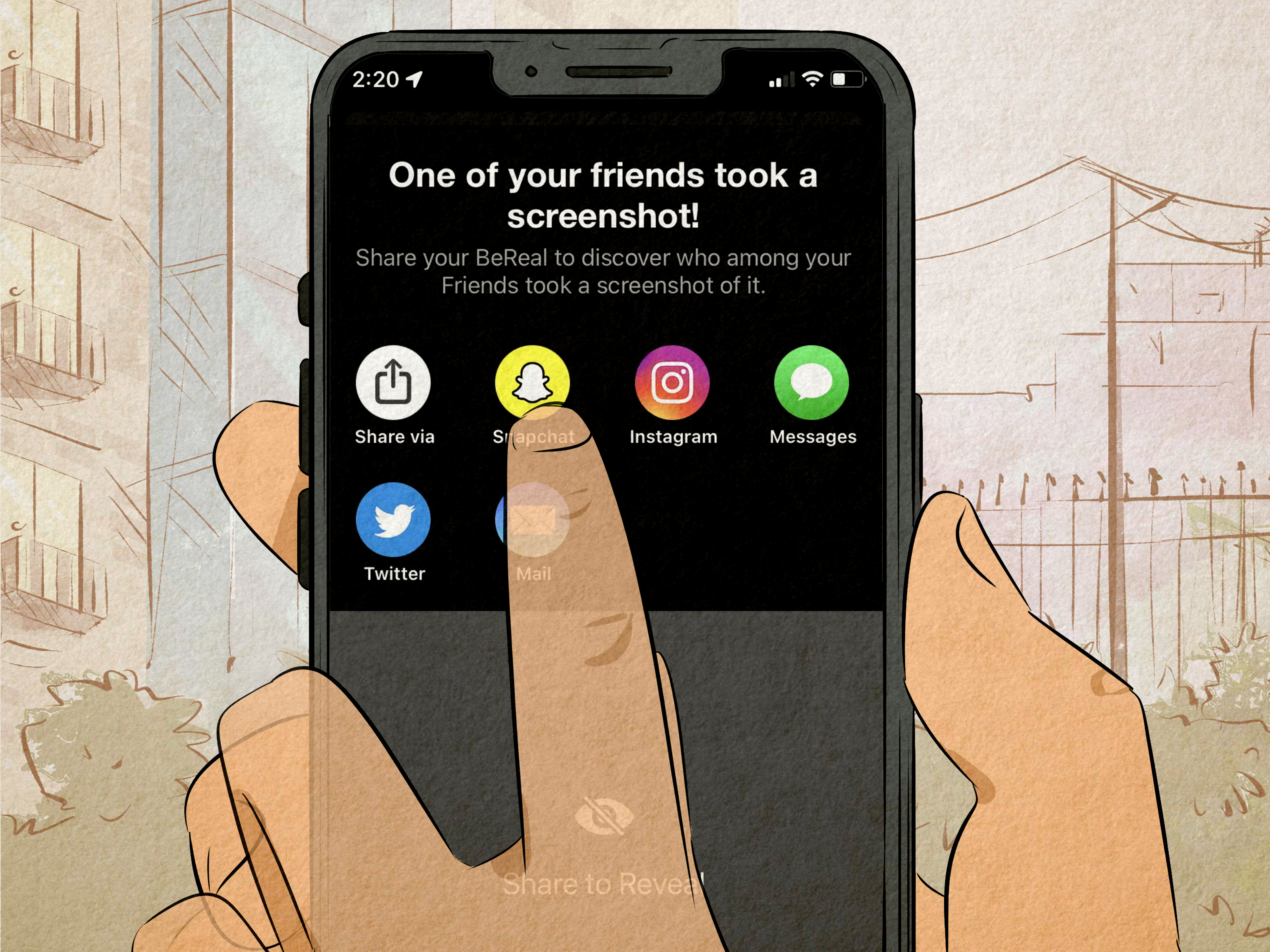
Depending on the device and app version, the owner may see a small camera shutter symbol, screenshot icon, or number showing how many captures were detected. Tapping that indicator may reveal the account associated with the screenshot.
This distinction matters:
- Immediate push notification: Usually no.
- In-app screenshot indicator: Yes, for supported BeReal posts.
- Identity of the person who captured it: Often visible after the poster opens the indicator.
In older versions, BeReal sometimes required the post owner to share the post through another app before revealing the screenshotter’s identity. Newer interfaces may show the information more directly. Because BeReal regularly experiments with its design, instructions found in an older tutorial may not perfectly match the buttons on your phone today.
Multiple platform guides describe an in-app icon or counter rather than a standard push alert.
What Happens After You Screenshot a BeReal?
When you use your phone’s normal screenshot shortcut while viewing a friend’s post in the BeReal app, several things may happen behind the scenes:
- Your phone saves the image to its photo or screenshot folder.
- BeReal detects or records the capture event.
- The original post receives a screenshot marker or updated counter.
- The post owner can inspect the marker and may see your username.
BeReal’s current privacy policy specifically lists screenshot activity among the usage data it may collect. That does not guarantee identical behavior on every operating system, but it confirms that screenshots are not automatically invisible to the platform.
The safest assumption is simple: when you screenshot a BeReal inside the official app, act as though the poster will know. That rule saves you from awkward conversations and from having to explain why you permanently preserved someone’s 11:47 p.m. microwave nachos.
BeReal’s privacy policy states that usage data can include when a user takes a screenshot in the app.
How to See Who Screenshotted Your BeReal
If you suspect that one of your friends has turned your daily post into a permanent museum exhibit, check the post itself.
Typical Steps on iPhone or Android
- Open the latest version of the BeReal app.
- Open your current BeReal or the relevant post.
- Look near the post details for a screenshot, camera, or shutter icon.
- Tap the icon or screenshot count.
- Follow any on-screen instruction required to reveal the account.
On some versions, you may have to expand the post fully before the indicator appears. On others, the icon may sit beside the posting time, caption, location, or engagement details. If no icon is present, it may mean nobody captured the post, the capture was not detected, or your app has not yet received the same interface as other users.
Why You May See a Number Instead of a Name
A number indicates how many screenshot events BeReal associated with the post. You may need to tap it to view individual accounts. If the list remains hidden, close and reopen the app, install pending updates, and check again. Temporary synchronization problems can delay the counter or account list.
Does BeReal Send a Push Notification for Screenshots?
Usually, BeReal does not send a conventional push notification the instant a screenshot occurs. Your phone may remain silent, and no dramatic warning may appear on the lock screen. The notification is more accurately described as an in-app record.
That makes BeReal different from services that immediately announce a capture inside a chat. A BeReal poster might not discover the screenshot until hours later, when checking reactions, comments, or the post itself. Silence, therefore, does not mean secrecy. It may simply mean the app has saved the surprise for later.
BeReal’s primary push notifications are still the randomized prompts asking users to post. Everyone in the same time-zone group typically receives the daily prompt together and has two minutes to capture a front-and-back-camera post. Screenshot tracking is a separate feature and does not use the same prominent alert style.
BeReal documents its daily two-minute posting notification separately from screenshot activity.
Does BeReal Notify for Screen Recordings?
Screen-recording behavior is less clearly documented than ordinary screenshots. BeReal’s public privacy information explicitly mentions screenshot activity, while support materials do not provide an equally clear, universal explanation for every type of screen recording.
Some users report that recording a screen does not create the same post indicator. Others report inconsistent detection depending on their device, permissions, and app version. Mobile operating systems also change how apps can observe capture activity, so a method that appeared unnoticed last year may behave differently after an update.
Do not treat screen recording as a guaranteed invisible workaround. Even when BeReal does not display a marker, the recording still creates a durable copy of someone else’s content. The same ethical and privacy considerations apply.
What About Using Another Phone?
BeReal cannot directly detect a separate camera physically photographing the screen. No social media app can reliably know that another device is pointed at a display. Nevertheless, using another phone specifically to avoid a privacy signal may feel deceptive, particularly when the post includes a private location, personal conversation, family member, or embarrassing moment.
Does BeReal Notify for Screenshots of Profiles?
BeReal’s best-documented screenshot notification behavior relates to individual posts. There is no dependable public guarantee that every capture of a profile page, username, friend list, comment area, memory, or chat will generate the same alert.
This uncertainty should not be interpreted as permission to capture anything without consequences. BeReal can modify its detection system, and different versions may record more in-app screens than older versions did. When the information is sensitive, assume that the other person could learn about the captureor simply ask before saving it.
Do Screenshots of RealMojis and Comments Trigger an Alert?
A RealMoji is BeReal’s photo-based reaction feature. Because RealMojis and comments appear around a BeReal post, a full-screen screenshot may capture the original post along with those reactions. In that situation, the screenshot event may be associated with the main post rather than treated as a completely separate capture of the reaction.
BeReal does not provide a simple public chart covering every possible combination of posts, RealMojis, comments, chats, profiles, and memories. As a result, users should avoid making absolute claims about niche situations. The consistent principle is that screenshot activity inside the app can be recorded, especially when the screen contains an active BeReal post.
Can Someone Prevent You From Screenshotting a BeReal?
BeReal generally does not block the phone’s normal screenshot controls. The platform’s approach is closer to accountability than prevention: it may allow the capture but show evidence to the poster afterward.
The person who posted the image also cannot remotely delete a copy already stored in someone else’s gallery. Deleting the original BeReal removes it from the platform according to the app’s rules, but it does not reach into another person’s phone and erase screenshots.
This is why users should treat every social media upload as potentially permanent. BeReal promotes unpolished sharing, but “unpolished” is not the same as “impossible to save.” A photo that lasts for one posting cycle can survive indefinitely in a message thread, cloud backup, group chat, or camera roll.
Why BeReal Tracks Screenshots
BeReal’s central idea is that friends share genuine moments rather than carefully staged highlight reels. Screenshot visibility supports that environment by giving posters some awareness when their supposedly casual content is saved.
The feature cannot stop misuse, but it can discourage silent collection. It also reminds users that there is a person behind the post. Your friend may be comfortable sharing a sleepy face with a small BeReal circle for the day but uncomfortable having the same image reposted in a group chat six months later.
Research into BeReal’s design has found that its timed prompts, reciprocal posting, and audience choices can reduce some pressures associated with polished self-presentation. Screenshot accountability fits that broader attempt to make social interaction feel more personal, even though no technical feature can manufacture perfect trust.
Research on BeReal describes how its design encourages spontaneous sharing and more carefully chosen audiences.
Why BeReal Might Not Show a Screenshot Notification
Screenshot tracking is not flawless. Several technical issues can prevent or delay an indicator:
- The BeReal app is outdated on one or both phones.
- The capture occurred while the post was loading.
- The operating system restricted BeReal’s storage or photo permissions.
- The app failed to synchronize the event with BeReal’s servers.
- A staged feature rollout gave the two users different interfaces.
- The screenshot came from a screen or content type that is not tracked consistently.
- A software bug created a false positive or failed to record a genuine capture.
Android users in particular may see differences caused by manufacturer-specific software and storage controls. An app can behave differently on a Google Pixel, Samsung Galaxy, and another Android model even when all three phones appear to run the same major Android version.
How to Troubleshoot the Screenshot Counter
- Update BeReal through the App Store or Google Play.
- Force-close and reopen the app.
- Restart the phone.
- Check whether BeReal has the photo or media permissions it requests.
- Open the post in full view rather than checking only the feed.
- Wait briefly for the account to synchronize.
- Contact BeReal support if the indicator repeatedly behaves incorrectly.
Do not install unofficial “screenshot detector” apps or provide your BeReal password to a third-party service. Such tools cannot magically access private platform records and may expose your account credentials or personal data.
BeReal Screenshot Etiquette and Privacy Tips
The technical answer is useful, but the social answer is even easier: ask before saving a personal post. A five-second message such as “This is hilariouscan I keep it?” can prevent a five-day friendship cold war.
For People Taking Screenshots
- Ask permission when a post contains an embarrassing or private moment.
- Do not repost a screenshot publicly without the creator’s consent.
- Crop or blur unrelated people, locations, addresses, and notifications.
- Delete the image when it is no longer needed.
- Never use screenshots for harassment, impersonation, or humiliation.
For People Posting on BeReal
- Check both the front and rear camera views before publishing.
- Avoid exposing home addresses, school details, work documents, or computer screens.
- Review the audience selected for the post.
- Remove friends you no longer trust with personal updates.
- Report inappropriate sharing or harassment through BeReal’s reporting tools.
BeReal advises users to report inappropriate content or behavior directly in the app and offers blocking tools for unwanted interactions. These protections are more useful after a problem occurs, so careful posting remains the strongest first defense.
BeReal’s Help Center provides in-app reporting and blocking guidance for inappropriate behavior.
Frequently Asked Questions
Does BeReal tell someone when I screenshot their post?
Yes, it can display an in-app screenshot icon or counter on the captured post. The owner may be able to tap it and identify the account responsible.
Will the person receive a notification on their lock screen?
Usually not. Screenshot activity is generally shown inside BeReal rather than delivered as an immediate push notification.
Can I screenshot a BeReal anonymously?
You should not assume so. Standard screenshots taken inside the app may be associated with your account and revealed to the poster.
Does airplane mode hide a BeReal screenshot?
Airplane mode is not a dependable solution. An app may store an event locally and synchronize it after the connection returns. Features can also change without warning.
Does BeReal notify when I save my own post?
Your own BeReal can normally be saved or downloaded through the app’s sharing and Memories features. There is little reason to use a screenshot when BeReal provides an official download option for your own content.
Can I see screenshots of an older BeReal?
Screenshot information may remain visible when opening certain posts or Memories, but availability can vary by app version and interface. Current posts are the most consistently documented case.
Can BeReal’s screenshot detection make mistakes?
Yes. Delayed indicators, missed captures, and occasional false detections can occur because of app bugs, storage monitoring, device permissions, or operating-system differences.
Real-World Experiences With BeReal Screenshot Notifications
The most common BeReal screenshot experience is surprisingly undramatic. Someone captures a funny post, nobody receives an immediate alert, and the screenshotter assumes the mission was invisible. Later, the poster opens the photo, notices a tiny icon, taps it, and discovers exactly who preserved the moment. What follows ranges from a laughing emoji to an interrogation worthy of a courtroom drama.
Consider a college student who posts a BeReal from the library. The rear camera shows a spectacular tower of empty coffee cups, while the front camera captures the expression of someone reconsidering every life choice that led to an 8:00 a.m. exam. A friend takes a screenshot because the picture is funny. The poster sees the screenshot counter later and asks why it was saved. Because the reason is harmless, the situation becomes an inside joke. A quick explanation keeps the moment friendly.
Now imagine a more sensitive scenario. A user posts from home without noticing that a package label, apartment number, medical document, or work dashboard appears in the background. A friend screenshots the post and shares it in a group conversation. Even when nobody intends harm, the screenshot turns a temporary mistake into a permanent privacy problem. This is why checking both camera views before posting matters more than whether BeReal sends a notification.
Accidental screenshots also happen. Many phones use a combination of the power and volume buttons, and those buttons are easy to press while adjusting the device. Gesture-based screenshot controls create similar surprises. When BeReal records the capture, the other person may interpret it as deliberate. Sending a brief message“Sorry, accidental screenshot while locking my phone”is usually better than hoping the icon goes unnoticed.
Users also report inconsistent results when friends test the feature across different devices. An iPhone may show the indicator promptly, while an Android post updates after the app is reopened. One friend may see a count but not a name; another may be asked to use a sharing option before identities appear. These differences do not necessarily mean someone is lying. App versions, permissions, temporary bugs, and regional feature rollouts can produce genuinely different experiences.
Another familiar situation involves the “helpful screenshot.” A friend captures a recipe, event detail, restaurant recommendation, outfit idea, or book title visible in the post. The purpose is practical rather than personal, but the poster still sees the capture. Asking first remains polite, especially when the screenshot includes the person’s face or private surroundings. Alternatively, request the information directly and let the friend send a cleaner image or link.
The social meaning of a screenshot depends heavily on context. Capturing a friend’s new haircut because they look great feels different from saving an emotional post made during a difficult day. Saving a public event schedule is different from preserving an awkward facial expression for a meme. Technology can reveal that a capture happened, but it cannot explain the intention. Communication has to do that job.
The best overall experience comes from treating screenshot indicators as a reminder rather than a trap. Posters should remember that anything shown on a screen can be copied. Viewers should remember that access to a post is not automatic permission to archive or redistribute it. BeReal may encourage casual authenticity, but healthy friendships still require the decidedly old-fashioned features of consent, context, and basic courtesy.
Final Verdict: Does BeReal Notify for Screenshots?
Yes, BeReal can notify a poster indirectly by displaying an in-app screenshot icon, count, or account list on the captured post. It usually does not send an immediate push notification, but the person may discover the screenshot the next time they inspect their BeReal.
The interface can differ between iOS and Android, and less common situations such as screen recordings, profiles, chats, and Memories are not documented as consistently as ordinary post screenshots. BeReal also updates frequently, so no “secret” capture method should be considered permanent or dependable.
The practical rule is wonderfully uncomplicated: if you capture someone’s BeReal, assume they can find out. Better yet, ask before turning a temporary slice of real life into a permanent image.