
If you’ve ever tried to remember whether you took your medication, how you slept, and why your “easy run” somehow turned into a competitive sport
against a stranger’s dog… Apple has been watching. (Not in a creepy way. In a “your wrist and phone already have sensors” way.)
With iOS 16 and watchOS 9, Apple didn’t just add a few shiny health features. It made the Health app and Apple Watch feel less like a data dump and
more like a helpful, slightly nerdy assistant who organizes your life with color-coded chartsand doesn’t judge you for your bedtime scrolling.
The Big Idea: Make Health Data Useful, Not Just “Available”
Health tracking isn’t new for Apple. What’s new is the emphasis on actionable clarity: reminders you’ll actually notice, trends you can
understand at a glance, and reports you can share without needing to translate “vertical oscillation” into human language.
iOS 16 upgrades the Health experience on iPhoneespecially for medication management and sharingwhile watchOS 9 upgrades the Apple Watch as a fitness
and heart-health companion. Together, they form a “two-device team”: your iPhone handles organization and context, and your watch handles continuous
tracking and in-the-moment coaching.
And importantly, Apple’s approach aims for the sweet spot: giving people more insight without pretending the phone is a doctor. The updates are designed
to help you spot patterns, stay consistent, and walk into appointments with better questions (and fewer “uhhh I think I started that pill… last month?” moments).
What’s New in iOS 16: A Smarter Health App (and a More Motivating Fitness App)
1) Medication Tracking That Feels Like a Real-Life Safety Net
The headline feature is Medications inside the Health app. You can build a list of prescriptions, over-the-counter meds, vitamins, and
supplements, then set schedules and reminders so you’re not playing “guess the dose” at 11:47 p.m.
The experience is designed for normal humanspeople who travel, get busy, and sometimes forget whether “twice daily” means “twice whenever I remember.”
You can log doses, set follow-up reminders if you miss one, and (if you choose) enable more urgent alert styles for critical schedules.
One of the most useful touches is the way iOS 16 can surface interaction alerts and “interaction factors” (like alcohol, tobacco, or cannabis)
so the information you’d normally skim on a pharmacy pamphlet is easier to revisit when you actually need it.
2) Health Sharing: Less “I’m Fine,” More “Here’s the Data”
iOS 16 makes it easier to share selected health info with trusted family members. This isn’t about turning your spouse into your personal health auditor.
It’s about adding support: an older parent can share key metrics, or someone recovering from an illness can let a caregiver see trends without constant check-ins.
Sharing is most helpful when it’s paired with meaningful signalslike notifications about changes or highlightsso the people who care about you can help
you notice what you might miss.
3) The Fitness App for Everyone (Yes, Even Without an Apple Watch)
iOS 16 also expands the Fitness app so iPhone-only users can set a daily Move goal and track progress using iPhone sensors. That means your
“I don’t have a watch” era doesn’t have to be your “I guess I’ll never close a ring again” era.
It’s a subtle shift, but it matters: Apple is turning fitness tracking into a default iPhone experience, not a perk locked behind wearable ownership.
For beginners, this lowers the barrier to building consistent habitswalks, steps, active calories, and workouts from supported third-party apps can all
contribute to the daily goal.
What’s New in watchOS 9: More Insight Into Sleep, Heart Health, and Training
1) Sleep Stages: More Than “You Slept… Kinda”
Sleep tracking in watchOS 9 goes deeper with sleep stages, estimating time spent in REM, Core, and Deep sleep, plus time awake. Instead of
a single “hours slept” number, you get a more nuanced view of your nightuseful for spotting patterns like late caffeine, inconsistent bedtimes, or the
mysterious phenomenon known as “I watched one episode and it became three.”
The real win is context. In the Health app, sleep stage charts can sit alongside other metrics like heart rate and respiratory rate, making it easier to
connect the dots over time instead of guessing based on vibes.
2) AFib History: A Deeper Look for People Already Diagnosed
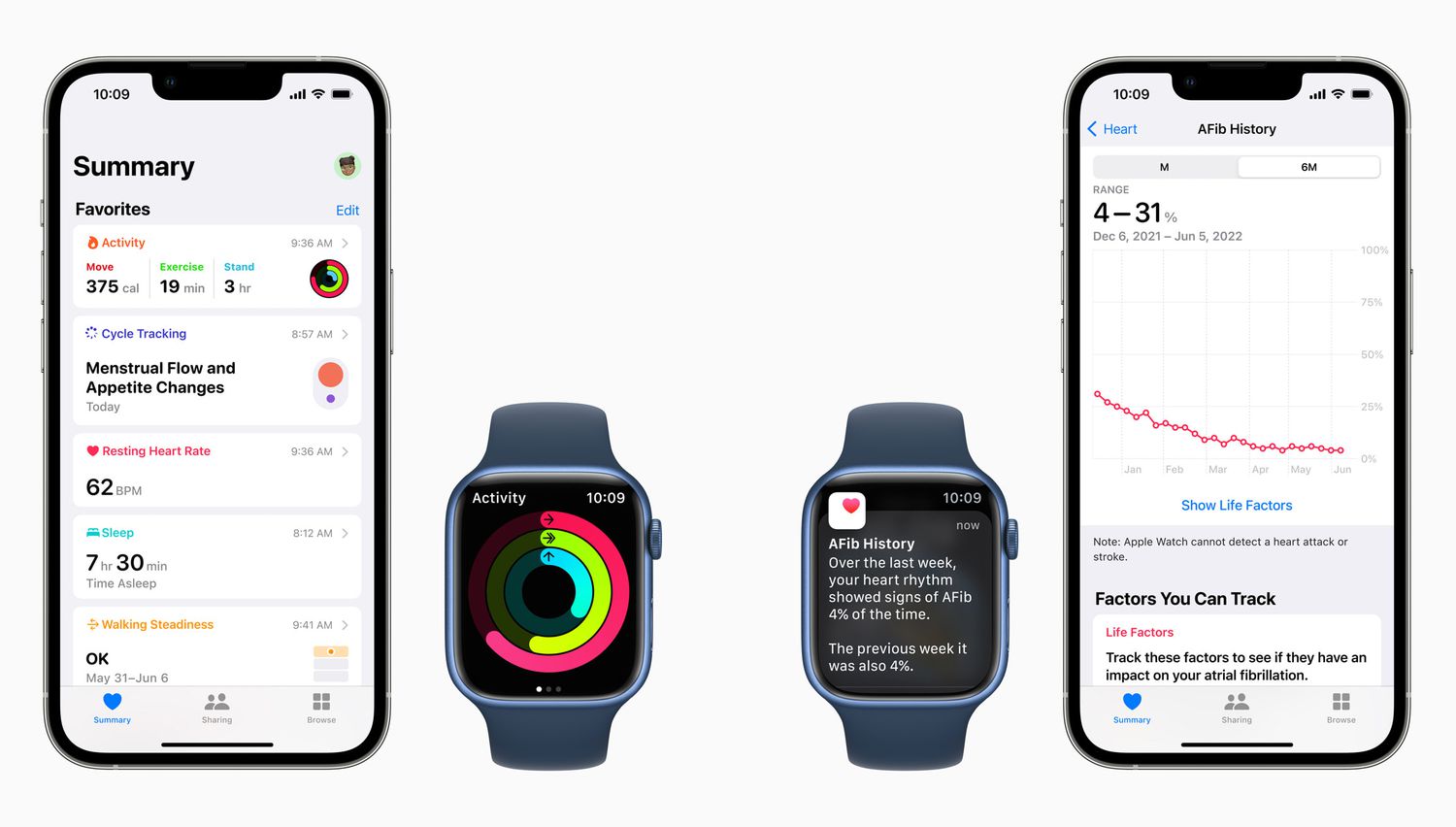
Apple also introduced AFib History in watchOS 9 for users who have already been diagnosed with atrial fibrillation. Rather than a one-time
reading, it estimates how frequently your heart rhythm shows signs of AFib over a period of time, and it can generate weekly summaries.
It’s positioned as a conversation-starter for clinician visits: users can export a PDF report that includes AFib estimates and related lifestyle factors
(like sleep, exercise, and alcohol). This is especially helpful because real-world symptoms don’t always match a quick snapshot at the doctor’s office.
3) Heart Rate Zones and Custom Workouts: Training With Guardrails
If you’ve ever tried to “run easy” and accidentally turned it into a tempo workout because your playlist got dramatic, watchOS 9 has your back.
Heart Rate Zones can be calculated automatically or set manually, and the watch can alert you when you drift out of your target zone.
On top of that, Custom Workouts make interval sessions less chaotic. You can build structured work/rest segments, then add alerts for pace,
power, cadence, or heart rateessentially turning the watch into a tiny coach that never cancels due to “scheduling conflicts.”
4) Running Metrics: The “Form Nerd” Upgrade (In a Good Way)
watchOS 9 adds more running metrics, including form-focused stats like stride length, ground contact time, and vertical oscillation. You can surface these
as live workout views, then review trends later in the Fitness and Health apps.
These numbers won’t magically fix your running form overnight, but they can help you notice patterns. For example: if ground contact time creeps up when
you’re tired, it might explain why your pace fades at the end of longer runs. If vertical oscillation spikes, it can hint that you’re bouncing instead of
moving forward efficiently.
5) Multisport and Smarter Summaries
For athletes who do more than one thing on purpose (triathletes) or by accident (you forgot your running shoes so you swam), watchOS 9 adds a
Multisport workout that can switch between swim, bike, and run segments automatically.
Apple also refreshes workout summaries with more interactive charts and detail, helping you review sessions without squinting at tiny numbers and wondering
why your “easy” hike looks suspiciously like a hill-sprint festival.
Why These Updates Matter in Real Life
The value of health tracking isn’t in the existence of datait’s in what the data helps you do next. iOS 16 and watchOS 9 aim to support three
everyday goals:
- Consistency: Medication schedules, reminders, and logging reduce missed doses and confusion.
- Awareness: Sleep stages, heart rate zones, and trends help you see what’s changingbefore it becomes a bigger issue.
- Better conversations: Exportable reports and clearer summaries help you show your clinician patterns, not just anecdotes.
A practical example: imagine you’re starting a new prescription. The Health app helps you build a schedule, gives you a nudge when it’s time, and makes it
easier to bring a clean medication list to a doctor visit. Meanwhile, your Apple Watch quietly logs sleep and workout intensity, which can help you notice
whether your energy dip is linked to poor sleep, overtraining, or something else entirely.
Privacy and Limitations: The Fine Print You Should Actually Read
Apple emphasizes privacy protections for health data, including encryption on-device and safeguards when syncing via iCloud (depending on your settings).
That said, “private” doesn’t automatically mean “risk-free,” especially if you share data with othersso choose sharing partners like you choose passwords:
carefully and with intention.
Also, these features are not magic. Medication tracking helps you remember and log; it doesn’t replace a pharmacist. Sleep stages are estimates; they’re
useful for trends, not for self-diagnosing sleep disorders. AFib History is intended for people already diagnosed, and it’s meant to support clinical
conversationsnot replace them.
How to Get the Most Out of iOS 16 + watchOS 9 (Without Becoming a Spreadsheet Person)
- Start with one habit. Add your core medications first, then expand. The goal is reliability, not a museum archive of every supplement you bought once.
- Use trends, not single days. Sleep stages and workout metrics become meaningful when you look at weeks, not one “weird Tuesday.”
- Set the right alerts. Heart rate zone notifications and interval alerts are greatunless they’re so noisy you start negotiating with your watch like it’s a toddler.
- Bring data to appointments. If you’re tracking AFib history, medications, or sleep changes, export summaries and use them to ask sharper questions.
The best health tech is the kind you forget is therebecause it quietly helps you stay consistent, then shows you the insights when you’re ready to use them.
Experiences: What Living With These Features Feels Like (The 500-Word Reality Check)
The first time you use medication tracking in iOS 16, it feels almost suspiciously grown-uplike you suddenly own matching towels and remember to water plants.
You add a prescription, set “morning” and “evening,” and your phone starts doing the gentle-nudge thing that alarms and reminder apps have tried (and failed)
to do for years. The difference is context: this isn’t just “ding!”it’s a health-focused prompt that invites you to log the dose, see your schedule, and move on.
Then there’s the “Did I take it?” moment. Everyone has it. You’re in the kitchen, you’re not sure, and you don’t want to double-dose out of fear.
With medication logging, you check once and get a real answer. It’s not glamorous, but it’s the kind of boring utility that can genuinely reduce stressespecially
for people managing multiple prescriptions, caregivers juggling routines, or anyone who travels across time zones and suddenly can’t remember what “morning” even means.
Sleep stages in watchOS 9 are a different kind of experience: less “fix my life instantly,” more “oh… that explains a lot.” You might notice that when your bedtime drifts,
your REM dips. Or that a late workout makes you fall asleep faster but changes how your night breaks down. The point isn’t to chase a perfect score (please don’t),
but to spot patterns that are actionablelike cutting caffeine earlier, keeping a consistent bedtime, or realizing that doomscrolling is not a recognized wellness practice.
If you train, heart rate zones and custom workouts feel like leveling up without getting overwhelmed. Suddenly “easy run” has guardrails. Your watch taps you when you’re
pushing too hard, andif you listenyou finish feeling better instead of wrecked. Interval days become more structured: you know when to work, when to recover, and you
stop “accidentally” turning every run into a personal test of suffering.
The running metrics can be humbling in the best way. Seeing stride length, ground contact time, or vertical oscillation doesn’t instantly make you fasterbut it gives you
clues. You might realize your form falls apart on hills, or that fatigue turns you into a bounce machine. Over time, small adjustments (cadence, strength work, better pacing)
show up in the trends. It’s not instant gratification; it’s the slow satisfaction of seeing effort become measurable improvement.
And for people using AFib History (where appropriate), the experience is often about reassurance and clarity. Instead of guessing how often episodes happen, you can see
longer-term patterns and share them with a clinician. It’s not about panicking over every data pointit’s about replacing uncertainty with better information and better conversations.
Ultimately, iOS 16 and watchOS 9 make health tracking feel less like a chore and more like a helpful background system: quietly keeping tabs, nudging you when needed,
and handing you a clearer story when you ask, “How am I really doing?”