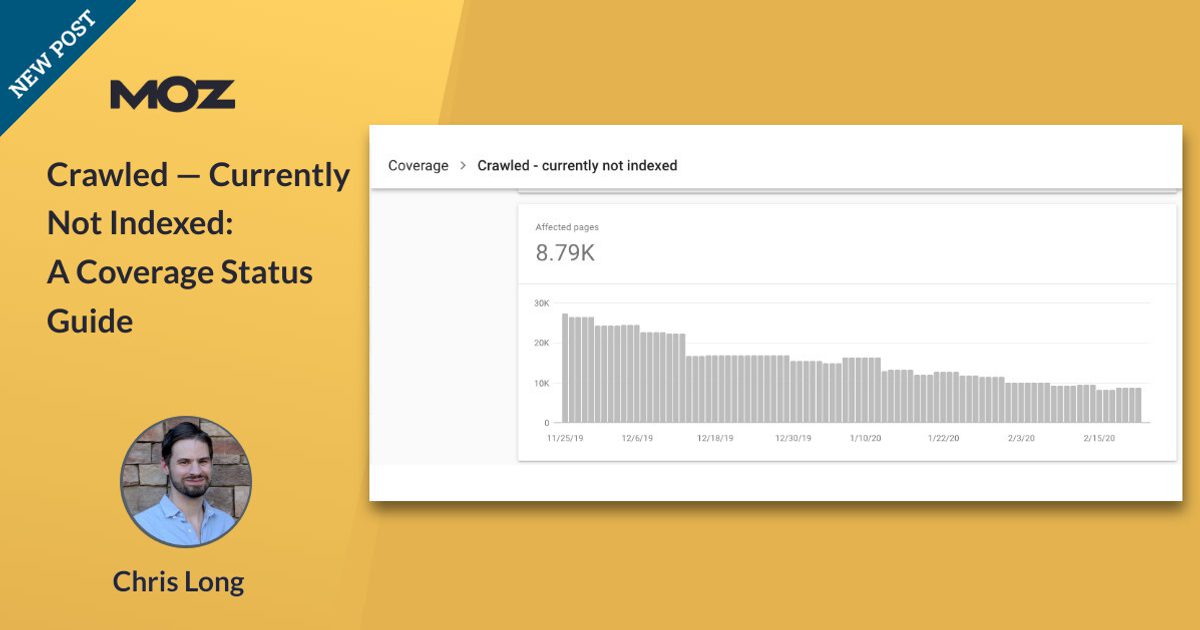

You publish a page, polish the title, add internal links, submit the sitemap, and wait for Google to roll out the red carpet. Instead, Google Search Console delivers one of SEO’s least charming status messages: “Crawled currently not indexed.”
Translation: Googlebot visited the URL, looked around, and then decided not to put the page in Google’s indexat least for now. That does not automatically mean your website is broken, penalized, or destined to spend eternity on page 97. It does mean the URL cannot reliably compete in Google Search until Google chooses to index it.
Google’s current Page Indexing documentation explicitly describes this status as a page that has been crawled but not indexed and notes that it may or may not be indexed later. Google also says there is no need to repeatedly resubmit the URL merely because it has this status.
This guide explains what Crawled currently not indexed means, why important URLs can land there, how it differs from other Google Search Console indexing statuses, and what actually increases your chances of getting valuable pages indexed.
What Does “Crawled Currently Not Indexed” Mean?
Search engines generally move through several broad stages before a web page can generate organic traffic:
- Discovery: Google learns that a URL exists through links, sitemaps, previous crawls, redirects, or other signals.
- Crawling: Googlebot requests the page and retrieves its resources.
- Rendering and processing: Google interprets the HTML, JavaScript-generated content, links, metadata, and other page elements.
- Index selection: Google decides whether the page belongs in its searchable index and determines how it relates to similar URLs.
- Serving and ranking: An indexed page may become eligible to appear for relevant searches.
“Crawled currently not indexed” means the URL made it through crawling but did not make the cut during index selection. Google knows the page. The crawler successfully visited it. The problem is that Google currently sees insufficient reason to retain that particular URL as a searchable document.
That distinction matters. This status is fundamentally different from a page Google cannot access because of a server failure, authentication requirement, robots restriction, or other crawling problem.
Crawled vs. Discovered Currently Not Indexed
These two messages look similar enough to cause plenty of SEO headaches, but they describe different points in Google’s process.
Discovered currently not indexed
Google knows the URL exists but has not crawled it yet. Google says this can sometimes happen when crawling the URL would place too much load on a site, causing the crawl to be postponed.
Crawled currently not indexed
Google has already visited the page. Therefore, submitting another sitemap or smashing the “Request Indexing” button as though it were an elevator button is usually not the real solution.
When many URLs remain in the crawled-but-not-indexed bucket for weeks or months, you should investigate what those URLs have in common.
Why Does Google Crawl a Page but Not Index It?
There is no single universal cause. Google does not provide a convenient message saying, “We skipped this article because section three was boring.” Diagnosis usually requires examining content, duplication, site architecture, rendering, URL patterns, and Google’s selected canonical.
1. The page provides too little unique value
A technically perfect URL is not automatically an index-worthy URL.
If your article says essentially the same thing already available on hundreds of competing pages without adding original research, experience, examples, data, analysis, tools, or perspective, Google may decide that storing another version adds little value.
Google’s people-first content guidance encourages original information, substantial coverage, useful analysis, demonstrable experience, trustworthy authorship, and content that provides meaningful value compared with existing search results.
This is especially relevant for websites producing large numbers of formulaic pages. Changing a city name, product name, or keyword while leaving 95% of the page unchanged may technically create a new URL, but it does not necessarily create a new reason to index it.
2. The page is thin
Thin content does not mean “anything under 1,000 words.” Google does not have a magical minimum word count.
A 300-word page can completely solve a narrow problem, while a 3,000-word page can spend half an afternoon saying absolutely nothing.
Thinness is better understood as insufficient useful information for the page’s purpose. Product pages with manufacturer descriptions, location pages containing only swapped place names, empty category archives, doorway-style pages, and automatically generated tag pages are common examples.
3. Google sees substantially similar or duplicate content
Modern websites can manufacture duplicate URLs faster than a coffee shop produces receipts. Sorting parameters, tracking parameters, filters, printer pages, session IDs, HTTP/HTTPS variations, pagination, localization systems, and CMS archives can all generate overlapping content.
Google clusters duplicate or highly similar pages and chooses a representative canonical URL. Your declared canonical is an important signal, but Google can select another URL when its systems believe another version is more representative.
If one page is basically a remix of another page without meaningful differentiation, improving canonicalization may be smarter than trying to force both URLs into the index.
4. Internal linking makes the URL look unimportant
Imagine publishing an amazing guide and then linking to it from nowhere except the XML sitemap. Technically, Google can discover it. Structurally, however, your own website is whispering, “This isn’t particularly important.”
Important pages should normally be integrated into your information architecture and linked contextually from relevant pages.
Google notes that properly implemented site navigation should allow it to reach important pages from the homepage, while SEO platforms such as Conductor and Onely similarly identify weak internal linking as a recurring characteristic of URLs struggling with indexation.
5. JavaScript rendering prevents Google from seeing the real page
Google may successfully fetch a URL while still encountering difficulty rendering meaningful page content.
This can occur when important content depends on JavaScript requests that fail, require user interaction, time out, or behave differently for crawlers.
Google recommends server-side rendering, static rendering, or hydration rather than relying on dynamic rendering as a long-term workaround. Google’s documentation also acknowledges limitations surrounding JavaScript processing.
Use URL Inspection’s live test and examine the rendered HTML and screenshot. If your 2,000-word article appears to Google as a header, spinner, and empty white rectangle, you have found a very persuasive suspect.
6. Your URL inventory contains low-value pages
Not every crawlable URL deserves indexation.
Faceted navigation can produce hundreds of combinations such as:
- /shoes/?color=black
- /shoes/?color=black&size=10
- /shoes/?color=black&size=10&sort=price
If those pages offer no distinct search value, trying to index every variation creates unnecessary complexity. Google’s documentation specifically warns site owners not to expect 100% of known URLs to be indexed and notes that duplicate, filtered, or otherwise unnecessary variations often should remain outside the index.
7. Sitewide quality patterns may matter
A frequent mistake is treating every non-indexed URL as an isolated technical ticket.
For a handful of pages, that approach can work. When hundreds or thousands of similar URLs are affected, however, investigate templates and sitewide publishing patterns.
Google representatives have repeatedly discussed the possibility that indexing behavior can reflect broader site quality, not merely a defect on one individual page. Search Engine Roundtable has documented Google comments emphasizing that stronger site structure and overall quality can matter when pages are crawled but remain outside the index.
Does “Crawled Currently Not Indexed” Hurt SEO?
The status itself is not a manual penalty.
The immediate problem is simpler: an unindexed URL cannot normally earn conventional Google Search visibility. You can have Pulitzer-worthy copy, immaculate schema markup, and Core Web Vitals that make performance engineers emotionalbut if the page isn’t indexed, it has little opportunity to rank.
The more important question is whether your valuable pages are affected.
Google explicitly says that not every URL needs to be indexed. Duplicate URLs, filtered variations, expired pages, feed URLs, and other low-value resources can remain excluded without creating a crisis.
If your revenue-driving product pages, original research, service pages, category hubs, or flagship editorial content consistently remain unindexed, that deserves immediate attention.
How to Fix Crawled Currently Not Indexed
Step 1: Decide whether the URL should actually be indexed
Do not begin with “How do I index everything?” Begin with:
“Which URLs would genuinely deserve to appear in a search result?”
Divide affected URLs into groups such as:
- Must be indexed
- Useful but nonessential
- Duplicate or near-duplicate
- Parameter or faceted URLs
- Expired content
- Utility pages
- Feeds and non-HTML resources
This prevents your team from spending three days trying to rescue URLs nobody wants ranking anyway.
Step 2: Inspect representative URLs
Use Google Search Console’s URL Inspection tool on several examples from each URL pattern.
Check:
- Last crawl date
- Crawl allowed status
- Indexing allowed status
- User-declared canonical
- Google-selected canonical when available
- Rendered HTML
- Screenshot
- HTTP response
Google specifically recommends URL Inspection for checking the current index state of an individual URL because the broader Page Indexing report is intended for aggregate monitoring rather than precise real-time diagnosis.
Step 3: Compare affected pages by template
Export your non-indexed URLs and look for common patterns.
For example, suppose 2,400 URLs are affected, but 2,100 contain /tag/. Congratulationsyou have transformed an intimidating 2,400-page mystery into one template-level investigation.
Useful dimensions include:
- Directory
- Page type
- Publish date
- Word count
- Internal link count
- Crawl depth
- Canonical destination
- Status code
- Rendered content
SEO crawlers such as Screaming Frog can combine crawl information with Search Console inspection data to identify URLs that are technically indexable but absent from Google’s index.
Step 4: Improve pages that deserve indexation
Do not simply add 500 filler words. Improve the reason the page exists.
Depending on search intent, improvements might include:
- Original screenshots
- First-hand testing
- Expert commentary
- Original statistics
- Comparison tables
- Step-by-step instructions
- Unique product specifications
- Frequently asked questions based on real customers
- Case studies
- Better examples
- Updated information
A page should leave visitors less likely to return to Google and repeat the same search.
Step 5: Consolidate duplicate pages
If several URLs satisfy essentially the same intent, consider combining them into one stronger resource.
Use appropriate 301 redirects when a page has permanently moved, and use canonical annotations when multiple versions must remain accessible but one should represent the primary version.
Google describes redirects and rel="canonical" annotations as strong canonicalization signals, while sitemap inclusion acts as a weaker supporting signal.
Step 6: Strengthen internal linking
Give important pages meaningful contextual links from established, relevant URLs.
For example, a comprehensive “Technical SEO Guide” could internally link to specialized pages covering:
- Canonical tags
- Robots.txt
- XML sitemaps
- JavaScript SEO
- Crawl budget
- Google Search Console indexing
A logical hub-and-spoke structure helps users navigate while also giving crawlers clear paths through your site’s important content.
Step 7: Clean up your XML sitemap
Your XML sitemap should emphasize canonical URLs you genuinely want search engines to process.
A sitemap is a discovery signal, not an indexation vending machine. Google explicitly says sitemap inclusion does not guarantee crawling or indexing. Bing likewise describes sitemaps as a mechanism for informing its crawler about URLs, particularly URLs that may otherwise be difficult to discover.
Avoid stuffing XML sitemaps with redirects, duplicate URLs, obsolete content, accidental staging pages, or URLs you intentionally do not want indexed.
Step 8: Check technical accessibility
Although “Crawled currently not indexed” usually indicates that Google fetched the page, technical problems can still influence what Google was actually able to evaluate.
Check for:
- Intermittent 5xx errors
- Slow server responses
- Blocked JavaScript or CSS
- CDN or firewall rules affecting crawlers
- JavaScript rendering failures
- Incorrect canonicals
- Unexpected meta robots directives
- X-Robots-Tag headers
Remember that robots.txt controls crawling behavior, whereas a noindex directive controls indexation when a crawler can access and process that directive. Confusing the two can produce spectacularly unnecessary SEO adventures.
Step 9: Request indexing only after meaningful changes
Once you have materially improved an important page, requesting indexing can make sense.
What generally does not make sense is requesting indexing every morning while changing absolutely nothing.
Google says it automatically recrawls known pages and recommends requesting another crawl when important changes have been made and Google has not noticed them after some time.
Should You Use “Validate Fix”?
Validation can be useful when you have corrected an actual website-side indexing problem across a set of URLs. However, “Crawled currently not indexed” is not always a conventional error with a switch you can flip from red to green.
If the underlying problem is weak differentiation or insufficient usefulness, clicking Validate Fix without improving the content accomplishes approximately what pressing “close door” repeatedly does in many elevators: emotionally satisfying, operationally questionable.
Google says validation can take up to roughly two weeks in typical cases and sometimes longer. More importantly, Google’s systems will update known issues as pages are recrawled whether or not you explicitly start validation.
What About Bing?
The Google Search Console phrase belongs specifically to Google’s reporting system, but the underlying SEO principles are useful beyond Google.
Bing Webmaster Tools also allows site owners to submit sitemaps and URLs and provides crawl information. A clean URL inventory, strong internal architecture, useful content, sensible canonicalization, and technically accessible pages benefit search-engine discovery generally rather than serving one platform alone.
A Practical Indexing Audit Checklist
When an important URL remains crawled but not indexed, work through this checklist:
- Does the URL return HTTP 200 consistently?
- Is indexing permitted?
- Is Googlebot allowed to fetch necessary resources?
- Does the rendered page contain the primary content?
- Is the canonical correct?
- Does Google select a different canonical?
- Is substantially similar content available elsewhere?
- Does the page satisfy a unique search intent?
- Does it contain information competitors do not?
- Is it linked internally from relevant pages?
- Is it buried too deeply in the site architecture?
- Is the canonical URL listed in the sitemap?
- Does the page belong in the search index at all?
Answering those questions methodically is far more useful than randomly rewriting title tags and hoping Google changes its mind.
Conclusion: Indexation Is Earned, Not Guaranteed
“Crawled currently not indexed” sounds like an error message, but it is better viewed as feedback about Google’s current index-selection decision.
Google does not promise to index every URL it discovers or crawls. Your objective should therefore not be a dashboard showing 100% index coverage. Your objective should be ensuring that every important, canonical, valuable page has the strongest possible case for inclusion.
Start by separating pages that matter from those that do not. Then inspect representative URLs, identify template-wide patterns, improve unique value, consolidate duplication, strengthen internal links, verify rendering, clean your sitemaps, and request another crawl only after meaningful changes.
The most effective indexing strategy is surprisingly similar to the most effective SEO strategy: build fewer pages that deserve attention instead of manufacturing more URLs that merely demand it.
Note: Search Console reports and individual URL Inspection results can sometimes appear temporarily inconsistent because report data is not necessarily updated at exactly the same time. For a specific URL, inspect the current URL directly before assuming an older aggregate report reflects its present state.
Experience-Based Lessons From Troubleshooting Crawled but Not Indexed Pages
One of the most useful lessons from real-world indexing audits is that the number displayed in Search Console is rarely the best place to begin. A report containing 8,000 crawled-but-not-indexed URLs looks terrifying until those URLs are grouped by template. Suddenly, you may discover that 6,500 are filter combinations, another 900 are old tags, and only 600 represent pages the business genuinely wants indexed. The emergency just became considerably smaller.
The first experience-based rule is therefore segment before fixing. Export the URLs, split them by directory and template, and inspect several examples from each group. Randomly opening URLs one at a time is slow and frequently hides the actual pattern.
A second recurring lesson is that adding words rarely fixes weak pages by itself. Consider two affiliate-style product guides. Page A contains 2, assembled from manufacturer specifications already repeated across dozens of websites. Page B contains 1,200 words but includes original testing photographs, measurements, pros and cons, comparison results, and explanations of who should actually buy the product. Page B has the stronger reason to exist. Search quality is not an essay-length contest.
Another common scenario involves programmatic local pages. Imagine a company creating separate pages for 400 cities. Each page contains exactly the same service description with only the city name changed. The CMS considers those 400 unique pages because the URLs are different. A search engine may see 400 variations of substantially the same document. In this situation, writing one more generic paragraph for every city is unlikely to transform the project. Adding location-specific staff, service areas, regulations, testimonials, pricing considerations, photographs, case studies, availability, and genuinely local information creates much stronger differentiation.
Internal linking is another place where small changes can produce a clearer site structure. Pages that matter commercially should not behave like forgotten boxes in an attic. If a page is useful enough to rank, users should normally have a sensible way to reach it from related content, category pages, navigation, or contextual recommendations. Adding relevant internal links does more than help crawlers discover the URL; it communicates how the page fits into the site’s subject architecture.
Technical investigations also repeatedly show why rendering must be tested rather than assumed. A developer may open a React or JavaScript-heavy page in Chrome and see a beautiful article. Google’s rendered version may contain only navigation because an API request failed for the crawler. Checking the rendered HTML and screenshot can reveal that the “quality problem” is actually a content-delivery problem.
Another useful lesson is to resist unnecessary indexation. SEO teams occasionally celebrate reducing a site’s indexable inventory after removing useless search-result pages, empty tags, redundant archives, and endless filter combinations. Fewer indexable URLs can create a cleaner relationship between the site’s architecture and its valuable content.
Finally, patience mattersbut only after action. Waiting is reasonable for newly published or substantially improved URLs because crawling and indexing are not instantaneous. Waiting six months for unchanged low-value pages while clicking “Request Indexing” every Tuesday is not a strategy.
The most productive workflow is simple: determine whether the URL deserves indexing, identify what makes it uniquely useful, verify that Google can fully render it, connect it naturally to the rest of the site, eliminate competing duplicates, and then allow the search engine to reevaluate it. That process does not guarantee indexationnothing canbut it replaces guesswork with evidence and gives valuable pages the best possible opportunity to enter the index.