
Registering a drone sounds like one of those tasks that should come with a tiny violin and a government form written in ancient printer ink. Good news: in the United States, FAA drone registration is usually much simpler than people expect. If your drone weighs more than 0.55 pounds, which is 250 grams, or if you fly under Part 107 for business or non-recreational purposes, registration is not optional. It is part of flying legally, safely, and without giving your future self a headache.
This guide explains how to register drones in 10 clear steps, whether you are flying for fun, creating aerial videos for clients, inspecting a roof, helping a nonprofit, or simply trying to understand why your tiny aircraft suddenly has more paperwork than your bicycle. We will cover FAA DroneZone, recreational registration, Part 107 registration, Remote ID, labeling, renewal, and practical mistakes to avoid.
The main idea is simple: register through the official FAA DroneZone, choose the correct operation type, enter accurate information, pay the small registration fee, label your drone, carry proof of registration, and keep everything updated. That is the “no panic, no propeller drama” version. Now let us turn it into a full flight plan.
What Drone Registration Means in the U.S.
Drone registration is the process of adding your unmanned aircraft, or your recreational flyer account, to the Federal Aviation Administration’s registration system. It connects a drone or drone inventory to a responsible owner or operator. Think of it as giving your flying camera a legal name tag. It does not make you a perfect pilot, it does not replace training, and it does not automatically authorize flights in restricted or controlled airspace. It simply satisfies one major FAA requirement for many drone operations.
For recreational flyers, the FAA registration can cover all drones in your inventory, as long as they are flown only under the Exception for Limited Recreational Operations. For Part 107 pilots, each drone is registered separately and receives its own unique registration number. That difference matters because a drone registered only for recreational operations cannot be used for Part 107 operations under that recreational registration.
In plain English: if you fly only for fun, recreational registration may be enough. If you fly for business, compensation, marketing, inspections, real estate, school media, nonprofit projects, or anything that is not purely personal enjoyment, you should look closely at Part 107 rules.
How to Register Drones: 10 Steps
Step 1: Decide Whether Your Drone Must Be Registered
Start with weight and purpose. In general, drones weighing more than 0.55 pounds, or 250 grams, must be registered before outdoor flight in the National Airspace System. A drone weighing 0.55 pounds or less may not need registration if it is flown only for recreational purposes under the limited recreational exception. However, all drones flown under Part 107 must be registered, even if they are very small.
Here is a useful example. A sub-250 gram drone flown in your backyard strictly for fun may not need FAA registration. The same tiny drone used to shoot promotional footage for a landscaping company, inspect gutters for a neighbor’s paid project, or capture video for a business website falls into non-recreational territory and needs Part 107 registration. The drone did not gain weight; your purpose changed.
Before registering, check the drone’s takeoff weight with battery, prop guards, accessories, lights, or anything attached. Do not guess based on the product name alone. Some “mini” drones stay under 250 grams only with certain batteries or without accessories.
Step 2: Choose Recreational or Part 107 Registration
The next step is choosing the correct registration path. This is where many drone owners accidentally wander into the weeds wearing flip-flops.
Choose recreational registration if you fly strictly for personal enjoyment. That means flying because you like it, not because someone asked you to capture footage, promote something, support a business, or perform a service. Recreational registration is designed for hobby pilots who fly under the Exception for Limited Recreational Operations.
Choose Part 107 registration if your flight has any non-recreational purpose. Part 107 covers most commercial, professional, educational, organizational, and operational drone use. This can include real estate photography, construction progress videos, roof inspections, mapping, media work, agricultural support, public safety programs, and many volunteer projects. Payment is not the only factor. Purpose matters.
When in doubt, be conservative. If a flight helps a business, organization, sale, service, event, or official project, Part 107 is usually the safer category to investigate.
Step 3: Gather the Information You Need
Before opening FAA DroneZone, collect your details so you do not end up staring at your controller like it owes you answers. You will typically need your physical address, mailing address if different, email address, phone number, drone make and model, and a credit or debit card. If your drone has Standard Remote ID or you use a Remote ID broadcast module, you may also need the correct Remote ID serial number.
The Remote ID serial number is not always the same as the ordinary aircraft serial number printed on the box. Depending on the drone, it may appear on the aircraft, controller, app menu, startup screen, manufacturer documentation, or broadcast module label. If you cannot find it, check the manufacturer’s instructions rather than entering random numbers and hoping the FAA portal appreciates creativity. Spoiler: it will not.
Also confirm that the person registering is eligible. FAA small drone registration generally requires the registrant to be at least 13 years old and a U.S. citizen or legal permanent resident. If the owner is younger than 13, someone 13 or older must register the drone.
Step 4: Go to the Official FAA DroneZone
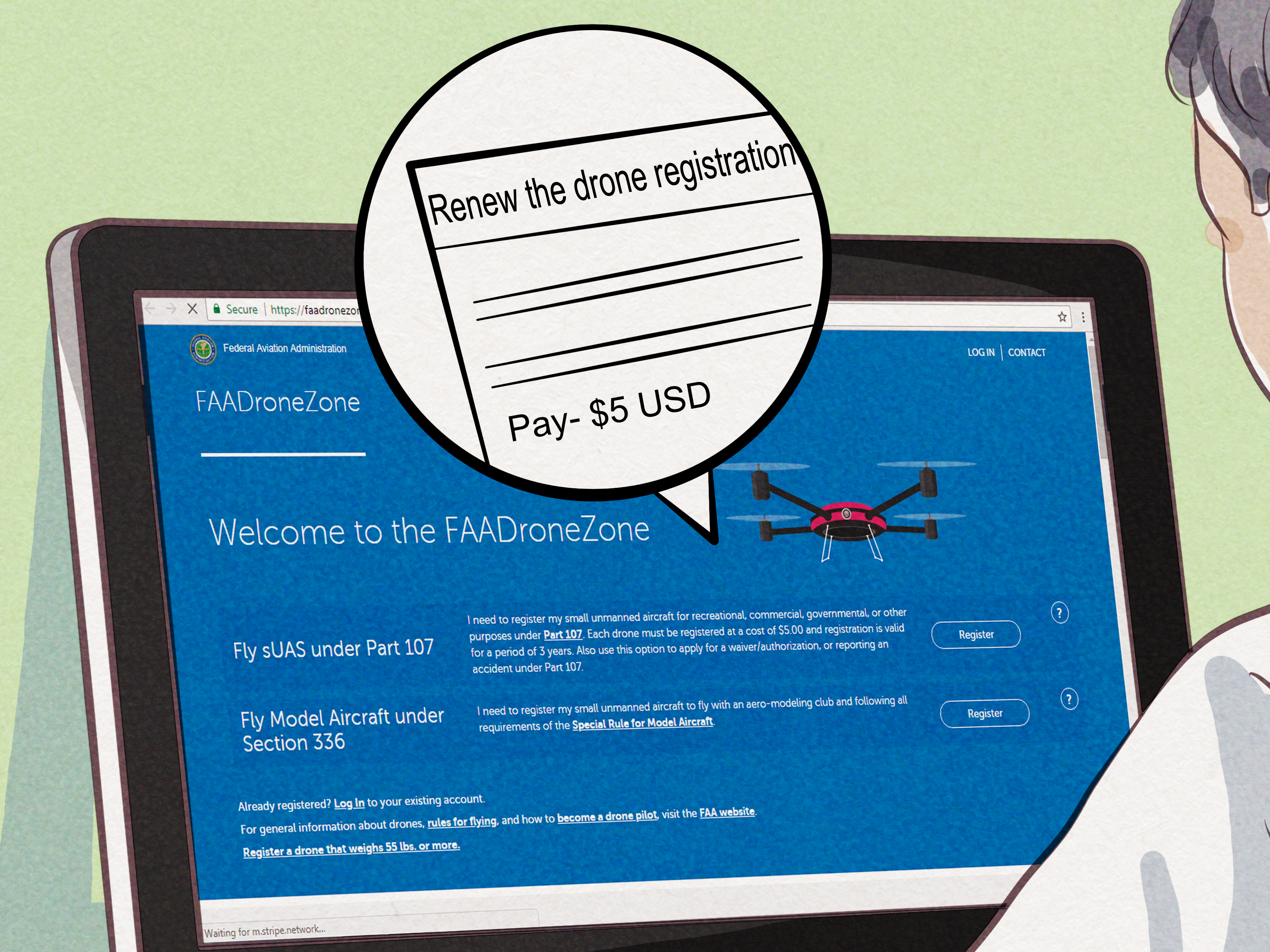
Use the official FAA DroneZone website to register. This is important because third-party sites may charge extra fees or make the process seem more complicated than it is. The official FAA registration fee is low, and the process is built for regular drone owners, not just aviation attorneys who drink coffee from regulation-shaped mugs.
Create an account or log in to your existing account. If you already registered a drone in the past, use the same email address when possible. This makes renewals, updates, and inventory management easier. If you forget your password, reset it through the official portal rather than creating duplicate accounts that later confuse you like a drawer full of mystery cables.
Step 5: Select the Correct Dashboard
Inside DroneZone, you will choose the appropriate dashboard. Recreational flyers should use the Recreational Flyer Dashboard. Business, commercial, government, organizational, or other non-recreational operators generally use the Part 107 dashboard.
This step matters because registration numbers work differently. Recreational flyers usually receive one registration number that can be applied to all drones in their recreational inventory. Part 107 pilots register each drone separately, and each drone receives its own registration number.
Do not treat the dashboards as interchangeable. A drone registered under the recreational exception cannot simply be flown for Part 107 work using that same recreational registration. If your flying purpose changes, update your registration approach before the work begins.
Step 6: Enter Drone and Remote ID Details Carefully
Now enter your drone details. Include the make and model exactly as requested. If the portal asks for Remote ID information, select the correct device type: Standard Remote ID drone or Remote ID broadcast module. Enter the Remote ID serial number carefully.
Remote ID is often described as a digital license plate for drones. In practice, it allows a drone in flight to broadcast identification and location information that can be received by authorized parties and nearby receivers. Most registered drones must comply with Remote ID requirements unless they qualify for a specific exception, such as flying within an FAA-Recognized Identification Area, also called a FRIA.
If your drone has built-in Remote ID, make sure firmware and manufacturer information are current. If your drone needs a broadcast module, attach and configure it according to the manufacturer’s instructions. For Part 107, remember that each device is registered individually. For recreational flyers, you may manage devices in your inventory, but each listed drone or module still needs accurate information.
Step 7: Pay the FAA Registration Fee
FAA drone registration costs $5 and is valid for three years. For Part 107, the fee applies per drone. For recreational registration, the $5 registration covers all drones in your recreational inventory for the three-year period.
That price is one reason you should avoid unofficial registration websites that charge more for doing the same basic task. Paying extra does not make your drone more legal, more aerodynamic, or more likely to impress birds. It just makes your wallet lighter.
After payment, save the confirmation information. You should receive an FAA registration certificate. Keep a digital copy and consider printing one as a backup. Drones may be modern technology, but “my phone died” is still not the strongest legal strategy ever invented.
Step 8: Label Your Drone on the Outside
Once registered, your drone must display the FAA registration number on the exterior surface. The number should be visible without opening a battery compartment, removing a panel, or performing tiny aircraft surgery with a screwdriver.
You can use a label maker, durable sticker, engraving, permanent marker, or another method that stays readable. Place the label somewhere visible but not where it blocks sensors, ventilation, propellers, antennas, gimbals, or landing gear movement. A neat label on the body, arm, or underside often works well, depending on the model.
If you own multiple recreational drones under the same recreational registration, each drone that requires registration should be marked with the same assigned number. If you operate under Part 107, each drone should be labeled with its own unique registration number.
Step 9: Carry Proof of Registration When You Fly
Registration is not a “set it and forget it” sticker party. When flying, you must have proof of registration available, either in paper or digital form. If another person operates your registered drone, that person must also have access to the registration certificate while flying.
It is smart to create a small drone document folder on your phone. Include your FAA registration certificate, TRUST completion certificate if flying recreationally, Remote Pilot Certificate if flying under Part 107, airspace authorizations, waivers if applicable, and any manufacturer Remote ID information you may need. This takes a few minutes and saves you from digging through email while your drone battery drops from “fine” to “land immediately, human.”
Recreational flyers must also pass The Recreational UAS Safety Test, known as TRUST, and carry proof of completion. Part 107 pilots need a Remote Pilot Certificate for operations under the Small UAS Rule.
Step 10: Renew, Update, and Fly Within the Rules
FAA drone registration is valid for three years. Mark your renewal date on your calendar. If your registration expires, renew through FAA DroneZone before flying a drone that requires registration.
You should also update your DroneZone information when needed. If your address changes, your drone inventory changes, you add a Remote ID broadcast module, or you move a drone into a different operational category, keep the account current. Accurate records are not glamorous, but neither is explaining outdated paperwork to someone in uniform.
Finally, remember that registration is only one piece of legal drone operation. You must also follow airspace rules, altitude limits, visual line-of-sight requirements, Remote ID rules, local restrictions, privacy expectations, and safety guidelines. If you want to fly in controlled airspace, recreational flyers can request authorization through LAANC where available or through FAA DroneZone. Always check your flight location before launch.
Common Drone Registration Mistakes to Avoid
Mistake 1: Thinking “No Payment” Means “Recreational”
Many pilots assume a flight is recreational if nobody pays them. That is not always true. If the flight supports a business, organization, sale, inspection, event, school media project, or nonprofit effort, it may be non-recreational even without money changing hands. Purpose is the key.
Mistake 2: Registering on the Wrong Website
Always use the official FAA DroneZone. If a website makes registration look expensive, overly urgent, or weirdly dramatic, pause. FAA registration is straightforward and affordable. Your drone does not need a concierge service with a gold-plated propeller.
Mistake 3: Forgetting Remote ID
If your drone is registered or required to be registered, Remote ID likely applies. Confirm whether your drone has built-in Standard Remote ID, needs a broadcast module, or will be flown only in a FRIA where permitted. Remote ID is now part of modern drone compliance, not an optional accessory like landing pad stickers.
Mistake 4: Hiding the Registration Number Inside the Battery Bay
The registration number belongs on the outside of the drone. It should be readable from a reasonable distance without opening compartments. Keep it clean, durable, and away from moving parts.
Mistake 5: Forgetting About Renewal
Three years feels long until it is suddenly last week. Set a calendar reminder for renewal. If you own multiple drones, keep a simple spreadsheet with model, serial number, Remote ID serial number, registration number, and expiration date.
Recreational vs Part 107 Drone Registration
Recreational registration is best for pilots who fly only for personal enjoyment. It is simple, inexpensive, and covers all drones in your recreational inventory. You still need to follow recreational flyer rules, take TRUST, carry proof of test passage, mark your drone, comply with Remote ID when required, and request authorization for controlled airspace.
Part 107 registration is for non-recreational operations. If you fly for commercial photography, inspections, mapping, content for a business, paid projects, public agency programs, or most organizational uses, Part 107 is the relevant framework. Each drone is registered separately, and the pilot must hold a Remote Pilot Certificate when conducting Part 107 operations.
Some pilots register drones under Part 107 even when they also fly for fun. That can be practical because a Part 107 registered drone can be used for Part 107 operations and recreational flights, assuming the pilot follows the rules for the specific flight. The reverse is not true for a drone registered only under the recreational exception.
Extra Experience Notes: What Registering a Drone Feels Like in Real Life
The first time many people register a drone, they expect the process to feel like applying for a pilot job at NASA. In reality, it feels more like setting up an online account, paying a small fee, and reading labels carefully. The most stressful part is usually not the FAA form. It is figuring out whether the flight is recreational or Part 107, and whether the Remote ID serial number is hiding in the app, on the box, or somewhere in a menu designed by someone who clearly enjoys scavenger hunts.
A good habit is to prepare before opening DroneZone. Put the drone on a table, charge the controller, open the manufacturer app, and write down the model name, serial number, and Remote ID details. If you use multiple batteries, confirm whether any heavier battery pushes the drone over 250 grams. This is especially important for compact drones marketed as lightweight. One accessory can turn a “no registration needed for fun” aircraft into a “hello, paperwork” aircraft.
Another useful experience is labeling the drone immediately after registration. Do not tell yourself you will do it later. Later is where small stickers go to retire. Print two labels: one for the drone and one backup. Use a durable label that will not peel off after one warm afternoon in a backpack. Avoid placing the label near cooling vents, obstacle sensors, propellers, or folding arms. If the drone has a smooth plastic surface on the body, that is often the easiest location.
Keep your proof of registration in more than one place. A digital copy on your phone is convenient, but a printed card in your drone case is a smart backup. Add your TRUST certificate or Part 107 certificate to the same folder. This little paperwork kit makes you look organized, which is always better than looking like you assembled your compliance plan in the parking lot while the drone was already blinking at you.
Before flying, registration should become part of a bigger checklist. Check propellers, battery health, firmware, Remote ID status, airspace, weather, people nearby, privacy concerns, and return-to-home settings. Registration does not give permission to fly everywhere. National parks, stadiums, airports, emergency response areas, temporary flight restrictions, and local rules can still limit or prohibit flight. The safest pilots treat registration as the first page of the rulebook, not the whole book.
The best real-world advice is simple: register early, label immediately, save documents twice, and check airspace every time. Drone flying is much more fun when the boring compliance pieces are already handled. That way, your brain can focus on smooth shots, safe landings, and not accidentally filming six minutes of your own shoes.
Conclusion
Learning how to register drones is not difficult, but it is important. The FAA expects drone owners and pilots to understand when registration is required, which operating category applies, how Remote ID fits into the process, and what documents must be carried during flight. For most U.S. drone owners, the safest path is to use the official FAA DroneZone, choose recreational or Part 107 registration correctly, pay the $5 fee, label the drone, save proof of registration, and renew every three years.
Registration will not make you an expert pilot overnight, but it does put you on the right side of the rules before takeoff. And that is a nice place to be, especially when your aircraft has spinning blades, a camera, and the confidence of a caffeinated hummingbird.
Note: Drone rules can change. Before flying, always confirm current FAA requirements, Remote ID status, airspace restrictions, and local rules for your exact location and operation type.