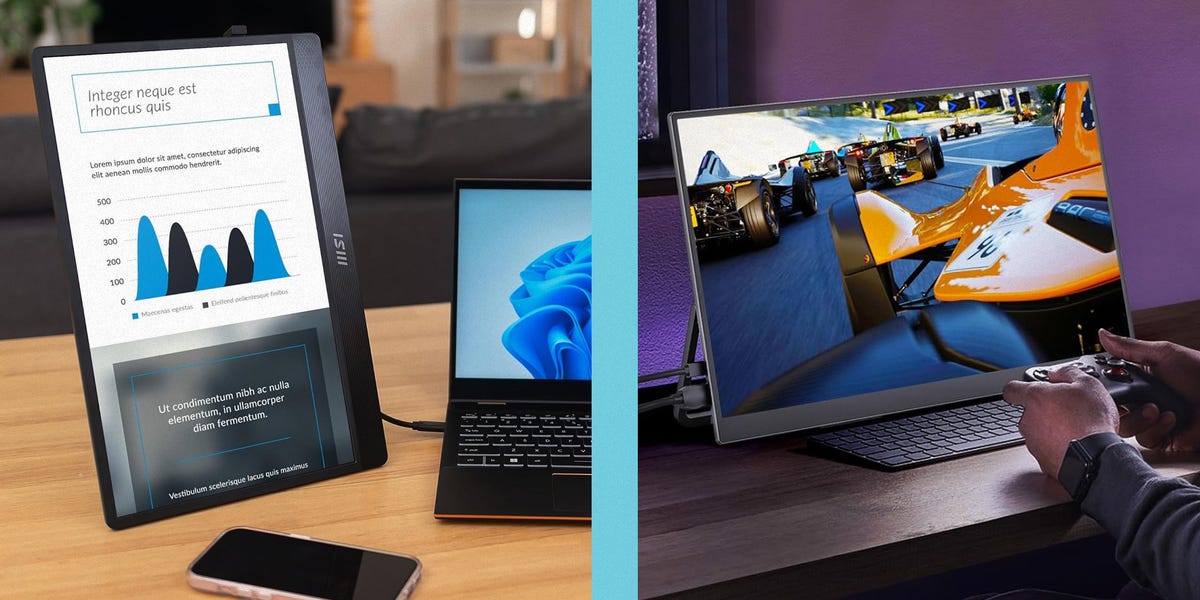

Once upon a time, working from a laptop meant choosing between freedom and screen space. You could roam the world with your slim notebook, but the moment you tried to compare spreadsheets, edit photos, answer Slack, and keep a browser open, your desktop turned into a digital shoebox. Thankfully, portable monitors have grown up. The best portable monitors in 2025 are no longer flimsy novelty screens that look like leftover laptop parts. They are sharp, bright, travel-ready displays built for remote workers, students, creators, gamers, and anyone who believes one screen is nice but two screens are civilized.
A good portable monitor for a laptop can turn a coffee shop table, hotel desk, dorm room, kitchen counter, or airport lounge into a surprisingly capable workstation. Some models focus on business basics, giving you a lightweight Full HD screen for email and documents. Others go premium with OLED panels, 4K resolution, touch support, high refresh rates, color accuracy, and USB-C single-cable convenience. In other words, there is now a portable screen for almost every kind of laptop useryes, even the person who “just needs one more tab open” and somehow has 47.
This guide highlights seven of the best portable monitors for laptops in 2025, based on real-world usability, display quality, portability, connectivity, build quality, and value. The goal is not to crown one screen as perfect for everyone. It is to help you choose the right second screen for the way you actually work, travel, create, or game.
Quick Comparison: Best Portable Monitors for Laptops in 2025
| Rank | Portable Monitor | Best For | Key Strength |
|---|---|---|---|
| 1 | ASUS ZenScreen OLED MQ16AHE | Best overall | OLED quality, slim design, strong connectivity |
| 2 | Lenovo ThinkVision M14t Gen 2 | Best touch monitor for productivity | 2.2K resolution, 16:10 aspect ratio, touch support |
| 3 | ViewSonic VX1655-4K-OLED | Best 4K OLED portable monitor | Ultra-sharp 4K OLED visuals for creators |
| 4 | HP Series 5 Pro 514pn | Best premium travel monitor | Lightweight 14-inch WQXGA screen with strong color |
| 5 | ASUS ROG Strix XG17AHPE | Best portable gaming monitor | 17.3-inch screen, 240Hz refresh rate, built-in battery |
| 6 | Dell 14 Portable Monitor P1424H | Best simple business pick | Reliable 14-inch Full HD IPS panel with dual USB-C |
| 7 | Plugable 15.6-inch USB-C Portable Monitor | Best value with hub features | Full HD IPS display plus USB-C pass-through charging |
How to Choose the Best Portable Monitor for Your Laptop
Screen Size and Portability
Most portable monitors sit between 14 and 17 inches. A 14-inch portable display is easier to carry and pairs neatly with compact laptops. A 15.6-inch screen feels more like a traditional laptop display and is often the sweet spot for productivity. A 17.3-inch portable monitor gives you more room for gaming, presentations, or creative work, but it takes up more bag space. Shocking revelation: bigger screens are bigger. Technology remains undefeated.
Resolution and Sharpness
Full HD, or 1920 x 1080, is still perfectly usable for email, documents, dashboards, video calls, and basic multitasking. However, 2.2K, 2.5K, WQXGA, and 4K portable monitors make text look crisper and give creators more detail for photo editing, design review, and video timelines. For a small portable screen, 4K can look gorgeous, but it may require scaling adjustments and more power.
USB-C Matters More Than You Think
The best portable monitors for laptops usually support USB-C with DisplayPort Alt Mode, which allows video and power through one cable. This keeps your desk clean and your patience intact. Some models also include mini-HDMI or micro-HDMI for game consoles, older laptops, cameras, and media devices. Before buying, check your laptop ports. Not every USB-C port carries video, and discovering that after checkout is the tech version of stepping on a Lego.
Brightness, Color, and Panel Type
IPS panels are common, affordable, and reliable for productivity. OLED portable monitors deliver deeper blacks, richer contrast, and more dramatic visuals, making them excellent for media and creative work. Matte screens reduce reflections in bright rooms, while glossy screens often look punchier but can turn into tiny mirrors under harsh light. If you travel often, brightness and anti-glare coating matter more than spec sheets suggest.
1. ASUS ZenScreen OLED MQ16AHE – Best Overall Portable Monitor
The ASUS ZenScreen OLED MQ16AHE is one of the strongest all-around portable monitors for laptop users in 2025 because it blends premium image quality with practical travel design. Its 15.6-inch Full HD OLED panel offers vibrant colors, deep contrast, and excellent visual pop. For everyday productivity, the screen makes documents and web pages look clean. For streaming, photo review, and light creative work, the OLED panel adds the kind of richness that makes ordinary IPS screens look a little sleepy.
ASUS also gets the physical design right. The monitor includes USB-C ports and mini-HDMI, giving it more flexibility than USB-C-only models. Its built-in kickstand supports both landscape and portrait orientation, which is helpful if you want to keep a vertical screen for coding, reading long documents, or monitoring a chat window. The rear tripod socket is another thoughtful touch for creators and presenters who want a more customized setup.
Why It Stands Out
The ASUS ZenScreen OLED MQ16AHE is ideal for laptop users who want a portable monitor that feels premium without becoming wildly impractical. It is slim, sharp, colorful, and easy to connect. The 60Hz refresh rate is not meant for competitive gaming, but for work, media, and travel, this screen hits a very appealing balance.
Best For
Remote workers, students, consultants, frequent travelers, and everyday laptop users who want a beautiful second screen that does not require a degree in cable management.
2. Lenovo ThinkVision M14t Gen 2 – Best Touch Portable Monitor for Productivity
The Lenovo ThinkVision M14t Gen 2 is built for serious productivity in a compact package. Its 14-inch display uses a 16:10 aspect ratio, which gives you more vertical space than a traditional 16:9 screen. That extra height is surprisingly useful when you are reading documents, editing slides, reviewing spreadsheets, or working with web apps. The 2240 x 1400 resolution keeps text crisp, and the touchscreen support makes it more flexible than a standard external display.
This is not the cheapest portable monitor, but it feels like a professional tool. The touch functionality is helpful for presentations, digital signing, annotation, sketching, and quick navigation. Designers may still prefer a larger or more color-specialized display, but business users who want a compact, sharp, touch-enabled laptop monitor will find a lot to like here.
Why It Stands Out
The ThinkVision M14t Gen 2 is excellent for people who want more than a passive second screen. It is light enough for travel, sharp enough for daily work, and versatile enough for touch-based tasks. The 16:10 shape also pairs nicely with modern productivity laptops.
Best For
Business travelers, hybrid workers, teachers, consultants, and anyone who frequently reviews documents, marks up files, or presents ideas on the go.
3. ViewSonic VX1655-4K-OLED – Best 4K OLED Portable Monitor
The ViewSonic VX1655-4K-OLED is the portable monitor you choose when picture quality is the priority. Its 15.6-inch 4K OLED panel delivers excellent detail, rich contrast, and vivid color. For photographers, video editors, designers, and content creators, that combination is hard to ignore. A 4K resolution on a portable screen means menus, timelines, images, and previews look incredibly sharp, especially when paired with a powerful laptop.
The monitor supports USB-C and mini-HDMI, which helps it connect to laptops, tablets, phones, cameras, and some gaming devices. The built-in stand keeps setup simple, while the slim profile makes it much easier to carry than a traditional desktop display. The main drawback is that 4K OLED portable monitors are not usually budget buys. They are also better suited to indoor or controlled lighting because glossy OLED panels can reflect bright surroundings.
Why It Stands Out
This ViewSonic model is one of the best portable monitors for users who care about sharpness and color more than bargain pricing. It is overkill for basic email, but it is a fantastic companion for high-resolution creative work.
Best For
Photographers, video editors, design professionals, creative freelancers, and laptop users who want a travel-friendly screen that does not treat color like an optional hobby.
4. HP Series 5 Pro 514pn – Best Premium Travel Monitor
The HP Series 5 Pro 514pn is a polished portable monitor for people who want a premium travel display without jumping into bulky territory. Its 14-inch WQXGA-class screen gives you a sharp 16:10 workspace, while the lightweight chassis makes it easy to slip into a laptop bag. HP positions this monitor as a serious productivity companion, and it feels especially well-suited for professionals who spend time moving between offices, client sites, hotels, and home workspaces.
One of the most attractive features is its balance of screen quality and portability. The higher-than-Full-HD resolution gives you more usable space than many basic portable screens, while USB-C connectivity keeps setup simple. The built-in stand is also important. A portable monitor can have the best panel in the world, but if the stand wobbles like a nervous flamingo, the experience quickly goes downhill.
Why It Stands Out
The HP Series 5 Pro 514pn is not trying to be a gaming beast or a giant creative canvas. It is a refined, compact, professional portable monitor that focuses on clarity, lightweight design, and everyday travel convenience.
Best For
Executives, consultants, writers, analysts, and professionals who want a premium second screen that looks sharp but does not turn their backpack into gym equipment.
5. ASUS ROG Strix XG17AHPE – Best Portable Gaming Monitor
The ASUS ROG Strix XG17AHPE is the portable monitor for gamers who read “60Hz is enough” and politely disagree with their entire soul. This 17.3-inch Full HD IPS display offers a 240Hz refresh rate, fast response time, adaptive sync support, and a built-in battery. That makes it one of the most capable portable gaming monitors available, especially for laptop gamers who want a smoother screen than their built-in display can provide.
The larger screen size is great for gaming, but it also makes sense for entertainment, presentations, and multitasking. The built-in battery is a major advantage because high-refresh gaming can be power-hungry. Connectivity includes USB-C and micro-HDMI, making it compatible with gaming laptops, handheld consoles, and other devices. It is more expensive and less compact than simple work-focused portable monitors, but it serves a very different purpose.
Why It Stands Out
The ROG Strix XG17AHPE is fast, big, and built for movement. It is not the most practical choice for someone who only edits Google Docs, but for portable gaming, it is a monster in a backpack-friendly disguise.
Best For
Gaming laptop owners, esports fans, console players, and travelers who want a large portable monitor with smooth motion and serious entertainment potential.
6. Dell 14 Portable Monitor P1424H – Best Simple Business Portable Monitor
The Dell 14 Portable Monitor P1424H is a practical, dependable choice for laptop users who want a clean second screen without paying for features they will never use. It has a 14-inch Full HD IPS panel, dual USB-C ports, and a straightforward adjustable stand. That sounds simple because it isand simple can be wonderful when you are trying to join a video call five minutes before it starts.
The Dell P1424H is not designed for color-critical editing or high-refresh gaming. Instead, it excels at business basics: email, documents, spreadsheets, dashboards, research, and messaging. Its compact size makes it easy to pair with a 13- or 14-inch laptop, and Dell’s business-focused design language gives it a professional look.
Why It Stands Out
This is the “just works” pick. The Dell 14 Portable Monitor P1424H is ideal for people who want a reliable portable monitor for productivity, not a flashy spec trophy.
Best For
Office workers, students, accountants, project managers, and anyone who needs a compact dual-screen setup for normal laptop work.
7. Plugable 15.6-inch USB-C Portable Monitor – Best Value with Hub Features
The Plugable 15.6-inch USB-C Portable Monitor earns a spot because it understands a common laptop problem: ports disappear when you need them most. This Full HD IPS portable monitor includes USB-C connectivity, pass-through charging support, and hub-style functionality that can help simplify a mobile workstation. It is not just a second screen; it can also become part of your cable strategy.
The 15.6-inch Full HD panel is a sensible size for productivity, making it useful for spreadsheets, research, email, coding, and video calls. The pass-through charging feature is especially helpful for laptops with limited USB-C ports, allowing you to power your laptop while using the display. For users who want strong practical value rather than luxury screen technology, Plugable makes a compelling case.
Why It Stands Out
The Plugable portable monitor is not trying to beat OLED screens on contrast or gaming panels on speed. Its appeal is usefulness. It gives you extra screen space, simple setup, and charging convenience at a reasonable level.
Best For
Remote workers, students, home office users, and travelers who want a good-value portable monitor with smarter connectivity than many basic displays.
Portable Monitor Buying Tips for 2025
Check Your Laptop’s USB-C Capabilities
Before buying any portable monitor, confirm that your laptop’s USB-C port supports video output. Look for DisplayPort Alt Mode, Thunderbolt, or USB4 support. If your laptop lacks USB-C video, choose a monitor with HDMI input or prepare for adapters. This tiny check can save you from the emotional journey known as “why is nothing happening?”
Do Not Ignore the Stand
The stand is one of the most underrated parts of a portable laptop monitor. A great screen with a bad stand is like a luxury chair with three legs. Look for a sturdy kickstand, adjustable cover, magnetic stand, or tripod support. If you plan to use the monitor daily, stability matters.
Think About Where You Work
If you often work in bright cafes, airports, or shared offices, prioritize brightness and anti-glare coating. If you work mostly indoors and care about movies or creative visuals, OLED may be worth the upgrade. If you travel constantly, lighter weight and a durable cover may matter more than extreme resolution.
Match the Monitor to the Job
For spreadsheets and writing, a 14- or 15.6-inch Full HD screen is enough. For design and video editing, choose 2.5K, WQXGA, or 4K with strong color coverage. For gaming, prioritize refresh rate and response time. For presentations and annotation, consider touch support. Buying the right portable monitor is less about chasing the biggest spec number and more about choosing the screen that makes your day easier.
Real-World Experience: What It Is Actually Like Using a Portable Monitor
Using a portable monitor sounds simple: plug it in, get more screen space, become a productivity wizard. In real life, the experience is mostly thatbut with a few practical lessons. The first thing most laptop users notice is how quickly a second screen changes their workflow. Instead of constantly switching between tabs, you can keep your main task on the laptop and supporting information on the portable display. For example, a writer can keep research notes on one screen and the draft on the other. A marketer can view analytics beside a campaign calendar. A student can keep lecture slides open while typing notes. Suddenly, your laptop feels less like a cramped studio apartment and more like a tiny office with windows.
The biggest benefit is mental breathing room. When you are working on one screen, every app fights for attention. A portable monitor gives your tasks a home. Video calls can live on the second screen while your notes stay in front of you. Spreadsheets can stretch wider. Designers can keep tool palettes separate from the main canvas. Developers can place documentation next to code. It does not magically make work fun, but it does reduce the digital gymnastics.
Travel use is where portable monitors become both brilliant and slightly humbling. In a hotel room, a portable display can turn a small desk into a real workstation. In a coffee shop, it can be fantastic if the table is stable and there is enough room. On an airplane tray table, however, expectations should remain grounded. A 15.6-inch monitor beside a laptop in economy class is ambitious, unless you enjoy performing a balancing act with electronics and ginger ale.
Power is another lesson. Some laptop and monitor combinations work beautifully with one USB-C cable. Others need extra power, especially brighter 4K screens or setups connected through adapters. Keeping a compact USB-C charger nearby is smart. So is carrying the cable that came with the monitor, because not all USB-C cables support video. The cable may look ordinary, but it has responsibilities.
Ergonomics also matter. A second screen is helpful, but placing it too low or too far to the side can strain your neck. The best setup keeps the portable monitor at a comfortable angle beside your laptop, preferably with both screens aligned at similar heights. If you work long hours, consider a small laptop stand or portable monitor stand. Your future spine will send a thank-you card.
After using a portable monitor regularly, the hardest part is going back to one screen. You start to wonder how you ever managed with only a laptop display. It is a little like discovering pockets in a jacket: once you have them, life without them feels unnecessarily dramatic. For many people, a portable monitor becomes one of those accessories that seems optional until it quietly becomes essential.
Final Verdict: Which Portable Monitor Should You Buy?
The best portable monitor for your laptop depends on what you need most. The ASUS ZenScreen OLED MQ16AHE is the best overall choice for many users because it combines excellent image quality, portability, and flexible connectivity. The Lenovo ThinkVision M14t Gen 2 is the better fit if you want touch support and a sharp productivity-focused screen. Creators who want maximum detail should look at the ViewSonic VX1655-4K-OLED, while frequent travelers who value a premium lightweight design should consider the HP Series 5 Pro 514pn.
Gamers should go straight to the ASUS ROG Strix XG17AHPE for its large 17.3-inch panel and 240Hz refresh rate. Business users who want a no-drama second screen will appreciate the Dell 14 Portable Monitor P1424H. Value seekers who want extra connectivity should put the Plugable 15.6-inch USB-C Portable Monitor near the top of the list.
In 2025, portable monitors are no longer niche accessories. They are practical laptop upgrades that help people work faster, travel smarter, and enjoy more flexible screen space. Choose the right one, and your laptop setup becomes more comfortable, more capable, and far less likely to make you mutter at a pile of overlapping windows.