
Want to browse TikTok profiles without feeling like you left digital footprints in wet cement? Good news: TikTok lets you turn off Profile View History. This complete guide explains exactly how to do it, what changes afterward, why the setting may not appear, and which extra privacy controls are worth checking while you are already in the settings menu.
What Are Profile Views on TikTok?
TikTok’s Profile View History is a privacy feature that lets eligible users see which TikTok accounts viewed their profile within the last 30 days. It does not show everyone who watched your videos, liked your posts, replayed your clips, or accidentally landed on your page after falling into a three-hour “just one more video” spiral. It is specifically about profile page visits.
The most important detail is that Profile View History is mutual. In simple terms, you can only see someone in your profile view list if both you and that person have Profile View History turned on. Likewise, someone else can only see that you viewed their profile if both of you have the feature enabled. If either person turns it off, the visibility disappears.
That makes this setting useful for people who want more privacy, less awkwardness, or simply fewer mysteries. Maybe you checked out a classmate’s page, a competitor’s creator profile, a brand account, or someone who commented on your video. Turning off Profile View History helps keep that browsing more low-key.
Quick Answer: How to Turn Off Profile Views on TikTok
Here is the fast version:
- Open the TikTok app.
- Tap Profile in the bottom-right corner.
- Tap the Menu button, usually shown as three lines, in the top-right corner.
- Choose Settings and privacy.
- Tap Privacy.
- Select Profile views.
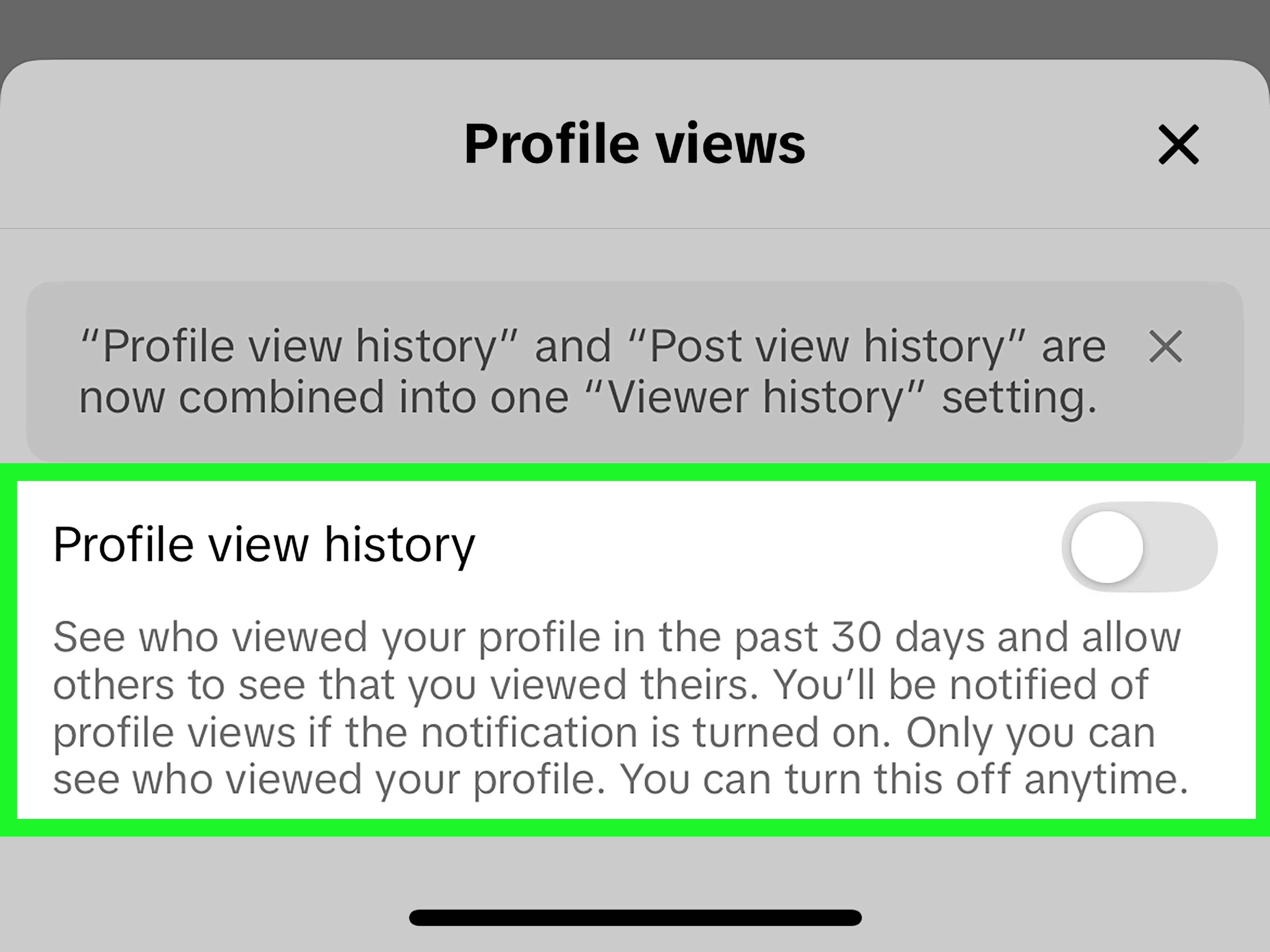
- Turn off Profile view history.
Once the toggle is off, you will no longer be able to see who viewed your profile, and other eligible users should not see you in their Profile View History when you visit their profile. Privacy, as always, is a trade: you get more invisibility, but you give up the viewer list.
Step-by-Step Guide to Turn Off Profile Views on TikTok
Step 1: Open TikTok and Go to Your Profile
Start by opening the TikTok app on your phone. Profile View History is an app-based feature, so it is best to use the mobile app rather than trying to manage it from a browser. Tap Profile at the bottom-right corner of the screen. This takes you to your main profile page, where your bio, videos, reposts, and other account details live.
Step 2: Open the Menu
On your profile page, look at the top-right corner. Tap the menu icon. It usually appears as three horizontal lines. This opens TikTok’s account menu, where you can access creator tools, QR codes, settings, and privacy controls.
Step 3: Tap Settings and Privacy
From the menu, choose Settings and privacy. This is TikTok’s control room. It contains options for account security, privacy, notifications, content preferences, screen time, family pairing, and other settings that can make your TikTok experience feel less chaotic.
Step 4: Choose Privacy
Next, tap Privacy. This section controls how people find you, interact with your content, send messages, view certain activity signals, and engage with your profile. If TikTok were a house, the Privacy page would be the place where you decide which windows get curtains.
Step 5: Open Profile Views
Scroll until you find Profile views. TikTok may also show a small footprint-style icon for this feature. Tap it to open the Profile View History setting.
Step 6: Turn Off Profile View History
Finally, switch off Profile view history. The setting should take effect immediately. You do not need to uninstall the app, restart your phone, whisper an apology to the algorithm, or perform any mysterious TikTok ritual. The toggle does the job.
Alternative Method: Turn Off Profile Views From the Viewer Page
Some TikTok accounts may also access Profile View History from the profile viewer icon on the profile page. If you see a footprint or eye-like profile view icon near the top of your profile, tap it. Then look for a settings icon or gear icon inside the Profile Views screen. From there, you may be able to turn Profile view history off directly.
This route is handy if you are already checking who viewed your profile and suddenly think, “Actually, I would like to vanish from the visitor economy now.” However, TikTok changes layouts from time to time, so the Settings and privacy path is usually the most reliable method.
What Happens When You Turn Off Profile Views?
Turning off profile views changes how profile visit visibility works for your account. Here is what you should expect:
- You will no longer see which accounts viewed your profile.
- Other users with Profile View History turned on should not see your account when you view their profiles.
- The feature still does not reveal who watched individual TikTok videos.
- You can turn Profile View History back on later if you change your mind.
- Your general TikTok activity, such as likes, comments, follows, and public interactions, may still be visible depending on your other privacy settings.
In other words, turning off Profile View History helps hide profile visits, but it does not make your entire TikTok presence invisible. If you like someone’s video, comment “first” three weeks late, or follow their account, those actions may still be visible. Profile view privacy is one piece of the larger privacy puzzle.
Can People Still See That You Viewed Their TikTok?
For profile visits, the answer is generally no if Profile View History is turned off. The feature depends on both users having it enabled. If you disable it, you stop participating in that viewer exchange.
For video views, TikTok works differently. Profile View History is not the same as post view history, analytics, likes, comments, saves, or shares. A creator may see total views, engagement numbers, and analytics depending on their account tools, but Profile View History is not a full “who watched everything I posted” list.
Think of it this way: walking past someone’s house and looking at the front porch is a profile view. Watching one of their videos is more like seeing their poster on a giant public billboard. TikTok measures both, but it does not treat them the same way.
Why You Might Not See the Profile Views Option
If you cannot find the Profile views setting, do not panic. You probably did not break TikTok. The option may be missing for several reasons:
Your App Needs an Update
Older versions of TikTok may not show the same settings layout. Visit the App Store or Google Play Store and update TikTok. After updating, close and reopen the app, then check again.
The Feature Is Not Available for Your Account
TikTok does not make every feature available to every account at the same time. Availability can depend on age, follower count, account type, region, or feature rollout status. If the option is absent, it may simply not be available to your account right now.
You May Not Meet Eligibility Requirements
Profile View History has eligibility limits. TikTok has historically limited this feature to users who meet certain conditions, such as being at least 16 years old and having fewer than a certain number of followers. If your account does not qualify, the setting may not appear.
The Layout Has Changed
TikTok loves moving buttons around the way people rearrange furniture before guests arrive. If the exact label is not where you expect, search inside Settings and privacy for related privacy terms, check the Privacy section carefully, or look for a viewer icon on your profile page.
Profile Views vs. Post Views: Do Not Mix Them Up
One common TikTok privacy mistake is confusing Profile View History with Post View History. They sound similar, but they are not identical.
Profile View History is about who viewed your profile page. Post View History relates to visibility around certain video views. TikTok may provide separate settings for these features, and turning one off does not always mean the other is off. If your goal is stronger privacy, review both settings instead of assuming one toggle handles everything.
Also remember that analytics are different again. TikTok analytics can show performance data such as views, likes, comments, shares, audience patterns, and watch behavior. Analytics are useful for creators, but they are not the same as a simple list of profile visitors.
Should You Turn Off Profile Views on TikTok?
For many users, turning off Profile View History is a smart move. It reduces social pressure and makes browsing feel more relaxed. You can check profiles without wondering whether your username will pop up like an uninvited guest at a digital dinner party.
You may want to turn off profile views if:
- You prefer private browsing.
- You research competitors, brands, creators, or trends.
- You do not care who views your profile.
- You want fewer awkward online moments.
- You are reviewing your privacy settings and want tighter control.
On the other hand, you may want to keep Profile View History on if you are a creator, small business, influencer, student organization, local service provider, or personal brand trying to understand who is discovering your page. If you use TikTok for networking or audience research, profile views can offer light insight into who is curious about you.
The best choice depends on your goal. If privacy matters more, turn it off. If audience curiosity matters more, keep it on. If both matter equally, welcome to the modern internet, where every button comes with a tiny emotional spreadsheet.
Extra TikTok Privacy Settings Worth Checking
Since you are already in TikTok’s privacy settings, it is worth spending two more minutes checking related controls. Turning off Profile View History is helpful, but it is not the only setting that affects how visible you are.
Private Account
A private account lets you approve followers before they can see certain profile content and posts. This is stronger than simply turning off profile views. If you want tighter control over who sees your videos, likes, following list, and bio details, consider switching your account to private.
Suggest Your Account to Others
This setting affects whether TikTok may suggest your account to contacts, Facebook friends, people with mutual connections, or people who open links you send. If you want fewer real-life connections finding your TikTok, review this section carefully.
Sync Contacts and Facebook Friends
If contact syncing is enabled, TikTok may use your phone contacts or connected social data to help recommend accounts. Turning off syncing and removing previously synced contacts can reduce unwanted discoverability.
Activity Status
Activity Status can show mutual followers when you are active or were recently active. If you want a calmer, less watched feeling, consider turning this off too.
Comments, Mentions, Duet, and Stitch
These controls decide who can interact with your content. You can limit comments, filter keywords, restrict mentions, and choose who can Duet or Stitch your videos. For creators, these settings can reduce spam and drama without shutting down your account completely.
Troubleshooting: Profile Views Will Not Turn Off
If you turned off Profile View History but still feel unsure, try these fixes:
Close and Reopen the App
Sometimes settings need a quick refresh. Fully close TikTok, reopen it, and check whether the toggle remains off.
Update TikTok
An outdated app can cause missing settings, glitchy menus, or confusing labels. Update TikTok through your app store and check again.
Clear Cache
Inside TikTok settings, look for cache or storage options. Clearing cache can sometimes fix display issues without deleting your account.
Check on Another Device
If you have access to another trusted device, sign in and check whether the setting appears there. If it does, your first device may be showing an outdated layout.
Wait for a Rollout Update
If the option is unavailable, it may be due to account eligibility or TikTok’s rollout schedule. In that case, there may be nothing to fix. Keep the app updated and review your settings periodically.
Common Myths About TikTok Profile Views
Myth 1: Turning Off Profile Views Makes You Completely Anonymous
Nope. It only affects Profile View History. Your public interactions, follows, comments, likes, reposts, and messages may still be visible depending on your settings and behavior.
Myth 2: TikTok Sends a Notification When You View a Profile
TikTok does not usually send a dramatic “Someone viewed your profile!” push notification. Instead, eligible viewers may appear in the Profile View History list if both accounts have the setting turned on.
Myth 3: People Can See Every Video You Watched
Profile View History is not a full watch log. Watching a video, viewing a profile, liking a post, and commenting are separate actions with different visibility rules.
Myth 4: Private Accounts Do Not Need Any Other Privacy Settings
A private account helps, but it is not magic armor. You should still review suggestions, contact syncing, direct messages, comments, mentions, and activity status.
Best Practices for Staying Private on TikTok
If your goal is better TikTok privacy, use Profile View History as one part of a bigger privacy routine. Here are practical tips:
- Turn off Profile View History if you do not need viewer insights.
- Use a private account if you want to approve followers manually.
- Review “Suggest your account to others” to control discoverability.
- Turn off contact syncing if you do not want TikTok connecting you to people from your phone.
- Limit comments, mentions, Duets, and Stitches if unwanted attention becomes annoying.
- Use a strong password and enable security features when available.
- Think before posting personal details in your bio, captions, or videos.
Privacy is not about hiding from the world forever. It is about choosing what you share, who sees it, and how much control you want over your own digital space.
Real-World Examples: When Turning Off Profile Views Makes Sense
Example 1: The Curious Creator
Imagine you are a small creator studying other accounts in your niche. You want to see how they organize playlists, write bios, pin videos, and use thumbnails. Turning off Profile View History lets you research without constantly appearing in everyone’s viewer list.
Example 2: The Job Seeker
Maybe you are checking a company’s TikTok before applying for a job or internship. You do not necessarily want your personal account showing up in their profile views. Turning the feature off gives you a little breathing room.
Example 3: The Drama Avoider
Sometimes you just want to look at someone’s page without starting a social mystery novel titled “Why Were You On My Profile at 11:42 PM?” Turning off profile views can prevent unnecessary awkwardness.
Example 4: The Privacy-First User
You may not care about profile analytics at all. You just want to watch videos, follow creators, and keep your activity as quiet as possible. In that case, turning off Profile View History is an easy win.
Experience Notes: What It Feels Like to Turn Off Profile Views on TikTok
After using TikTok with Profile View History turned off, the biggest change is psychological. The app feels a little less like a hallway full of security cameras and a little more like a normal entertainment app. You can still watch videos, explore creator pages, compare bios, check pinned content, and follow trends, but you are not constantly wondering whether your name is appearing in someone’s profile visitor list.
For casual users, this makes TikTok feel lighter. Let’s be honest: people browse profiles for many harmless reasons. Maybe a creator made a recipe that looked good, and you wanted to see if they had more dinner ideas. Maybe someone left a funny comment, and curiosity got the better of you. Maybe a song clip sent you down a rabbit hole, and now you are looking at a musician’s profile, their playlist, and three unrelated videos about organizing a fridge. That is normal TikTok behavior. Turning off profile views removes the tiny awkward feeling that every click is announcing itself.
For creators, the experience is more mixed. If you are trying to grow an audience, Profile View History can be interesting because it gives you a small clue about who is checking your profile. You might notice potential collaborators, returning viewers, or people who found you through search. But it is not a full analytics dashboard. It will not tell you exactly why someone visited, what video sent them there, or whether they are about to follow. Because of that, many creators can safely turn it off without losing truly essential data.
For students, job seekers, and professionals, turning off Profile View History can feel especially useful. TikTok is not just dance trends and comedy clips anymore. It is also a search engine, portfolio platform, news discovery tool, shopping research space, and brand-building channel. You might check a school club’s profile, a company account, a local business, or a creator in your industry. Keeping profile views off lets you browse more naturally without treating every tap like a formal introduction.
Another practical lesson is that TikTok privacy works best when you review settings together. Turning off Profile View History is helpful, but the real privacy upgrade happens when you also check account suggestions, contact syncing, activity status, comment permissions, mentions, Duet, Stitch, and private account options. Many users turn off profile views and assume they are done, but TikTok has several visibility layers. If you want fewer people from your phone contacts finding your account, for example, Profile View History is not the main setting. You need to review suggested accounts and contact syncing too.
The setting is also easy to reverse. If you turn off Profile View History and later decide you miss seeing visitors, you can go back to the same menu and turn it on again. That flexibility is nice because your needs may change. During a period of personal browsing, off may be best. During a creator campaign, launch, or networking push, on may be useful. The smartest approach is not “always on” or “always off.” It is knowing what the feature does and choosing based on your current goal.
Overall, turning off profile views is one of those small TikTok settings that can make a surprisingly big difference. It will not make you invisible across the whole app, and it will not replace smart posting habits. But it does give you more control over one specific kind of visibility. In a world where apps often encourage everyone to watch everyone watching everyone, that little bit of control feels pretty refreshing.
Conclusion
Turning off Profile Views on TikTok is simple: go to Profile, open the Menu, tap Settings and privacy, choose Privacy, open Profile views, and switch off Profile view history. Once disabled, you give up the ability to see who viewed your profile, but you also reduce the chance of appearing in other users’ profile view lists.
The key is understanding what this feature does and does not do. It controls profile visit visibility, not every type of TikTok activity. For stronger privacy, review related settings such as private account, suggested accounts, contact syncing, activity status, comments, mentions, Duet, and Stitch. TikTok privacy is not one giant red button. It is more like a dashboard of small switches, and Profile View History is one of the easiest ones to manage.
If you want a more relaxed browsing experience, turn it off. If you are a creator who values viewer clues, leave it on. Either way, the best setting is the one that matches how you actually use TikTok.