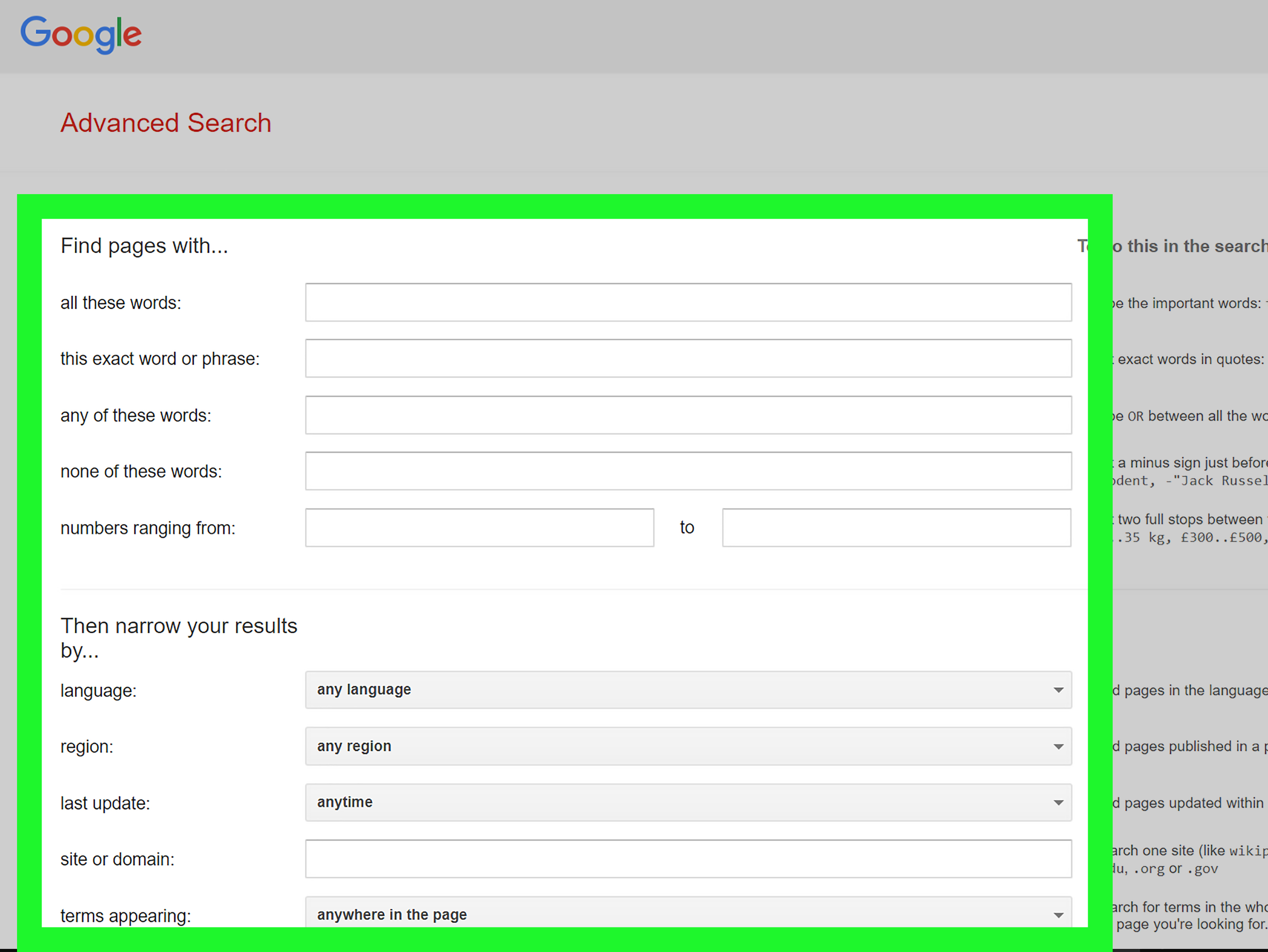

The internet is the largest library humanity has ever built, except the books are scattered across billions of shelves, some librarians are robots, and a surprising number of “experts” are selling miracle socks, investment secrets, or suspiciously confident opinions about nutrition. That is why learning how to search the internet like a pro is not just a neat digital trick. It is a modern survival skill.
Whether you are researching a school paper, comparing laptops, checking a medical term, planning a trip, investigating a company, or trying to remember the name of that actor who was “in the movie with the dog and the spaceship,” better search skills save time, reduce frustration, and help you avoid bad information. Professional-level searching is not about typing longer questions. It is about asking clearer questions, using search operators, filtering results, evaluating sources, and knowing when the first answer is not the best answer.
This guide breaks down practical internet search tips, advanced Google search techniques, Bing search operators, source evaluation methods, and real-world examples you can use immediately. By the end, you will not just search faster. You will search smarter.
Why Most Internet Searches Fail
Most people search the web in the same way they ask a sleepy friend for directions: vaguely. They type a few words, scan the first page, click whatever looks familiar, and hope the answer is hiding somewhere between ads, snippets, videos, shopping cards, and a forum post from 2011.
The problem is not that search engines are bad. Google, Bing, and other search tools are powerful. The problem is that search engines respond to the instructions we give them. If the instructions are fuzzy, the results will be fuzzy too. A search for best phone could mean best camera phone, best budget phone, best phone for gaming, best phone for older adults, best phone in 2026, or best phone according to someone who has an affiliate link and a very enthusiastic keyboard.
A pro searcher starts before the search box. They define what they need, choose the right keywords, and use filters to remove noise. That small amount of preparation turns a messy search into a focused investigation.
Start With a Better Search Question
Before typing, ask yourself three quick questions:
- What exactly do I need? A definition, comparison, statistic, tutorial, document, image, map, review, or official rule?
- Who is likely to know? A government agency, university, company, news outlet, database, expert organization, or user community?
- How recent does the answer need to be? A grammar rule may not change quickly. Tax laws, software features, product prices, and health guidance can change fast.
For example, instead of searching student loan help, search official student loan repayment options 2026 site:studentaid.gov. Instead of healthy breakfast, search high protein breakfast ideas dietitian. Instead of Excel problem, search Excel VLOOKUP returns N/A exact match example. Clear searches produce cleaner results.
Use Search Operators Like a Pro
Search operators are special commands that tell search engines exactly how to narrow, expand, or shape results. Think of them as the difference between walking into a grocery store and saying “food” versus handing someone a shopping list that says “whole-grain bread, unsalted butter, and absolutely no raisins.”
Use Quotation Marks for Exact Phrases
Quotation marks tell the search engine to look for words in the exact order you typed them. This is useful for names, quotes, article titles, product models, error messages, and unique phrases.
Example: "How to Search the Internet Like a Pro"
Example: "error 0x80070005 access denied"
Without quotes, the search engine may look for pages that contain the words separately. With quotes, it searches for the phrase as a unit.
Use the Minus Sign to Exclude Results
The minus sign removes unwanted meanings from your results. This is especially helpful when one word has multiple meanings.
Example: jaguar speed -car
This tells the search engine you want information about the animal, not the vehicle. You can also exclude entire phrases:
Example: apple nutrition -"Apple Watch"
Use site: to Search One Website or Domain
The site: operator limits results to a specific website or domain. This is one of the most powerful internet search techniques because it lets you search trusted sources directly.
Example: tax filing deadline site:irs.gov
Example: climate change report site:.edu
Example: resume template site:harvard.edu
This is useful when a website’s own search feature is clunky. Search engines often do a better job finding pages inside a website than the website itself. Yes, the internet is weird like that.
Use filetype: or ext: to Find Documents
If you want reports, PDFs, spreadsheets, presentations, or official forms, use document filters. Google commonly supports filetype:, while Bing also supports advanced keywords such as ext: for file extensions.
Example: cybersecurity checklist filetype:pdf
Example: annual report 2025 ext:pdf
This helps you find deeper material, not just short blog summaries. Government agencies, universities, nonprofits, and companies often publish high-value information as PDFs.
Use OR to Expand Your Search
The OR operator tells the search engine to look for either one term or another. It is helpful when a topic has synonyms.
Example: remote work productivity OR telework productivity
Example: heart attack symptoms OR myocardial infarction symptoms
Use capital letters for OR because some search engines treat lowercase “or” as a normal word.
Use Parentheses for Complex Searches
Parentheses help group ideas together, especially in Bing and database-style searches.
Example: ("electric vehicle" OR EV) (battery recycling OR lithium recycling)
This type of search is useful for research projects because it lets you combine multiple concepts without losing control of the results.
Think in Keywords, Not Full Sentences
Search engines are getting better at conversational questions, especially with AI-powered results. Still, keyword thinking remains essential. A full sentence like What are some of the reasons why my Wi-Fi keeps disconnecting on my laptop? may work, but a sharper query often works better:
Windows laptop Wi-Fi disconnects frequently causes fix
Good keywords usually include the topic, problem, context, and desired result. For troubleshooting, include the device, software version, exact error message, and action you were trying to take. For academic or professional research, include technical terms, synonyms, and authoritative source types.
Filter by Time When Freshness Matters
Some information ages like fine wine. Some information ages like milk in a hot car. Search results about tax rules, laws, software updates, travel restrictions, AI tools, product prices, medical recommendations, and current events need freshness checks.
Use search tools such as date filters, “past year,” “past month,” or custom date ranges. You can also add the current year to your query.
Example: best password manager 2026 review
Example: Google Analytics 4 setup guide 2026
However, do not rely only on the date shown in search results. Open the page and look for the publication date, update date, author, and whether the content actually reflects current information.
Search Beyond Google
Google is powerful, but it is not the whole internet. Professional searchers use different tools depending on the job.
- Bing: Useful for alternative results, image search, Microsoft-related topics, and advanced operators.
- Google Scholar: Best for academic papers, citations, and research literature.
- PubMed: Helpful for biomedical and health science research.
- Library databases: Great for peer-reviewed articles, newspapers, market reports, and archived materials.
- Government websites: Best for official laws, statistics, forms, safety guidance, and public data.
- Specialized search tools: Useful for patents, court records, datasets, maps, code repositories, and historical archives.
If one search engine gives weak results, do not assume the answer does not exist. Try another tool, change your keywords, or search a specific website directly.
Evaluate Sources Before You Trust Them
Finding information is only half the job. The other half is deciding whether it deserves your trust. This is where many people get fooled. A clean website design does not equal accuracy. A confident headline does not equal expertise. A viral post does not equal truth. A blue checkmark does not magically turn opinions into facts.
Use the SIFT Method
The SIFT method is a practical way to evaluate online information:
- Stop: Pause before sharing or trusting the information.
- Investigate the source: Find out who created it and why.
- Find better coverage: Look for stronger sources on the same claim.
- Trace claims back: Follow quotes, statistics, and images to the original source.
This method works because it moves you beyond the page you landed on. Instead of judging a website only by how it looks, you open new tabs and compare what other reliable sources say. This is called lateral reading, and it is one of the best habits for avoiding misinformation.
Check Authority, Evidence, and Purpose
Ask these questions before relying on a source:
- Who wrote it?
- What are their qualifications?
- Is the claim supported by evidence?
- Are sources named and traceable?
- Is the page selling something?
- Is the headline emotional or exaggerated?
- Does the information match other reliable sources?
A strong source does not have to be boring, but it should be transparent. If a page makes huge claims without evidence, treat it like a raccoon holding a business card: interesting, but not necessarily trustworthy.
Use Search Tabs Strategically
Search tabs are not decoration. They are shortcuts. Use them with intent.
- News: For current events and recent reporting.
- Images: For visual identification, charts, diagrams, and product comparison.
- Videos: For tutorials, demonstrations, repairs, and walkthroughs.
- Maps: For local businesses, routes, reviews, and hours.
- Shopping: For product availability and price comparison.
- Books or Scholar: For deeper research and citations.
If you are learning how to replace a faucet, a video may be better than a blog post. If you are comparing historical data, a PDF report or spreadsheet may be better than a news summary. The format matters.
Search With Examples and Templates
Examples are search fuel. If you are looking for a document, include words that usually appear in that type of document.
For templates: project timeline template filetype:xlsx
For policies: remote work policy example filetype:pdf
For academic research: renewable energy adoption systematic review
For official guidance: food safety storage guidelines site:.gov
For troubleshooting: "printer offline" Windows 11 fix
When you understand the language of the result you want, searching becomes easier. A researcher might use “systematic review,” a lawyer might use “statute,” a programmer might use “documentation,” and a marketer might use “case study.” Use the words insiders use.
Try Reverse Searching
Sometimes you do not start with words. You start with an image, quote, statistic, or suspicious claim. Reverse searching helps you trace information backward.
- Use reverse image search to find where an image appeared before.
- Search exact quotes in quotation marks.
- Search a statistic with the number and key phrase.
- Look for the original report, not just articles repeating it.
This is especially useful for viral posts. Many misleading images are old photos with new captions. A reverse search can reveal whether a dramatic “breaking news” image is actually from five years ago, another country, or a completely different event.
Use AI Search Carefully
AI-powered search tools can summarize information quickly, brainstorm keywords, explain complicated topics, and suggest related questions. They are excellent assistants, but they should not be treated as final authorities for high-stakes topics.
Use AI to help you search, not to stop searching. Ask it for alternative keywords, source types, search strategies, and questions you may have missed. Then verify important claims with primary sources, official documentation, expert organizations, or reputable publications.
For example, if you are researching a health issue, AI can help you understand basic terms, but you should still check trusted medical sources and consult a qualified professional for personal advice. If you are researching legal or financial rules, check official agencies and current regulations. Your future self will thank you, possibly with snacks.
Common Search Mistakes to Avoid
- Clicking only the first result: The top result is not always the best result.
- Ignoring dates: Old information can be misleading.
- Using one keyword only: Try synonyms and related terms.
- Trusting snippets too much: Open the page and check the context.
- Skipping source evaluation: A polished page can still be wrong.
- Forgetting official sources: For rules, forms, and data, go directly to the authority.
- Searching too broadly: Add context, location, date, format, or source type.
A Pro Search Workflow You Can Use Today
- Define the goal: Decide what kind of answer you need.
- Choose precise keywords: Include topic, context, and desired format.
- Run a broad search: See what language and sources appear.
- Refine with operators: Use quotes, minus signs,
site:,filetype:, andOR. - Check multiple sources: Compare results from reliable websites.
- Evaluate credibility: Investigate the author, evidence, date, and purpose.
- Trace important claims: Find original documents, studies, or official pages.
- Save useful searches: Keep your best queries for future research.
This process may sound slower than typing random words into a search box, but it is faster in practice. You spend less time wandering through weak results and more time finding what matters.
Experience-Based Lessons: What Searching Like a Pro Really Feels Like
One of the biggest lessons from serious internet searching is that the first query is rarely the final query. Good searchers treat searching as a conversation. You ask one question, study the results, learn better terminology, and ask again. The second or third search is often dramatically better because you now know the language of the topic.
For example, someone searching for back pain from sitting may get general wellness articles. After scanning reliable sources, they may discover terms such as “ergonomics,” “lumbar support,” “sciatica,” “hip flexor tightness,” or “workstation setup.” Each new term opens a better path. The search becomes less like shouting into a canyon and more like asking a librarian who finally understands what aisle you need.
Another practical experience is that official sources are not always written in the friendliest language, but they are often the best starting point. A government page may look plain, but if you need rules, deadlines, forms, safety standards, or statistics, plain can be beautiful. Blog posts can explain; official sources can confirm. The smartest approach is often to read an easy explanation first, then verify the important details with the original authority.
Search fatigue is real. After opening ten tabs, your brain may begin to feel like a browser with 4 percent battery. A professional habit is to organize as you go. Keep a simple note with useful links, dates, source names, and short comments such as “good overview,” “official data,” “outdated,” or “sales page.” This prevents you from rereading the same weak source three times while wondering why coffee has abandoned you.
It also helps to search from different angles. If you are researching whether a product is reliable, do not search only the product name plus “review.” Search the model number plus “problems,” “recall,” “manual,” “warranty,” “complaints,” and “comparison.” If you are researching a news claim, search the claim in quotes, then search the organization or person behind it. If you are researching a statistic, search the number itself with the topic. Numbers often lead back to reports, datasets, or press releases.
Finally, searching like a pro means being comfortable with uncertainty. Not every question has one clean answer. Sometimes sources disagree. Sometimes the best information is old, hidden in a PDF, locked in a database, or buried under pages of shallow summaries. A good searcher does not panic. They refine, compare, verify, and keep track of what is known, what is unclear, and what needs stronger evidence. That mindset is the real superpower. Search operators are tools. Critical thinking is the engine.
Conclusion
Learning how to search the internet like a pro is not about memorizing every advanced search operator on Earth. It is about building a better habit: ask clearer questions, use smarter filters, compare sources, check dates, and verify claims before trusting them. The internet rewards curiosity, but it rewards disciplined curiosity even more.
Start small. Use quotation marks for exact phrases. Try site: when you want trusted sources. Use filetype: when you need reports or documents. Add dates when freshness matters. Read laterally when a claim feels important. With practice, you will move through search results with less confusion and more confidence. You will find better information, avoid digital rabbit holes, and maybe even become the person your friends ask when they cannot find something online.
Note: This article is designed for web publication and focuses on practical search habits, real search-engine features, and responsible source evaluation without adding unnecessary reference clutter to the article body.