
Apple has a habit of making big changes look calm. No fireworks, no robot butlers rolling across the stage, no laptop doing a backflip. Just a thin aluminum notebook, a new chip, and a quiet message: the MacBook Air is not merely the “light” Mac anymore. With the M2 MacBook Air, Apple showed off a machine that felt less like a routine update and more like a fresh definition of what an everyday laptop could be.
When Apple introduced the M2 silicon in the redesigned MacBook Air, the company was not just adding a faster processor. It was refining the idea that began with the M1: a laptop could be thin, silent, cool, long-lasting, and still powerful enough for real creative work. The M2 MacBook Air arrived with a larger 13.6-inch Liquid Retina display, MagSafe charging, a 1080p FaceTime HD camera, a fanless design, and a flatter, more modern body that finally said goodbye to the famous wedge shape.
For students, writers, remote workers, creators, and anyone whose browser tabs multiply like rabbits, the M2 MacBook Air became one of the most talked-about Apple laptops of its generation. It was not perfect, and we will get to that, because every laptop has at least one “well, actually” moment. But the overall story is clear: Apple used the M2 MacBook Air to show that Apple silicon had moved from impressive experiment to confident mainstream standard.
What Is the M2 Chip, and Why Did It Matter?
The Apple M2 chip was the second generation of Apple silicon designed for the Mac. After the M1 surprised the laptop world with its performance-per-watt efficiency, M2 had a difficult job: improve the formula without ruining what made it great. Apple’s answer was a system-on-a-chip built on enhanced 5-nanometer technology, with 20 billion transistors, an 8-core CPU, up to a 10-core GPU, a 16-core Neural Engine, and 100GB/s of unified memory bandwidth.
In plain English, M2 made the MacBook Air faster, smoother, and better at juggling modern tasks. It was built to handle everyday workloads like browsing, writing, spreadsheets, streaming, video calls, and photo editing with ease. It also gave casual creators more room to work in apps like Photoshop, Final Cut Pro, Lightroom, GarageBand, and other creative tools that previously felt more “MacBook Pro territory.”
The real magic was not just raw speed. It was efficiency. The M2 MacBook Air could deliver strong performance without a fan. No sudden whoosh during a Zoom meeting. No tiny jet engine launching from your desk. Just a silent, slim machine doing its job like a very polite overachiever.
A New MacBook Air Design: Goodbye Wedge, Hello Modern Minimalism
For years, the MacBook Air was known for its tapered wedge design. It was iconic, instantly recognizable, and thin enough to make people feel slightly dramatic when sliding it out of a bag. With the M2 model, Apple retired that wedge and introduced a flatter, more uniform body inspired by the 14-inch and 16-inch MacBook Pro design language.
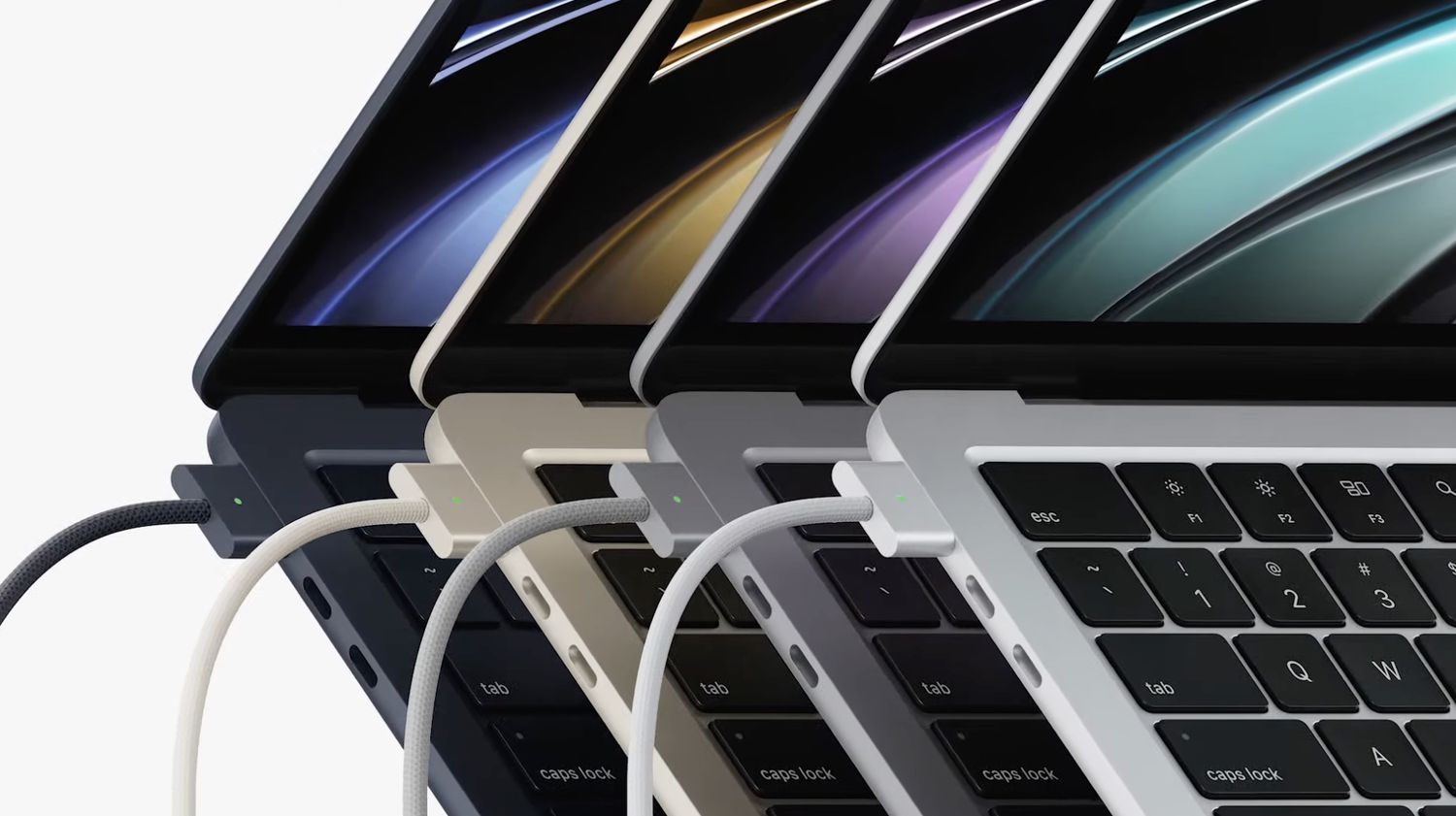
The result was a MacBook Air that looked cleaner, sharper, and more premium. At about 11.3 mm thin and 2.7 pounds, it remained extremely portable, but the new shape made it feel more like a miniature professional machine than a budget-friendly entry point. The aluminum unibody construction gave it the sturdy feel Apple users expect, while the new colorssilver, space gray, starlight, and midnightadded more personality.
The Midnight Finish: Beautiful, Moody, and Fingerprint-Hungry
The midnight color quickly became the attention magnet. It looked sleek, dark, and dramatic, like a laptop that listens to jazz at midnight and judges your cable management. However, it also became known for showing fingerprints more easily than lighter finishes. That did not stop people from wanting it, but it did teach many users to keep a microfiber cloth nearby like a tiny security blanket.
The 13.6-Inch Liquid Retina Display Makes a Big Difference
One of the most practical upgrades in the M2 MacBook Air was the larger 13.6-inch Liquid Retina display. Compared with the previous generation, Apple pushed the screen closer to the edges, reduced the bezels, and made the display brighter at up to 500 nits. It also supported 1 billion colors, which helped photos, videos, presentations, and design work look more vibrant.
For everyday use, the display upgrade mattered immediately. More screen space meant easier multitasking, cleaner document editing, and a better streaming experience. It was still not a mini-LED ProMotion display like Apple’s higher-end MacBook Pro models, so users looking for 120Hz refresh rates or extreme HDR performance still had reasons to go Pro. But for a thin-and-light laptop, the M2 Air’s screen hit a sweet spot.
MagSafe Returns, and Everyone’s Cable Anxiety Gets Better
MagSafe returned to the MacBook Air with the M2 generation, and that was a bigger deal than it may sound. MagSafe gives the laptop a dedicated charging port that magnetically snaps into place and disconnects if someone trips over the cable. Anyone who has ever watched a laptop nearly fly off a table knows this feature is not just convenient; it is emotional support.
The M2 MacBook Air also kept two Thunderbolt/USB 4 ports and a 3.5 mm headphone jack with support for high-impedance headphones. The port selection was not exactly a buffet, but MagSafe freed up both USB-C ports while charging, which made the setup far more flexible than the M1 Air for many users.
Performance: Fast Enough for Most People, Smarter Than It Looks
The M2 MacBook Air was designed for mainstream users, but “mainstream” no longer means basic. Today’s everyday laptop may be asked to run 20 browser tabs, edit photos, handle video meetings, open massive PDFs, sync cloud files, stream music, and keep a dozen apps awake in the background. The M2 chip handled these tasks confidently.
Apple positioned M2 as a meaningful step up from M1, especially in graphics, media processing, and memory bandwidth. With up to 24GB of unified memory, the M2 Air gave buyers more headroom than the M1 Air. That mattered for people who wanted a lightweight Mac but knew they would be editing images, working with large spreadsheets, or keeping heavy productivity workflows open for hours.
Where M2 Shines
The M2 MacBook Air is at its best in daily productivity and light-to-moderate creative work. Writing, coding, photo editing, presentation design, audio editing, online meetings, and casual video editing all fit comfortably within its personality. It launches apps quickly, wakes instantly, and feels responsive in the way Apple silicon Macs are known for.
Where the Fanless Design Has Limits
The MacBook Air has no fan, which keeps it silent and thin. That is wonderful until you push it through long, sustained workloads such as extended 4K video exports, 3D rendering, or heavy professional editing sessions. Under those conditions, the MacBook Air can reduce performance to manage heat. This is not a flaw so much as a design trade-off. The MacBook Air is built for portability and silence; the MacBook Pro is built for sustained performance.
The Webcam Finally Got the Upgrade It Needed
The M2 MacBook Air upgraded to a 1080p FaceTime HD camera, which was a welcome improvement for a world that had become deeply familiar with video calls. The older 720p webcams on many laptops often made people look like they were attending meetings from inside a potato. The 1080p camera, paired with Apple’s image signal processing, gave users a clearer, more professional look.
This was especially useful for remote workers, online students, freelancers, teachers, consultants, and anyone who spends part of the week saying, “Can you hear me?” into a grid of faces. The improved camera did not turn the MacBook Air into a Hollywood studio, but it made everyday calls look noticeably better.
Speakers, Microphones, and the Quiet Power of Better Details
Apple also improved the audio experience with a four-speaker sound system and a three-mic array. The speakers were integrated between the keyboard and display, helping maintain the thin design while improving stereo separation and vocal clarity. The MacBook Air also supported Spatial Audio for compatible music and movies with Dolby Atmos.
These details matter because laptop quality is not only about benchmark scores. It is about the little things you notice every day: how your voice sounds on calls, how clear a podcast is while you cook lunch, how comfortable the keyboard feels after three hours of writing, and whether the trackpad behaves like a precision tool or a stubborn cracker.
Battery Life: The Real Apple Silicon Flex
Apple claimed up to 18 hours of video playback for the M2 MacBook Air, and real-world battery life generally impressed reviewers and users. Battery results always vary depending on brightness, apps, browser choice, and whether you treat Chrome like a competitive sport. Still, the M2 MacBook Air’s battery life was one of its strongest selling points.
For many users, the laptop could last through a full workday without needing to panic-search for an outlet. That changed how people used it. A student could move between classes. A writer could spend the afternoon at a café. A traveler could work through a flight. A remote worker could bounce between rooms without carrying a charger like a life-support device.
Base Model vs. Upgrades: The Buying Debate
The M2 MacBook Air launched with a base configuration that included 8GB of unified memory and 256GB of storage. For light use, that configuration could work well. However, many reviewers and power users recommended upgrading to at least 16GB of memory or 512GB of storage, depending on needs.
The most talked-about issue was the 256GB SSD configuration, which used a storage setup that could be slower in some read/write tasks than higher-capacity models. For everyday users, this may not be noticeable. For people who move large files, edit video, or rely heavily on swap memory, the 512GB version was often the safer choice.
Who Should Choose 16GB of Memory?
If your work includes heavy multitasking, photo editing, coding, research with many tabs, or keeping apps open all day, 16GB of unified memory is a smart upgrade. Memory is not upgradeable later, so choosing enough at purchase is important. The base model may be fine for casual use, but 16GB gives the machine more breathing room and a longer useful life.
Who Should Choose More Storage?
If you store large photo libraries, local videos, music projects, design files, or offline work archives, more storage is worth considering. Cloud storage helps, but relying entirely on the cloud can become annoying when Wi-Fi decides to act like it needs a vacation.
MacBook Air M2 vs. MacBook Air M1
The M1 MacBook Air was already excellent, which made the M2 upgrade question more interesting. The M2 Air offered a better display, improved camera, MagSafe, newer design, more memory options, better graphics, and a more premium feel. The M1 Air, however, remained a strong value option, especially when discounted.
For users coming from an Intel MacBook Air, the M2 model felt like a huge leap. For users already on an M1 MacBook Air, the upgrade was more about quality-of-life improvements than raw necessity. That distinction matters. The M2 MacBook Air was not designed to make every M1 owner sprint to the Apple Store. It was designed to become the new standard for people buying a modern lightweight Mac.
MacBook Air M2 vs. MacBook Pro: Which One Made More Sense?
The M2 chip also appeared in the 13-inch MacBook Pro, but the MacBook Air often felt like the more exciting machine. The Air had the newer design, better webcam, MagSafe, larger display, and more modern look. The 13-inch MacBook Pro had active cooling and longer sustained performance, but it also kept an older design and the Touch Bar.
For most users, the M2 MacBook Air was the more balanced choice. The MacBook Pro made sense for people who needed sustained workloads in a compact body. But for students, office workers, writers, entrepreneurs, and casual creators, the Air delivered the better everyday experience.
Why the M2 MacBook Air Was Important for Apple
The M2 MacBook Air was important because it showed Apple silicon maturing. The M1 proved Apple could build great Mac chips. The M2 Air proved Apple could redesign one of its most important laptops around that silicon and make the entire product feel more intentional.
Instead of treating the chip as a component, Apple used M2 as the foundation for the machine. The fanless design, battery life, thin body, display, camera, and charging choices all worked together. That is the Apple silicon strategy in a nutshell: control the hardware and software closely enough that the final product feels smoother than the spec sheet alone can explain.
Best Uses for the M2 MacBook Air
The M2 MacBook Air is especially well suited for:
- Students who need a lightweight laptop for research, writing, classes, and media.
- Remote workers who spend the day in email, documents, calls, and project apps.
- Writers, bloggers, and editors who value portability, battery life, and a great keyboard.
- Small business owners who need a reliable Mac for daily operations.
- Casual creators editing photos, short videos, podcasts, or social media assets.
- Travelers who want power without carrying a bulky machine.
It is less ideal for users who need multiple external displays, heavy 3D rendering, long professional video exports, advanced gaming, or large-scale development workloads that run hot for extended periods. For those tasks, a MacBook Pro is still the better tool.
The Experience: Living With the M2 MacBook Air
Using the M2 MacBook Air feels like working with a laptop that understands the assignment. Open the lid, and it wakes instantly. The keyboard feels crisp. The trackpad is huge and accurate. The screen is bright enough for most environments. The body is light enough to carry around all day without making your shoulder file a complaint.
The biggest everyday benefit is the sense of effortlessness. You can move from writing an article to editing images, joining a call, sending files, managing notes, and streaming music without thinking much about performance. That may sound boring, but boring reliability is exactly what most people want from a laptop. Exciting computers are fun until they crash during a deadline.
The fanless design changes the mood of the machine. There is no sound, no vibration, no heat blast from a vent. In quiet spaces, that matters. Libraries, classrooms, bedrooms, meeting rooms, and cafés all feel more comfortable when your laptop is not audibly training for takeoff.
The display also improves the experience more than expected. The extra screen space makes split-screen work easier, and the thinner bezels make the laptop feel more modern. Whether you are editing a Google Doc, comparing browser tabs, watching YouTube, or polishing a presentation, the screen feels like an upgrade you notice constantly.
MagSafe is another daily pleasure. It seems small until you use it. Being able to charge without occupying a USB-C port makes desk setups cleaner. The magnetic connection also gives peace of mind in shared spaces where cables are always one careless foot away from disaster.
There are quirks. The midnight finish can attract fingerprints. The limited port selection may require a hub. The base model is not the best choice for everyone. And if you push the machine with long creative workloads, you may eventually find the limits of the fanless design. But these are understandable trade-offs for a laptop built around mobility.
For a writer or content creator, the M2 MacBook Air is especially appealing. It is light enough to take anywhere, powerful enough for image editing and content production, and dependable enough for long writing sessions. The battery life encourages working away from the desk, which can be surprisingly good for creativity. Sometimes a change of scenery does more for productivity than another productivity app with a motivational mascot.
For students, it feels like a laptop that can survive the chaos of campus life. It is portable, quiet, fast, and long-lasting. It handles research, documents, presentations, streaming, and video calls without drama. The main advice is to buy enough memory and storage for the next several years, not just the first semester.
For professionals, the M2 MacBook Air works best as a portable primary machine for general work or as a secondary travel laptop. It is not a full replacement for a high-end MacBook Pro if your work depends on heavy rendering or specialized workflows. But for many office, marketing, management, writing, education, and consulting roles, it is more than enough.
The most impressive thing about the M2 MacBook Air is that it does not feel like a compromise in daily use. Older ultraportable laptops often made users choose between thinness and power. The M2 Air narrowed that gap. It gave people a laptop that looked elegant, lasted long, stayed quiet, and performed well. That is why it became one of the defining Apple laptops of the Apple silicon era.
Conclusion: Apple’s M2 MacBook Air Was More Than a Simple Refresh
The M2 MacBook Air showed Apple at its most strategic. Instead of merely placing a new chip inside an old shell, Apple redesigned the MacBook Air around M2 silicon. The result was a laptop with a larger display, better webcam, improved speakers, MagSafe charging, strong battery life, and enough performance for a wide range of users.
It was not the cheapest MacBook Air at launch, and it was not the most powerful Mac laptop Apple offered. But it may have been the most balanced. The M2 MacBook Air captured what many people actually want: a beautiful, quiet, lightweight laptop that can handle real work without turning every day into a spec-sheet negotiation.
For anyone interested in Apple silicon, the M2 MacBook Air remains an important chapter. It proved that the MacBook Air could grow up without losing its charm. It also proved that thin laptops no longer had to feel underpowered. In classic Apple fashion, the biggest achievement was not one flashy feature. It was the way all the pieces worked together.