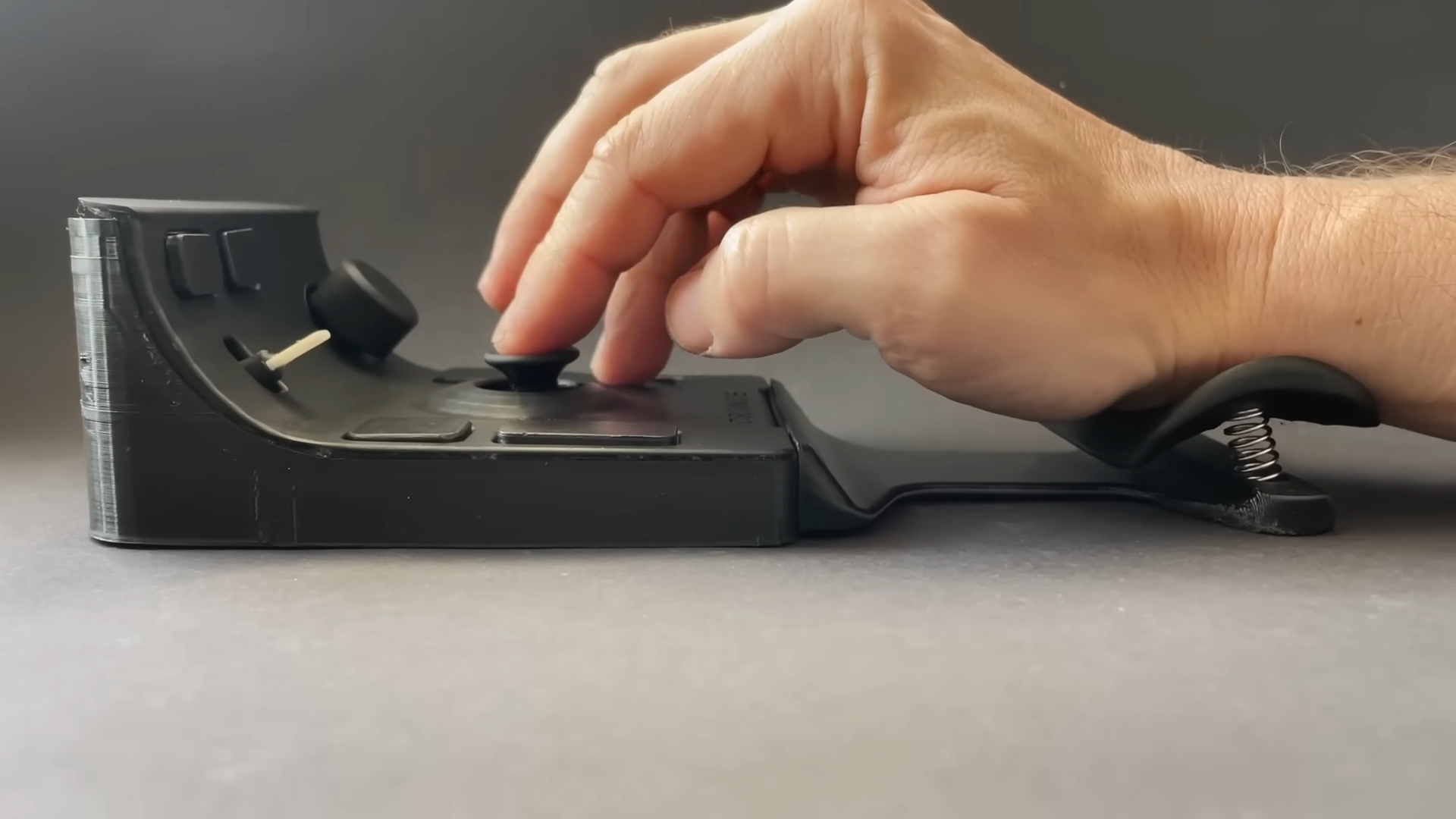

Every so often, a computer mouse wanders out of the gadget zoo looking less like office equipment and more like something a spaceship mechanic assembled during lunch. That is exactly the charm of a custom mouse with a neat thumbstick design: it challenges the sacred idea that a mouse must be a palm-sized pebble with two buttons, a wheel, and the emotional range of a stapler.
This kind of custom pointing device is not just a weird desk toy. It is a serious experiment in comfort, control, reliability, and human-computer interaction. Inspired by maker builds such as DIY Yarik’s 3D-printed mouse concept, the design replaces traditional sliding movement with a central thumbstick, adds a wrist-resting body, and surrounds the user’s hand with buttons, scroll controls, and even a rotary dial. In plain English: it is a mouse, a joystick, a macro pad, and a tiny control console all trying to share one apartment.
Some people will argue that a thumbstick-controlled device is “not really a mouse.” Fair enough. Call it a pointing device, a control deck, or a desk goblin with USB manners. What matters is that it sends mouse-style commands to a computer and aims to solve problems many users know too well: hand fatigue, short-lived switches, awkward wrist angles, and the eternal frustration of dragging a plastic puck around a desk until your shoulder starts writing a resignation letter.
Why Put a Thumbstick on a Mouse?
The central idea behind a thumbstick mouse is simple: instead of moving the whole device across a surface, the user moves a small analog stick with the thumb. That stick controls cursor direction and speed. Anyone who has played a console game already understands the basic motion, which makes the concept feel both strange and familiar at the same time.
A traditional mouse depends on surface tracking. Optical and laser sensors have become extremely accurate, and modern gaming mice can reach ridiculous DPI numbers that sound like sports car specs. But the standard design still asks the hand, wrist, forearm, and sometimes shoulder to move repeatedly throughout the day. A thumbstick design changes the workload. The device can stay planted while the thumb handles pointer movement.
That trade-off is fascinating. A thumbstick may not match a high-end optical sensor for fast, pixel-perfect flick shots in competitive games. Nobody is suggesting you bring this to an esports final unless you enjoy being roasted in several languages. But for browsing, coding, CAD navigation, media control, accessibility setups, and productivity workflows, a thumbstick can become a compact and comfortable alternative.
The Anatomy of a Custom Thumbstick Mouse
A 3D-Printed Body Built Around the Hand
The most eye-catching part of this custom mouse concept is the body. Rather than starting with the usual symmetrical shell, a maker can design the enclosure around actual hand posture. A 3D-printed frame allows the device to have a broad base, an integrated wrist rest, and raised control areas positioned where fingers naturally land.
This is where custom hardware shines. Commercial mice must fit millions of hands well enough. A custom mouse only has to fit one hand beautifully. That is a major advantage. The designer can adjust palm height, thumb angle, button spacing, and wrist support without waiting for a giant peripheral company to decide whether the market is large enough.
The Thumbstick as the Main Pointer
At the heart of the build is the thumbstick. Most analog thumbsticks use two potentiometers to measure movement on the X and Y axes, along with a push-in switch for selection. In a mouse-style build, firmware can translate that input into cursor movement. Push the stick slightly and the cursor moves slowly. Push it harder and the cursor moves faster. Add acceleration curves, dead zones, and smoothing, and suddenly the device becomes far more usable than “tiny joystick makes cursor run away.”
The tuning matters. A raw thumbstick can feel twitchy, especially near the center. Good firmware needs a dead zone to ignore tiny accidental movements, a speed curve for precision and travel, and damping to prevent kickback. Without those refinements, the cursor behaves like it drank three coffees and saw a ghost.
Buttons, Scroll Controls, and a Rotary Dial
The best custom thumbstick mouse designs do not stop at pointer movement. They add more controls than a normal mouse dares to dream about. Left and right click are obvious. A middle click is useful. Extra programmable buttons can handle copy, paste, undo, app switching, browser navigation, media controls, or gaming macros. A secondary scroll control can handle vertical or horizontal movement, while a rotary dial can adjust volume, brush size, timeline position, zoom, or whatever else the firmware allows.
This is where the design becomes more than a mouse. It becomes a control surface. Think of the Logitech MX Master line with its thumb wheel, the ASUS ROG Chakram with its programmable joystick, the Razer Naga with its thumb-button grid, or the Corsair Scimitar with its adjustable side buttons. Commercial products prove that the thumb is valuable real estate. A custom build simply takes that idea and goes full mad scientist, minus the lightning storm.
Ergonomics: The Real Reason This Design Matters
The most practical reason to build a custom mouse is comfort. Ergonomics research has repeatedly shown that wrist posture, forearm pronation, grip force, and repetitive movement all matter when using pointing devices for long sessions. Angled and vertical mouse shapes can improve wrist posture for many users, though no mouse should be treated as a magical cure for medical problems such as carpal tunnel syndrome.
A thumbstick mouse attacks the problem from another direction. Instead of simply changing the angle of the hand, it reduces the need to slide the device across a desk. The wrist can rest on the base. The forearm can stay more stable. The fingers can hover over assigned controls. For users who dislike trackpads, struggle with tiny laptop pointing devices, or feel discomfort after long mouse sessions, that is a compelling idea.
However, comfort is personal. One user’s dream device is another user’s plastic torture biscuit. A thumbstick shifts effort to the thumb, which can be great for some people and tiring for others. The best design would let users adjust sensitivity, stick resistance, button assignments, and hand position. That is the beauty of custom hardware: iteration is not a bug; it is the whole party.
How the Electronics Work
On the electronics side, a custom mouse can be surprisingly approachable. Microcontrollers with native USB support, such as boards based on the ATmega32u4 or modern SAMD chips, can present themselves to a computer as a USB Human Interface Device. That means the computer can recognize the build as a mouse, keyboard, joystick, or a mix of controls depending on the firmware.
The firmware reads the thumbstick’s analog values, checks button states, and sends mouse movement or click reports to the computer. For a wired build, USB is straightforward and low-latency. A wireless version is possible, but it adds battery management, radio communication, charging circuitry, and more opportunities for the project to develop “character,” which is maker-speak for “why is this not working at 1:13 a.m.?”
Durability is another key issue. Traditional mice often fail at switches, scroll wheels, cables, or worn feet. A custom design can choose higher-quality switches, modular wiring, replaceable thumbstick modules, and a shell that can be reprinted when it gets ugly. The repairability angle is important. Instead of tossing a whole mouse because one switch got mushy, the builder can replace the part and keep the device alive.
Software Tuning Makes or Breaks the Experience
The hardware may get the applause, but the software does the heavy lifting. A thumbstick mouse needs careful movement curves. Linear movement may feel too slow for long-distance travel and too fast for fine selection. A curved response can give slow movement near the center and faster movement at the edges. That lets the user nudge the cursor onto a tiny checkbox without needing the patience of a watchmaker.
Good firmware should also support profiles. One profile might be tuned for general desktop use. Another could be optimized for CAD, where pan, zoom, orbit, and precision movement matter. A third profile might serve video editing, with the rotary dial mapped to timeline scrubbing and extra buttons assigned to cut, ripple delete, and playback. The same physical device can feel completely different depending on the software layer.
That is why open-source code is so valuable in a project like this. When files are available on GitHub or similar platforms, other builders can study the wiring, modify the movement logic, redesign the enclosure, and share improvements. A custom mouse becomes less of a one-off curiosity and more of a starting point for a community of people who look at normal peripherals and think, “Nice, but what if it had more knobs?”
How It Compares With Trackballs, Vertical Mice, and Gaming Mice
A thumbstick mouse sits in a strange but useful middle ground. Compared with a trackball, it offers compact directional input without needing a rolling ball, bearings, or frequent cleaning. Compared with a vertical mouse, it can reduce desk movement even further. Compared with a standard gaming mouse, it trades sensor speed for stationary control and customization.
Commercial thumb-heavy mice already hint at the same design philosophy. The ROG Chakram includes a joystick under the thumb. The Razer Naga line gives MMO players a large thumb grid. The Corsair Scimitar adds an adjustable side-button panel. The Logitech MX Master 3S uses a thumb wheel for horizontal scrolling and productivity shortcuts. These products are not identical to a DIY thumbstick mouse, but they prove that serious users want more control under the thumb.
The custom design goes further by asking a bolder question: what if the thumb did the pointing too? That is controversial, but it is also where innovation lives. The first version of any unusual interface will feel odd. Then users adapt. Then someone improves it. Then suddenly an idea that looked ridiculous becomes normal enough to complain about on the internet.
Who Would Actually Use This?
A custom thumbstick mouse is not for everyone, and that is fine. It is best suited for users who value comfort, customization, and stationary control over conventional speed. Programmers might appreciate programmable buttons for shortcuts. Video editors could map the dial and buttons to timeline controls. Designers might use profiles for zoom and brush sizing. Accessibility users may benefit from a device that reduces arm travel. Makers, of course, will enjoy the build itself because makers are legally required to improve objects that already work.
There is also a strong reliability argument. If someone has burned through multiple commercial mice, a repairable custom device becomes attractive. Replaceable switches, accessible wiring, and printable parts turn the mouse from a sealed consumer product into a maintainable tool. That matters in a world where too many gadgets are designed like tiny electronic vaults.
Limitations and Trade-Offs
The thumbstick design has real challenges. Precision can be harder than with a high-end optical sensor. The learning curve can be steep. Some users may experience thumb fatigue. The device may be bulky. Firmware tuning can take time. And because the build is custom, the finish may not match a polished commercial product unless the maker spends serious time sanding, painting, testing, and muttering encouraging threats at the 3D printer.
There is also the identity problem. Is it a mouse? Is it a joystick? Is it a macro pad with ambition? Technically, if it reports itself as a mouse and controls a cursor, it can function as a mouse. Culturally, people will argue forever, because arguing about definitions is one of the internet’s most renewable resources.
The more important question is whether it solves a problem. If it helps a user work longer with less discomfort, access shortcuts faster, repair their own hardware, or enjoy their computer more, then the label matters less than the result.
Experience Notes: Living With a Thumbstick Mouse Design
The experience of moving from a conventional mouse to a thumbstick-based custom mouse is best described as “awkwardly promising.” The first hour is usually humbling. Your brain expects the whole hand to move the cursor, but the device stays still. Your thumb becomes the driver, and for a while it drives like a teenager in a parking lot. Overshooting buttons, drifting past menu items, and accidentally moving the cursor while trying to click are all part of the initiation ritual.
After a few sessions, the logic starts to click. Stationary control feels calmer. There is no need to lift and reposition the mouse at the edge of the pad. The wrist rest becomes more than decoration; it anchors the hand. Buttons around the fingers begin to feel like a cockpit. If the firmware is tuned well, small thumb movements handle precise selections while full deflection moves the cursor across the screen. The device stops feeling like a novelty and starts feeling like a specialized tool.
The best moment comes when shortcuts become automatic. Imagine editing a document with copy, paste, undo, browser back, browser forward, and scroll control under one hand. Or scrubbing through a video timeline with a rotary dial while the thumbstick handles cursor placement. Or working in a 3D application where extra buttons manage views, zoom, and tool changes. That is when the custom mouse earns its desk space.
There are still rough edges. Thumb fatigue can appear if sensitivity is too low because the user must hold the stick near its edge for too long. If sensitivity is too high, the cursor feels slippery. A good middle ground takes experimentation. The stick cap matters too. A slippery cap makes precision worse, while a textured or concave cap improves confidence. Button placement also needs testing. A button that looks perfect in CAD may be annoying in real life if it forces the finger to stretch or curl unnaturally.
The physical build quality affects trust. A flexible shell, rattly dial, or weak switch mount can make the device feel like a science fair survivor. A solid print, clean wiring, and damped thumbstick movement make it feel deliberate. Small details matter: rounded edges, stable rubber feet, cable strain relief, and enough weight to prevent sliding. If the base moves while the thumbstick moves, congratulations, you have invented frustration with extra steps.
For daily productivity, the thumbstick mouse makes the most sense as a personalized workstation device. It may not replace every mouse for every task, but it can become the preferred tool for users who want less arm motion and more programmable control. It also encourages a healthier mindset toward hardware: devices should fit people, not the other way around. If a commercial mouse is a shoe that comes in three sizes, a custom mouse is a cobbler with a soldering iron.
Conclusion
The custom mouse with a neat thumbstick design is exactly the kind of project that makes hardware tinkering exciting. It is practical enough to be useful, strange enough to be memorable, and flexible enough to invite improvement. By combining a 3D-printed ergonomic body, thumbstick cursor control, programmable buttons, scroll options, and repairable electronics, it challenges the standard mouse without pretending the standard mouse is obsolete.
The design will not be perfect for everyone. Fast-paced gamers may prefer traditional optical sensors. Some users may dislike thumb-driven cursor control. Others may need time to adapt. But as a proof of concept, it rocks. It shows that the humble mouse still has room for invention, especially when makers stop asking, “What does a mouse normally look like?” and start asking, “What should my hand actually enjoy using?”
Note: This article is written for web publication and synthesizes real information about custom pointing devices, USB HID behavior, Arduino-style mouse emulation, ergonomic mouse research, thumbstick hardware, and programmable commercial mouse designs.