
Buying an iPhone without a contract used to sound like ordering a fancy coffee in a language you do not speak: possible, but mildly intimidating and suspiciously expensive. Today, it is much easier. You can buy an unlocked iPhone, choose a prepaid or month-to-month plan, switch carriers when prices get rude, and avoid being trapped in a three-year “free phone” deal that is about as free as a hotel minibar.
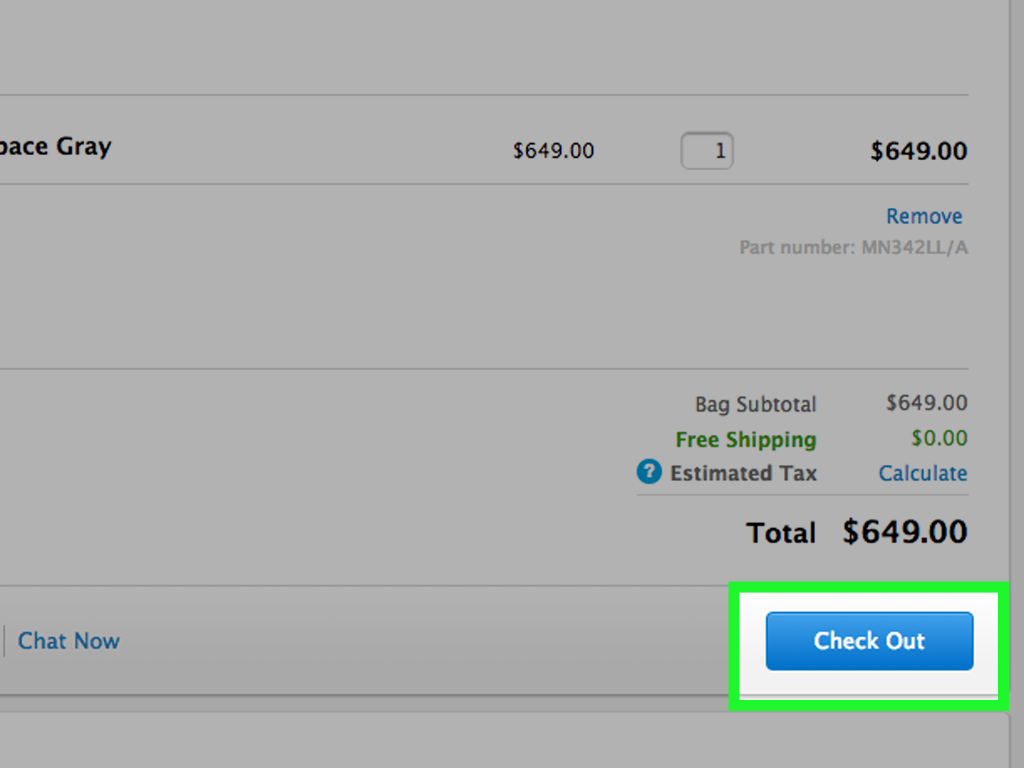
The main idea is simple: instead of letting a carrier tie your phone discount to a long installment agreement, you buy the iPhone separately and choose your service separately. That gives you more control over your monthly bill, your carrier, your travel options, and your upgrade timeline. The trade-off is that you may pay more upfront, so the smartest move is to compare the total costnot just the shiny price on the checkout page.
What Does “Without a Contract” Really Mean?
When people say they want to buy an iPhone without a contract, they usually mean one of three things. First, they want an unlocked iPhone that can work with different compatible carriers. Second, they want to avoid a carrier installment plan that spreads the cost over 24 or 36 months. Third, they want phone service with no long-term commitment, usually through a prepaid carrier, an MVNO, or a month-to-month plan.
These are related, but they are not identical. A phone can be “no contract” but still locked to a carrier for a period of time. A phone can be paid monthly but still not tied to a traditional service contract. A carrier can advertise “$0 down” while quietly attaching monthly bill credits that disappear if you leave early. That is why the magic words to look for are unlocked, SIM-free, No SIM restrictions, and paid in full.
Best Places to Buy an iPhone Without a Contract
1. Buy Directly From Apple
For most buyers, Apple is the cleanest place to buy an iPhone without a contract. When you buy from Apple, you can usually choose an unlocked model that works with any compatible carrier. Apple’s own shopping guidance says iPhones purchased from Apple are unlocked, with an important exception: iPhones bought through certain carrier installment plans, such as AT&T installment financing, may be locked.
Buying from Apple also makes setup easier. You can trade in an old phone, choose AppleCare+, set up eSIM, transfer data, and leave the store with a working device. It is not always the absolute cheapest route, but it is often the least chaotic. That counts for something when your alternative is arguing with a carrier kiosk at 8:47 p.m. under fluorescent lighting.
2. Buy an Unlocked iPhone From Best Buy or Another Major Retailer
Best Buy and similar U.S. retailers sell unlocked iPhones and often provide pickup, returns, trade-in options, and occasional discounts. This route is useful if you want to compare models in person, use a store credit card, or pick up a device the same day. Just read the listing carefully. “Unlocked” is good. “Activate today” or “carrier deal” may involve conditions.
Before buying, confirm the exact model, storage size, color, return window, and whether the phone is truly unlocked or only compatible with selected carriers. For newer U.S. iPhones, also remember that many models rely on eSIM rather than a physical SIM card, so make sure your carrier supports eSIM activation.
3. Buy Apple Certified Refurbished
Apple Certified Refurbished iPhones can be a smart contract-free option. They are tested, cleaned, include a new battery and outer shell on eligible iPhone refurb listings, and come with Apple’s one-year limited warranty. Availability changes often, but if the model you want appears in the refurbished store, you can save money without entering the wild jungle of mystery listings and “lightly used” phones that look like they survived a skateboard accident.
4. Buy From Reputable Refurbished Marketplaces
Amazon Renewed, Back Market, and other refurbished marketplaces can offer lower prices on unlocked iPhones. The key is to focus on warranty coverage, return policy, seller rating, battery condition, and whether the device is unlocked. Back Market commonly highlights warranty coverage and inspection processes, while Amazon Renewed products are backed by the Amazon Renewed Guarantee.
This option is best for budget-minded buyers who are comfortable checking details. Do not buy based on price alone. A cheap iPhone that is locked, blacklisted, damaged, or has poor battery health is not a deal. It is a small rectangular lesson.
5. Buy Used, But Be Careful
Used iPhones from private sellers can be the cheapest route, but they require the most caution. Ask the seller to confirm the phone is unlocked, fully paid off, not reported lost or stolen, and free from Activation Lock. On the device, go to Settings > General > About and check the Carrier Lock line. If it says No SIM restrictions, the iPhone is unlocked.
Also check battery health, cameras, Face ID, speakers, charging, display condition, and whether the IMEI is clean. Meet in a safe public place if buying locally, preferably somewhere you can test activation. If the seller says, “Trust me, bro,” your wallet should immediately put on running shoes.
How to Choose the Right iPhone Model
Buying without a contract means you are not being pushed into whatever model has the biggest carrier promotion. That is good news. Start by asking what you actually need. If you mostly text, browse, stream, take photos, and use social apps, you may not need the most expensive Pro Max model. If you shoot lots of video, edit content, game heavily, or keep your phone for five years, a newer or higher-storage model may be worth it.
Storage: Do Not Underbuy
Storage matters because iPhones do not have microSD card slots. For light users, 128GB may be enough. For people who record lots of 4K video, download movies, or keep years of photos, 256GB or more is safer. Paying a little more for storage upfront can prevent the monthly ritual of deleting apps while whispering apologies to your photo library.
Battery Health: Critical for Used and Refurbished iPhones
If you buy used or refurbished, battery health is one of the most important details. A phone with weak battery health may still work, but you could soon need a battery replacement. For used iPhones, check Settings > Battery > Battery Health & Charging. For refurbished purchases, look for a clear battery guarantee or return policy.
eSIM Compatibility
Many recent U.S. iPhones use eSIM instead of a physical SIM tray. eSIM is a digital SIM built into the phone, and it lets you activate service without inserting a plastic SIM card. This is convenient when your carrier supports it, especially for switching plans or adding travel service. However, it also means you should confirm eSIM support before you buy, particularly if you plan to use a smaller prepaid provider or international carrier.
How to Pick a No-Contract Phone Plan
Once you own the iPhone, you need service. This is where the savings can become real. Instead of automatically choosing AT&T, Verizon, or T-Mobile postpaid service, compare prepaid and MVNO options such as Mint Mobile, Visible, US Mobile, Cricket, Metro, and others. These carriers often use major networks but sell service with lower monthly prices and fewer long-term commitments.
Check four things before switching: coverage in your area, data speed policies, hotspot allowance, and international features. A $25 plan is wonderful until you discover it performs like a sleepy turtle in your neighborhood. Use coverage maps, ask local friends, and try a short-term plan before moving your main number if you are unsure.
BYOD: Bring Your Own Device
Most no-contract carriers support BYOD, meaning you bring your own unlocked phone. The carrier will usually ask for your IMEI to check compatibility. If your iPhone passes the checker, you can often activate with eSIM in minutes. This is one of the biggest advantages of buying an unlocked iPhone: you are not asking permission to leave every time your bill gets dramatic.
Unlocked vs. Carrier-Locked: Know the Difference
An unlocked iPhone can work with different compatible carriers. A locked iPhone is restricted to one carrier until it meets that carrier’s unlocking requirements. According to current U.S. carrier policies, unlocking can depend on payment status, account standing, time since purchase or activation, and whether the device has been reported lost, stolen, or involved in fraud.
AT&T generally requires the device to be paid off and purchased more than 60 days ago. T-Mobile requires the device to meet its postpaid or prepaid eligibility rules and not be reported lost, stolen, or blocked. Verizon’s unlocking rules have changed in recent years, and some devices may be locked for a defined period before unlocking. The FCC also provides general consumer guidance on cell phone unlocking, including the idea that prepaid unlocking rules and carrier requirements can differ.
The practical lesson: if your goal is freedom, buy unlocked from the start whenever possible. Unlocking later can work, but it may involve waiting, account requirements, or customer support conversations that make you question your life choices.
How to Buy an iPhone Without a Contract: Step-by-Step
Step 1: Decide Your Budget
Set a total budget before shopping. Include the phone, case, screen protector, AppleCare+ or insurance, taxes, and your first month of service. A contract-free iPhone can save money over time, but the upfront cost is often higher.
Step 2: Choose New, Refurbished, or Used
Buy new if you want the latest features and the simplest warranty. Buy Apple Certified Refurbished if you want Apple quality at a discount. Buy from a reputable refurbished marketplace if you want deeper savings. Buy used only if you know how to verify unlock status, battery health, IMEI status, and Activation Lock.
Step 3: Confirm It Is Unlocked
Look for “unlocked” or “SIM-free” in the listing. If the phone is already in your hands, check Settings > General > About > Carrier Lock. The phrase No SIM restrictions is what you want to see.
Step 4: Check Carrier Compatibility
Before paying, use your preferred carrier’s compatibility checker. Enter the IMEI if possible. For eSIM-only iPhones, confirm that your carrier supports eSIM activation for your exact model.
Step 5: Compare Plans
Compare prepaid, MVNO, and postpaid plans based on real monthly cost. Watch for taxes, fees, hotspot limits, deprioritized data, international roaming, and family-plan discounts. The best plan is not always the cheapest; it is the cheapest one that works well where you actually live, work, study, and wander around looking for snacks.
Step 6: Protect Your Purchase
Use a strong case, a screen protector, and Find My iPhone. Consider AppleCare+ or another protection plan if you are buying an expensive model. Paying full price for a phone and then carrying it naked over concrete is not confidence. It is suspense.
Common Mistakes to Avoid
The first mistake is assuming “no contract” means “unlocked.” Always verify. The second mistake is focusing only on the monthly payment. A carrier deal may look cheap, but if credits are spread over 36 months, leaving early can cost you the remaining balance. The third mistake is buying too little storage. The fourth mistake is ignoring return policies, especially with refurbished or used devices.
Another common mistake is buying a phone before choosing a carrier. Do both together. Check the carrier’s network, eSIM support, and compatibility first. That way, you do not end up with a beautiful iPhone that connects to nothing except your home Wi-Fi and your regret.
Is Buying an iPhone Without a Contract Cheaper?
Sometimes yes, sometimes no. The upfront price of an unlocked iPhone can be higher than a carrier promotion. However, the long-term savings can be strong if you pair the phone with a lower-cost prepaid plan. For example, imagine one person buys an iPhone through a carrier deal and pays for a premium unlimited plan for three years. Another person buys an unlocked iPhone and uses a lower-cost prepaid plan. Even if the second person pays more upfront, they may spend less over the full ownership period.
The correct comparison is the total cost over 24 or 36 months. Add the phone cost, service cost, taxes, fees, insurance, activation charges, and any trade-in value. This is not the most glamorous math, but it is the kind that saves real money.
Extra Experience: What It Feels Like to Buy an iPhone Without a Contract
The best part of buying an iPhone without a contract is psychological. You own the phone. Not sort of. Not “after 36 bill credits and three autumns.” You own it. That changes how you shop for service. Suddenly, carriers have to compete for your business instead of holding your phone hostage like a tiny glass rectangle with excellent cameras.
In real life, the experience usually starts with sticker shock. Seeing the full iPhone price at once can feel like your bank account just made eye contact with a lion. But after that first moment, the benefits become clearer. You can choose a cheaper plan. You can test a prepaid carrier. You can switch if coverage disappoints you. You can travel and use eSIM options more easily. You can sell the phone later with better resale appeal because unlocked iPhones are attractive to more buyers.
One practical experience is that activation is much faster than it used to be. With eSIM, many users can buy a plan online, scan or download the eSIM, and activate service without waiting for a physical SIM card. That said, eSIM can still be annoying if a carrier’s app glitches or the IMEI checker behaves like a grumpy gatekeeper. Before switching your main number, it is wise to make sure the new service is working properly.
Another experience: refurbished buying can be excellent, but only when you respect the details. A refurbished iPhone from a reputable source with a warranty can feel almost new. A random used iPhone with vague photos, no return policy, and a seller who answers every question with “works good” is a different adventure. When buying used, patience is your best friend. Check battery health, storage, camera function, Face ID, speaker quality, charging, carrier lock, and Activation Lock before handing over money.
People who buy contract-free often become more aware of their actual phone habits. Maybe you do not need a premium unlimited plan. Maybe you use Wi-Fi most of the day. Maybe 15GB of high-speed data is plenty. Maybe you really do need unlimited hotspot because your laptop lives a dramatic life. Once the phone and service are separate decisions, you stop buying a bundle and start buying what fits.
The biggest lesson is to ignore the word “free” until you read the terms. A “free iPhone” through a carrier can be a good deal for someone who already loves that carrier, needs that premium plan, and plans to stay for the full credit period. But if you like flexibility, travel often, move between cities, or simply hate being told what plan to keep, buying without a contract may be the cleaner choice.
In short, buying an iPhone without a contract feels like paying more attention upfront so you can enjoy fewer surprises later. It is not always the cheapest on day one, but it can be smarter over the life of the phone. And honestly, fewer billing surprises is a luxury feature Apple should probably advertise.
Conclusion
Buying an iPhone without a contract is about control. You choose the phone, the seller, the condition, the storage, the carrier, and the plan. The safest route is to buy an unlocked iPhone directly from Apple or a reputable retailer. The best-value route may be Apple Certified Refurbished or a trusted refurbished marketplace. The cheapest route may be used, but only if you verify everything carefully.
Before you buy, remember the golden checklist: confirm the iPhone is unlocked, check carrier compatibility, understand eSIM requirements, compare total costs, and read the return policy. Do that, and you can enjoy your iPhone without dragging around a contract-shaped anchor.