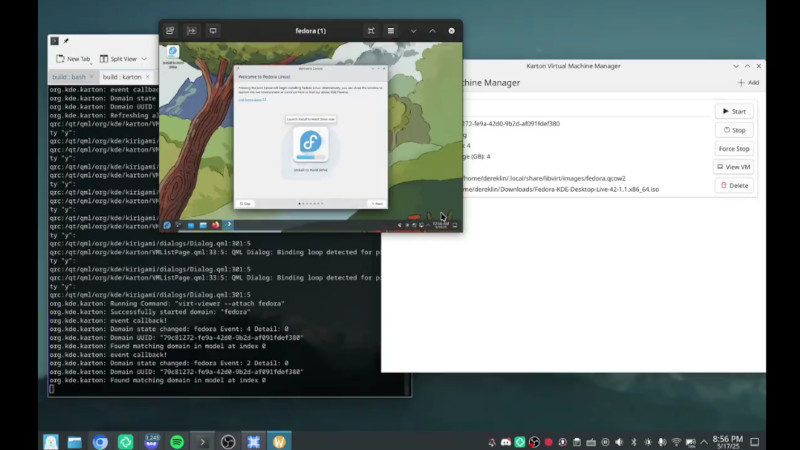

For years, KDE Plasma users have had a slightly odd relationship with virtual machines. Plasma itself is polished, fast, deeply customizable, and proudly Qt-based. But when it came time to create a quick Linux test box, boot a Windows guest for one stubborn app, or safely poke at a new distribution without turning a laptop into digital soup, many KDE users reached for tools that felt like visitors from another desktop neighborhood.
That may finally be changing. KDE’s in-development virtual machine manager, Karton, aims to give Plasma users a more native, friendly, and visually integrated way to create, launch, view, and manage virtual machines. In plain English: KDE users may soon get the kind of simple VM experience GNOME users have enjoyed with Boxes, but with a KDE personality, KDE design language, and KDE-level “yes, you can probably customize that later” energy.
This is not just about another app icon in the system menu. It is about making virtualization less intimidating for regular Linux desktop users. A virtual machine should not require a sacred ceremony involving eight terminal tabs, three wiki pages, and a quiet apology to QEMU. For many people, the ideal workflow is simple: choose an ISO, assign memory and CPU, click create, and boot. Karton is being built to move KDE closer to that experience.
What Is Karton?
Karton is a KDE virtual machine manager designed to work naturally inside the Plasma desktop. It is being built with KDE-friendly technologies such as Qt Quick and Kirigami, while relying on libvirt as the backend layer for managing virtual machines. That matters because libvirt is already a respected foundation in the Linux virtualization world. It helps applications create, modify, monitor, start, stop, and delete virtual machines without each app needing to reinvent the wheel, the axle, and the garage.
The project gained attention during Google Summer of Code 2025, where developer Derek Lin worked on bringing Karton into a more usable state. The goal was not to replace every advanced virtualization tool overnight. Instead, the mission was more focused: create a KDE-native VM manager that can handle common tasks with a clean interface and grow into more advanced functionality over time.
At this stage, Karton is still early software. That is important. It is not something most users should throw at their most important production virtual machine and then wander away for coffee. The project itself warns that it is under development and may break existing VMs. But as a sign of where KDE desktop tooling is going, it is exciting. It suggests a future where virtualization feels like a normal part of the Plasma experience rather than an awkward side quest.
Why KDE Users Needed an Easier VM Manager
Linux already has powerful virtualization tools. The problem is that “powerful” sometimes means “has enough switches to launch a submarine.” Advanced users love that. Beginners do not.
virt-manager, also known as Virtual Machine Manager, is one of the most capable graphical tools for libvirt-based virtualization. It can create domains, adjust virtual hardware, display performance statistics, and connect to guest consoles through VNC or SPICE. It is excellent for users who need serious control. It is also, let us be honest, not the friendliest first date for someone who just wants to test Fedora, Ubuntu, Arch, openSUSE, or a Windows installer.
GNOME Boxes took a different path. It focused on simplicity. Boxes made it easier to spin up guest operating systems with sensible defaults and fewer intimidating decisions. That simplicity made it popular among people who needed a quick virtual machine rather than a full virtualization control center.
KDE users could, of course, run both virt-manager and GNOME Boxes. Linux does not explode if a KDE user opens a GTK app. Usually. But visual integration matters. Plasma users often care about consistent theming, window behavior, file dialogs, icons, menus, shortcuts, and interface patterns. When a tool looks and behaves like it belongs in the desktop, it reduces friction. It feels less like borrowing a wrench from the neighbor and more like opening your own toolbox.
How Karton Fits Into the Linux Virtualization Stack
To understand why Karton is interesting, it helps to break down the stack underneath it.
QEMU and KVM
QEMU is a machine emulator and virtualizer. With hardware acceleration through KVM on Linux, it can run virtual machines with near-native performance. That is the engine room. It is powerful, flexible, and capable of handling many architectures and device configurations.
libvirt
libvirt acts like a management layer. Instead of making every graphical app talk directly to QEMU in its own special way, libvirt provides a common API and configuration model. It handles important VM details such as domain definitions, storage, networks, devices, and lifecycle operations.
SPICE and Display Viewers
Once a VM is running, users need to see and interact with it. That is where technologies like SPICE and VNC come in. SPICE can provide a graphical connection to a virtual machine, forwarding display output and user input between guest and host.
Karton’s Role
Karton is not trying to be the hypervisor itself. It is the friendly front door. It aims to let KDE users create and manage VMs through a Plasma-style graphical interface, while libvirt and QEMU/KVM do the heavy lifting behind the scenes. Think of Karton as the café menu, not the kitchen plumbing.
What Karton Can Do So Far
Based on current development information, Karton already has several practical pieces in place. It can display a list of existing virtual machines, start and stop VMs, view VM sessions, and support installing and deleting virtual machines. These are the basics, but they are exactly the basics that matter most to everyday users.
The project has also moved toward generating libvirt domain XML directly instead of depending on command-line tools such as virt-install for VM creation. This is a meaningful architectural step. By generating the configuration itself, Karton can eventually offer a more controlled, integrated, and expandable experience.
Another important area is the custom Qt SPICE viewer. Earlier approaches used external viewer tools, which worked but did not feel deeply integrated. By building its own viewer, Karton can better fit into KDE’s interface model. This also opens the door to features such as VM previews, better window behavior, smoother controls, fullscreen handling, and future improvements like clipboard sharing or file transfer.
The interface direction is also promising. A sidebar can show the list of VMs, while the main panel can show details and preview information for the selected machine. That layout is familiar, efficient, and friendly. It is the kind of design that says, “You are managing virtual computers,” not “Welcome to the cockpit of a 1990s network appliance.”
Why Native KDE Integration Matters
Some users may ask: why does KDE need its own VM manager when virt-manager already exists? Fair question. The answer is not that virt-manager is bad. It is not. The answer is that desktop integration changes how comfortable software feels.
Native KDE integration can mean consistent colors, icons, spacing, keyboard behavior, notifications, window controls, file picker interactions, and responsive layouts. It can also mean better support for Plasma conventions, KDE system settings, and eventually mobile or small-screen layouts through Kirigami.
That last point is easy to overlook. Kirigami is used for convergent KDE applications, meaning apps can adapt across different screen sizes and device types. A VM manager is not necessarily something everyone wants on a phone, but flexible design is still useful on laptops, tablets, ultrawide monitors, and compact screens. KDE users are famously creative with setups. Someone, somewhere, is probably running Plasma on hardware that looks like it escaped from a robotics lab.
Karton vs GNOME Boxes vs virt-manager
The most useful way to think about Karton is not as a direct replacement for every existing VM tool. It is more like a KDE answer to the “easy VM management” category.
Karton and GNOME Boxes
GNOME Boxes focuses on simplicity. It is great for quickly creating and running VMs with minimal setup. Karton appears to be moving toward a similar ease-of-use goal, but with KDE-native design and technologies. For Plasma users who like the Boxes concept but want an app that feels at home in KDE, Karton is the obvious missing piece.
Karton and virt-manager
virt-manager is the advanced toolkit. It exposes deeper configuration options and is valuable for administrators, developers, homelab users, and anyone who needs detailed control over virtual networks, storage, devices, and remote connections. Karton may eventually grow more advanced, but its early promise is convenience and integration rather than replacing every professional workflow.
Karton and Commercial VM Tools
Commercial virtualization tools often win on polish, guest integration, snapshots, and beginner-friendly workflows. Open-source Linux tools win on transparency, flexibility, and cost. Karton’s long-term opportunity is to narrow the polish gap for KDE users while keeping the open-source advantages intact.
Who Will Benefit Most?
Karton could be especially useful for several groups of users.
Linux beginners will benefit from easier testing. Instead of dual-booting or wiping a machine to try another distribution, they can create a VM, test the installer, explore the desktop, and delete the VM afterward. No drama, no partition panic, no mysterious bootloader gremlins.
Developers can use VMs to test software across different distributions or operating system versions. A KDE developer might test an app on Fedora KDE, KDE neon, openSUSE, and Arch-based environments without turning their main system into a dependency salad.
Students can practice Linux administration, networking, server setup, or cybersecurity fundamentals in isolated environments. A broken VM is a lesson. A broken main laptop at midnight before class is a character-building event nobody requested.
Tech writers and reviewers can quickly boot operating systems for screenshots, tutorials, and comparisons. A simple KDE-native VM manager makes that workflow smoother.
Curious desktop users can safely experiment. Want to see what a new distro release looks like? Want to test a beta? Want to open a suspiciously weird old ISO from your archive without sacrificing your daily driver? A VM is the sandbox.
Current Limitations and Why They Matter
Karton is promising, but it is still under development. That means users should treat it as experimental software. Important production VMs should stay in mature tools until Karton is fully tested, packaged, and released through normal distribution channels.
Several areas still need work. Better display performance, improved scaling, stronger error handling, snapshot support, clipboard passthrough, file transfer, easier ISO browsing, and deeper VM configuration are all natural next steps. These are not small features. Snapshots alone can be a major quality-of-life improvement because they let users save a VM state before risky changes. Clipboard and file sharing can make a guest system feel far less isolated. Better scaling matters because no one enjoys reading tiny installer text like it is a legal disclaimer printed on a grain of rice.
The good news is that Karton is being built on widely used technologies. Choosing libvirt, QEMU/KVM, libosinfo, Qt Quick, Kirigami, and SPICE-related components gives the project a practical foundation. It is not magic. It is a carefully layered interface over tools the Linux world already understands.
Why This Is Good News for KDE Plasma
KDE Plasma has been moving steadily toward a more complete desktop experience. It is no longer just the “tweak everything” desktop, though it still happily lets users tweak more knobs than a vintage recording studio. Plasma is also becoming more approachable, modern, and cohesive.
A native virtual machine manager fits that direction. It helps KDE feel complete for developers, testers, students, and power users. It also lowers the intimidation factor for people who are curious about virtualization but do not want to start with raw QEMU commands or advanced libvirt XML editing.
Desktop Linux grows when powerful tools become understandable. That is the bigger story. The command line should remain available. Advanced tools should remain powerful. But the first step should not always feel like being handed a dragon and told, “It is friendly once you learn its config file.”
Practical Example: Testing a New Linux Distribution
Imagine a KDE user wants to try a new Fedora KDE release. Today, they might download the ISO, open virt-manager, create a new VM, choose storage, configure CPUs and RAM, select firmware details, attach the ISO, and possibly adjust display or network settings. That is manageable for experienced users, but it can be a lot for beginners.
With a polished Karton workflow, the process could become simpler. Open Karton, click create, choose the ISO, name the VM, assign memory and CPU, and boot. After installation, eject the virtual installation media and restart into the installed system. The VM appears in a sidebar with a preview, so the user can recognize it later. That sounds ordinary, which is exactly the point. Good desktop tools make technical work feel ordinary.
Experience Notes: What Easy VM Management Feels Like in Real Use
The difference between a difficult VM workflow and an easy one is not just the number of clicks. It is the amount of hesitation before each click. When users are new to virtualization, every option feels loaded. Should the VM use UEFI or BIOS? How much RAM is enough? What disk format should be used? Should networking be NAT, bridged, isolated, user-mode, or “please make the internet happen somehow”? A friendly VM manager reduces that anxiety by choosing sane defaults and presenting advanced choices only when needed.
In real desktop use, the best VM manager is the one you do not have to mentally prepare for. You download an ISO, open the tool, create a machine, and move on. That matters for writers testing screenshots, students following tutorials, developers checking installers, and everyday users who simply want to try something without risking their host system. If the process is smooth, people experiment more. If it is painful, they postpone the experiment forever and tell themselves they will “set it up this weekend,” which is where projects go to nap indefinitely.
For KDE users, the experience factor is even more important because Plasma users often build carefully customized desktops. They tune panels, shortcuts, themes, widgets, window rules, Dolphin behavior, and system settings until everything feels personal. Dropping into a tool that looks visually out of place can be jarring. It still works, but it breaks the flow. A Qt/Kirigami VM manager can make virtualization feel like part of the same workspace rather than a separate island.
Another real-world benefit is discoverability. Many users do not know what libvirt, QEMU, KVM, SPICE, or domain XML are, and they should not have to learn all of that on day one. Those technologies can stay underneath the interface until the user is ready. A good VM manager can introduce concepts gradually: memory, CPU, storage, ISO, display, snapshots, shared folders, and networking. That learning curve is much friendlier than starting with a wall of acronyms.
There is also a confidence benefit. When a VM appears in a clean list with a preview, state indicator, and obvious start or stop controls, users feel in control. When they can eject an ISO from the interface after installation, they understand the virtual equivalent of removing a USB stick. When they can open a guest display without a separate viewer popping up like an uninvited raccoon, the whole workflow feels calmer.
Of course, advanced users will still want deep controls. They will want device passthrough, fine-tuned storage, bridged networking, snapshots, XML editing, and performance graphs. That is fine. A great KDE VM manager does not need to hide complexity forever. It only needs to avoid throwing every advanced option at the user before the first boot. The best design lets beginners succeed quickly while giving experienced users room to grow.
From a practical publishing perspective, Karton is also a reminder of why desktop-native apps still matter. Web apps are everywhere, but system tools benefit from deep integration. Virtual machines touch local storage, hardware acceleration, display protocols, input forwarding, audio, networking, and permissions. A well-designed native app can make those pieces feel safer and more understandable.
The most exciting thing about Karton is not that it exists as a checkbox feature. It is that it represents KDE’s continued push toward approachable power. KDE has always been good at giving users control. The next challenge is giving users control without making them feel like they accidentally opened the maintenance hatch of a spaceship. If Karton reaches maturity, it could become one of those quiet desktop utilities that people use constantly and stop thinking about, which is often the highest compliment software can earn.
Conclusion
Karton is not finished, and cautious users should remember that clearly. But the direction is exciting. KDE Plasma users are finally getting a virtual machine manager that aims to feel native, simple, and integrated while standing on proven open-source virtualization foundations.
For beginners, Karton could make testing operating systems less intimidating. For developers, it could speed up everyday test environments. For KDE fans, it could fill a long-standing desktop gap. And for the broader Linux ecosystem, it is another reminder that open-source software does not have to choose between power and polish. With enough patience, testing, and community work, KDE users may soon have easy virtual machine management that feels right at home.