
Note: This guide explains how to change levels on a D&D 5e character sheet for both paper sheets and popular digital tools. Always confirm leveling choices with your Dungeon Master, especially when using milestone leveling, multiclassing, optional feats, or 2024 rule updates.
Introduction: Leveling Up Without Turning Your Sheet Into Goblin Soup
Changing levels on a character sheet for D&D 5e sounds simple: your character gains a level, you write a new number in the level box, and everyone cheers. Then reality arrives wearing full plate armor. Suddenly you need to update hit points, Hit Dice, proficiency bonus, spell slots, class features, subclass abilities, prepared spells, feats, ability scores, attack bonuses, saving throws, skill modifiers, and possibly your character’s entire life plan.
The good news is that leveling up in Dungeons & Dragons 5th Edition follows a predictable process. Whether you use a printed character sheet, a fillable PDF, D&D Beyond, Roll20, Foundry, Fantasy Grounds, or a notebook with suspicious coffee stains, the core idea is the same: increase the character’s level, choose the class level gained, and then update everything that level changes.
This guide walks through how to change levels on a character sheet for D&D 5e in a practical, player-friendly way. You will learn what to change, what to double-check, how digital sheets usually handle leveling, and what mistakes commonly cause confusion. By the end, your character sheet should look like an adventurer who grew strongernot like a wizard sneezed into a tax form.
What “Changing Levels” Means in D&D 5e
In D&D 5e, your character level represents your total adventuring experience. Most characters start at level 1 and can advance up to level 20. When you gain a level, your character becomes more capable. That may mean more hit points, new class features, stronger spells, better attacks, or improved ability scores.
For a single-class character, changing levels is straightforward. A level 3 Fighter becomes a level 4 Fighter. A level 5 Cleric becomes a level 6 Cleric. You increase the class level and apply the new benefits from that class table.
For a multiclass character, things need a little more attention. A Rogue 3 / Fighter 2 is a 5th-level character overall. If that character levels up and takes another Fighter level, they become Rogue 3 / Fighter 3, for a total character level of 6. Your total level controls your proficiency bonus, while individual class levels control class features.
Step 1: Confirm Whether You Leveled by XP or Milestone
Before changing anything, confirm how your campaign handles advancement. D&D 5e commonly uses either experience points or milestone leveling.
Experience Point Leveling
With XP leveling, your character gains experience points from encounters, quests, challenges, and other campaign achievements. When your XP reaches the required amount for the next level, your character advances. For example, a character reaches level 2 at 300 XP, level 3 at 900 XP, and level 5 at 6,500 XP.
Milestone Leveling
With milestone leveling, the Dungeon Master decides when the party levels up based on story progress. You might level after defeating a major villain, finishing a dungeon, surviving a political disaster, or finally remembering the NPC’s name after six sessions.
Digital tools may ask whether your character uses XP or milestones. If your campaign uses milestones, you may not need to enter an XP number at all. You simply change the character’s level when the DM says the party has advanced.
Step 2: Change the Level Number on the Character Sheet
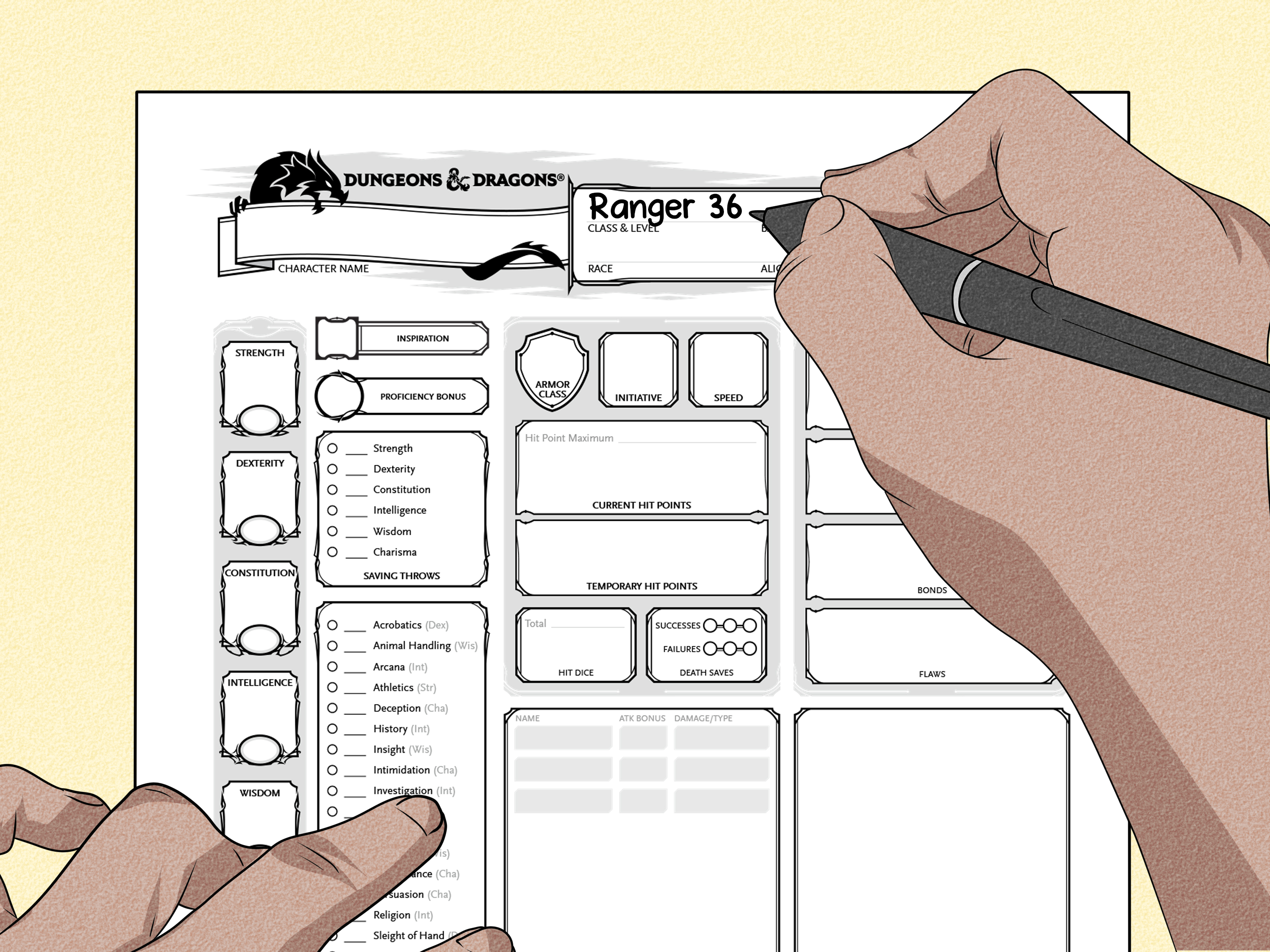
On a paper character sheet, find the section near your character’s class and level. If your sheet says “Class & Level,” update the level beside your class name. For example:
- Wizard 3 becomes Wizard 4
- Barbarian 5 becomes Barbarian 6
- Rogue 4 / Fighter 1 becomes Rogue 4 / Fighter 2
On digital sheets, the process varies slightly, but the general method is similar. Open your character editor or builder, go to the class or level section, and increase the class level. On D&D Beyond, this is usually handled through the character builder or “manage levels” area. On Roll20, it depends on the sheet version and campaign setup; some values update automatically, while others may require manual adjustment.
The key is this: do not only type a new number into a visible label if the sheet has a proper character builder. Digital sheets often calculate features from the class-level settings behind the scenes. If the builder still thinks your Paladin is level 2, simply typing “3” in a display box may not unlock Divine Health, spellcasting changes, or subclass options.
Step 3: Choose Which Class Gains the Level
If your character is single-classed, this step is easy. A level 6 Bard becomes a level 7 Bard. Done. Take a bow, preferably with dramatic lute music.
If multiclassing is allowed, you must decide which class receives the new level. For example, a Ranger 5 / Rogue 2 reaching level 8 overall could become Ranger 6 / Rogue 2 or Ranger 5 / Rogue 3. Those choices produce different results. Ranger 6 improves Ranger progression, while Rogue 3 grants a Roguish Archetype feature.
Before multiclassing, check three things:
- Your DM allows multiclassing.
- Your character meets the ability score prerequisites.
- You understand what features, proficiencies, and spellcasting changes you gain.
Multiclassing is fun, but it is also where character sheets go to develop tiny math gremlins. Read carefully before clicking buttons or erasing class levels.
Step 4: Update Hit Points and Hit Dice
Every time your character gains a level, they gain one additional Hit Die from the class they leveled in. They also increase their maximum hit points.
Rolling for Hit Points
If your table rolls for hit points, roll the class’s Hit Die and add your Constitution modifier. A Fighter uses a d10. A Cleric uses a d8. A Wizard uses a d6. If a Fighter with a +2 Constitution modifier rolls a 7 on the d10, they gain 9 maximum hit points.
Using Fixed Hit Points
Many tables use the fixed average instead of rolling. Under common 5e rules, the fixed value is based on class. For example, a Fighter typically gains 6 plus Constitution modifier, while a Wizard gains 4 plus Constitution modifier.
Do Not Forget Constitution Changes
If your Constitution modifier increases, your maximum hit points increase retroactively by 1 per character level for each +1 modifier increase. For example, if an 8th-level character raises Constitution from 17 to 18, their modifier increases from +3 to +4. That character gains 8 extra maximum hit points in addition to the normal hit points from leveling.
Step 5: Update Your Proficiency Bonus
Your proficiency bonus is based on total character level, not class level. It starts at +2 and increases at certain levels:
| Character Level | Proficiency Bonus |
|---|---|
| 1–4 | +2 |
| 5–8 | +3 |
| 9–12 | +4 |
| 13–16 | +5 |
| 17–20 | +6 |
When your proficiency bonus increases, update everything that uses it. This may include attack rolls, spell attack bonus, spell save DC, proficient saving throws, proficient skills, tool checks, and class features that reference proficiency bonus.
This is one of the most common leveling mistakes. A character reaches level 5, gains a +3 proficiency bonus, but their sword attack still uses +2. Congratulations, the math goblin has entered the room.
Step 6: Add New Class and Subclass Features
Each class has a progression table showing what features arrive at each level. When you change levels, check the class table and record every new feature. Some levels are simple. Others are packed like a Bag of Holding after a shopping episode.
Examples of class features gained through leveling include:
- Extra Attack for many martial classes
- Ability Score Improvement or feats
- New spellcasting features
- Subclass features
- Improved class resources such as Ki, Sorcery Points, Rage damage, or Bardic Inspiration
Do not only write the feature name. Read what it does. A feature you forget is basically treasure you left in the dungeon because nobody checked the suspicious statue.
Step 7: Choose Ability Score Improvements or Feats
At certain levels, most classes gain an Ability Score Improvement, often called an ASI. Depending on your table’s rules, you may increase ability scores or choose a feat.
If you increase ability scores, update the ability score and modifier if the score reaches a new even number. For example, increasing Dexterity from 15 to 16 changes the modifier from +2 to +3. That affects initiative, Armor Class in light or medium armor, Dexterity saving throws, Acrobatics, Stealth, ranged attacks, finesse weapon attacks, and more.
If you choose a feat, add the feat to your sheet and apply every benefit it grants. Some feats increase an ability score, some grant spells, and some add combat options. Digital sheets may automate part of this, but you should still review the final numbers.
Step 8: Update Spells, Spell Slots, and Prepared Spells
Spellcasters need extra care when changing levels. A new level may grant more spell slots, higher-level spells, more spells known, additional cantrips, or a larger prepared spell list.
Prepared Casters
Clerics, Druids, Paladins, and Wizards often prepare spells from a larger list. If your ability modifier or class level changes, the number of spells you can prepare may also change. Review your prepared spell count after leveling.
Known Casters
Bards, Sorcerers, Rangers, and Warlocks usually have a limited number of spells known. When leveling up, check whether you learn a new spell or can replace an old one.
Multiclass Spellcasting
Multiclass spellcasters can be tricky because spell slots may be based on combined caster levels, while spells known and prepared are handled by individual class rules. For example, a Cleric/Wizard multiclass may have higher-level spell slots but still prepare Cleric spells and Wizard spells separately according to each class.
If your spell sheet looks wrong after leveling, check class level, multiclass spellcasting rules, prepared spell settings, and whether your digital sheet is using the correct rule version.
Step 9: Update Attacks, Saving Throws, and Skills
After changing levels, review the numbers your character actually rolls during play. These are the stats that matter when the dragon is staring at you like lunch with initiative.
Check the following:
- Weapon attack bonuses
- Weapon damage bonuses
- Spell attack bonus
- Spell save DC
- Saving throw modifiers
- Skill modifiers
- Passive Perception, passive Investigation, and passive Insight
- Armor Class if Dexterity or equipment changed
- Initiative bonus
Any change to proficiency bonus, ability modifiers, equipment, class features, or feats can affect these values. Digital tools usually handle many calculations, but they are not a substitute for understanding what changed.
How to Change Levels on D&D Beyond
D&D Beyond is one of the most common digital character sheet tools for 5e. To change levels, open your character, enter the character builder or management area, and adjust the level in the class section. If your character is multiclassed, make sure you increase the correct class.
After changing the level, review any required choices. D&D Beyond may prompt you to select spells, feats, subclass options, invocations, fighting styles, or other features. If your sheet does not update immediately, refresh the page, check the character builder again, and confirm that all required choices are complete.
One important tip: digital sheets often hide incomplete choices. A character may technically be level 4, but if you have not selected an ASI or feat, your sheet may not reflect the final result. Look for warning icons, missing selections, or tabs that still need attention.
How to Change Levels on Roll20
Roll20 character sheets vary depending on the game setup. Some campaigns use the official 5e sheet with automation, while others use customized sheets or imported characters.
To level up in Roll20, open the character sheet and check the class, level, and settings fields. If your sheet uses a builder-style tool, update the level there. If it is more manual, you may need to adjust hit points, Hit Dice, proficiency bonus, class features, spell slots, and attacks yourself.
After changing levels, make a test roll for a proficient attack, a proficient skill, and a spell if applicable. This quickly reveals whether proficiency bonus and ability modifiers are calculating correctly.
How to Change Levels on a Paper Character Sheet
Paper sheets are wonderfully flexible and brutally honest. They will not automate your math, but they also will not hide settings in a menu called “advanced options” guarded by a tiny gear icon.
For a paper sheet, use this leveling checklist:
- Change the class and level line.
- Add one Hit Die from the class you leveled in.
- Increase maximum hit points.
- Update proficiency bonus if your total level reached 5, 9, 13, or 17.
- Add new class or subclass features.
- Choose ASI or feat if the level grants one.
- Update spells, spell slots, and prepared spells.
- Recalculate attacks, saving throws, skills, DCs, and passive scores.
- Update equipment, resources, and notes.
Use pencil. Always use pencil. Ink is for contracts with devils and players who enjoy regret.
Common Mistakes When Changing Levels
Only Updating the Level Box
The level number is only the beginning. If you change “3” to “4” but forget your ASI, hit points, and new class features, your character is not fully leveled.
Forgetting Proficiency Bonus
Levels 5, 9, 13, and 17 are big checkpoints because proficiency bonus increases. Review every proficient roll when you reach those levels.
Missing Subclass Features
Many subclasses grant features at specific levels. If you only check the main class table, you may miss subclass abilities.
Confusing Character Level and Class Level
A Fighter 3 / Wizard 2 is a 5th-level character, but not a 5th-level Fighter or 5th-level Wizard. This matters for class features, spell choices, and multiclass progression.
Not Checking Hit Points After Constitution Changes
Constitution affects hit points retroactively. If your Constitution modifier increases, update maximum hit points for every level you already have.
Example: Leveling a Rogue from 4 to 5
Let’s say you have a level 4 Rogue with 16 Dexterity, 14 Constitution, and a +2 proficiency bonus. The DM says the party reaches level 5.
You change the sheet from Rogue 4 to Rogue 5. Then you add one d8 Hit Die. If using fixed hit points, you add 5 plus your Constitution modifier, so +7 maximum hit points. Your total character level is now 5, so your proficiency bonus increases from +2 to +3.
Now you update proficient skills, saving throws, weapon attacks, and any features that use proficiency bonus. You also add the Rogue level 5 feature, Uncanny Dodge. Finally, you check Sneak Attack progression and confirm your sheet shows the correct damage dice.
That is a complete level change. Not just “I wrote 5 where 4 used to be.” That is character growth with paperwork.
of Practical Experience: What Leveling Up Actually Feels Like at the Table
In real games, changing levels on a character sheet is rarely a quiet, organized moment. It usually happens at the end of a session when everyone is excited, snacks are low, someone is packing dice, and the DM casually says, “You all level up.” Then the table erupts. The Barbarian cheers because bigger numbers are coming. The Wizard opens six tabs. The Cleric asks whether they can prepare different spells. The Rogue mysteriously starts reading multiclass guides.
The best experience I have seen is when players treat leveling as a short between-session ritual instead of a rushed five-minute scramble. After the session, write down the new level, but do the detailed updates before the next game. This gives you time to read your class features, compare spell choices, and ask your DM questions. A calm level-up creates fewer mistakes than a midnight level-up powered by soda and questionable confidence.
One useful habit is keeping a “level-up notes” section on your sheet. When you gain a level, write a quick summary: “Level 5: proficiency bonus +3, gained Extra Attack, HP +8, learned Misty Step.” This helps you remember what changed and makes it easier to explain your updates to the DM. It also helps if a digital sheet glitches or you need to rebuild the character later.
Another practical lesson: do not ignore features that seem boring. A small proficiency bonus increase can matter more often than a flashy new ability. Updating a skill from +6 to +7 may not feel dramatic, but that one point can be the difference between sneaking past the guard and becoming the reason the party has a prison-break episode.
Spellcasters should be especially careful. Choosing new spells is exciting, but it can also slow down the next session if you do not understand what your spells do. When you add a spell, read its casting time, range, components, duration, concentration requirement, and saving throw. A spell you understand is a tool. A spell you barely read is a decorative panic button.
For digital sheets, the biggest experience-based tip is to review the final sheet, not just the builder screen. After leveling, return to the playable character sheet and check your attacks, spell DC, hit points, features, and resources. If something looks wrong, the issue is often an incomplete choice, a wrong rule source, a multiclass setting, or a manual override.
For paper sheets, keep an older copy or take a photo before leveling. This gives you a backup if you accidentally erase the wrong number. Paper character sheets have a special talent for becoming unreadable right before initiative.
Most importantly, leveling up should reflect your character’s story. Do not choose features only because a guide says they are optimal. Think about what your character has experienced. A Fighter who nearly died to magic might take Mage Slayer. A Bard who negotiated peace between rival clans might boost Charisma. A Wizard who keeps getting hit may finally learn a defensive spell and stop trusting “I stand in the back” as a survival strategy.
Conclusion: Level Up Cleanly, Play Confidently
Learning how to change levels on a character sheet for D&D 5e is one of the most useful skills a player can develop. A level-up is not just a new number. It is a full character update involving hit points, Hit Dice, class features, proficiency bonus, ability scores, spells, attacks, and sometimes multiclass choices.
The easiest way to avoid mistakes is to follow a checklist every time. Confirm the level-up method, choose the class level, update hit points, check proficiency bonus, add features, handle ASIs or feats, review spells, and recalculate important rolls. Whether you use D&D Beyond, Roll20, a fillable PDF, or a beloved paper sheet, the same logic applies.
Leveling up should feel exciting, not stressful. Take your time, read your new abilities, ask your DM when something is unclear, and make sure your sheet matches the character you want to play. Your future selfprobably standing in front of a dragon with one spell slot leftwill thank you.