
Building a custom keyboard is one of those hobbies that begins with an innocent thought: “Maybe I’ll just swap the keycaps.” Three weeks later, you are comparing switch springs, watching soldering tutorials, arguing with a stabilizer wire, and referring to a 65% layout as if it were a family member. Welcome to maximum effort.
A custom keyboard is not merely a computer accessory. It is a personal machine for thought, gaming, writing, coding, editing, chatting, and occasionally sending the wrong emoji to the wrong person because your macro layer got a little too ambitious. The best builds combine engineering, ergonomics, sound design, firmware, and taste. The worst builds still teach you something, usually humility.
The phrase “A Custom Keyboard At Maximum Effort” captures the spirit of the keyboard enthusiast perfectly. It suggests more than buying a nice mechanical keyboard. It means shaping the typing experience from the ground up: layout, case, PCB, switches, stabilizers, keycaps, firmware, cable, acoustics, and all the tiny details that separate “pretty good” from “I need everyone within 20 feet to hear this spacebar.”
What Makes a Keyboard Truly Custom?
A custom keyboard is built or heavily modified around the user instead of forcing the user to adapt to a mass-market rectangle. That customization can be simple, like choosing hot-swappable switches and keycaps, or gloriously unreasonable, like hand-wiring a split ergonomic keyboard with a custom plate, removable wrist rests, and firmware layers tuned for one person’s workflow.
At its core, a keyboard has a few essential parts: a case, a PCB or hand-wired matrix, a plate, switches, stabilizers, keycaps, and firmware. Each part affects the final feel. The case changes weight and sound. The plate influences firmness and pitch. Switches define the press. Stabilizers control large keys. Keycaps affect texture, height, and tone. Firmware decides what each key actually does. In a custom build, every one of those choices is fair game.
The Maximum-Effort Mindset
Maximum effort does not always mean maximum money. It means maximum intention. A $90 hot-swap board chosen carefully can feel better than a $600 build assembled like a raccoon found a soldering iron. The point is not to flex a receipt. The point is to create a tool that disappears under your hands because it fits your habits so well.
For example, a writer may want a quiet tactile keyboard with a soft gasket mount, a dedicated em dash macro, and comfortable keycaps for long sessions. A gamer may prefer linear switches, fast polling, low latency, and a compact layout that leaves more mouse room. A programmer may want layers for brackets, symbols, navigation, and terminal shortcuts. A designer may add a rotary encoder for timeline scrubbing or brush sizing. A keyboard at maximum effort is not “better” in the abstract. It is better for the person using it.
Layout: The First Big Decision
Before buying parts, decide how many keys you actually need. Full-size keyboards include the number pad, function row, arrows, and navigation cluster. Tenkeyless boards remove the number pad. A 75% layout keeps many familiar keys but compresses them into a smaller footprint. A 65% layout keeps arrows but drops the function row. A 60% board goes even smaller, relying on layers for arrows, function keys, and navigation. Split ergonomic layouts go further by separating the hands and often staggering columns to match finger movement.
The layout should match your real habits, not your fantasy identity as a minimalist productivity monk. If you use spreadsheets daily, do not delete your number pad just because a tiny keyboard looks cool on a desk mat. If you never touch the function row, a smaller layout might feel cleaner. If your wrists complain after long typing sessions, a split keyboard may be worth exploring. Good customization starts with honesty, which is rude but useful.
PCB, Hand-Wiring, and the Keyboard Matrix
The PCB is the nervous system of most custom keyboards. It connects switches to the controller and tells the computer which key was pressed. Hot-swappable PCBs let you change switches without soldering, making them friendly for beginners and serial switch experimenters. Solder PCBs are more permanent but can offer layout flexibility and a satisfying “I built this” feeling.
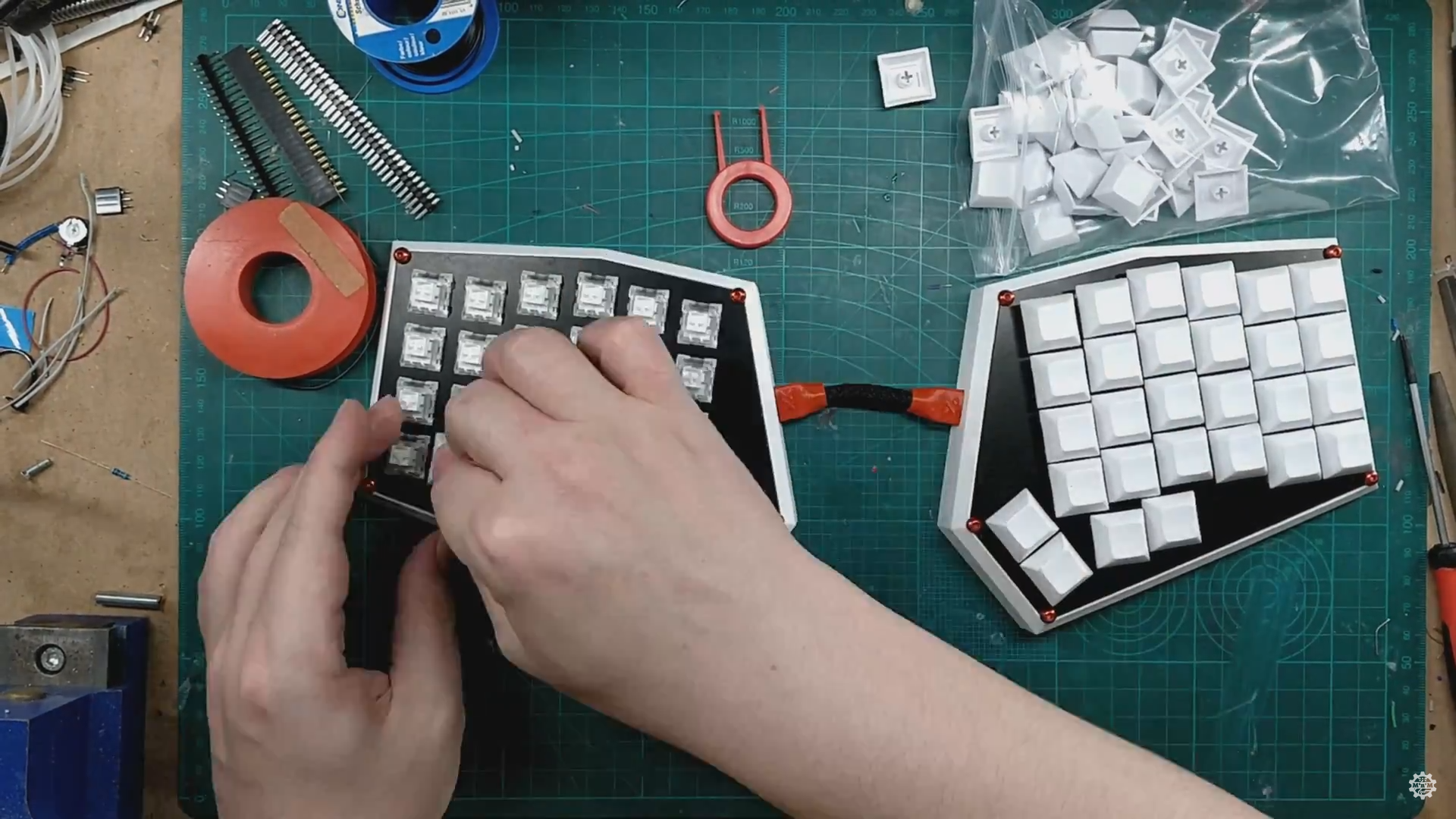
Hand-wiring is the maximum-effort route. Instead of using a manufactured PCB, each switch is wired into rows and columns, usually with diodes to prevent ghosting. The result can look chaotic before it looks brilliant. It also gives builders freedom to create unusual shapes, split boards, macro pads, and one-off ergonomic experiments. Hand-wiring is not the easiest path, but it is one of the clearest expressions of custom keyboard obsession.
Switches: Linear, Tactile, Clicky, and the Personality Crisis
Switches determine much of the typing feel. Linear switches move smoothly from top to bottom, making them popular for gaming and fast typing. Tactile switches include a bump that tells your finger when the key actuates. Clicky switches add an audible click, which can be delightful for the user and a workplace incident report for everyone else.
Switch choice also includes spring weight, travel distance, stem material, housing material, factory lubrication, and wobble. A light linear switch may feel fast but cause accidental presses. A heavier tactile switch may feel deliberate but tiring over long sessions. The only reliable way to know your preference is to test. Switch testers help, but they are like sniffing soup from another room: useful, not complete. A switch feels different inside a full keyboard with keycaps, stabilizers, and a case around it.
Stabilizers: Small Parts, Big Drama
Stabilizers support larger keys such as the spacebar, Enter, Shift, and Backspace. When they are tuned well, they vanish. When they are bad, they rattle like a shopping cart with one dramatic wheel. Many beginners obsess over switches while ignoring stabilizers, then wonder why their expensive build sounds like a drawer full of forks.
Good stabilizer tuning can include careful lubrication, balancing the wire, reducing housing movement, and making sure the keycap sits evenly. Screw-in stabilizers are common in enthusiast builds because they mount securely to the PCB. Plate-mounted stabilizers are easier to remove but may feel less refined depending on the board. Either way, stabilizers deserve patience. The spacebar is the lead singer of the keyboard band; do not let it perform with a tambourine taped to its ankle.
Plate and Mounting Style: The Feel Beneath the Feel
The plate holds switches in place and influences typing stiffness, sound, and consistency. Aluminum plates tend to feel firm and bright. Polycarbonate can feel softer and produce a deeper tone. Brass adds weight and a sharper sound. FR4, the fiberglass material used in many circuit boards, sits somewhere in the middle and is popular for custom projects because it is workable, durable, and available in different finishes.
Mounting style matters too. Tray mount boards screw the assembly into posts inside the case. Top mount boards secure the plate to the top frame. Gasket mount boards isolate the plate or PCB with soft material, often creating a cushioned feel and cleaner acoustics. There is no universal winner. A firm board can feel precise. A soft board can feel luxurious. A great keyboard is not always the softest; it is the one that makes your fingers stop negotiating for better working conditions.
Keycaps: Beauty, Texture, and Compatibility Traps
Keycaps are the most visible part of a custom keyboard, but they are not just decoration. Material matters. ABS keycaps can produce a smooth sound and vivid colors, though they may shine over time. PBT keycaps are usually more textured and resistant to shine. Profiles such as Cherry, OEM, SA, MT3, DSA, XDA, and KAT change height, sculpting, and finger feel.
Compatibility is where many first-time builders stumble. A beautiful keycap set is not useful if it lacks the correct right Shift, bottom row, split spacebar, or special keys for your layout. Before buying, compare the keyboard’s layout with the keycap kit coverage. This is boring. It is also cheaper than discovering your dream keyboard has no matching question-mark key, which is a strangely specific heartbreak.
Firmware: Where the Keyboard Learns Tricks
Modern custom keyboards often use QMK, VIA, Vial, KMK, ZMK, or manufacturer software to control keymaps, layers, lighting, encoders, macros, and advanced behavior. QMK is especially popular in enthusiast keyboards because it is open-source and flexible. VIA makes configuration easier by letting users remap supported keyboards through a graphical interface without rebuilding firmware from scratch.
Firmware is where a keyboard becomes more than hardware. A 60% board can still access arrows, media controls, function keys, and symbols through layers. A split keyboard can place Backspace under a thumb. A macro key can type a frequently used phrase. A rotary encoder can control volume. Caps Lock can become Control, Escape, or whatever else your workflow demands. The keyboard becomes a programmable cockpit, minus the part where anyone gives you a pilot license.
Sound Tuning: Chasing the Famous “Thock”
Keyboard sound is a hobby inside the hobby. Builders talk about “thock,” “clack,” “marble,” “pop,” “cream,” and other terms that sound like a very confused dessert menu. Sound depends on switches, keycaps, case material, plate, foam, desk surface, stabilizers, and even how hard you type.
Common tuning methods include adding case foam, plate foam, PE foam, silicone dampening, tape on the back of the PCB, lubed switches, switch films, and carefully tuned stabilizers. The danger is over-modding. Too much foam can make a keyboard sound lifeless. Too much lubricant can make switches sluggish. The goal is not to smother every vibration. The goal is to remove annoying noise while keeping character.
Tools and Parts Checklist
A practical custom keyboard build usually requires the board kit or case, PCB, plate, switches, stabilizers, keycaps, USB cable, switch puller, keycap puller, screwdriver, and possibly lubricant, brush, switch opener, tweezers, soldering iron, solder, flush cutters, and a multimeter. For hot-swap builds, the tool list is shorter. For hand-wired builds, bring patience, spare wire, and the emotional flexibility of a jazz musician.
Testing is essential. Test the PCB before installing everything. Test switches after insertion. Test stabilizers before fully assembling the case. Test the firmware before declaring victory. Many keyboard problems are easier to fix when the board is still open. Once everything is screwed together, every mistake becomes a tiny haunted house.
Step-by-Step: Building With Maximum Effort
1. Define the Purpose
Start with the job. Is this keyboard for writing, gaming, coding, schoolwork, design, video editing, music production, travel, or pure desk decoration? A keyboard built for competitive shooters may not be ideal for long essays. A silent office board may not deliver the dramatic soundtrack you want at home.
2. Choose the Layout
Pick a layout based on daily use. If you rely on arrows, do not remove them unless you enjoy learning through mild suffering. If you want ergonomic comfort, compare split and Alice-style layouts. If you need macros, consider a board with extra keys or a separate macro pad.
3. Select the Build Platform
Beginners should consider a hot-swappable barebones kit. It reduces soldering risk and makes switch testing simple. Advanced builders may choose solder PCBs, hand-wired designs, or custom CAD files for plates and cases. Maximum effort can mean designing the entire board, but it can also mean making smart choices with an existing platform.
4. Tune Stabilizers Before Final Assembly
Install and test stabilizers early. Press the spacebar and listen. If it rattles, ticks, or feels uneven, fix it before adding every switch. Stabilizers are easier to tune before the keyboard becomes a finished object with feelings.
5. Install Switches Carefully
For hot-swap boards, make sure switch pins are straight before pressing them into the PCB. Bent pins are common and usually fixable, but forcing a switch can damage a socket. For solder builds, check orientation and alignment before soldering. The keyboard will not reward optimism here.
6. Add Keycaps and Test Every Key
Use a keyboard tester and press every key. Check layers, macros, lighting, and encoder behavior. Confirm that large keys return smoothly. A single dead key is easier to troubleshoot now than after you have posted glamour photos and emotionally committed to perfection.
Common Mistakes to Avoid
The first mistake is buying parts that do not fit together. Check PCB compatibility, plate support, stabilizer type, switch pin style, and keycap coverage. The second mistake is assuming expensive means better. Price can reflect materials, rarity, machining, or branding, but comfort remains personal. The third mistake is chasing someone else’s sound. A keyboard recorded through a studio microphone will not sound identical on your desk next to a water bottle and a suspicious pile of snack crumbs.
Another mistake is ignoring ergonomics. A heavy aluminum board may look incredible, but if the typing angle hurts your wrists, it is a beautiful problem. Consider wrist position, desk height, chair height, and typing posture. The best keyboard is not just the one that sounds good in a video. It is the one you can use comfortably for hours.
Why Custom Keyboards Are Worth the Effort
A custom keyboard rewards attention. Every improvement is tangible. Tune the stabilizers and the spacebar stops rattling. Change switches and the board feels calmer, faster, or more deliberate. Adjust firmware and a shortcut that used to require finger gymnastics becomes one thumb key. The process turns a daily tool into something personal.
There is also joy in understanding the object. Once you have built a keyboard, it stops being a mysterious slab. You know why keys register, why diodes matter, why firmware layers are powerful, and why the spacebar can ruin your afternoon. That knowledge makes you a better buyer, builder, and troubleshooter.
of Experience: What Maximum Effort Feels Like in Real Life
The first real lesson of a maximum-effort keyboard build is that confidence and competence are not the same thing. You may begin the project feeling like a calm engineer. Then a stabilizer wire clicks unevenly for the eleventh time, and suddenly you are bargaining with a spacebar like it controls the weather. This is normal. The keyboard is not fighting you personally. It simply has standards.
One of the most memorable experiences in building a custom keyboard is the moment the bare parts become a working object. Before that, the desk is covered with components: switches in trays, keycaps in little organized piles, screws that somehow multiply, foam sheets, a cable, a PCB, and a case that looks expensive enough to deserve its own insurance policy. Then you press the first key in a tester and see it register. It is a tiny signal, but it feels huge. The machine is alive. It does not yet have keycaps, but it has potential, which is basically the keyboard version of wearing a graduation cap.
The second lesson is that sound is emotional. You can read descriptions all day, but the final typing sound hits differently when it comes from something you assembled. A deeper spacebar feels satisfying. A clean Enter key feels like a tiny door closing properly. A rattly Backspace feels like betrayal. You learn to listen in layers: switch sound, stabilizer noise, case resonance, desk reflection, keycap pitch. At some point you may tap one key repeatedly while staring into the distance. Anyone watching may worry about you. Let them. You are conducting science.
The third lesson is that perfection is a moving target. After finishing one build, you may notice that the left Shift is slightly louder than the right Shift. Then you may wonder whether a polycarbonate plate would feel better than aluminum. Then you may decide the keycap profile is good but not “forever good.” This is how the hobby gets people. It does not demand another build. It merely whispers, “What if?” from inside a drawer full of spare switches.
Still, the experience is deeply rewarding because the final product becomes part of your daily rhythm. A good custom keyboard makes ordinary tasks feel more intentional. Writing feels smoother. Gaming feels more responsive. Coding feels more organized. Even answering email feels slightly less tragic when the keys sound great. The board becomes a tool, a craft project, and a small piece of personal design sitting in front of you every day.
Maximum effort is not about building the most complicated keyboard possible. It is about caring enough to make thoughtful choices. Maybe that means a hand-wired split keyboard with custom firmware. Maybe it means a simple hot-swap 75% board with tuned stabilizers and keycaps that make you smile. Either way, the experience teaches patience, precision, and the strange pleasure of turning small plastic rectangles into a machine that feels unmistakably yours.
Conclusion
A custom keyboard at maximum effort is a celebration of personal tools. It takes something most people treat as ordinary and turns it into a carefully tuned extension of the user’s hands. From layout and switches to stabilizers, firmware, acoustics, and keycaps, each decision shapes the final experience. The process can be nerdy, occasionally fussy, and dangerously addictive, but it is also practical. When you spend hours typing, playing, creating, or working, the device under your fingers matters.
The best custom keyboard is not the loudest, rarest, or most expensive. It is the one that fits your work, your comfort, your sound preference, and your personality. Build with intention, test patiently, tune carefully, and leave room for personality. Maximum effort does not mean perfection. It means caring enough to make the tool yours.
Note: This article is original, written for web publishing, and based on real custom mechanical keyboard building concepts, firmware practices, and enthusiast tuning methods.