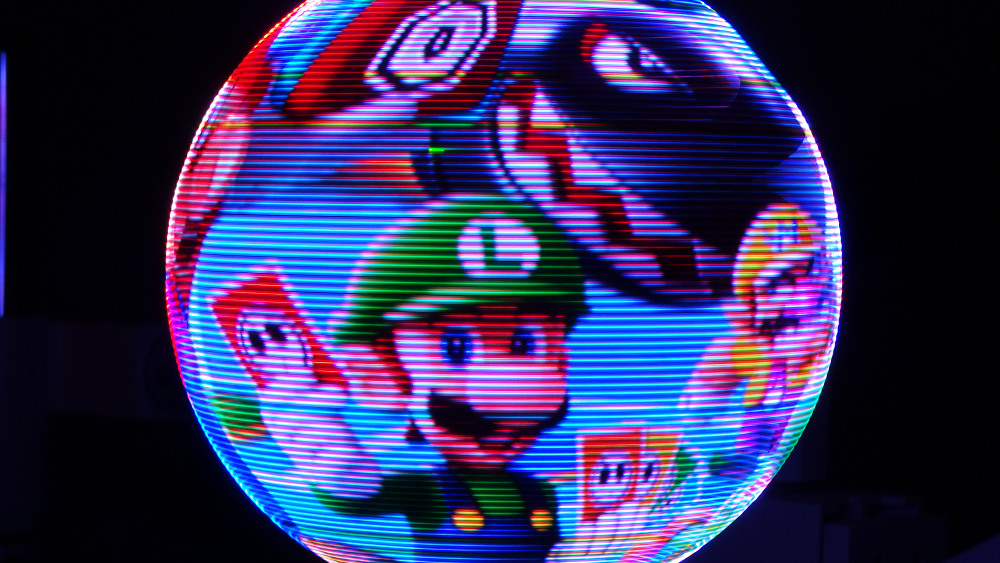

Some electronics projects blink. Some glow. And then there are the rare ones that spin a wafer-thin slice of hardware fast enough to fool your eyes into seeing a floating sphere of light. That is the magic behind a spherical POV display, and the project commonly known as Flicker shows exactly why edge-mounted LEDs can make a persistence-of-vision build look less like a science fair volcano and more like something smuggled out of a futuristic design lab.
The idea sounds almost suspiciously simple: mount LEDs around the edge of a circular PCB, spin the board vertically, and switch the LEDs on and off at precisely calculated moments. Your eyes and brain do the rest, blending those flashing slices into what appears to be a complete glowing globe. In practice, though, a high-resolution spherical POV display is a deliciously complicated sandwich of optics, timing, mechanics, power delivery, image processing, and “please do not wobble yourself into pieces” engineering.
What makes this design especially cool is not just that it uses LEDs. Plenty of projects use LEDs. Your router uses LEDs. Your toaster might use LEDs if it has ambitions. The clever part is the edge-mounted LED layout: the light sources sit on the rim of the spinning PCB rather than facing out from only one flat side. That small mechanical choice has a massive visual payoff, helping the spherical image feel cleaner, brighter, and more complete from more viewing angles.
What Is a Spherical POV Display?
POV stands for persistence of vision, a visual effect where a rapidly changing light source appears continuous because our visual system holds impressions briefly. If you have ever waved a sparkler in the dark and drawn a temporary glowing line in the air, congratulations: you have accidentally joined the POV research department. Please collect your lab coat at the door.
A basic POV display uses a moving row, strip, or ring of LEDs. Instead of building a full screen with thousands of fixed pixels, it moves a much smaller set of LEDs through space and updates their color or brightness as they travel. When the timing is accurate, the eye perceives the result as a complete image. In a spherical POV display, that moving LED array sweeps out the surface of a globe.
This approach has appeared in bike-wheel displays, rotating LED clocks, propeller-style signs, globe displays, and experimental volumetric systems. The common trick is always the same: trade physical pixel count for motion and timing. A regular display says, “Here are all the pixels at once.” A POV display says, “Here are a few pixels, but I am going to move them so fast you will not complain.”
Why Edge-Mounted LEDs Matter
In many LED projects, surface-mount LEDs are placed flat on a PCB. That works beautifully when the viewer is looking directly at the board. But a spherical POV display has a different problem. The board is rotating through space, and the viewer expects to see a luminous sphere rather than a flashing paddle. If the LEDs only emit strongly from one face of the board, the illusion can become uneven.
Edge-mounted LEDs solve that problem with a bit of geometric elegance. By placing tiny LEDs along the outer rim of the circular PCB, the light is emitted from the path that actually defines the sphere. The LEDs become the moving outline of the globe, not just decoration attached to a spinning surface. It is the difference between drawing with the tip of a pen and drawing with the side of a sandwich. One of those is art. The other is lunch damage.
Flicker’s design used very small RGB LEDs that fit the PCB edge especially well. The edge placement allowed the board to spin while the LEDs traced a clean circular path through the viewer’s field of vision. As the PCB rotated at roughly 15 revolutions per second, the system updated LED output in tiny angular slices, creating the illusion of a spherical image suspended in mid-air.
The Engineering Behind the Glow
A spinning PCB becomes the display surface
The heart of the design is a circular PCB mounted vertically on a rotating shaft. The board is not just a passive carrier for lights; it is the display engine. It holds LEDs, drivers, memory, control logic, and power regulation. As it spins, the edge LEDs sweep through a full circle, forming the perceived shell of the sphere.
This is where spherical POV becomes more demanding than a flat spinning sign. A simple POV clock might only need to display numbers or a flat image. A spherical display has to map image data onto a curved surface. The system must know where the board is in its rotation, which slice of the image should be visible at that exact angle, and what color each LED should show. Miss the timing by a little and the image jitters. Miss it by a lot and your beautiful digital planet starts looking like it had too much coffee.
Timing is everything
For a POV display, timing is not a detail. Timing is the entire magic trick. The LEDs must update fast enough to produce many angular slices per revolution. Higher angular resolution means the sphere looks smoother. Lower angular resolution makes the image look blocky or smeared. The display also needs stable rotation tracking, because even small errors in angular position can show up as visible distortion.
In Flicker’s case, the creator explored position sensing and dealt with the kind of real-world issue that makes hardware projects so charming and mildly rude: motors do not always rotate with perfectly consistent speed through every part of a revolution. A rotation sensor can tell the system when the board passes known positions, but the controller still needs to estimate what happens between those points. Better sensing and more frequent angular reference points reduce jitter and make the final image calmer.
FPGA control gives the display serious muscle
A high-resolution spherical POV display has to move a lot of image data quickly. Every LED needs color information, and that information changes many times during each spin. That is why designs like Flicker often lean on an FPGA instead of asking a small microcontroller to juggle everything alone.
An FPGA is excellent at doing many timing-sensitive operations in parallel. It can receive video data, buffer image frames, calculate or retrieve the correct slice, and push data to LED drivers with tight timing. In Flicker, image data was supplied from a Raspberry Pi over an HDMI-style pipeline, then processed by FPGA logic before reaching the LED drivers. That makes the system feel less like a blinking toy and more like a custom display device.
This also explains why POV displays can be surprisingly data-hungry. Imagine 128 or 256 LEDs, each requiring color data, updated hundreds or thousands of times per revolution, while the board spins many times per second. The numbers climb quickly. A casual blink becomes a bandwidth workout.
How the Illusion Becomes a Sphere
The spherical effect depends on both motion and mapping. Each LED represents a point along one vertical curve of the sphere. When the PCB rotates, that curve sweeps around the central axis. If the controller updates the LEDs at the right angular positions, it can paint the outer surface of a globe one slice at a time.
Think of peeling an orange into many vertical strips, then showing one strip at a time so quickly that the viewer mentally reconstructs the orange. Except instead of citrus, you have LEDs. Instead of juice, you have firmware. And instead of a snack, you have a spinning electromechanical sculpture that makes everyone nearby say, “Wait, how is that doing that?”
The best spherical POV displays are especially impressive when showing content that naturally belongs on a globe: maps, planets, weather visualizations, orbit paths, abstract animations, and rotating wireframes. A flat logo can look good, but a textured Earth animation looks like the display finally found its dream job.
Edge-Mounted LEDs vs. Regular LED Placement
Regular LED placement is easier to assemble and route. Put the LEDs on the PCB face, wire them to drivers, and move on with your life. Edge mounting is trickier because the LED package must physically suit the thickness of the board, and the soldering approach has to create reliable connections at the rim. The mechanical tolerance is tighter, and any alignment problem can become visible when the board spins.
But the benefits are hard to ignore. Edge-mounted LEDs can make the light appear to originate from the true perimeter of the display. That improves the spherical outline and reduces the sense that viewers are looking at the face of a spinning board. It also helps the project feel more like a real volumetric display, even though the visible “volume” is generated by a rotating two-dimensional structure.
The challenge is that edge mounting leaves less room for forgiveness. If the PCB edge is slightly off, if solder joints are weak, or if a few LEDs lose contact, the result may appear as dark streaks or missing lines in the image. In a normal static display, one bad LED is annoying. In a rotating POV globe, one bad LED becomes a recurring guest star.
Why High PWM and Fast LED Drivers Matter
A POV display does not merely need LEDs that turn on. It needs LEDs that turn on and off with excellent timing, stable brightness, and minimal flicker artifacts. For addressable LED strips, parts such as APA102 or DotStar-style LEDs are popular in many POV projects because they support fast data transfer and high PWM rates compared with slower alternatives. For more custom builds, dedicated LED driver chips can provide precise current control and grayscale performance.
Fast PWM matters because the display updates while the LEDs are physically moving. If the LED brightness cycle is too slow, the viewer may see artifacts, uneven intensity, or streaking that does not match the intended image. In a stationary lamp, slow PWM may be tolerable. On a spinning globe, it can become the visual equivalent of a drummer falling down stairs.
Good LED drivers also help with color balance. RGB LEDs rarely produce perfectly equal perceived brightness across red, green, and blue channels. Green often appears stronger to human eyes, so serious display projects usually need calibration. Turning down one channel or adjusting color values can make images look more natural and prevent every planet from looking like it was dipped in radioactive mint.
Mechanical Balance: The Unseen Hero
A spherical POV display is a mechanical machine as much as an electronic one. At around 15 revolutions per second, a small imbalance can create vibration. Vibration leads to noise, image wobble, bearing stress, and the general feeling that the device is trying to escape the table. Balancing the spinning PCB is therefore essential.
The layout of components affects this balance. That is one reason automated placement scripts in PCB design tools can be so useful. When LEDs, capacitors, drivers, and support components are arranged evenly around the circumference, the board has a better chance of spinning smoothly. Symmetry is not just pretty; it is mechanical politeness.
Power delivery is another mechanical concern. A rotating board cannot be powered with ordinary loose wires unless the project’s goal is to invent an expensive knot. Some designs use slip rings, commutators, batteries, or wireless power modules. Each option has tradeoffs involving current capacity, electrical noise, weight, reliability, and complexity.
What Makes This Project Look Fantastic?
The reason this spherical POV display stands out is that the design choices reinforce the illusion instead of fighting it. The edge-mounted LEDs define the perimeter cleanly. The FPGA provides the timing muscle. The rotating PCB creates the spherical sweep. The image pipeline allows real visual content rather than simple blinking patterns. And the mechanical design, while experimental, is good enough to let the light show take center stage.
There is also something emotionally satisfying about seeing hardware perform a trick that software alone cannot. On a phone screen, a rotating globe is ordinary. On a physical spinning ring of LEDs, it feels like a tiny portal. Your brain knows there is no solid sphere there, but your eyes keep filing complaints.
Practical Uses for Spherical POV Displays
Spherical POV displays are not likely to replace televisions, monitors, or phone screens. They are specialized, mechanically complex, and not ideal for every viewing environment. But they are excellent for situations where attention matters. Museums, science centers, trade show booths, product launches, art installations, and educational exhibits can all benefit from a display that makes people stop walking and start pointing.
They are especially effective for data that is naturally global or circular: Earth imagery, planetary models, satellite paths, weather systems, ocean currents, aviation routes, and abstract 3D animations. A spherical screen can make geographic information feel intuitive because the display shape matches the subject. Showing a rotating Earth on a flat monitor is useful. Showing it on a glowing sphere is theater.
There is also room for creative branding. A company logo wrapped around a luminous globe, a music visualizer pulsing across a sphere, or a game-like interface floating in space can feel far more memorable than another rectangular screen. Rectangles are useful, but they have had a very long career. Sometimes the room deserves a glowing orb.
Challenges and Limitations
The biggest limitation of spherical POV technology is that it depends on motion. Moving parts wear out, need balancing, and can create safety concerns if not properly enclosed. A spinning PCB with hard edges is not something to treat casually. Serious designs should consider guards, transparent enclosures, stable bases, and careful power management.
Another challenge is capture. POV displays often look better in person than on camera. Camera shutter speed, frame rate, rolling shutter behavior, and exposure can introduce bands, flicker, or dark waves that the human eye does not perceive the same way. This is why videos of POV displays sometimes undersell them. In person, the glow can appear smooth and magical; on camera, it may look like the display is arguing with the sensor.
Resolution is also different from normal screens. A spherical POV display may have fixed vertical resolution based on LED count and angular resolution based on how many slices it can update per revolution. That means image preparation matters. Content must be mapped correctly, simplified when needed, and designed for curved motion rather than flat-screen assumptions.
Experience Notes: What Working Around a Spherical POV Display Feels Like
Spending time with a spherical POV concept changes how you think about displays. A normal screen feels like a surface. A POV globe feels like an event. It has sound, motion, timing, rhythm, and a slightly theatrical personality. Even before the image appears, the spinning hardware creates anticipation. Then the LEDs wake up, and suddenly a thin ring becomes a luminous object that seems far larger than the parts used to create it.
The first lesson is that alignment matters more than expected. On paper, a POV globe can look clean and mathematical. In real life, a fraction of a degree can become visible. If the rotating board is not centered, if the sensor signal jitters, or if the LED spacing is uneven, the image tells on you immediately. It is like trying to draw a perfect circle while riding a bicycle over gravel. Possible? Yes. Forgiving? Absolutely not.
The second lesson is that brightness is not the same as quality. Beginners often assume more brightness will make the display better. Sometimes it does. Other times it washes out detail, exaggerates color imbalance, and turns subtle animation into a glowing blob. A beautiful POV display needs contrast, timing, and color control, not just maximum output. The best result usually comes from tuning brightness until the image feels solid without becoming harsh.
The third lesson is that cameras are sneaky little troublemakers. A POV sphere that looks smooth to the eye may show banding on video. A camera can capture slices of the refresh cycle in ways the viewer never notices. This makes documentation tricky. Long exposure photography can make the display look dramatic, but it may not represent how the animation feels in person. Short exposure can freeze individual slices and make the illusion seem broken. The project is not necessarily failing; the camera may simply be telling a different story.
The fourth lesson is that content design matters. High-detail photos may not always look better than bold graphics. A simple rotating planet, a wireframe model, or a high-contrast logo can outperform a busy image because the display is painting with motion. Fine details can blur, especially if the angular resolution or LED count is limited. Designing for POV is closer to designing for signage or animation than designing for a laptop screen.
Finally, there is the joy factor. Edge-mounted LEDs on a spinning spherical POV display create a kind of physical illusion that still feels special in a world full of high-resolution screens. It reminds you that display technology is not only about pixel density. It is also about cleverness. A small number of components, arranged with precision and driven with good timing, can create a visual object that feels almost impossible. That is why projects like Flicker are so satisfying: they make engineering visible, beautiful, and just a little bit mischievous.
Conclusion
Edge-Mounted LEDs Make This Spherical POV Look Fantastic because the design turns a difficult engineering problem into a convincing visual illusion. By placing tiny LEDs around the rim of a spinning PCB, synchronizing them with precise rotation data, and driving them fast enough to paint slices of an image in mid-air, the display creates a glowing sphere from surprisingly minimal physical pixels.
The project is a reminder that great maker engineering is not always about adding more parts. Sometimes it is about putting the right parts in exactly the right place. Edge-mounted LEDs do not merely decorate the build; they define the illusion. Combined with FPGA control, careful timing, balanced mechanics, and smart image mapping, they help transform a spinning circuit board into a display that looks futuristic, playful, and wonderfully strange.