
Before Linux became the invisible engine behind cloud servers, Android phones, smart TVs, routers, supercomputers, and half the internet’s plumbing, it was something you installed with courage, coffee, and a suspicious stack of floppy disks. Reliving the authentic 90s Linux experience is not just about booting an old distribution in a virtual machine. It is about stepping into a time when computing felt less like tapping icons and more like negotiating with a small metallic creature that lived under your desk.
The 1990s Linux world was exciting, messy, stubborn, brilliant, and occasionally allergic to your sound card. It was a place where documentation lived in HOWTO files, community wisdom traveled through mailing lists and Usenet posts, and “desktop Linux” usually meant you had successfully convinced X11 to show a gray stippled background without exploding. It was not always easy, but that was the point. Linux in the 90s made users feel like participants, not passengers.
This article revisits the real flavor of that era: the bootloaders, distributions, command-line rituals, graphical experiments, hardware battles, and community culture that defined early Linux. Tighten your anti-static wrist strap, find your beige keyboard, and prepare to type startx like it means something.
What Made the 90s Linux Experience So Different?
Modern Linux is polished enough to install in minutes, recognize most hardware automatically, and update thousands of packages with a single command. In the 90s, every successful installation felt like earning a small degree in computer archaeology. You did not merely “install Linux.” You collected it, partitioned for it, configured it, argued with it, and eventually became friends with it after it stopped eating your boot sector.
The authentic 90s Linux experience was built around discovery. A user often started with a magazine CD-ROM, a downloaded floppy image, or a box from a computer store promising a “complete Unix-like operating system” for a regular PC. That promise was magical. Commercial Unix workstations were expensive. Microsoft Windows was everywhere. Linux offered something radical: a real multiuser, multitasking, Unix-like environment that ordinary people could study, modify, and share.
That freedom came with a catch. You had to learn. Linux expected you to know what a partition was. It expected you to read error messages. It expected you to understand that “permission denied” was not a personal insult, even though it often felt like one at 2:13 a.m.
The Birth of a Hobby That Became a Movement
The Linux story began in 1991, when Linus Torvalds, then a student in Finland, announced a small Unix-like kernel project for 386-class PCs. His famous “just a hobby” attitude became part of Linux folklore because, in hindsight, the understatement is almost comic. The project grew quickly because it arrived at exactly the right cultural and technical moment. Personal computers were becoming powerful enough for serious operating systems, the internet was connecting programmers across borders, and the GNU Project had already produced many essential free software tools.
By the mid-1990s, Linux had moved from experiment to usable system. Kernel 1.0 arrived in 1994, giving the community a psychological milestone: this was no longer just a fascinating toy for brave kernel whisperers. It was becoming a real platform. Distributions such as Slackware and Debian helped turn the kernel, GNU utilities, shells, compilers, editors, networking tools, and installation scripts into something people could actually put on a PC without assembling every piece by hand.
That packaging work mattered enormously. Linux was never just one program. It was an ecosystem. A 90s Linux system might include the Linux kernel, GNU tools, Bash, GCC, Emacs or vi, the X Window System, networking utilities, man pages, and a growing universe of free software. The word “distribution” became central because each distribution reflected a different philosophy about how all those parts should fit together.
Installing Linux in the 90s: Adventure With a Partition Table
To relive 90s Linux properly, you must begin with installation anxiety. Today, an installer politely asks where you live, what keyboard you use, and whether you would like dark mode. A 90s installer might ask which disk geometry your BIOS reported, whether your CD-ROM was IDE or SCSI, and whether you felt emotionally prepared to edit /etc/fstab.
Floppies, CD-ROMs, and the Ritual of Boot Disks
Early Linux installations often began with boot and root floppy disks. You created images using raw writing tools, rebooted the machine, and hoped the floppy drive did not make a sound like a raccoon trapped in a filing cabinet. Later in the decade, CD-ROM installations became common, but even then, floppies remained useful for bootstrapping systems that could not boot from CD.
Slackware had a particularly strong 90s aura. It was straightforward, Unix-like, and unapologetically hands-on. Users selected package sets, watched files scroll by, configured networking, and emerged with the satisfied expression of someone who had assembled furniture without instructions and only one mysterious leftover screw.
Partitioning: Where Courage Met fdisk
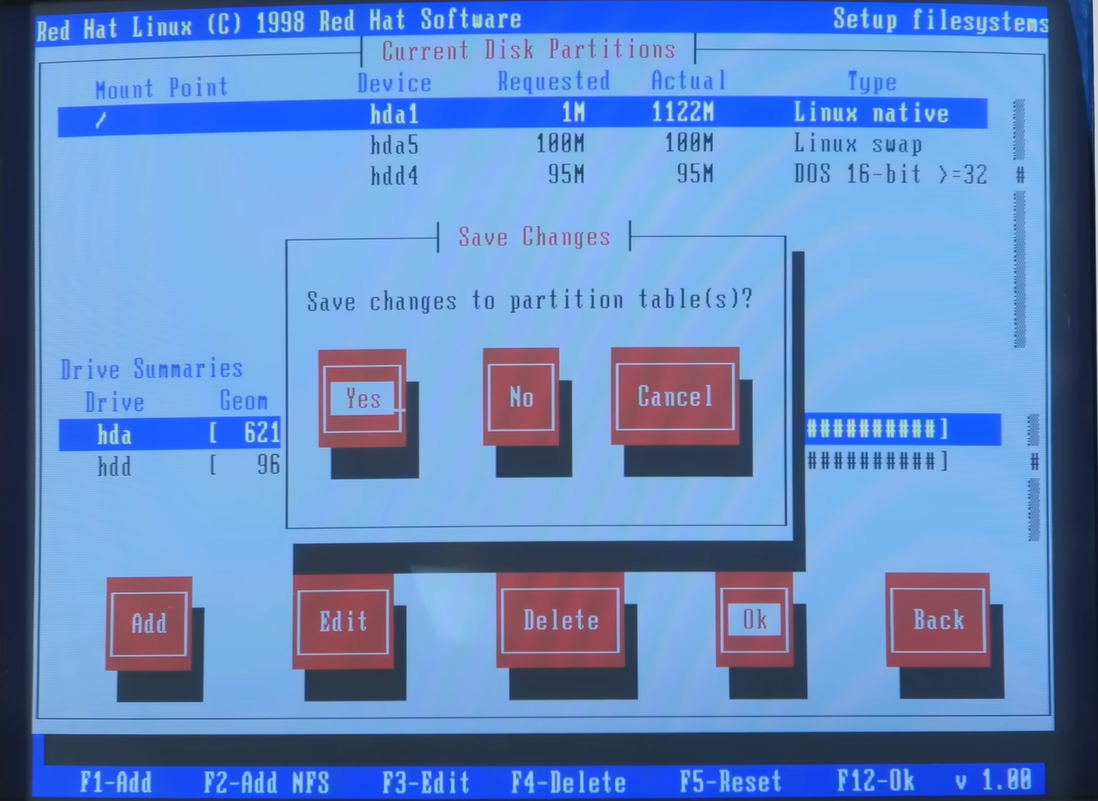
Partitioning was one of the great rites of passage. Many users dual-booted DOS, Windows 3.1, Windows 95, or Windows 98 alongside Linux. That meant shrinking or rearranging disk space before friendly graphical partition managers became common. You learned about primary partitions, extended partitions, swap partitions, and the haunting possibility that one wrong move could make your computer forget it had ever known Windows.
The classic Linux layout was simple: a root partition, maybe a separate /home, and a swap partition. But getting there required care. Disk sizes were small, so every megabyte mattered. A full install could feel extravagant. You chose packages like you were packing for a long camping trip: compiler, editor, networking tools, man pages, maybe games if you were feeling rich in disk space.
LILO, Boot Prompts, and the Thrill of Seeing “login:”
Before GRUB became the default bootloader for many systems, LILO ruled much of the Linux world. The Linux Loader was powerful but famously literal. After editing /etc/lilo.conf, you had to remember to run lilo or your changes would not apply. Forgetting that step was a classic beginner mistake, right up there with deleting a file and then learning that the command line does not send flowers.
When LILO worked, it felt magnificent. You selected Linux at boot, watched kernel messages fly by, and eventually reached a text login prompt. That prompt was the doorway. No dancing wizard. No welcome animation. Just your hostname and a blinking cursor, patiently judging your typing.
Logging in as root for the first time was both empowering and dangerous. The root account could fix anything and break everything. Many 90s users learned system administration by making mistakes that today would be described as “excellent learning opportunities” and at the time were described with much louder words.
The Command Line Was Home Base
In 90s Linux, the shell was not an advanced feature hidden behind a developer menu. It was home base. Bash, tcsh, and other shells gave users control over files, processes, permissions, scripts, and system behavior. You learned commands because you needed them. ls, cd, cp, mv, chmod, chown, tar, grep, ps, kill, and man became part of daily vocabulary.
The phrase “RTFM” was everywhere, sometimes rude, sometimes necessary, and occasionally accurate. The manual pages were not decorative. They were survival gear. The Linux Documentation Project, HOWTO files, FAQs, and distribution manuals helped users configure modems, printers, sound cards, Ethernet cards, PPP connections, X11, and kernels. A good HOWTO could feel like a treasure map with fewer pirates and more semicolons.
Compiling software from source was also normal. You downloaded a tarball, unpacked it, ran ./configure, then make, then make install, and watched your terminal scroll like it was delivering a weather report from the compiler gods. When it failed, you hunted missing libraries, header files, and cryptic errors. When it succeeded, you felt like you had personally negotiated a peace treaty between C code and your machine.
Package Management: Before Everything Felt Automatic
Package management improved rapidly during the decade, but the early experience depended heavily on distribution choice. Slackware used simple package tools and a clear structure. Debian developed a strong package system with dpkg, and later APT made dependency management far more pleasant. Red Hat popularized RPM, which became influential across several distributions.
Still, dependency problems were a defining 90s headache. Installing one program could require another library, which required another package, which required a newer version of something that your system treated like a load-bearing wall. The phrase “dependency hell” was not invented for dramatic flair. It was a residential address.
Yet package management also showed Linux’s greatest strength: shared effort. Communities built repositories, mirrors, and conventions that turned scattered software into maintainable systems. Every improvement made Linux less intimidating and more practical for servers, developers, students, hobbyists, and eventually ordinary desktop users.
X11: The Graphical Desktop With a Side Quest
No authentic 90s Linux journey is complete without X11. The X Window System offered graphical computing, but it did not always arrive politely. Configuring X could involve monitor refresh rates, video card chipsets, mouse protocols, and a configuration file that looked harmless until your screen displayed a pattern from another dimension.
Running startx successfully was a victory. The early Linux desktop often meant a window manager rather than a full desktop environment. FVWM, twm, AfterStep, Window Maker, Enlightenment, and others gave users different looks and workflows. Some were minimal. Some were stylish. Some looked like they had escaped from a cyberpunk basement, which, frankly, was part of the charm.
By the late 1990s, KDE and GNOME changed the conversation. KDE aimed to provide a more complete and user-friendly graphical desktop. GNOME emerged with a strong commitment to free software principles and also worked toward a friendlier desktop experience. These projects helped move Linux from “great if you enjoy editing config files” toward “maybe your cousin can use this without calling you every twelve minutes.”
Hardware Support: The Boss Level
If 90s Linux had a final boss, it was hardware. Network cards, sound cards, printers, scanners, winmodems, and graphics adapters could all become sources of suspense. Some hardware worked beautifully. Some required kernel modules and careful configuration. Some was designed with Windows-only drivers and treated Linux users like uninvited dinner guests.
ISA cards required attention to IRQs and I/O addresses. SCSI hardware could be excellent but intimidating. Sound often meant convincing the system that your Sound Blaster-compatible card was actually compatible. Printers involved filters, spoolers, and sometimes a level of patience normally reserved for assembling model ships inside bottles.
But this struggle built knowledge. Users learned what hardware actually did. They learned the difference between a kernel driver and a user-space program. They learned how boot messages revealed detected devices. They learned that dmesg was not just output; it was a diary written by the kernel in a hurry.
Dial-Up Networking and the Internet Before Convenience
The 90s Linux experience was deeply tied to the early public internet. Many users connected through dial-up modems using PPP. Configuration involved chat scripts, phone numbers, serial ports, authentication files, DNS settings, and a sense of optimism that the modem handshake would eventually stop screaming and start connecting.
Once online, Linux felt natural. It came from internet culture and thrived there. FTP mirrors, mailing lists, Usenet groups, IRC channels, and personal websites distributed software and knowledge. Linux users did not just consume updates; they participated in conversations. A bug report might lead to a patch. A question might become a FAQ entry. A personal configuration note might help thousands of strangers.
This community-driven support model was not always gentle, but it was powerful. People solved problems in public. The archive became the documentation. The web was still young, search engines were less magical, and finding the answer often meant reading carefully instead of skimming a dozen nearly identical blog posts written by content farms wearing fake glasses.
Why People Loved 90s Linux Despite the Trouble
So why did people put themselves through it? Because Linux offered control, transparency, and possibility. It made an ordinary PC feel like a workstation. It gave students access to compilers, networking tools, scripting languages, and server software without expensive licenses. It gave hobbyists a playground. It gave professionals a reliable platform that could be understood from the inside out.
The culture also mattered. Linux was part of a broader free and open-source software movement that valued sharing, modification, and learning. You could read the source code. You could build your own kernel. You could contribute documentation, patches, translations, bug reports, or advice. The operating system did not arrive as a sealed appliance. It arrived as an invitation.
And yes, there was pride. Getting Linux running on difficult hardware felt like winning a private championship. The reward was not just a working system; it was the knowledge that you had made it work. That feeling is harder to find in today’s smoother, more automated technology landscape.
How to Recreate the Authentic 90s Linux Experience Today
If you want to relive the authentic 90s Linux experience, you have several options. The easiest is to use virtualization. Tools like VirtualBox, VMware, QEMU, or PCem can run older Linux distributions without risking your modern laptop. Look for period-appropriate releases such as Slackware from the mid-to-late 90s, Debian 1.x or 2.x, Red Hat Linux 4.x through 6.x, or early SUSE releases.
Build a Retro Setup
For a more physical experience, use a retro PC with a Pentium, Pentium II, or early AMD K6 processor, a modest amount of RAM, a small IDE hard drive, a CD-ROM drive, and a compatible Ethernet card. A beige case is not required, but it adds emotional accuracy. Bonus points if the keyboard is loud enough to announce your commands to neighboring apartments.
Install from CD-ROM or floppy images, choose a small set of packages, configure LILO, and boot into a text console. Avoid modern conveniences at first. Read man pages. Edit configuration files with vi or pico. Try to set up networking manually. Install X11 only after you have enjoyed enough character-building hardship.
Use Period-Correct Software
Try window managers like FVWM, AfterStep, or Window Maker. Use Netscape Navigator if your chosen distribution includes it, or experiment with early browsers and text-based tools such as Lynx. Write C programs with GCC. Send mail locally. Configure Apache. Explore Emacs, vi, Bash scripts, cron jobs, and classic Unix utilities.
The goal is not to suffer for nostalgia’s sake. The goal is to understand how Linux taught people to think. It rewarded curiosity. It exposed layers that modern systems hide. It made computing feel tangible.
What 90s Linux Still Teaches Us
The 90s Linux experience remains relevant because it reminds us that technology is not magic. It is layers of decisions, protocols, files, processes, permissions, and communities. Modern systems are easier to use, and that is a good thing. Nobody should have to manually configure a monitor refresh rate just to read email. But convenience can create distance. Linux in the 90s closed that distance by making users confront the machine directly.
It also teaches the value of open collaboration. Linux grew because people shared code, documentation, bug reports, and practical knowledge. The ecosystem was not perfect, but it showed that distributed volunteers and companies could build serious infrastructure together. That lesson now powers much of modern computing.
Most of all, 90s Linux teaches patience. Not passive patience, but active patience: the kind that reads logs, tests one variable at a time, and celebrates small progress. In a world of instant apps and invisible updates, that mindset is still useful. Sometimes the best way to understand a system is to fix it when it breaks.
A 500-Word Retro Experience: One Weekend Inside 90s Linux
Imagine it is Saturday afternoon in 1997. You have a desktop PC under the desk, a CRT monitor deep enough to qualify as furniture, and a Linux CD you received from a magazine or bought in a thick book that promises to reveal the secrets of Unix. The book smells like paper, glue, and ambition. You clear space on the hard drive, make a backup you deeply hope is usable, and begin.
The installer boots into a text interface. No glossy gradients. No spinning beach balls. Just menus, package names, and your growing awareness that you do not fully understand your own computer. You choose a keyboard layout, select a target partition, create swap, and install package sets with names that sound both technical and mysterious. Development tools? Obviously. Networking? Yes. Games? You pretend this is for testing system performance.
Then comes configuration. LILO asks where it should live. The master boot record feels dangerous, like signing a lease with a dragon. You proceed anyway. The installer finishes. You remove the disk, reboot, and hold your breath. The machine prints a few letters, pauses, then continues. Kernel messages stream across the screen. Devices are detected. Some are not. You see the login prompt. Against all odds, you are in.
The first login feels quiet. The system is not trying to entertain you. It is waiting. You type ls and see files. You type pwd and learn where you are. You type man ls and discover that even the simplest command has more options than a diner menu. You add a normal user account because every guide warns you not to live as root unless you enjoy danger as a lifestyle.
Networking is next. Your modem sits nearby, smug and beige. You edit PPP scripts, enter your ISP’s phone number, and listen to the modem perform its electronic whale song. The connection fails. You check logs. You try again. It fails differently, which counts as progress. Eventually, the connection works, and the internet arrives not as a sleek portal but as a hard-won tunnel you dug with configuration files.
Now you try X11. The configuration utility asks about your video card and monitor. You answer with the confidence of someone guessing on a tax form. The first attempt produces a blank screen. You panic, press key combinations, reboot, read more documentation, and adjust the settings. On the second or third try, a graphical desktop appears. It is simple, maybe awkward, but beautiful because you earned every pixel.
By Sunday night, the system is not perfect. Sound may not work. Printing is a rumor. Your mouse wheel is decorative. But you have a shell, a compiler, a text editor, networking, and a graphical environment. More importantly, you have a new relationship with the computer. It is no longer a sealed box. It is a machine you can question, inspect, repair, and reshape. That was the authentic 90s Linux experience: not convenience, not polish, but ownership.
Conclusion
Reliving the authentic 90s Linux experience is a reminder of a wilder, more hands-on chapter in personal computing. It was an era of floppy disks, LILO prompts, X11 configuration files, HOWTO documents, source compilation, and late-night victories over hardware that had no intention of cooperating. Yet beneath the friction was something powerful: freedom. Linux gave ordinary users access to a serious operating system they could study, modify, and share.
Today’s Linux world is easier, broader, and far more polished, but the old spirit remains. Every time someone opens a terminal, reads a log, files a bug, writes a patch, or helps a stranger solve a problem, they are carrying forward that 90s tradition. The tools have changed. The curiosity has not.