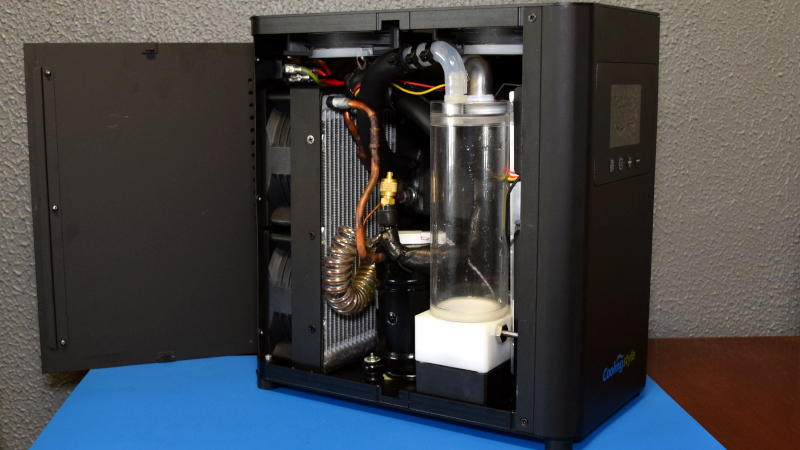

The Cooler Max Liquid Cooling System is not your average “slap a radiator on the roof of the case and call it a day” PC cooler. It is bigger, louder, colder, stranger, and far more interesting than a typical all-in-one liquid cooler. In plain English, Cooler Max looks like someone took a compact industrial chiller, taught it gaming vocabulary, gave it a few RGB manners, and told it to keep a desktop PC cool under heavy loads.
That is exactly why a teardown of the Cooler Max Liquid Cooling System is so fascinating. Most PC liquid coolers move heat from the CPU or GPU to a radiator, then let fans dump that heat into the room. Cooler Max goes a step further. It uses air-conditioning-style refrigeration technology to chill the coolant before sending it back to the PC. In other words, this is not merely moving heat away faster. It is actively trying to push coolant temperatures below what normal room-air cooling can achieve.
For gamers, overclockers, workstation users, and hardware nerds who enjoy peeking behind metal panels, this system feels like a rare creature. It combines familiar PC water-cooling parts with a miniature compressor, condenser, heat exchanger, reservoir, pump, controller electronics, temperature sensing, and condensation management. That makes it part PC accessory, part science project, and part “please read the manual before turning your motherboard into a decorative fountain.”
What Is the Cooler Max Liquid Cooling System?
Cooler Max is a self-contained external liquid cooling unit designed for heavy-load desktops, overclocked PCs, gaming rigs, rendering machines, and systems that generate more heat than a normal air cooler wants to handle. Unlike a standard AIO cooler, which usually keeps the pump, cold plate, radiator, and fans attached to the PC case, Cooler Max moves the bulky cooling hardware outside the computer.
The idea is simple but bold: connect the PC’s CPU or GPU water block to an external cooling box, circulate coolant through that box, chill the fluid using a refrigeration cycle, and send the cold fluid back into the loop. The manufacturer describes the unit as capable of cooling liquid below 10°C, or 50°F, with a claimed 500W cooling capacity and a 1.2L/min flow rate. Those numbers place it far beyond the personality of a normal 240mm or 360mm AIO cooler.
In practice, Cooler Max behaves more like a small water chiller than a conventional PC liquid cooler. That matters because a normal radiator cannot cool below room temperature. If your room is 75°F, a radiator can only move the coolant temperature toward that room temperature. Cooler Max, using a compressor-based system, can pull coolant below ambient temperature. That is the magic trick, and also where the complications begin.
Why This Teardown Matters
PC cooling is usually a battle between three forces: temperature, noise, and convenience. Air coolers are simple and reliable, but they dump heat into the case. AIO liquid coolers move heat to a radiator and can reduce noise under the right conditions. Custom loops offer more surface area and flexibility, but they require planning, filling, bleeding, maintenance, and a healthy respect for fittings.
The Cooler Max Liquid Cooling System enters from a different door. By moving the cooling hardware outside the case and adding refrigeration, it tries to solve a problem that standard coolers cannot fully solve: removing large amounts of heat while also lowering coolant below ambient air temperature. For high-end CPUs, GPUs, AI workstations, rendering systems, and overclocked rigs, this is an exciting concept.
But a teardown reveals the real personality of any machine. Marketing says “powerful cooling.” A teardown asks, “With what parts, exactly?” That is where Cooler Max becomes interesting. Inside the unit are common PC water-cooling elements, industrial-style refrigeration hardware, practical service features, and a few prototype-like choices that make the system feel both impressive and slightly experimental.
External Design: Built Like a Small Desktop PC
From the outside, Cooler Max looks less like a PC accessory and more like a compact desktop tower that lost its motherboard but found a compressor. The unit is large compared with standard liquid coolers, which is expected because refrigeration hardware needs space. You are not hiding this behind a motherboard tray. This is the kind of device that sits beside a PC and politely announces, “Yes, I am part of the setup.”
The case design uses sheet metal panels, with a structure similar to a small PC chassis. The side panels can be removed, giving access to the internal components. That alone is a pleasant surprise. Many consumer cooling products are sealed shut like a vault guarding national secrets. Cooler Max is comparatively serviceable, and that makes the teardown more rewarding.
There are also signs that the unit was designed from an existing industrial cooling platform and adapted for desktop PC use. This is not necessarily a criticism. Industrial chillers are built for continuous operation, temperature control, and coolant movement. Repackaging that concept for gaming and workstation PCs makes sense, especially for users who run power-hungry hardware for long sessions.
Inside the Cooler Max: The Main Components
Opening the Cooler Max reveals two systems working together: a water-cooling loop and a refrigeration loop. The water loop handles coolant circulation between the PC and the unit. The refrigeration loop chills that coolant before it returns to the PC. Think of it as a relay race where one runner carries heat away from the CPU or GPU, and the other throws that heat out into the room.
1. Water Block and Coolant Path
Like other liquid cooling systems, Cooler Max depends on a water block attached to the heat source. That heat source may be a CPU, GPU, or both, depending on the loop configuration. A proper water block uses a metal cold plate, often copper, to absorb heat from the processor’s integrated heat spreader or GPU die area. Inside the block, small channels or microfins increase surface area, allowing the coolant to pick up heat more efficiently.
Coolant then travels through tubing to the external Cooler Max unit. This part will feel familiar to anyone who has built a custom PC loop. Tubing, fittings, clamps, blocks, and coolant routing all matter. Bad fittings do not care how expensive your graphics card is. They will leak with the emotional range of a garden hose.
2. Pump and Reservoir
The pump keeps coolant moving. In a liquid cooling system, flow rate matters because heat must be transported continuously from the water block to the cooling device. A reservoir helps hold coolant, provides a filling point, and gives air bubbles a place to separate from the liquid. Cooler Max uses a self-circulating design, which means the cooling unit is not just passively waiting for coolant to arrive. It actively manages the loop.
During teardown, the water-cooling components appeared relatively standard. That is good news for repairability. A standard pump, reservoir, fittings, and tubing are easier to replace than proprietary parts shaped like they were designed during a meeting called “How Can We Make This Impossible to Service?”
3. Compressor
The compressor is the star of the show. Standard PC liquid coolers do not have one. A compressor is what moves refrigerant through a refrigeration cycle, similar to the system inside a mini air conditioner or small chiller. By compressing refrigerant and sending it through the condenser and heat exchanger, the system can remove heat from the coolant more aggressively than a normal radiator.
This is what gives Cooler Max its below-ambient cooling ability. It is also why the unit is larger, more complex, and likely louder than a standard AIO. A compressor is not magic. It consumes power, produces vibration, generates heat on the hot side of the loop, and needs control electronics. In exchange, it gives the system a cooling advantage that ordinary radiators cannot match.
4. Condenser and Fans
The condenser looks like a radiator, but it belongs to the refrigeration side of the system. Its job is to release heat from the refrigerant into the surrounding air. Fans move air through the condenser fins, helping reject heat from the system. This is the part where the Cooler Max pays the thermal bill. Heat removed from the PC must go somewhere, and that somewhere is your room.
That means Cooler Max may cool your PC beautifully while making your room warmer. Congratulations: your CPU is comfortable, and now your office has joined a sauna membership.
5. Heat Exchanger
The heat exchanger is where the water loop and refrigeration loop interact without mixing. Hot coolant from the PC enters this area and gives up heat to the refrigerant system. The cooled liquid then returns to the PC. This component is crucial because it allows the system to chill the PC coolant without sending refrigerant into the computer loop.
In teardown photos and descriptions, the heat exchanger appears wrapped and insulated, which makes sense. If the system is chilling fluid below room temperature, unwanted heat gain and condensation become real concerns. Insulation helps keep the cold where it belongs.
6. Control Electronics
The Cooler Max includes control boards for the compressor, front panel, fan control, sensors, and user settings. Teardown observations showed a dedicated power supply, control circuitry, and an interface for temperature and flow-related settings. Manual mode includes options such as temperature setting, threshold setting, flow rate setting, and fan speed setting.
This matters because refrigeration-based PC cooling cannot be managed with a simple fan curve alone. The system must know coolant temperature, react to thermal load, and avoid pushing temperatures into dangerous condensation territory. Smart controls are not decorative here. They are the difference between “great overclocking session” and “why is there dew on my motherboard?”
How Cooler Max Differs From a Standard AIO Cooler
A normal AIO liquid cooler moves heat from the CPU to coolant, then from coolant to a radiator, then from the radiator to the air. It is a closed loop, usually maintenance-free, and fits inside a PC case. It is elegant because it is simple. Cooler Max is more ambitious.
The key difference is active chilling. AIO coolers are limited by ambient room temperature. Cooler Max can cool the liquid below room temperature because it uses a compressor and refrigeration cycle. This makes it potentially more powerful for high-heat systems, but it also adds complexity, weight, cost, noise, maintenance considerations, and condensation risk.
Another major difference is placement. Cooler Max is external, which removes major heat-producing cooling components from the PC case. This helps prevent radiator heat from recirculating inside the chassis. It also creates more flexibility because the cooling unit does not need to fit into the top, front, or side of the case. On the other hand, you now have an extra box, extra tubing, and extra setup work.
The Condensation Problem: Cold Is Not Always Your Friend
Below-ambient cooling sounds fantastic until physics walks in holding a glass of iced tea. When a surface drops below the dew point of the surrounding air, moisture can condense on that surface. In a PC, that surface might be tubing, fittings, the CPU block, GPU block, or nearby motherboard components. Water and electronics are not famous for their friendship.
This is why Cooler Max includes condensation-aware control behavior. In automatic mode, the system can reduce compressor speed when condensation is detected or when conditions suggest risk. That is a smart design choice. Any refrigerated PC cooling system must treat humidity as seriously as temperature. A coolant temperature that is safe in a dry room may be risky in a humid room.
For users, the practical rule is simple: do not chase the lowest possible number just because the controller allows it. A stable, safe coolant temperature above the dew point is better than a heroic benchmark followed by a damp motherboard and an expensive silence.
Performance Potential: Who Is Cooler Max For?
Cooler Max makes the most sense for extreme users. That includes overclockers, high-end gaming rigs, rendering workstations, simulation machines, and systems with powerful CPUs and GPUs running sustained workloads. If you mainly browse email, write documents, and occasionally watch a cat video, this unit is spectacularly unnecessary. A good air cooler would be more reasonable, and your desk would have more room for coffee.
For heavy users, however, the appeal is clear. Modern processors and graphics cards can draw serious power under load. When boost clocks depend on temperature headroom, better cooling can help maintain performance. In workstation tasks such as 3D rendering, code compilation, AI workloads, and video encoding, sustained cooling matters more than a quick benchmark run.
The 500W cooling claim is especially relevant for systems with multiple hot components. A single high-end GPU and CPU can generate enough heat to challenge ordinary cooling setups. Cooler Max’s external refrigeration approach gives it a unique role: not simply cooling a chip, but acting as a compact coolant management system for demanding desktops.
Repairability and Serviceability
One of the best surprises from the Cooler Max teardown is serviceability. Many parts appear accessible with ordinary tools. The unit uses removable panels, recognizable water-cooling hardware, socketed or screw-down electrical connections, fans, a power supply, sensors, tubing, and fittings that do not seem designed to punish the person repairing them.
The presence of a refrigerant service port in teardown observations is especially interesting. Refrigeration systems are often sealed, and servicing them usually requires proper tools and knowledge. A service port suggests the unit was built with maintenance in mind, though final production versions may vary. Still, it is refreshing to see a performance cooling product that does not treat repair as a forbidden ritual.
That said, refrigeration systems should not be casually opened by beginners. Refrigerant handling can involve legal, safety, and environmental requirements. Users can inspect tubing, fans, water blocks, coolant, and fittings, but compressor-side repairs are best left to qualified technicians.
Noise, Power, and Real-World Trade-Offs
The Cooler Max Liquid Cooling System is powerful, but it is not invisible. A compressor-based cooling unit will not sound like a silent passive heatsink. Users should expect some operating noise from fans, pump movement, and compressor vibration. It may be acceptable in a workshop, gaming room, or studio with headphones, but it may not be ideal beside a microphone during quiet recording.
Power consumption is another factor. A normal cooler uses fan and pump power. Cooler Max also powers a compressor. That extra energy becomes part of the total system cost and heat output. The PC may run cooler, but the heat still enters the room, along with the electrical energy used to move it.
This does not make Cooler Max inefficient by default. It simply means buyers should understand the trade. Extreme cooling is rarely free. It costs money, space, noise, power, and attention. In return, it gives temperature control that ordinary cooling cannot match.
Installation Tips Before Using a System Like Cooler Max
Plan the Loop Before Cutting Tubing
Measure twice, cut once, and do not route tubing like spaghetti after a family argument. External cooling loops need clean paths between the PC and the chiller. Avoid sharp bends, kinked tubing, stressed fittings, and awkward cable crossings.
Leak-Test Before Powering the PC
Run the cooling loop with the computer electronics protected and powered off. Watch every fitting, block, and tube connection. A leak test is not optional. It is the ritual that separates confident builders from people posting sad photos online.
Monitor Dew Point Conditions
If the coolant can drop below room temperature, monitor humidity and ambient temperature. A simple temperature target is not enough. Condensation depends on dew point, not just coolant temperature. In humid environments, use conservative settings.
Keep Airflow Around the Unit
The condenser needs airflow to reject heat. Do not trap the Cooler Max under a desk in a sealed cabinet. It needs breathing room, or it will fight itself and lose efficiency.
Practical Experience: Living With a Cooler Max-Style Liquid Cooling System
Using a Cooler Max-style system feels different from using a regular AIO cooler. A normal AIO is a set-it-and-forget-it product. You install it, connect the fan and pump headers, maybe adjust a curve in software, and then mostly ignore it until dust turns the radiator into a gray sweater. Cooler Max asks for more attention. It behaves more like a piece of lab equipment that happens to enjoy gaming.
The first experience is physical: placement matters. Because the unit sits outside the case, the desk layout changes. You need space beside or below the PC, safe routing for tubes, and enough clearance for airflow. The system should be placed where it will not be kicked, tipped, or blocked by a backpack, chair leg, or curious pet. Cats already think warm keyboards are real estate. Do not give them chilled tubing to investigate.
The second experience is setup confidence. The external loop needs careful filling, bleeding, and leak testing. You should take your time and treat the first run like a checklist, not a race. Watch the reservoir level, check fittings with a dry paper towel, and look for tiny bubbles moving through the loop. Air pockets can reduce performance and create pump noise, so patience matters. A few extra minutes during setup can save hours of troubleshooting later.
The third experience is tuning. With a compressor-based cooler, the coldest setting is not automatically the best setting. For daily use, a stable coolant temperature that avoids condensation is more valuable than the lowest number on the display. In a dry, air-conditioned room, you may have more flexibility. In a humid room, especially during summer, conservative settings are smarter. The goal is controlled cooling, not turning the inside of the PC into a rainforest exhibit.
The fourth experience is sound. A compressor has a different character than a fan. Fans whoosh. Pumps hum. Compressors rumble. Some users will not mind it, especially if the PC is already a performance monster with multiple fans. Others may find it too noticeable in a quiet room. If you stream, record voiceover, or work in silence, think carefully about placement. Moving the unit farther from the microphone or using sound-dampening furniture around the area can help, as long as airflow is not restricted.
The fifth experience is maintenance mindset. Standard AIO owners rarely think about coolant. Custom loop builders think about coolant constantly. Cooler Max sits closer to the custom-loop side. You should periodically inspect tubing, coolant clarity, fittings, dust buildup, and fan operation. If coolant becomes cloudy, flow seems reduced, or temperatures rise unexpectedly, investigate before pushing the system under heavy load.
The biggest lesson from using a system like this is that performance cooling rewards careful users. Cooler Max is exciting because it breaks the ordinary limit of room-temperature cooling, but that same advantage demands respect. It is not the best choice for every PC. It is a specialized solution for people who understand why their hardware is hot, what they expect from cooling, and how much complexity they are willing to manage.
When everything is configured properly, the experience can feel wonderfully excessive. Watching coolant temperatures stay low under load gives the same satisfaction as seeing a tidy cable run or a perfectly mounted GPU block. It is technical, slightly dramatic, and undeniably fun. Cooler Max is not just a cooler. It is a conversation starter with hoses.
Final Verdict: A Serious Cooler for Serious Heat
The Cooler Max Liquid Cooling System is one of the more unusual PC cooling concepts because it blends custom water cooling with compact refrigeration. The teardown shows a system that is more than a flashy box. It contains a real compressor, condenser, heat exchanger, pump, reservoir, sensors, controls, and accessible internal hardware. It is not a normal AIO, and it should not be judged like one.
Its strengths are clear: below-ambient cooling potential, external heat removal, high cooling capacity, repair-friendly construction, and strong appeal for overclockers or workstation users. Its weaknesses are just as real: size, noise, power consumption, condensation risk, setup complexity, and the need for careful monitoring.
For everyday PC builders, Cooler Max is overkill. For thermal obsessives, heavy-load creators, and people who hear “mini refrigerated desktop chiller” and immediately reach for a screwdriver, it is a fascinating piece of hardware. It proves that PC cooling still has room for weird, ambitious engineering. And honestly, the PC world could use more machines that make us say, “Wait, is that an air conditioner for your CPU?”
SEO Tags