
You know the routine. Your keys have vanished, your phone is hiding under something soft, and the scissors have apparently entered a witness-protection program. You check the kitchen counter, the couch, your pockets, the same kitchen counter again, and finally the refrigeratorbecause desperation does not respect logic.
Now imagine putting on a pair of upgraded glasses, saying what you are looking for, and receiving a visual, audible, or directional cue that leads you straight to it. That is the idea behind item-finding smart glasses: combine wearable cameras, computer vision, wireless tracking, and artificial intelligence to give ordinary eyesight a technological assistant.
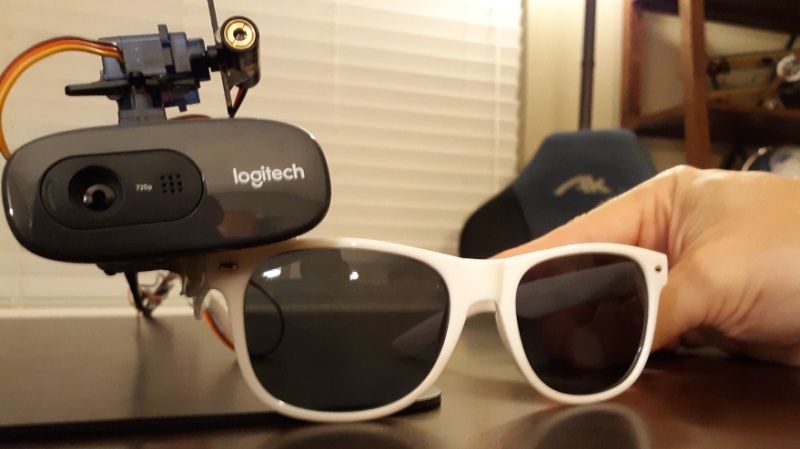
One memorable prototype called Artemis demonstrated this concept by attaching a camera, servos, and a laser pointer to a pair of glasses. It was not exactly something you would wear to a dinner party unless the theme was “cyborg garage inventor,” but it offered a fascinating preview of how smart eyewear could help people locate misplaced objects.
What Does It Mean to Upgrade Your Shades?
Upgrading your shades to find lost items does not simply mean gluing a Bluetooth tracker to your sunglasses. The broader idea is to turn eyewear into a hands-free search system that can understand what you see, recognize the object you want, and guide your attention toward it.
A practical system may combine several technologies:
- A small camera that captures the wearer’s field of view
- Computer vision software that recognizes objects
- A processor that analyzes images in real time
- Bluetooth or ultra-wideband technology for locating tagged items
- Speakers, displays, vibration motors, or lights that provide directions
- An AI assistant that understands requests such as “Where did I leave my wallet?”
The result would be less like wearing a miniature surveillance command center and more like having a calm assistant whisper, “The wallet is under the newspaper, three feet to your left.” Ideally, the assistant would avoid adding, “Exactly where you left it.” Nobody needs that level of judgment from their eyewear.
Meet Artemis: The Object-Finding Glasses Prototype
Artemis was created by maker and software engineer Nick Bild as an eyeglass-mounted object detection system. A camera attached to the glasses streamed images to an NVIDIA Jetson AGX Xavier development platform, which provided the computing power needed to process the video.
The system used an SSD300 object detection model trained with the COCO dataset. SSD stands for Single Shot MultiBox Detector, a computer vision architecture capable of identifying and locating objects within an image in one processing pass. Instead of merely announcing that an image contained scissors, the model could estimate where the scissors appeared within the frame.
The pretrained COCO model recognized 80 general object categories, including bottles, cups, chairs, backpacks, people, and scissors. That made it useful for proving the concept, although it could not automatically identify every personal possession. Your favorite blue keychain, for example, might be obvious to you but completely mysterious to a general-purpose model.
How the Glasses Pointed Toward an Object
Finding the target in a camera image was only half the challenge. Artemis also needed a way to show the wearer where the object was located. The prototype used a laser diode mounted on two small servos. One servo controlled horizontal movement, while the other controlled vertical movement.
OpenCV image-processing techniques helped the system determine the visible position of the laser dot. The software compared the coordinates of the detected object with the coordinates of the laser, adjusted the servos, and moved the beam until it rested on the target.
An Adafruit ItsyBitsy M4 Express microcontroller handled servo control. In simplified terms, the Jetson computer acted as the eyes and brain, the microcontroller managed movement, and the laser behaved like an extremely enthusiastic finger pointing across the room.
Why Finding Lost Items Is Harder Than It Looks
Humans are good at recognizing familiar objects, but we are surprisingly bad at noticing them when they appear in an unexpected location. A phone on a desk is obvious. The same phone resting on a black chair, partially covered by a sweater, can become practically invisible.
An automated object finder faces similar problems. Real homes contain clutter, uneven lighting, reflective surfaces, overlapping objects, moving pets, and furniture that seems specifically designed to swallow remote controls.
Computer vision systems must deal with several obstacles:
- Occlusion: Most of the object may be hidden behind something else.
- Poor lighting: Cameras may struggle in dark rooms or strong backlighting.
- Visual similarity: Several objects may have nearly identical shapes or colors.
- Unusual viewpoints: An object seen from above can look different from the same object viewed from the side.
- Limited training data: A model cannot reliably recognize an item it has never learned to identify.
- Motion blur: Rapid head movement may reduce image quality.
That is why an effective lost-item system should not depend on only one method. Computer vision is excellent for searching visible spaces, while wireless trackers are better when an item is inside a bag, beneath a cushion, or in another room.
Computer Vision Versus Bluetooth Trackers
Computer Vision Finds What the Camera Can See
Visual object detection works without requiring a tracker on every possession. The glasses can scan a desk, garage, workshop, or living room and recognize objects based on appearance. This is useful when searching for ordinary items such as a mug, screwdriver, backpack, or pair of shoes.
Wearable-camera research has also explored “last seen” systems. GO-Finder, for example, used video from a wearable camera to detect objects handled by the user and build a visual history. Instead of searching the entire house in real time, a user could review where an item last appeared.
This approach addresses a common problem: many lost objects are not truly lost. They are simply sitting at the last place where the owner interacted with them. A visual timeline can turn “Where is it?” into the more useful question, “Where did I last put it down?”
Bluetooth Trackers Find Tagged Possessions
Bluetooth trackers take a different approach. A small tag is attached to an important item and communicates with a phone or nearby devices. When the tracker is within range, an app can make it play a sound or display a proximity indicator.
Products such as Tile allow users to ring a nearby tracker, view its last reported location, or receive a notification when the network detects it. This works well for frequently misplaced objects such as keys, wallets, luggage, and backpacks.
Bluetooth Direction Finding can go beyond basic “warmer or colder” measurements. Compatible systems can estimate the direction from a receiver to a tag, creating a more useful arrow-like experience instead of forcing the user to wander around waving a phone like a confused airport marshaller.
Ultra-Wideband Adds Precision
Ultra-wideband, commonly called UWB, is designed for accurate short-range ranging and positioning. A compatible phone or wearable can estimate both distance and direction to a nearby UWB tag. This makes it especially useful during the final stage of a search, when the item is somewhere in the room but refuses to reveal itself.
Apple’s Precision Finding illustrates this type of experience. With supported hardware, the Find My interface can provide directional guidance toward a nearby AirTag instead of showing only a general map location. UWB industry specifications also address use cases involving missing keys, luggage, and other personal property.
How Modern Smart Glasses Could Find Your Stuff
A polished consumer system could combine visual AI, wireless networks, and contextual memory into one search workflow.
Step 1: Understand the Request
The wearer might say, “Find my black wallet,” “Where did I leave my glasses case?” or “Show me the screwdriver.” Speech recognition would convert the request into an object category and, when possible, personal characteristics such as color, shape, or ownership.
Step 2: Search Recent Visual Memory
If the user previously allowed the system to remember selected moments, the glasses could retrieve the last recorded location where the item appeared. Modern AI eyewear has already introduced reminder features that can remember contextual information, such as where a user parked.
A responsible system would make this memory feature optional, transparent, and easy to delete. It should not continuously upload a detailed video diary of your home simply because you once misplaced a TV remote.
Step 3: Check Wireless Trackers
If the object has a Bluetooth or UWB tag, the system could determine whether it is nearby. For an item outside the home, a crowdsourced finding network might report the most recent encrypted location detected by another participating device.
Apple’s Find My network and Google’s Find Hub network demonstrate how large groups of devices can help locate offline or disconnected belongings. Tile similarly uses its device network to update the position of a lost tracker when another participating device encounters it.
Step 4: Guide the Wearer
Guidance could be delivered in several ways. Glasses with a display might show an arrow, outline the detected object, or place a marker over its position. Audio-only glasses could say, “Turn right,” “Look down,” or “The item is behind the blue chair.” A vibration in the left or right temple could provide silent directional feedback.
These alternatives are generally more practical than pointing a laser. A digital overlay is visible only to the wearer, while audio and haptic feedback eliminate the need to project light into the environment.
Useful Applications Beyond Finding Keys
Item-finding smart glasses could be valuable in many everyday and professional settings.
Home Organization
The glasses could help locate medicine bottles, chargers, kitchen utensils, cleaning supplies, toys, and documents. A personalized model might learn the appearance of household objects that general image-recognition systems overlook.
Workshops and Warehouses
Technicians could request a particular tool, component, storage bin, or safety item. The system might combine shelf labels, barcodes, visual recognition, and indoor positioning to reduce time spent searching.
Travel
Travelers could locate tagged luggage, remember where they placed a passport, or receive a warning before leaving a hotel room without an essential item. The glasses would not eliminate travel stress, but they might prevent the classic airport sprint known as “I left my wallet at security.”
Accessibility
Audio descriptions and object recognition can assist people who are blind or have low vision by identifying visible objects, reading text, and describing surroundings. An item-finding mode could add more focused guidance, although it should supplement rather than replace established mobility tools and training.
Memory Support
Optional visual history could help users remember where they last handled an object. The most respectful design would provide gentle assistance without making assumptions about a user’s health or independence.
The Limitations Smart Shades Still Need to Solve
Personal Objects Require Personal Training
A model trained to recognize “backpack” may identify dozens of backpacks but still fail to distinguish yours from someone else’s. Future systems may let users register important items by photographing them from several angles or describing distinctive details.
Battery Life and Heat Matter
Continuous video processing consumes power and generates heat. Heavy computing may need to run on a connected phone, a pocket-sized processor, or a remote server. Each option introduces trade-offs involving latency, privacy, network access, and battery life.
False Positives Can Become Annoying
A system that confidently points to the wrong object is worse than one that admits uncertainty. Reliable glasses should communicate confidence, ask the user to confirm a match, and avoid marking every vaguely rectangular object as the missing phone.
Privacy Cannot Be an Afterthought
Camera-equipped eyewear can capture people, screens, documents, and private spaces. Users need clear recording indicators, local processing options, controllable retention periods, encryption, and simple deletion tools.
Bluetooth finding networks also require strong protections. Research into commercial Bluetooth finders has demonstrated that poorly designed services can expose more personal information than necessary. Apple and Google now provide unwanted-tracker alerts and privacy safeguards, but responsible use remains essential. Tracking technology should locate belongingsnot secretly monitor people.
Lasers Introduce Serious Safety Concerns
The Artemis prototype used a laser to demonstrate physical targeting, but a consumer product should favor a private display, audio guidance, or haptic feedback. Laser energy can injure eyes, distract drivers, and create hazards when aimed at reflective surfaces, aircraft, vehicles, animals, or people.
The U.S. Food and Drug Administration regulates laser products and advises consumers to check labels, warnings, and compliance information. A laser-based wearable should never be treated as a toy or casually reproduced without appropriate engineering controls.
What to Look for in Item-Finding Smart Glasses
When this category becomes more widely available, evaluate products based on practical performance rather than futuristic advertising. Helpful features may include:
- Fast object recognition with clear confidence indicators
- Support for Bluetooth and UWB trackers
- On-device processing for sensitive visual data
- An easy way to disable the camera and microphone
- Visible recording indicators that cannot be secretly bypassed
- Encrypted location information
- Custom recognition for personal objects
- Audio, visual, and haptic guidance options
- Replaceable or rechargeable tracker batteries
- Useful operation without a permanent subscription
Also consider comfort. Smart glasses that can locate every missing object but feel like a desktop computer strapped to your forehead will probably spend most of their life in a drawerwhere, ironically, you may need another device to find them.
Could You Build a Safer DIY Version?
A modern hobbyist project could preserve the spirit of Artemis while replacing the laser with safer feedback. A camera could send images to a phone, compact computer, or edge AI board. Object-detection software could identify a target and translate its screen coordinates into spoken directions.
For example, the system might announce:
- “Scissors detected at the upper right.”
- “Move two steps forward.”
- “The wallet is partially hidden beneath the magazine.”
A small display could draw a box around the object, while vibration motors could indicate left or right. Tagged objects could add Bluetooth proximity data when visual recognition fails.
The most important design rule is restraint. Collect only the data needed for the feature, process images locally when possible, provide obvious controls, and never use the system to identify or follow people without their knowledge and permission.
The Future of Glasses That Remember
The most promising future is not a pair of glasses that merely detects objects in the current camera frame. It is eyewear that understands context over time.
Imagine telling your glasses, “Remember that I put the spare key in this drawer.” Three months later, the system could retrieve that approved memory. It could warn you when you are leaving home without your wallet, identify the shelf where a tool was last seen, or provide directions to tagged luggage in a crowded terminal.
Advances in vision-language models are making it easier for computers to answer questions about first-person images. However, research also shows that real smart-glasses scenes remain challenging. A useful assistant must first identify the correct object, understand the wearer’s intent, and distinguish reliable evidence from an attractive AI guess.
The winning design will probably combine several modest technologies rather than depend on one magical algorithm: visual recognition for visible objects, UWB for precise ranging, Bluetooth for inexpensive tags, encrypted networks for distant items, and user-controlled memory for last-seen locations.
Conclusion: Smarter Sight and Fewer Scavenger Hunts
Artemis showed that a camera, an object-detection model, a compact computer, and a physical pointer could transform ordinary glasses into an object-finding prototype. Today’s Bluetooth trackers, UWB positioning systems, AI assistants, and smart eyewear bring that idea much closer to everyday use.
The technology still has substantial work ahead. It must become lighter, more accurate, more private, less power-hungry, and socially acceptable. It also needs to guide users without firing a laser across the living room like a cat toy designed by a robotics laboratory.
Even so, item-finding shades represent a genuinely useful direction for wearable computing. The best smart glasses will not demand constant attention. They will quietly help when needed, then get out of the waypreferably after revealing that the missing keys were in your hand the entire time.
Experience Journal: A Realistic Week With Item-Finding Shades
The following experience is a practical composite scenario illustrating what using well-designed item-finding smart glasses could feel like in daily life.
Day One: The Easy Victory
The first test involves a set of keys carrying a UWB tracker. After the wearer asks the glasses to find them, a soft tone confirms that the tracker is nearby. An arrow appears at the edge of the display and rotates as the wearer turns. The distance changes from 14 feet to six feet, then two. The keys are inside a reusable grocery bag.
The experience feels almost unfair. A search that normally involves checking every table and blaming innocent family members takes less than a minute. Confidence rises dangerously fast. The wearer begins looking around for additional possessions to lose professionally.
Day Two: Computer Vision Meets the Couch
The target is a black TV remote without a tracker. The glasses scan the room and initially identify two possible matches: a smartphone on the coffee table and a narrow object between the couch cushions. The system reports moderate confidence rather than pretending to know everything.
After the wearer moves closer, the camera gets a clearer angle and confirms the remote. A subtle outline appears around the visible corner. This is where visual AI feels genuinely helpful. The object was technically visible, but its color blended into the upholstery so effectively that ordinary eyesight ignored it.
Day Three: The Limits Become Obvious
The wearer asks for a small screwdriver in a cluttered garage. The glasses identify several tools but cannot distinguish the specific screwdriver. Shadows, overlapping handles, and reflective metal produce uncertain results.
Instead of inventing an answer, the system asks for more information. The wearer adds, “It has a yellow-and-black handle.” That narrows the candidates, but the final result still requires moving a box. The glasses assist with the search; they do not perform magic through solid cardboard.
Day Four: Last-Seen Memory Saves the Morning
A document folder cannot be found before an appointment. The wearer asks where it was last seen. The glasses retrieve an approved memory from the previous evening showing the folder on a dining chair. It is still there, concealed beneath a jacket.
This feature feels more valuable than real-time detection. Rather than scanning every room, the system identifies the most likely starting point. The wearer also appreciates that visual memories must be intentionally saved and can be deleted from a companion app.
Day Five: Privacy Gets Awkward
During a conversation, another person notices the camera and asks whether it is recording. The wearer disables visual processing with a physical switch, and an external indicator confirms that the camera is off.
The moment demonstrates that social trust is part of the product experience. Even excellent object recognition becomes difficult to enjoy when everyone nearby wonders whether they are being filmed. Clear signals and physical controls are not optional decorations; they are essential features.
Day Six: Travel Shows the Best Combination
At a busy station, the glasses use Bluetooth network information to show the general location of a tagged suitcase. Once the wearer moves closer, UWB provides precise directional guidance. Computer vision then identifies the suitcase among several similar black bags by recognizing a bright orange strap.
No single technology handles the entire search. The network locates the general area, UWB supplies distance and direction, and visual recognition confirms the correct bag. The combination is much more reliable than any one method working alone.
Day Seven: The Feature Becomes Quietly Useful
By the end of the week, the novelty has faded. That is a compliment. The glasses are no longer treated as a futuristic toy but as a practical backup for moments of forgetfulness. They do not eliminate clutter, prevent objects from being misplaced, or stop a cat from pushing pens under the refrigerator.
They simply shorten the frustrating gap between losing something and finding it. The experience suggests that successful item-finding eyewear will not need dramatic holograms or superhero graphics. It will need dependable recognition, honest uncertainty, respectful privacy controls, comfortable hardware, and directions that arrive exactly when required.
Note: Artemis was an experimental maker prototype rather than a commercial consumer product. Features, compatibility, privacy protections, and tracking accuracy vary among current smart glasses and item-finding platforms. Laser-based wearable projects require strict eye-safety precautions; private displays, audio cues, and haptic feedback are safer alternatives.