
For decades, science fiction has promised computers that sit politely on our faces, whisper useful information into our eyeped from a low-budget spaceship movie. Reality has been slower. Most smart glasses are either expensive, tightly locked down, or about as fashionable as wearing a router on your forehead.
Then along comes the maker community, armed with Linux, 3D printers, tiny displays, and an admirable inability to leave well enough alone. A documented Raspberry Pi smart-glasses project by maker Teemu Laurila showed what happens when a lightweight Linux computer, a 3D-printed frame, a small display, and a little optical trickery all decide to live near your eyebrow.
The result is not a polished consumer product. It is something more interesting: a wearable Linux computer you can study, modify, improve, and occasionally explain to confused relatives at dinner. These 3D printed smart glasses put a tiny desktop-like environment in the wearer’s field of view, proving that augmented computing does not need to begin inside a corporate lab with a secret codename and a suspiciously glossy launch video.
A Linux Computer That Happens to Be Eyewear
The original project is built around a Raspberry Pi Zero W, a compact single-board computer capable of running Linux. Instead of treating the glasses as a simple notification gadget, the design uses a full Linux-based platform. That distinction matters.
A basic microcontroller-powered wearable can blink LEDs, read a sensor, or display a few icons. A Linux-powered wearable can do much more. It can run Python scripts, connect to Wi-Fi, communicate with other devices, stream camera data, display custom interfaces, log information, run networking tools, and serve as a miniature experimental computer that just happens to be mounted near your eye.
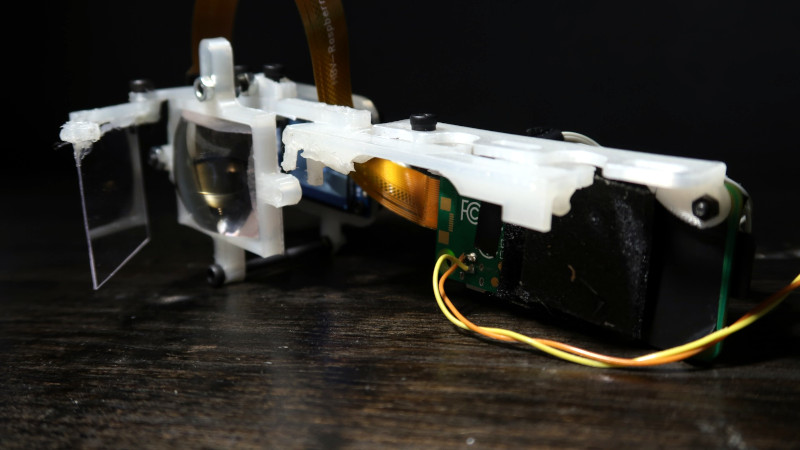
In the documented build, the glasses use a 240-by-240 IPS display running at 60 Hz, along with a Raspberry Pi camera module. The display is not intended to fill the wearer’s entire view like a high-end virtual reality headset. Instead, it acts more like a compact heads-up display positioned near the edge of vision. Think “tiny personal dashboard,” not “the world has become a video game.”
The design also includes a 3D-printed support structure that clips onto a regular pair of glasses. That modularity is a big deal because faces are frustratingly nonstandard. One person’s perfect temple fit is another person’s plastic pinch point. By using printable components, makers can adjust mounting positions, cable paths, display angles, and balance without redesigning the entire device from scratch.
Why Linux Changes the Smart Glasses Conversation
Linux is the secret sauce that turns these glasses from a clever display experiment into a genuinely flexible wearable computer. The operating system acts as the bridge between hardware and imagination. Once Linux is running, the glasses are no longer limited to one manufacturer-approved app or a tiny menu of preset tricks.
A Real Platform Instead of a Fancy Notification Light
With Linux aboard, a maker can build custom interfaces for calendar reminders, home automation controls, network diagnostics, voice assistants, camera tools, text prompts, timers, sensor dashboards, or personal productivity widgets. A small monocular display might sound modest, but it can be surprisingly useful when the information is brief and well chosen.
Imagine glancing at a short checklist while repairing a computer, monitoring a live sensor feed during a workshop project, seeing a timer while cooking, or controlling smart-home devices without pulling out a phone. The goal is not to bury the real world beneath windows and icons. The goal is to put the right information in the right place for a few seconds at a time.
That is where Linux shines. It allows experimentation. A maker can write a quick Python program in the afternoon, test it on the glasses by evening, dislike it by dinner, and replace it before bedtime. That is not failure. That is the traditional open-source development cycle, also known as “progress with snacks.”
Camera Input Opens More Possibilities
The addition of a camera moves the project beyond simple display output. Camera input makes it possible to explore computer vision, object recognition, gesture experiments, image streaming, and remote processing. In the original demonstration, camera footage could be sent to a more powerful desktop computer for hand-tracking work before the processed result was sent back to the glasses.
This approach is practical because tiny wearable computers have limits. A Raspberry Pi Zero W is impressively capable for its size, but it is not a miniature supercomputer hiding in a pair of spectacles. Complex vision models, advanced machine learning tasks, and real-time image processing can demand more memory and computing power than a small board can comfortably provide.
Offloading demanding work to another computer is not cheating. It is smart engineering. The glasses can remain lightweight while a desktop, local server, or connected device performs the heavy lifting. In other words, the glasses do not need to bench-press the entire data center.
The Optical Trick: Making a Tiny Screen Feel Usable
A display mounted near the eye is only useful if the wearer can actually focus on it. This is where the project becomes part electronics lab, part optical experiment, and part “why is this tiny lens now trying to escape my workbench?”
The glasses use a reflector and lens arrangement to create a visible image in front of the wearer’s eye. A thin PETG reflector and a repurposed lens from inexpensive VR goggles help direct and magnify the image. The display itself is physically tiny, but the optical path makes it appear farther away and easier to view.
This is not the same as a premium waveguide-based augmented reality system. Commercial AR glasses often use specialized optics to place digital content over the real world with more polished transparency, brightness, and alignment. The 3D printed Linux glasses take a more accessible route: practical materials, clever geometry, and enough experimentation to remind everyone that optics can be both magical and extremely picky.
Even a few millimeters of adjustment can change readability. Display angle, lens distance, reflector placement, eye position, and ambient light all affect whether the image looks crisp, dim, distracting, or like a tiny ghost trying to send you email.
3D Printing Is More Than a Fancy Case
The 3D-printed frame is not merely decorative plastic. It is the mechanical backbone of the project. It holds the display, routes cables, supports optical components, distributes weight, and connects the electronics to a wearable form factor.
That is a harder job than it sounds. A desktop computer can hide its awkward bits inside a box. Smart glasses cannot. Every extra gram sits on the wearer’s nose, ears, or temples. Every cable competes with comfort. Every sharp edge becomes a tiny reminder that the prototype was designed by someone who enjoys CAD more than cartilage.
Printable components make rapid iteration possible. A maker can alter the display mount, move a battery attachment, create a better clip, reduce a bulky support, or test a new lens holder without paying for injection molds or industrial tooling. That flexibility is why 3D printing and wearable computing fit together so naturally.
Material choice matters, too. PETG is often favored for functional printed parts because it is tougher and more heat-resistant than standard PLA in many everyday situations. Still, wearable parts need careful finishing, smooth edges, and thoughtful fit. A strong frame is wonderful. A strong frame that pokes your skin for two hours is a tiny plastic tyrant.
The Hard Parts Are Not Always the Obvious Parts
Projects like this are exciting because they expose the real challenges behind smart glasses. The difficult part is not simply attaching a screen to a frame. The difficult part is making the device useful, safe, comfortable, readable, private, and socially acceptable at the same time.
Brightness and Outdoor Visibility
One of the biggest problems with compact displays is brightness. A tiny display that looks excellent indoors can become nearly invisible near a window or outdoors. The original project acknowledged that looking toward a bright light source could make the image difficult to see. This is a common challenge for wearable displays because ambient light is ruthless and sunlight does not care about your prototype’s dreams.
Weight and Heat
Wearable devices must be light enough to forget about. That is an unforgiving standard. A project can work perfectly on a desk and become exhausting after fifteen minutes on a face. The computer board, display, camera, wires, battery, lenses, and frame all add up.
Heat is another concern. Small computers generate warmth, and putting that warmth close to the head requires careful design. A good wearable prototype should prioritize ventilation, sensible power settings, stable mounting, and short testing sessions before attempting extended use.
Input Is Still Awkward
A display is easy. Telling the display what to do is harder. Touchscreens do not work well in midair, and typing on invisible keyboards is mostly fun in movies where nobody has to correct typos.
Possible approaches include buttons, small touch controls, voice commands, Bluetooth keyboards, wrist-mounted controllers, phone companion apps, and gesture recognition. Each method has trade-offs. Voice input can be convenient but awkward in public. Gesture recognition can feel futuristic but needs reliable sensing. Physical buttons are boring but have a suspiciously strong track record of working.
Privacy Is Part of Good Design
Any wearable camera raises privacy questions. People around the wearer may not know whether the camera is active, recording, streaming, or simply existing. A responsible project should make camera status obvious, respect local laws, avoid recording people without permission, and use visible indicators when possible.
Open-source hardware gives makers greater control, but control also brings responsibility. The ability to build a camera-equipped wearable should be paired with the judgment to use it respectfully. The coolest smart glasses are not the ones that collect the most data. They are the ones people are comfortable being around.
Where Linux Smart Glasses Could Actually Be Useful
DIY smart glasses are most compelling when they solve small, specific problems. They are not yet replacements for phones, laptops, or certified professional equipment. They work best as experimental personal interfaces.
A maker could use them to display a soldering checklist, a pinout diagram, a timer, or a scrolling log from a project. A home-automation enthusiast could trigger lights, monitor a temperature sensor, or view a doorbell-camera notification. A programmer could create a wearable terminal display for basic diagnostics. An artist could build a cyberpunk costume piece that does more than glow dramatically at conventions.
They can also be valuable as education tools. A smart-glasses project combines 3D modeling, electronics, Linux administration, Python programming, optical design, user-interface design, and human-centered engineering. It teaches an important lesson: technology is not only about making something work. It is about making something work for a person.
That is why the project matters. Even in a rough prototype form, it turns several complex disciplines into one visible, wearable experiment. It gives makers a platform to ask better questions: Can the frame be lighter? Can the display be clearer? Can the software be simpler? Can the camera be used responsibly? Can the device become helpful without becoming distracting?
The Open-Source Advantage
Commercial smart glasses often ask users to accept a finished product exactly as it ships. Open-source smart-glasses projects take the opposite approach. They invite people to inspect the design, modify the software, remix the hardware, and build new features around the same core idea.
That collaborative spirit is important because smart glasses are still an unfinished category. There is no single perfect interface, no universally comfortable frame, and no one feature that everyone wants. Open designs allow many people to test many ideas instead of waiting for one company to guess correctly.
Today’s maker prototype may look chunky. Tomorrow’s version may be smaller, brighter, lighter, and easier to use. The path forward is rarely one dramatic leap. More often, it is a long series of tiny improvements: a better clip, a cleaner cable route, a brighter display, a more comfortable nose bridge, a smarter interface, and one less mysterious screw left over after assembly.
Hands-On Experience: What Wearing Linux on Your Face Can Feel Like
Using a DIY Linux smart-glasses prototype is less like putting on a finished gadget and more like stepping into a personal laboratory. The first thing a wearer is likely to notice is not the software. It is the physical presence of the device. Even a carefully designed build has a personality: a little extra weight near one temple, a cable that must be routed just right, a display arm that needs a precise angle before the image becomes comfortable.
Once the display is aligned, the experience changes quickly. A small block of text appears near the edge of vision. It may be a terminal prompt, a timer, a sensor reading, a calendar reminder, or a simple menu. That information feels strangely intimate because it is not on a phone across the room or a monitor on a desk. It is floating in a space reserved for your own attention.
At first, the wearer may instinctively stare at the display. That is normal. It is also a reminder that good wearable interfaces should be brief. The best interactions are quick glances: check a countdown, confirm a command, see a message, then look back at the real world. If a display demands constant focus, it stops being useful and starts competing with everything around you.
Indoor use is likely to feel more satisfying than outdoor use. In a workshop, office, bedroom, or dim maker space, a compact display can appear clear and futuristic. Near bright windows or outside, the image may fade into the background. This is one of those moments when the wearer learns that sunlight is not just a source of vitamin D. It is also a ruthless quality-control manager for display technology.
The Linux side of the experience is where the project becomes especially rewarding. A basic script can be changed in minutes. A new icon can replace an old one. A sensor value can become a graph. A keyboard shortcut can trigger a home-automation command. The device feels alive because it is not limited to a fixed set of features. It evolves as the wearer learns.
There is also a distinct sense of accomplishment in seeing a custom program run on something you built and can wear. A phone app is impressive. A script that appears in your own 3D-printed smart glasses is a different kind of satisfying. It feels like carrying a small piece of your curiosity around with you.
Of course, the experience also includes debugging. The display may shift. The Wi-Fi connection may complain. A cable may need better strain relief. A lens may require another adjustment. The battery may not last as long as hoped. These moments are not glamorous, but they are where the learning happens.
That is the honest charm of DIY smart glasses. They are not perfect. They are personal. They make computing feel physical again: something you can print, wire, code, tune, wear, and improve. And when the display finally lights up with your own Linux interface hovering near your eye, it is difficult not to smile like you just unlocked a side quest in the future.
Conclusion
3D printed smart glasses running Linux are a reminder that the future of wearable computing does not belong only to giant technology companies. A small Raspberry Pi, a compact display, a camera, printable parts, and open software can become a serious platform for experimentation.
The documented project is not pretending to be a finished replacement for premium augmented reality glasses. It is better understood as a bold proof of concept: a wearable Linux computer that demonstrates what can happen when makers combine hardware, software, optics, and curiosity.
Its biggest contribution may be the question it inspires: what would you put in your field of view if you could build the interface yourself? For some people, the answer may be a timer or a terminal. For others, it may be a smart-home dashboard, a creative display, a sensor tool, or the beginning of a much stranger project. Either way, Linux has officially reached the face.
Note: This article discusses an experimental maker project. DIY smart glasses should not be treated as protective eyewear, medical equipment, or a distraction-free device for driving, cycling, or other activities that require full attention.