
The Linux command line is one of computing’s great survival stories. It has outlived flashy desktop trends, survived countless “terminal killer” apps, and still calmly waits behind a blinking cursor like a monk who knows your entire Git history. But even loyal command-line users admit one thing: the traditional terminal emulator carries a lot of old baggage. Cat9 and LASH are two ambitious pieces of the Arcan ecosystem that ask a sharp question: what if the Linux command line stopped pretending it was trapped inside a 1970s terminal?
Cat9 is not simply another shell theme, prompt plugin, or “Bash but with nicer colors” project. It is a user shell script for LASH, written in Lua, designed to work closely with the Arcan display server instead of living entirely inside a conventional terminal emulator. That architectural decision changes everything. Commands become trackable jobs. Output can be retained, reused, sliced, rearranged, and visually managed. The shell can cooperate with the graphical environment instead of shouting through a tiny text tunnel and hoping the desktop understands.
In plain English, Cat9 and LASH want to make the Linux command line less like a scrolling typewriter and more like a command workspace. If Bash, Zsh, and fish are refined sports cars on the same old road, Cat9 is trying to build a new road—possibly with trapdoors, smart signs, and a cup holder for stderr.
What Are Cat9 And LASH?
Cat9 is a shell environment built as a ruleset on top of LASH. LASH provides the basic infrastructure, while Cat9 defines much of how the user-facing command line behaves. The project is part of the wider Arcan ecosystem, which includes a display server and experimental desktop components such as Durden.
The unusual part is not that Cat9 is written in Lua. Plenty of tools are scriptable. The unusual part is that Cat9 is designed around a different relationship between the command line and the display system. Traditional Unix shells generally assume they are running inside a terminal emulator. The terminal emulator then handles the visual display, keyboard events, scrollback, colors, and text grid. Cat9 challenges that stack by communicating more directly with Arcan’s display layer.
That means Cat9 does not treat the command line as a dumb stream of text. It can treat commands and their results as structured, persistent, interactive objects. A command is not merely something you typed five minutes ago and then lost somewhere in scrollback. It becomes a job with an identity, output buffers, context, status, and reusable data.
Why The Traditional Linux Terminal Feels Limited
The classic command-line model is brilliant because it is simple. Programs read from standard input, write to standard output, and complain through standard error. Pipelines connect tools. Redirection saves output. Scripts automate work. This design is why a tiny command like grep, awk, or find can still punch far above its weight.
But that same model has rough edges. Terminal emulators often behave like modern wrappers around old terminal assumptions. They emulate text grids. They process escape sequences. They scroll. They support colors, mouse events, tabs, splits, and images in various clever ways, but the basic shell-emulator relationship remains awkward. The shell speaks in streams; the desktop speaks in windows, events, pixels, drag-and-drop, focus, and interactive state.
This mismatch creates everyday friction. You run a command, then scroll up to find the output. You redirect results to a file just so you can reuse them. You parse ls output even though everyone knows that can get messy. You open another terminal pane because one long-running process has taken over the current one. You copy a filename with your mouse and accidentally include a space, newline, or the emotional damage of your last failed build.
Cat9 does not claim that the Unix model was a mistake. Instead, it argues that the interactive command-line interface can evolve beyond a plain stream trapped inside a terminal emulator.
The Big Idea: Commands Become Jobs
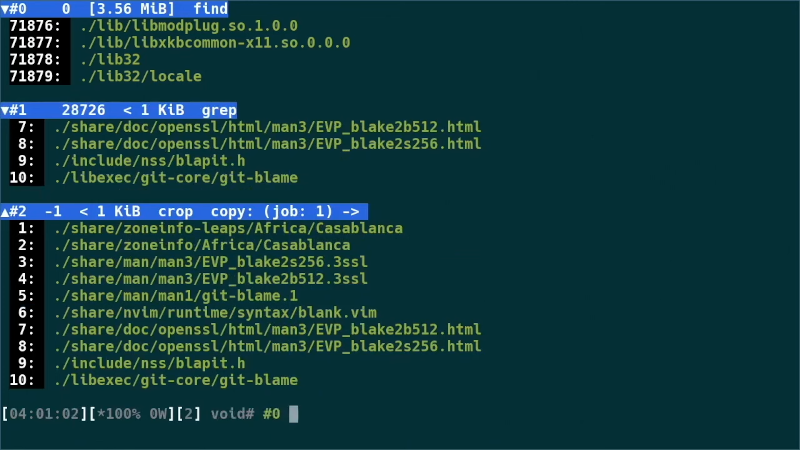
The job model is one of Cat9’s most important ideas. In Cat9, commands are tracked by default as jobs. Each job can receive an identifier such as #0, and users can refer to jobs later using absolute or relative references. For example, #last can refer to the latest job, while references like #-1 or #csel can point to previous or cursor-selected jobs.
This might sound small until you imagine using it daily. In a traditional shell, previous output often becomes part of a scrollback swamp. In Cat9, previous command results remain addressable. You can repeat a job, reuse its context, slice out part of its output, copy data from it, or change how it is displayed.
That style of interaction turns output into something closer to a live object. It is not just text that flew by. It is a source you can point at, reshape, and use again. For developers, system administrators, and power users, this is the difference between “Where did that output go?” and “I know exactly which result I want.”
Asynchronous Workflows Without Terminal Chaos
Cat9 is built around asynchronous job handling. Multiple commands can run concurrently, and their output can be separated cleanly. This matters because modern command-line work is rarely one neat command at a time. You might run a build, tail logs, inspect files, test a patch, watch a service, and keep a network command alive. In a normal terminal setup, this often means juggling tabs, panes, multiplexers, and memory.
Cat9’s approach is more workspace-oriented. Instead of everything competing for the same scrollback, jobs can be visually organized, folded, expanded, repeated, forgotten, or grouped. Standard output and standard error can be treated separately. A noisy command does not have to pollute the entire screen forever. Your terminal stops looking like a raccoon broke into a server room.
This design also makes failure easier to manage. If a command fails, its job remains available for inspection. If a command succeeds, it can trigger another action. The trigger concept can connect job status to follow-up behavior, such as alerting when a task finishes or repeating a command after a delay.
Cat9’s Visual Command Line: More Than Pretty Text
Many modern terminal tools focus on appearance: better fonts, GPU acceleration, transparency, themes, icons, ligatures, and command palettes. Those features are useful, but Cat9 aims deeper. It wants the shell itself to understand presentation, not just decorate text after the fact.
Because Cat9 works through LASH and Arcan, it can support layouts, windows, tabs, dynamic views, and graphical interactions in ways that traditional terminal emulators struggle to provide cleanly. Some commands can appear in different views. Output can be wrapped, collapsed, expanded, or presented with line numbers. Legacy terminal programs can still be launched when needed, but they are not the foundation of every interaction.
That distinction matters. Cat9 is not anti-command-line. It is anti-unnecessary-terminal-emulator-dependency. If a program truly needs a pseudo-terminal, Cat9 can provide compatibility paths. But when a command does not need a full terminal illusion, Cat9 can treat it more directly.
Smarter File Handling With List And Stash
Two Cat9 features that show its practical direction are list and stash. The list command is similar in spirit to ls, but it is designed for interaction rather than disposable text output. A listing can stay alive, update when files change, and support navigation. Instead of running ls, copying a filename, and hoping shell quoting behaves, users can interact with file entries more directly.
The stash command is another example. It lets users collect filenames and apply group actions to them. Think of it as a command-line-friendly file basket. You can gather specific files, verify changes, map stash entries, or create an archive. This is especially useful when a task involves hand-picked files rather than a simple glob pattern.
For example, imagine reviewing a directory with mixed logs, screenshots, configuration files, and build artifacts. In a traditional shell, you may build a complicated command using find, xargs, and careful quoting. In Cat9, the workflow can become more interactive: inspect, select, stash, verify, archive, process. It feels closer to combining the precision of the command line with the convenience of a file manager.
How Cat9 Compares With Bash, Zsh, Fish, And Nushell
Bash remains the standard scripting workhorse on many Linux systems. Zsh is beloved for customization. fish focuses on friendly interactive use with helpful completions and syntax highlighting. Nushell takes a structured-data approach, treating pipelines as tables, records, and typed values rather than plain text streams.
Cat9 overlaps with these tools but does not fit neatly into the same category. Like fish, it cares about interactive usability. Like Nushell, it questions the limits of unstructured text. Like terminal multiplexers, it wants better management of concurrent work. But Cat9’s most distinctive move is architectural: it tries to dissolve the wall between the shell and graphical environment.
That makes Cat9 both exciting and difficult. Users who want a drop-in replacement for Bash may find it strange. People who live in SSH sessions all day may not benefit from its graphical assumptions. But users who want a more integrated Linux command workspace may find the idea refreshing.
Specific Examples Of Where Cat9 Could Shine
1. Build And Test Loops
A developer compiling a project can keep the build output as a job, repeat it after changes, and compare results without losing previous context. Failed builds can remain visible while successful reruns appear nearby. Instead of scrolling through a thousand lines and muttering ancient curses, the developer can work with identifiable job output.
2. Log Monitoring
System administrators often watch multiple logs at once. Cat9’s job and container model can help separate outputs, group related streams, and trigger actions based on completion or failure. It makes the command line feel less like a single fire hose and more like a dashboard built from commands.
3. File Review And Batch Processing
With list, stash, and each, a user could select a group of files, run an operation on each one, and manage the results as a set. This is useful for media conversion, checksum verification, archive creation, code review, or cleanup work.
4. Mixed Graphical And Text Work
Cat9’s relationship with Arcan opens the door to workflows where command output, visual previews, terminal programs, and graphical views cooperate more naturally. Instead of treating the GUI as a separate kingdom, Cat9 invites it into the command-line conversation.
The Catch: Cat9 Is Not For Everyone Yet
Ambitious tools usually come with a price, and Cat9 is no exception. It is experimental, deeply tied to Arcan, and not as easy to adopt as installing a prompt theme. Building and configuring the full environment can be challenging. Users expecting a polished mainstream terminal replacement may need patience, curiosity, and a healthy tolerance for sharp edges.
There is also the portability question. One reason traditional shells endure is that they work almost everywhere. SSH into a tiny server, rescue system, old UNIX machine, or container, and you can usually count on a familiar shell environment. Cat9’s strengths depend on a richer graphical stack, so it is unlikely to replace conventional shells in minimal or remote environments soon.
But that does not make Cat9 irrelevant. Many important interface ideas begin as experiments. The modern desktop, web browser developer tools, structured shells, terminal multiplexers, and IDE terminals all came from someone deciding that the old workflow was not enough. Cat9 is part of that tradition.
Why Cat9 And LASH Matter For The Future Of Linux
The Linux command line is powerful, but power is not the same as ergonomics. Many users have built elaborate personal systems around aliases, functions, scripts, tmux layouts, terminal themes, file managers, fuzzy finders, and editor integrations. These custom setups are proof that the command line is loved. They are also proof that people keep patching its weak spots.
Cat9 and LASH matter because they question the foundation rather than adding another layer of polish. What if shell output remained reusable by default? What if the desktop handled presentation instead of forcing everything through terminal escape sequences? What if command history became more self-documenting? What if interactive CLI work could use windows, selection, visual state, and persistent objects without losing the composability that made Unix tools valuable?
Those questions are bigger than Cat9 itself. Even if Cat9 never becomes mainstream, its ideas may influence future shells, terminal emulators, developer environments, and Linux desktop experiments. In that sense, Cat9 is less a product pitch and more a design provocation. It pokes the command line and says, “You are wonderful, but you could stop cosplaying as a glass teletype now.”
Experience Section: What Working With A Cat9-Style Command Line Feels Like
A realistic experience with Cat9 starts with confusion, and that is not necessarily a bad thing. The first surprise is that the command line no longer feels like one endless scroll. In a normal terminal, your session is a long receipt from a store that sells errors, warnings, and occasionally success. In a Cat9-style workflow, each command has more presence. It becomes something you can point to, revisit, and manipulate. That shift takes a moment to absorb because years of terminal muscle memory teach users to run, scroll, copy, paste, redirect, and repeat.
Imagine working on a small Linux project. You run a file search, inspect the results, build the project, open a few files, and test a command. In a standard shell, you may quickly end up with a cluttered history and scattered output. You might pipe results into less, redirect them to temporary files, or open another terminal tab just to keep things readable. With Cat9’s job-oriented design, the output from your search can remain available as a referenced job. You can slice out selected lines, copy them into another command, or repeat the original task without rebuilding the entire command from memory.
The most noticeable benefit is psychological. The shell feels less disposable. Output is no longer something that appears, scrolls away, and becomes archaeological evidence. It becomes part of the workspace. That is especially valuable when commands are expensive, slow, or context-sensitive. If you ran a long search across a source tree, you may not want to run it again just because you forgot one filename. If you built a list of files, you may want to process only rows 3, 7, and 12. Cat9’s referencing model makes that kind of interaction feel natural.
The second experience is visual relief. Developers often use terminal multiplexers, split panes, and tabs because command-line work is rarely linear. Cat9’s model acknowledges that reality. Long-running tasks, file lists, repeated jobs, and legacy terminal applications can be separated more thoughtfully. The command line becomes less like a crowded elevator and more like a workbench with labeled trays.
There is still friction. Users coming from Bash or Zsh must learn new references, prefixes, and mental models. Some commands still need traditional terminal behavior. Remote server work remains better suited to classic shells. And because Cat9 belongs to the Arcan world, setup can feel adventurous. This is not the kind of tool you install five minutes before a production incident unless you enjoy adrenaline as a lifestyle brand.
Still, the experience is valuable because it reveals how much of today’s terminal workflow is habit rather than destiny. We accept scrollback hunting, fragile copying, repeated commands, and visual clutter because they are familiar. Cat9 and LASH suggest that the command line can stay keyboard-driven, scriptable, and powerful while becoming more visual, persistent, and context-aware. That is the sweet spot: not replacing the command line with a bloated GUI, but giving the command line a better room to work in.
Conclusion
Cat9 and LASH are bold attempts to rethink what the Linux command line can be. Instead of treating the terminal emulator as an unavoidable container, they use Arcan to build a more integrated shell experience where commands are trackable jobs, output remains reusable, and graphical presentation can play a smarter role. The result is not a simple Bash replacement, and it is not yet a mainstream tool for every Linux user. It is experimental, opinionated, and sometimes demanding.
But that is exactly why it is interesting. The Linux command line has always evolved through experiments: new shells, smarter prompts, better terminals, structured pipelines, multiplexers, fuzzy search, and editor integrations. Cat9 and LASH push the conversation further by asking whether the command line should remain trapped inside terminal emulation at all. For power users, developers, and Linux interface nerds, that question is worth exploring. The cursor is still blinking, but Cat9 wants to give it a much bigger stage.
Note: This article is written for web publication in original American English and is based on publicly available technical information about Cat9, LASH, Arcan, and modern Linux command-line workflows.