
Cheap portable soldering irons have become the pocket knives of the electronics bench: small, surprisingly capable, and suspiciously easy to buy at 2 a.m. while convincing yourself it is “for productivity.” Among the most interesting examples is the ultra-budget T12-style portable soldering iron that sells for around €10 to €15 and hides an 8051-based microcontroller under its modest plastic shell.
At first glance, it looks like just another low-cost tool from the endless online bazaar of electronics gear. Plug it into a suitable power source, choose a temperature, wait for the tip to heat, and solder away. But inside that inexpensive handle is a tiny control system: a microcontroller, temperature sensing, power switching, a display, buttons, and firmware deciding how hot the tip gets, how fast it responds, and whether the whole experience feels smooth or like arguing with a toaster.
That is why the project known as Hacking A €15 8051-Based Portable Soldering Iron With Custom Firmware is so appealing. It is not just about making a cheap iron do tricks. It is about understanding how modern “smart” tools work, why firmware matters, and how open experimentation can turn a mystery gadget into a learning platform.
Why a Cheap Soldering Iron Has a Microcontroller at All
Older soldering irons were often simple heating tools. They got hot, stayed hot, and relied heavily on the user’s skill, patience, and occasional mild panic. Modern portable soldering irons are different. They behave more like compact soldering stations squeezed into a handle. A microcontroller reads temperature data, adjusts power, drives the display, handles buttons, and may add features such as sleep mode, boost mode, voltage monitoring, calibration, and battery protection.
In a portable iron, firmware is not decorative. It is the traffic cop between heat, power, safety, and usability. The heating element needs enough energy to recover quickly when touching a ground plane, but not so much that it overshoots wildly and cooks a delicate pad. The display needs to show useful information without turning the interface into a cryptic arcade game. The buttons need to feel predictable. The firmware is where all of that behavior lives.
This is why open-source firmware projects such as IronOS became popular in the smart soldering iron world. They show that a small tool can gain a much better user experience when the control software is transparent, maintained, and designed by people who actually use the tool. The €15 8051-based iron is not the same platform as a Pinecil or TS100, but the spirit is similar: if the hardware is capable, better firmware can unlock it.
The Hardware: A Tiny 8051 Brain in a Budget Tool
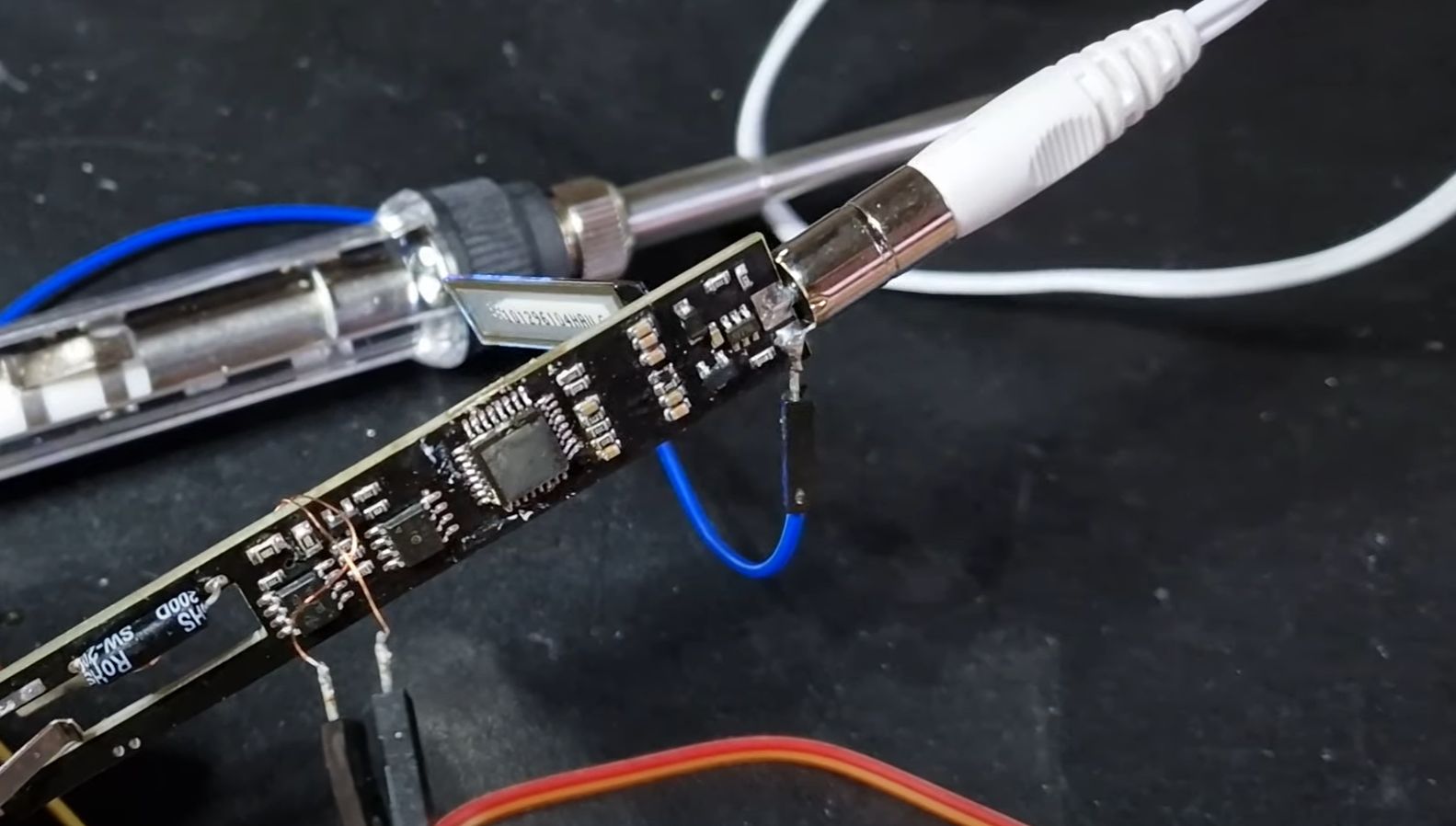
The hacked portable soldering iron discussed by the electronics community uses an STC 8051-family system-on-chip. The chip markings were reportedly removed from the board, which is not exactly a warm handshake from the manufacturer. Still, reverse engineering showed that the device used an STC8H-series 8051-based microcontroller, a modern descendant of the classic 8051 architecture.
The 8051 architecture has been around for decades, but it refuses to retire. It is the embedded world’s equivalent of that one old pickup truck that still starts every winter. Modern 8051-compatible microcontrollers can be inexpensive, compact, and fast enough for control tasks such as reading sensors, driving displays, scanning buttons, and managing heater output. For a soldering iron, that is plenty of computing power.
The specific custom firmware project associated with this iron was written in C and built with PlatformIO and SDCC, a toolchain that supports 8051 development. The public repository describes the firmware as a basic proof of concept rather than a polished daily-driver replacement. That matters. This is not a finished commercial firmware package with a big shiny “Install Now” button. It is closer to a lab notebook that says, “Yes, the chip can be identified, programmed, and made to control the iron.”
What Custom Firmware Can Improve
The first question is obvious: why bother? If the iron already melts solder, why reprogram it? The answer is that melting solder is only the opening act. A good portable soldering iron should feel responsive, predictable, and safe. Custom firmware can potentially improve several areas.
1. Temperature Control
Temperature control is the heart of the project. A soldering iron tip loses heat when it touches a joint, especially a large copper pad or connector. The firmware must notice the drop and apply more power. If it reacts too slowly, soldering feels frustrating. If it reacts too aggressively, the tip may overshoot and run hotter than expected.
Many temperature-control systems use proportional, integral, or derivative-style logic, often grouped under the familiar PID concept. In plain English: measure the difference between the target temperature and real temperature, then decide how hard to drive the heater. For a cheap iron, even modest improvements to the control loop can make the tool feel more expensive than it is.
2. User Interface
Budget tools often suffer from “mystery button syndrome.” You press once and something happens. Hold it and something else happens. Press both buttons and the device enters a menu written by a sleep-deprived calculator. Custom firmware can simplify the interface by making temperature changes, sleep settings, boost mode, and calibration easier to understand.
A better interface does not need to be fancy. It just needs to be predictable. A small display can show set temperature, live temperature, input voltage, power state, and warning messages. That is enough to turn a cheap iron from a guessing game into a useful field tool.
3. Sleep and Safety Behavior
A smart soldering iron should know when to calm down. Sleep mode can reduce the tip temperature after inactivity, helping extend tip life and lowering burn risk. Auto-shutdown can add another layer of protection. These features are especially valuable in portable tools because they are often used on crowded benches, at repair events, or in improvised workspaces where the “stand” might be whatever is not currently on fire.
4. Calibration and Consistency
Cheap tools can vary from unit to unit. One iron set to 350°C might behave differently from another set to the same number. Custom firmware can include calibration options that let users tune the displayed temperature closer to reality. That does not magically turn a €15 iron into a laboratory instrument, but it can make the tool more trustworthy.
The Reverse-Engineering Appeal
Reverse engineering a soldering iron is oddly satisfying because the device is simple enough to understand but complex enough to teach real embedded lessons. You are dealing with power electronics, thermal response, microcontroller pins, firmware flashing, display control, button logic, and safety behavior. It is a full embedded system hiding inside a handle.
The original exploration involved identifying the microcontroller, mapping enough of the board to understand the relevant signals, and building a small firmware example to prove that the chip could be controlled. That is a classic hardware-hacking workflow. First, observe. Then identify. Then document. Then write the smallest possible program that proves you are not hallucinating.
The humor here is that the soldering iron becomes both the subject and the tool of the project. You may need a soldering iron to modify the soldering iron, which feels like asking a printer to print its own repair manual. Still, this is precisely the kind of recursive tinkering that makes hardware hacking fun.
8051 Firmware Development: Old Core, Modern Workflow
The 8051 may be vintage, but the workflow does not have to feel like programming in a cave by candlelight. PlatformIO provides a modern project structure, while SDCC supports C development for 8051-family microcontrollers. That combination makes the project more approachable for people who are used to contemporary embedded development.
Writing firmware for a small 8-bit microcontroller is also a useful discipline. There is less room for waste. You think about memory, timing, interrupts, and direct hardware control. You do not casually import a mountain of libraries to blink an icon. The chip will not applaud your abstraction layers. It wants efficient code and clear intent.
For a soldering iron, the firmware loop might include reading an analog temperature signal, comparing it with the target, updating heater control, checking buttons, refreshing the display, and managing timers for sleep or shutdown. The concept is straightforward, but the quality is in the details. Thermal systems are slow enough to be manageable and fast enough to punish sloppy control.
How This Compares With IronOS and Pinecil
The broader smart soldering iron scene has already shown what good firmware can do. IronOS, originally associated with the TS100 ecosystem and later expanded to other devices, supports features such as configurable power behavior, temperature settings, boost mode, language support, and device-specific hardware options. Pinecil also helped popularize the idea that a soldering iron can be open, affordable, and actively improved by its community.
The €15 8051-based iron is more limited and less polished, but that is exactly why it is interesting. It represents the lower edge of the market: the bargain-bin device that still contains enough intelligence to be worth studying. While a supported IronOS device may be the better choice for daily work, the cheap 8051 iron is a more mischievous classroom.
Think of it this way: buying a polished open-source iron is like getting a reliable bicycle. Hacking the €15 iron is like finding a bicycle in a hedge and discovering it has a tiny computer taped under the seat. One is practical. The other is a story.
Safety: The Part That Should Not Be Skipped
Firmware experiments on a heating tool deserve caution. A soldering iron can burn skin, damage components, melt plastic, start a fire, or quietly sit at a dangerous temperature while everyone assumes it is “probably fine.” Custom firmware should never be treated as harmless just because the device is small.
Anyone experimenting with soldering iron firmware should use a stable power supply, proper ventilation, eye protection, a heat-resistant stand, and a realistic understanding that bugs can become hot very quickly. A firmware mistake in a blinking LED project gives you a weird blink. A firmware mistake in a heater project gives you a tiny metal dragon.
This is also why a proof-of-concept firmware should be treated as educational unless it has been carefully tested. Thermal runaway protection, input voltage checks, sleep behavior, and shutdown routines are not luxury features. They are the boring guardians that keep the exciting parts from becoming expensive smoke.
Why the Project Matters
The real value of this custom firmware effort is not that everyone should rush to reflash a €15 soldering iron. The value is that it shows how much embedded intelligence now lives in ordinary tools. A device that used to be a heating element with a handle is now a tiny control system. When that system is closed and undocumented, users are stuck with whatever behavior shipped from the factory. When it is understood and opened, users can learn, modify, and improve.
This project also highlights the strange economics of modern electronics. For less than the cost of a decent lunch in many cities, you can buy a portable soldering iron with a microcontroller, display, case, buttons, power electronics, and a heater cartridge. That low price is impressive, but it often comes with trade-offs: minimal documentation, inconsistent firmware quality, unknown component choices, and mystery design decisions.
Open documentation helps balance those trade-offs. A pinout, wiring notes, sample firmware, and build environment can turn a disposable gadget into a platform. Even if the original developer does not continue the project, the published work gives others a starting point.
Practical Lessons for Makers and Repair Enthusiasts
There are several practical lessons hiding inside this project. First, cheap hardware is not always bad hardware. Sometimes it is capable hardware held back by rushed firmware. Second, reverse engineering is most useful when it is documented clearly. A private breakthrough is fun; a public repository can help an entire community.
Third, firmware quality matters as much as component choice. A high-wattage heater with clumsy control can feel worse than a modest heater with intelligent firmware. Fourth, open-source tools lower the barrier to experimentation. PlatformIO, SDCC, and public firmware examples make 8051 development less intimidating than it used to be.
Finally, safety must be part of the design, not a paragraph added after the excitement. Any firmware that controls heat should fail safely, communicate clearly, and avoid assuming that users will always do the perfect thing. Spoiler: users will not. Users will answer the door, bump the bench, forget the iron is on, and occasionally place a cable exactly where a cable should not be.
Experience Notes: What It Feels Like to Hack a Cheap Smart Soldering Iron
Working on a project like Hacking A €15 8051-Based Portable Soldering Iron With Custom Firmware feels different from ordinary embedded development. With a normal dev board, the stakes are low. If the code crashes, maybe an LED stops blinking. With a soldering iron, the firmware is controlling heat, and heat has opinions. It wants to spread, discolor things, and remind you that physics does not care about your Git commit message.
The first experience is curiosity. You open the handle and immediately start asking questions. What chip is this? Why are the markings missing? Which pins go to the buttons? How is the tip temperature measured? Is the display driven directly or through a small controller? Is the heater switched by a MOSFET? Is there any input protection, or is the circuit living dangerously like a raccoon in a transformer box?
The second experience is respect. Even a cheap device represents dozens of design choices. Some are clever, some are compromises, and some make you stare silently for a few seconds. Budget electronics often have a ruthless elegance: every part must justify its existence. There is no room for unnecessary luxury. If a resistor could do two jobs, it may be doing three and looking tired.
The third experience is humility. Firmware that seems simple on paper becomes more complicated when connected to real hardware. Temperature readings may be noisy. Buttons may bounce. The display may flicker if timing is sloppy. The heater may respond more slowly than expected, then suddenly overshoot like it remembered an appointment. Good firmware is less about writing heroic code and more about patiently taming dozens of small annoyances.
The fourth experience is appreciation for mature projects. After touching a bare proof-of-concept firmware, it becomes easier to respect full-featured projects such as IronOS. Menus, calibration, safety timers, power negotiation, translations, boost modes, and hardware profiles do not appear by magic. They are built through testing, bug reports, edge cases, and many small improvements that users only notice when they are missing.
The fifth experience is the joy of making a tool more personal. A soldering iron is already a maker’s tool, but custom firmware makes it feel like a tool that has joined the conversation. You can decide how it wakes, sleeps, displays information, and responds. Even if the result is not perfect, the process teaches you how embedded systems blend software with the physical world.
The best advice from this kind of experience is simple: treat the project as learning first and upgrading second. Document everything. Keep changes small. Test behavior carefully. Respect heat. Do not assume that cheap means simple, and do not assume that simple means safe. A €15 smart soldering iron may be inexpensive, but it contains enough engineering to keep a curious person busy for many evenings.
Conclusion
Hacking a €15 8051-based portable soldering iron with custom firmware is a perfect example of why hardware tinkering remains so addictive. It combines mystery, practicality, embedded programming, thermal control, and just enough risk to keep everyone honest. The project shows that even bargain tools can contain capable microcontrollers and that firmware can dramatically shape the user experience.
For everyday soldering, a well-supported smart iron may still be the better choice. But as an educational project, this little 8051-based iron is wonderful. It teaches how smart tools work, why documentation matters, and how open firmware can transform a cheap gadget into a platform for experimentation. Not every hack needs to produce a commercial-grade tool. Sometimes the real win is understanding the device well enough to make it blink, heat, behave, and reveal its secrets.
SEO Tags