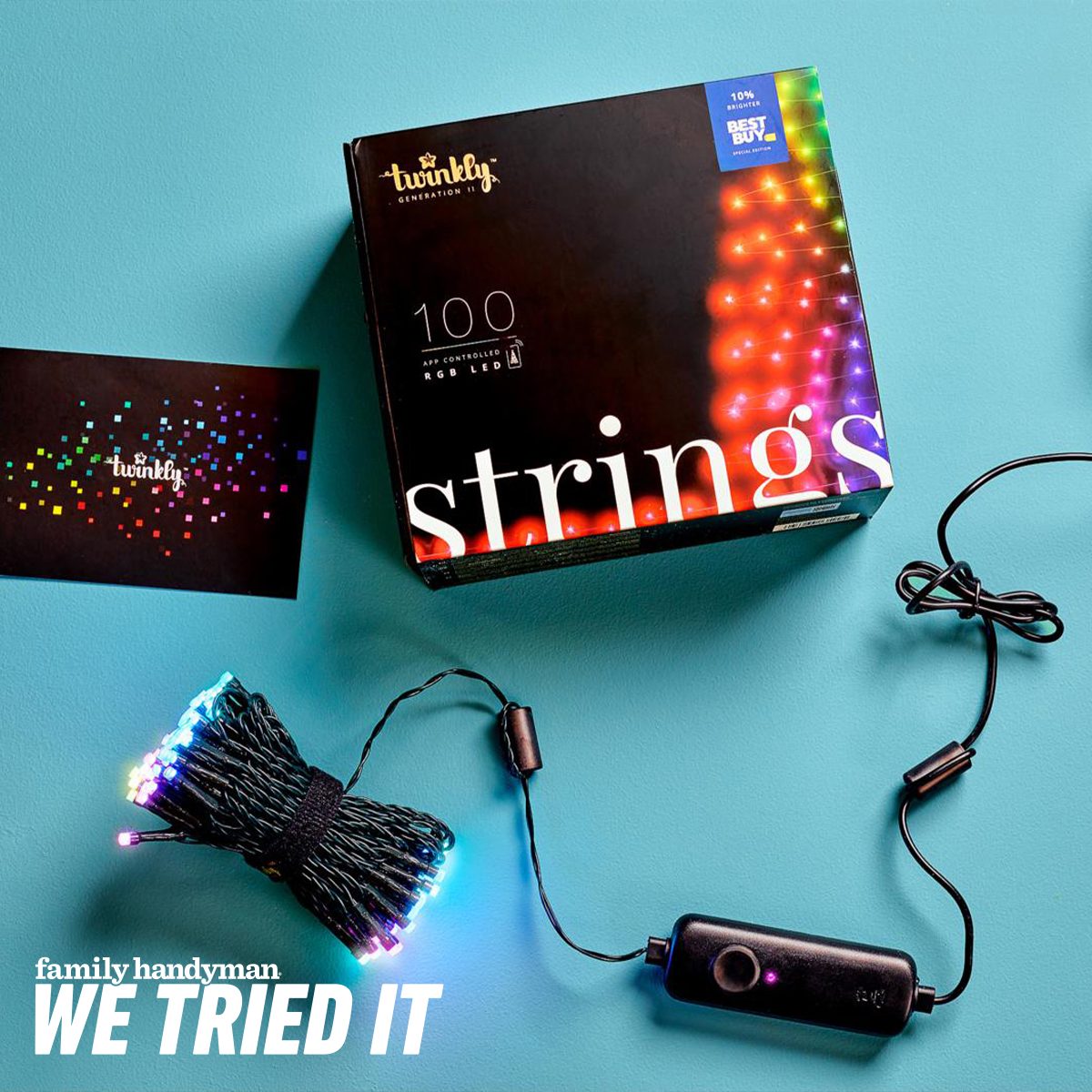

Traditional Christmas lights are charming, but their creative range usually stops at “steady,” “blinking,” and “blinking fast enough to alarm the cat.” Twinkly Smart Christmas Lights promise something far more ambitious: individually controlled LEDs, animated effects, custom color palettes, voice commands, and camera-based light mapping that turns an ordinary tree into a programmable display.
We tried Twinkly lights on a seven-foot artificial Christmas tree, explored the app, mapped the bulbs, customized effects, and lived with the system through everyday holiday use. The verdict is bright, colorful, and slightly complicated. Twinkly produces some of the most impressive smart Christmas lighting effects available, but the premium price and occasional Wi-Fi fussiness mean these lights are best for people who genuinely enjoy customization.
What Are Twinkly Smart Christmas Lights?
Twinkly Strings are app-controlled LED Christmas lights designed for indoor and outdoor decorating. Instead of treating the entire strand as a single lighting zone, Twinkly can control each LED individually. That makes it possible to display moving gradients, stripes, sparkles, waves, flags, pixel-style images, and other effects that flow across the physical arrangement of the bulbs.
The product line includes different string lengths, LED counts, cord colors, and color profiles. RGB models produce more than 16 million colors, while RGB+W versions add dedicated white LEDs for a cleaner, more traditional white-light appearance. Depending on the model, shoppers can find strings ranging from compact 100-light sets to much larger 400- and 600-light configurations.
Generation II models connect through Bluetooth during setup and then use 2.4GHz Wi-Fi for everyday control. Most larger Generation II strings split into two branches with the controller near the center. This design can make tree installation easier, although it may feel unusual if you are accustomed to one long strand that begins at the plug.
Twinkly Smart Christmas Lights at a Glance
| Lighting technology | Individually addressable smart LEDs |
|---|---|
| Color options | RGB multicolor or RGB+W, depending on model |
| Connectivity | Bluetooth and 2.4GHz Wi-Fi |
| App features | Camera mapping, preset effects, custom designs, timers, playlists, brightness control, and device grouping |
| Smart-home support | Amazon Alexa, Google Assistant, and Apple HomeKit on compatible Generation II products |
| Outdoor rating | Common Strings models are IP44-rated; verify the specific package before outdoor installation |
| Music synchronization | Available with the separately sold Twinkly Music accessory |
| Best for | Creative decorators who want animated, highly customizable holiday lighting |
Setting Up the Twinkly Christmas Lights
Wrapping the Tree
Physically installing Twinkly lights is much like hanging any other strand, with one important difference: even spacing improves the final animations. The app can compensate for an imperfect layout, but it cannot magically move three bulbs that have formed a secret committee behind the tree.
We tested a 250-light configuration on a slim seven-foot tree. It provided respectable coverage, especially when the lights were distributed near the outer branches. For a full-width tree of similar height, 400 lights would create a richer display, while 600 would suit anyone pursuing the “visible from low Earth orbit” aesthetic.
Before wrapping, locate the controller and determine how both branches of the string will travel around the tree. Keep the controller accessible because its physical button is used during pairing and can cycle through stored effects later.
Connecting the Twinkly App
After plugging in the lights, we downloaded the Twinkly app, enabled Bluetooth, and followed the prompts to add a Generation II device. Bluetooth handles the initial discovery, after which the lights join the home Wi-Fi network.
Twinkly requires 2.4GHz Wi-Fi. That is not unusual for smart-home equipment, but it may create a speed bump on routers that combine 2.4GHz and 5GHz bands under one network name. If pairing fails, moving closer to the router or temporarily separating the Wi-Fi bands may help.
Once connected, the app can install firmware updates, name the device, adjust brightness, create schedules, and link supported voice assistants. The initial setup was manageable, but it involved more steps than plugging traditional lights into a timer. These are Christmas lights with a software onboarding process, which is either delightful or deeply suspicious depending on your relationship with technology.
The Feature That Makes Twinkly Different: Light Mapping
Twinkly’s camera-based mapping system is the reason its animated effects look coordinated rather than random. During mapping, the LEDs flash through a sequence while the phone’s camera identifies their positions. The app then creates a virtual representation of the display.
A quick, single-angle scan works for flat installations such as a wall, window, or railing. A tree benefits from multiview mapping, which records the lights from several angles and creates a more complete three-dimensional layout.
We achieved the best results by dimming the room, reducing reflections, stepping several feet away, and holding the phone steady. Mapping can be repeated if part of the tree looks inaccurate. It is worth spending a few extra minutes here because effects such as diagonal stripes, sweeping gradients, and falling snow depend heavily on an accurate bulb map.
Watching the app locate individual LEDs feels surprisingly futuristic. One moment, the tree is a collection of unrelated points; the next, it behaves like a low-resolution screen wrapped around pine branches.
Using the Twinkly App and Custom Effects
The app’s Effects Gallery includes numerous still and animated designs. Seasonal choices range from warm gold sparkles to red-and-green waves, while rainbow gradients and saturated color patterns work for parties or year-round decorative lighting.
Many effects allow adjustments to color, speed, angle, scale, and brightness. That flexibility matters because an animation that looks elegant at 30% speed can resemble an airport runway emergency at 100%.
Twinkly also lets users create effects with templates, draw across the mapped layout using a fingertip, or import GIFs. Complex images will not look television-sharp on a loosely wrapped tree, but simple symbols and bold animations can be surprisingly recognizable. Gradient, stripe, sparkle, and color-block effects generally produce the strongest results.
Multiple Twinkly products can be grouped virtually in the app, allowing compatible strings, curtains, icicle lights, and other fixtures to participate in a coordinated installation. They do not need to be physically daisy-chained to share an effect.
Brightness and Color Quality
Brightness is one of Twinkly’s strengths. The LEDs remain vivid even in a moderately lit room, and their small housings disappear reasonably well among green branches. At night, full brightness can be intense, so the app’s dimming control is more useful than it may initially sound.
Colors are saturated and distinct. Reds look red rather than orange, blues are rich, and mixed-color animations have enough contrast to remain visible across the tree. RGB models can approximate white by combining colors, but buyers who prefer classic warm-white Christmas lights should consider an RGB+W version with a dedicated white channel.
Animated effects move smoothly when the Wi-Fi connection is stable. Because an applied effect can be stored on the controller, the lights do not require the phone to remain open continuously. The physical controller button also provides basic operation when opening an app feels like one holiday task too many.
Smart-Home Controls, Timers, and Music
Compatible Generation II lights work with Amazon Alexa, Google Assistant, and Apple HomeKit. Voice control is convenient for turning the display on or off and changing brightness, but the Twinkly app remains the main destination for selecting and designing sophisticated effects.
The built-in timer can automate daily operation, while playlists can rotate through several effects. These tools are useful for preventing a single frenetic rainbow animation from running for six straight hours and causing visiting relatives to question your judgment.
Music synchronization requires the optional Twinkly Music dongle. The accessory listens to nearby audio and adapts effects to the beat. It can be entertaining during a party, but it is not essential for a tree that primarily provides ambient holiday lighting.
Can Twinkly Lights Be Used Outdoors?
Many Twinkly Strings models carry an IP44 rating, meaning they can tolerate splashing water but should not be submerged or treated as fully waterproof. They can be used on sheltered porches, shrubs, railings, and exterior trees when installed according to the manufacturer’s instructions.
Keep the plug and electrical connections in an appropriately protected outdoor receptacle or weatherproof enclosure. Avoid low areas where water collects, inspect the cable before each season, and confirm that the exact model is approved for outdoor use. Smart features are impressive, but electricity remains stubbornly unimpressed by holiday enthusiasm.
What We Liked
- Excellent animated effects: Mapping allows patterns to move logically across the tree instead of flashing randomly.
- Deep customization: Users can change colors, speed, brightness, direction, and scale or design an effect from scratch.
- Strong color and brightness: The LEDs look vibrant during both daytime and nighttime viewing.
- Flexible installations: Twinkly Strings can decorate trees, walls, railings, windows, and outdoor spaces.
- Expandable platform: Multiple Twinkly devices can be grouped into a synchronized display.
- Useful smart controls: Timers, playlists, voice commands, and remote app control make daily operation convenient.
What Could Be Better
- Premium pricing: Twinkly costs considerably more than conventional LED Christmas lights.
- Wi-Fi limitations: The requirement for a 2.4GHz network can complicate setup on some modern routers.
- App learning curve: The large number of effects and editing controls may initially feel busy.
- Mapping requires patience: A rushed or obstructed camera scan can produce awkward animations.
- Music hardware costs extra: Music synchronization is not built directly into standard Strings models.
- Not fully waterproof: IP44 protection is suitable for splashes, but outdoor connections still need careful shelter.
Are Twinkly Smart Christmas Lights Worth It?
Twinkly lights are worth considering if holiday decorating is a creative project rather than a checkbox. They offer substantially more control than ordinary color-changing lights, and the mapping technology produces effects that less advanced strands cannot easily duplicate.
They make the most sense for smart-home enthusiasts, enthusiastic holiday decorators, party hosts, and families who will enjoy creating new designs together. They are harder to justify for anyone who wants one warm-white setting and plans never to touch it again. A simple LED strand and an outlet timer can perform that job for far less money.
Compared with popular alternatives, Twinkly’s strongest advantage is its effect engine and layout mapping. Some competing smart lights are cheaper or include built-in microphones, while systems such as Philips Hue may integrate more naturally into an existing whole-home lighting setup. Twinkly is the better choice when the light show itself is the priority.
Our Extended Experience With Twinkly Smart Christmas Lights
Living With the Lights After the Initial Excitement
The real test began after setup, once we stopped staring at the Effects Gallery like children who had discovered a button labeled “launch fireworks.” During the first evening, we tried nearly every preset. Some were elegant, some were wonderfully excessive, and a few made the tree look as though it had consumed an energy drink.
For everyday use, subtle effects became the favorites. A slowly moving warm-gold sparkle created a traditional atmosphere without looking static. A red-and-white diagonal pattern produced an effective candy-cane design, while a deep blue gradient worked well during movie nights. Lowering brightness to roughly half made the display more comfortable in a dark room and prevented reflections from dominating the television.
The schedule quickly became one of the most practical features. We configured the lights to turn on in the late afternoon and shut down before bedtime. After that, the tree largely managed itself. Voice commands were convenient when we wanted a quick on-or-off response, although choosing specific animations was still easier inside the Twinkly app.
Our first multiview map was acceptable but not perfect. A section near the back appeared compressed in the virtual layout, causing one stripe effect to bend strangely around the tree. We remapped with more space around the phone and paused at each angle. The second result was noticeably better, confirming that mapping quality matters more than perfectly symmetrical wrapping.
We also learned that not every imported image deserves to become a Christmas-tree animation. Simple graphics with bold shapes worked reasonably well. Detailed photographs became colorful oatmeal. The tree has hundreds of LEDs, not millions of pixels, so restraint wins. Custom gradients and finger-drawn patterns were easier to create and looked more polished.
Family Reactions and Real-World Convenience
Guests immediately noticed the lights. Most initially assumed the patterns depended on carefully placing specific colors in precise rows. Demonstrating the camera map and switching effects from a phone generated the sort of attention normally reserved for desserts arriving at the table.
Children enjoyed selecting colors and drawing designs, while adults gravitated toward warm, slower animations. This revealed an unexpected strength: one set of lights can satisfy dramatically different decorating tastes. The tree can appear restrained during dinner, playful during a party, and aggressively rainbow-colored whenever a six-year-old gains temporary administrative privileges.
The dark cord blended well with the artificial branches, but the controller and power hardware required planning. Keeping the controller accessible made troubleshooting easier, yet leaving it fully exposed looked untidy. We tucked it near the lower rear portion of the tree where it remained reachable without becoming part of the display.
Connectivity was generally stable once setup was complete. The app occasionally took an extra moment to find the device after the phone had changed networks, but the stored animation continued running. That distinction is important: a temporary app connection problem does not necessarily turn the tree dark.
Taking everything together, Twinkly transformed the tree more dramatically than swapping one conventional light color for another. The system rewarded experimentation and became easier to use once we selected a handful of favorite effects. We would recommend it to decorators who will explore the creative tools, reuse the lights for several seasons, and tolerate a little networking housekeeping in exchange for an unusually impressive display.
Final Verdict
Twinkly Smart Christmas Lights deliver on their central promise. The individually addressable LEDs are bright, the animations are smooth, and the camera-based mapping system creates effects that look genuinely designed for the shape of the installation.
The price is high, setup is more involved than with ordinary lights, and 2.4GHz Wi-Fi may demand troubleshooting. Nevertheless, Twinkly remains an excellent premium option for anyone who wants customizable Christmas lights rather than another basic blinking strand. Once the tree starts displaying flowing stripes, layered gradients, and personalized effects, conventional lights suddenly seem a little underqualified.
Editorial note: Product sizes, prices, app functions, compatibility, and available effects may change. Confirm the specifications and indoor/outdoor rating of the exact Twinkly model before purchasing or installation.