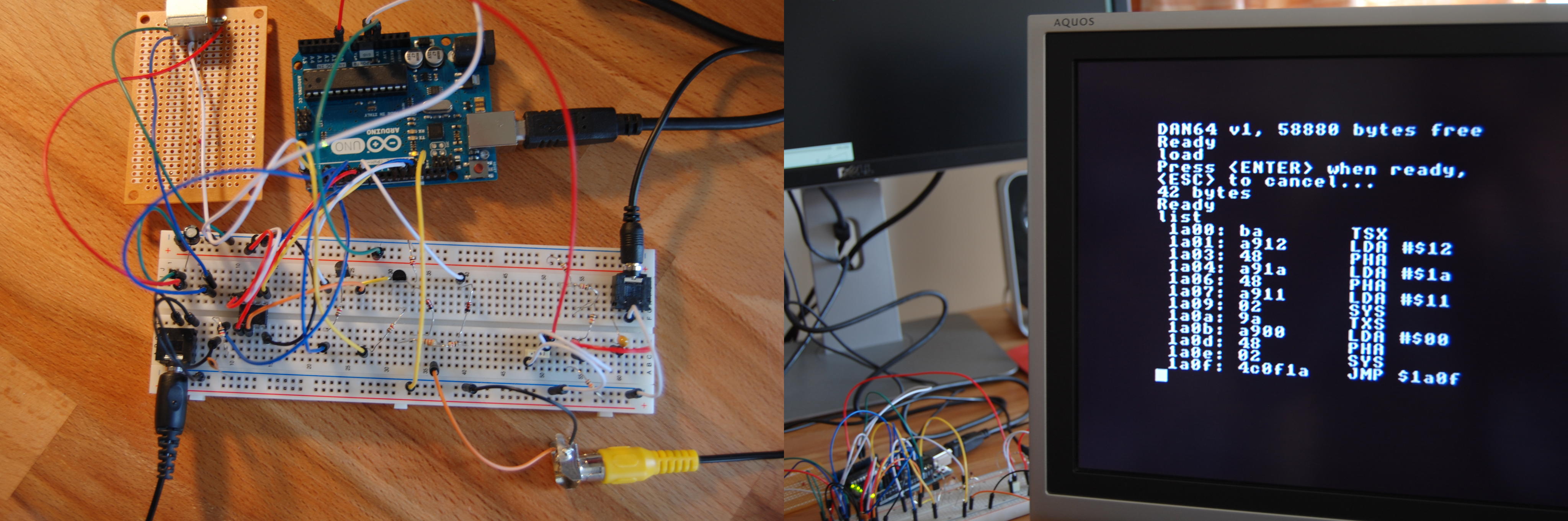

The Dan64 is the kind of project that makes modern hardware feel slightly overfed. In an age where a “simple” development board often arrives with Wi-Fi, Bluetooth, a floating-point unit, a USB stack, a camera interface, and enough marketing stickers to tile a kitchen backsplash, the Dan64 walks in wearing a plain T-shirt and says, “I brought an 8-bit microcomputer.”
And somehow, that is more exciting.
Created by Juan J. Martinez, the Dan64 is an open hardware and open software experiment built around the humble ATmega328 microcontrollerthe same AVR chip family associated with the classic Arduino Uno. With only a small set of supporting parts, including external SPI SRAM, simple composite video circuitry, and a PS/2 keyboard connector, the Dan64 becomes a tiny retro-style computer that can display text, accept keyboard input, load programs, and run code through a 6502 virtual machine.
In other words, it is not just a microcontroller blinking an LED and asking for applause. It behaves like a small personal computer, the sort of thing that would have looked perfectly at home next to a stack of cassette tapes and a beige television in 1982.
What Is the Dan64?
The Dan64 is a minimal hardware AVR microcomputer designed to recreate the spirit of early 8-bit home computers using modern, inexpensive parts. Its name hints at a classic 64KB address-space world, but its brain is not a vintage MOS 6502 chip. Instead, the system uses an ATmega328-based AVR microcontroller and runs a 6502 virtual machine in firmware.
That choice is clever. A real 6502 computer usually needs a CPU, RAM, ROM, glue logic, input circuitry, video hardware, and storage support. The Dan64 compresses much of that personality into software. The AVR handles the system services, video generation, keyboard input, audio storage routines, and the virtualized 6502 environment. It is a microcomputer built with the restraint of a camping stove and the ambition of a small arcade cabinet.
The Dan64 can be assembled on a breadboard using an Arduino Uno board, making it approachable for hobbyists who already have basic AVR tools. Its general feature set includes black-and-white composite video output, PS/2 keyboard support, a 6502 virtual machine, linear 64KB memory access from the VM, audio input/output for storage, a basic command shell, and integrated assembler/disassembler tools.
Why the ATmega328 Makes This Project Interesting
The ATmega328P is not a monster chip. It has 32KB of flash memory, 2KB of SRAM, 1KB of EEPROM, digital I/O, timers, SPI, I2C, USART, and enough personality to keep generations of Arduino projects alive. On paper, it looks modest. In practice, modesty is exactly what makes the Dan64 fascinating.
Most microcomputer projects solve problems by adding hardware. Need more memory? Add RAM. Need video? Add a display controller. Need input? Add an interface chip. Need storage? Add an SD card. The Dan64 goes in the opposite direction. It asks how much can be done with the fewest parts before the laws of timing, memory, and sanity start throwing furniture.
The answer is: more than expected, but not for free.
The ATmega328 must juggle time-sensitive jobs. Composite video requires carefully timed signals. Keyboard input depends on reliable interrupt handling. Program storage over audio needs decoding logic. The 6502 virtual machine needs cycles to execute user programs. This is like asking one person to cook dinner, play drums, translate Latin, and keep a cat away from a soldering iron. It can work, but only with discipline.
The Minimal Hardware Philosophy
The Dan64’s hardware is intentionally lean. The core arrangement includes an Arduino Uno or compatible ATmega328 setup, external SPI SRAM, a few transistors and passive components for composite video output, and a PS/2 keyboard connector. That is the charm: it looks less like a commercial computer motherboard and more like a dare.
External SRAM is essential because the ATmega328’s internal 2KB SRAM is far too small for a comfortable microcomputer environment. The Dan64’s virtual machine presents a 64KB memory space, including page zero, stack, video RAM, and user program memory. The project’s layout reserves part of memory for video and leaves the rest for user programs.
This gives programmers a familiar 8-bit target. If you understand old-school memory maps, peek and poke commands, and the delicious danger of writing directly into memory, the Dan64 feels like a tiny laboratory for computing fundamentals.
Composite Video: Retro Output With Real Timing Drama
The Dan64 produces black-and-white composite video, with a 256 x 192 pixel display and a 32 x 24 character text mode using an 8 x 8 font. That may sound tiny compared with modern 4K screens, but for a breadboard computer, it is luxurious. It is enough for a shell, text programs, small games, memory dumps, and the kind of blocky graphics that make retro fans nod approvingly.
Composite video generation on an AVR is a timing-sensitive trick. The microcontroller must toggle pins at very precise intervals to create a signal a television can understand. PAL timing, de-interlaced output, and character rendering all demand reliable interrupts and predictable execution. This is where the Dan64 becomes more than a novelty. It demonstrates how software can replace dedicated display hardware, but also why old computers used specialized chips when they could afford them.
One practical limitation is that the system cannot always do everything at once. During audio loading and saving, video output may need to be disabled because the AVR has to focus on decoding or generating storage signals. That is not a flaw so much as an honest design trade-off. The machine is telling you, politely, that it has only two hands.
PS/2 Keyboard Input: Simple, Durable, and Delightfully Unfashionable
The Dan64 uses a PS/2 keyboard rather than USB. This is a smart choice for a minimal 8-bit-style computer. USB host support is complex and would drag the design away from its tiny-hardware mission. PS/2, by contrast, uses clock and data lines and is much easier to manage directly from a microcontroller.
There is also something emotionally correct about typing into a retro microcomputer with a PS/2 keyboard. USB keyboards feel like they belong to operating systems, device descriptors, and firmware updates. PS/2 keyboards feel like they belong to scancodes, interrupts, and late-night debugging.
The Dan64 documentation notes support for a UK PS/2 keyboard layout, which can be adapted if needed. That detail matters because keyboard layout is not just a cosmetic setting on a machine like this. At this level, keys become scancodes, scancodes become translation tables, and suddenly the question mark key is a tiny international incident.
The 6502 Virtual Machine: A Beautiful Shortcut
The Dan64’s most interesting software decision is its 6502 virtual machine. Instead of using a physical 6502 processor, the AVR emulates one. This allows the system to expose a familiar 6502 programming model while keeping the hardware minimal.
Why emulate the 6502? Because the 6502 is one of the great old workhorses of personal computing. It powered or influenced systems such as the Apple II, Commodore PET, VIC-20, Commodore 64, Atari 8-bit computers, and the Nintendo Entertainment System. It has a simple instruction set, a 16-bit address space, and a huge body of documentation, tools, and community knowledge.
By targeting a 6502 VM, Dan64 users can write assembly programs in a familiar environment. They can also take advantage of cross-development tools such as cc65, which provides a C compiler, assembler, linker, and related utilities for 6502-based systems. That makes the Dan64 more practical than it first appears. You can develop code on a modern computer, assemble or compile it, then load it into the Dan64 environment.
The VM approach is also philosophically elegant. The AVR becomes both host and illusionist. It is not pretending to be a full Commodore 64, but it borrows the spirit of that era: direct memory access, simple commands, visible constraints, and the sense that every byte has rent to pay.
Audio Storage: Cassette Vibes Without the Cassette Tantrum
Storage on the Dan64 is handled through audio input and output. This recalls the cassette-based storage systems used by many early home computers, although the Dan64 does not simply clone the Kansas City Standard. Instead, it uses audio pulses to encode data in a minimal way that reduces external hardware requirements.
For modern users, audio storage may sound hilariously inconvenient. Why not use an SD card? Why not USB? Why not Wi-Fi? Why not summon the program from the cloud while a smart refrigerator judges your snack choices?
The answer is that audio storage fits the design goal. It is simple, cheap, understandable, and historically appropriate. It also teaches an important lesson: data is not magic. Data can be voltage, sound, timing, pulses, and patience. Loading a program through audio makes the invisible visibleor at least audible.
The Dan64 documentation warns that audio input may require high volume and tuning. That is part of the fun, depending on your definition of fun. Retro computing often includes a small ritual of adjustment: volume up, try again, cable wiggle, suspicious glance at ground connection, triumphant load.
The Built-In Shell, Assembler, and Disassembler
The Dan64 includes a basic shell with commands such as peek, poke, load, and run. This is exactly the kind of interface that makes old microcomputers feel alive. You are not separated from the machine by layers of icons and permissions. You type commands, inspect memory, alter values, and immediately see consequences.
The integrated assembler and disassembler are especially useful. They let users write or inspect 6502 code directly on the machine. This turns the Dan64 from a passive demo into an educational platform. It is not only a device that runs programs; it is a device that encourages you to understand what programs are.
For students and hobbyists, that is gold. Modern programming environments are powerful, but they hide many fundamentals. The Dan64 puts the fundamentals back on the table: memory maps, opcodes, registers, stack behavior, display buffers, interrupts, and I/O timing. It is computer science with the upholstery removed.
How the Dan64 Compares With Other Retro Microcomputer Builds
Many retro-style builds use a real 6502 processor, separate RAM, EEPROM, VIA interface chips, clock circuitry, and sometimes additional video hardware. Those projects are fantastic, especially for learning bus architecture. They show how a CPU talks to memory and peripherals across address and data lines.
The Dan64 takes a different route. It is less about recreating the exact electrical architecture of an old machine and more about recreating the experience of programming one. It trades hardware authenticity for minimalism. Instead of wiring a full 6502 bus, you get a compact AVR-hosted environment that still exposes 6502-style software concepts.
That makes it especially attractive for builders who want a small, approachable project. A full 6502 breadboard computer can become a majestic wire forest. The Dan64 keeps the bill of materials lower and the wiring simpler. It is not necessarily easier in software terms, but it is physically less intimidating.
What the Dan64 Teaches
1. Constraints Create Better Understanding
When memory is limited, every buffer matters. When CPU time is scarce, every interrupt matters. When video generation depends on precise timing, sloppy code stops being an abstract problem and starts becoming a rolling mess on the screen. The Dan64 makes constraints educational instead of annoying.
2. Hardware and Software Are Not Separate Worlds
On a modern computer, software developers can go years without thinking about voltage levels. On the Dan64, that luxury disappears. A program, a memory map, a video signal, and a keyboard interrupt all share the same tiny stage. You begin to understand why hardware-aware programming matters.
3. Retro Computing Is Still Relevant
The point of a project like this is not nostalgia alone. Retro machines are understandable in a way modern systems often are not. You can hold the Dan64 design in your head. You can trace a keypress. You can reason about a screen character. That clarity is rare and valuable.
Who Should Build or Study the Dan64?
The Dan64 is ideal for hobbyists who enjoy AVR microcontrollers, Arduino Uno experimentation, retro computing, 6502 assembly, breadboard electronics, and minimalist design. It is also a strong educational project for people who want to understand how early personal computers worked without immediately diving into a large multi-chip build.
It may not be the best first electronics project. Beginners should be comfortable with basic wiring, microcontroller flashing, serial tools, and reading schematics. However, it is a wonderful second or third serious project because it connects many topics at once: video timing, memory expansion, input protocols, audio encoding, virtual machines, and low-level programming.
If your ideal weekend includes jumper wires, a slightly suspicious display signal, and the emotional roller coaster of making a keyboard talk to a tiny computer, the Dan64 is absolutely your kind of weird.
Practical Experiences With a Minimal AVR Microcomputer
Working with a machine like the Dan64 feels different from using a polished development board demo. The first lesson is patience. Minimal hardware projects do not always fail loudly. Sometimes they fail by doing almost nothing, which is somehow more insulting. A blank video screen might mean a wiring mistake, a timing issue, a PAL/NTSC mismatch, a bad ground, a loose jumper, or simply that the universe has chosen comedy.
The best approach is to build slowly. Start with power and ground. Confirm the AVR or Arduino Uno is programmable. Add the SRAM and test communication if possible. Add video circuitry and verify output before worrying about keyboard input. Then add the PS/2 keyboard and storage path. A minimal system rewards incremental testing because every new wire is a potential plot twist.
Another practical lesson is that old interfaces are friendly only after you respect them. PS/2 is simpler than USB, but it still expects correct timing and proper pullups. Composite video is electrically simple compared with HDMI, but the timing must be tight. Audio storage may use ordinary cables, but volume level and waveform quality matter. The Dan64 reminds builders that “simple” does not mean “careless.” It means the complexity has moved into timing, signal quality, and software discipline.
Programming for the Dan64 is also a refreshing mental reset. On a desktop computer, wasting a few kilobytes is not even a misdemeanor. On an 8-bit-style system, it is a lifestyle choice with consequences. You begin to think about where data lives, how much screen memory costs, and whether a feature deserves its bytes. Even a tiny demo program can feel satisfying because it is not floating in an ocean of abstraction. It is running in a small, visible world.
There is also a special joy in direct memory commands. Peek and poke are not just nostalgic keywords; they are a way of touching the machine’s state. Change a value and something changes on-screen. Inspect a location and you learn what the system is doing. That feedback loop is immediate and addictive. It is the programming equivalent of opening the hood and seeing the engine actually respond.
For builders used to modern microcontrollers, the Dan64 offers a useful humility check. A 16MHz AVR is powerful enough to do surprising things, but not powerful enough to let you ignore costs. Video interrupts can interfere with storage routines. Shared SRAM can become a bottleneck. A virtual CPU consumes cycles. These limitations are not disappointments; they are the lesson. They show why classic computers used dedicated chips for video, sound, and I/Oand why clever software mattered so much.
The most rewarding experience is realizing that the Dan64 is not trying to compete with modern boards. It is not a Raspberry Pi replacement. It is not a productivity computer. It is a compact teaching machine, a retro playground, and a love letter to understandable computing. When it finally displays text, accepts commands, and runs a small 6502 program, the result feels bigger than the parts list. You have not merely assembled a circuit. You have built a tiny computer with a personality.
Conclusion
The Dan64 proves that a microcomputer does not need to be complicated to be meaningful. With an AVR microcontroller, external SRAM, simple video output, PS/2 keyboard support, audio storage, and a 6502 virtual machine, it captures the spirit of early home computing in a compact and educational design.
Its real value is not raw performance. Its value is clarity. The Dan64 makes computing feel physical again. You can see the trade-offs, hear the storage, type into the shell, inspect memory, and understand why every design decision matters. It is minimal hardware with maximum teaching power.
For retro computing fans, AVR experimenters, and anyone who thinks a weekend is improved by a breadboard and a questionable number of jumper wires, the Dan64 is a delightful reminder that small computers can still feel enormous.