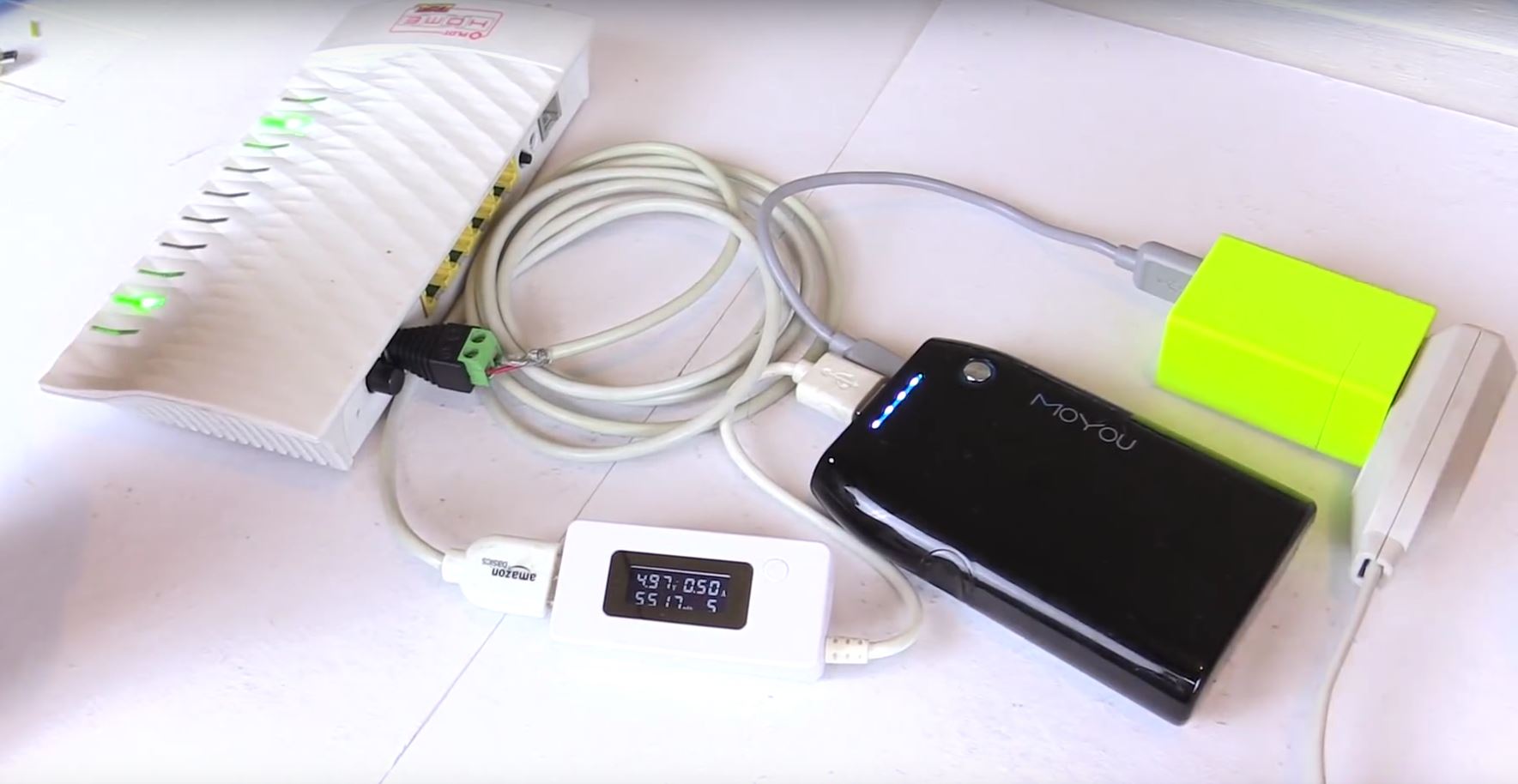

Power outages have a special talent for arriving at the worst possible moment. You are five minutes from submitting a project, your video call is finally going well, or your favorite show has just reached the “wait, who is that guy?” scene. Then the lights blink, the room goes silent, and your Wi-Fi disappears like it just remembered an appointment elsewhere.
Here is the good news: in many homes, your internet connection may not be gone because the internet itself failed. It may be gone because your modem, router, or fiber box lost electricity. The quick hack is beautifully simple: plug your home networking gear into a small battery backup, also called a UPS, before the outage happens. That way, when the grid takes a dramatic nap, your Wi-Fi can keep humming along.
This does not work in every single outage. If your internet provider’s neighborhood equipment also loses power, your powered-up router may still have no signal to share. But for many short outages, flickers, brownouts, and local power interruptions, a UPS for your modem and router can be the difference between staying connected and watching your laptop spin like it is contemplating life.
What Is the Quick Hack?
The hack is to give your internet equipment its own tiny power station. Instead of plugging your modem, router, mesh base station, or fiber ONT directly into the wall, plug them into the battery-backed outlets of an uninterruptible power supply. A UPS sits between the outlet and your devices. Under normal conditions, it passes power through and keeps its internal battery charged. When electricity cuts out, it instantly switches to battery power.
That instant switch matters. A router does not need a thunderous amount of electricity, but it does need continuous electricity. Even a brief interruption can force your modem to reboot, reconnect, and renegotiate service with your provider. That can take several minutes, which is roughly three centuries in “I was just about to click submit” time.
The Devices You Actually Need to Power
Do not plug your entire entertainment center into the UPS and then wonder why it lasted six minutes. The goal is not to keep the big-screen TV, gaming console, space heater, lava lamp, and mystery device from 2009 alive. The goal is to power only the equipment required for internet access.
In most homes, that means:
- The modem or gateway from your internet provider
- Your Wi-Fi router, if it is separate from the modem
- The main mesh Wi-Fi unit, if you use a mesh system
- The fiber ONT or network terminal, if your fiber setup has one inside the home
- Any small network switch required to connect the system
Keep the load small and the runtime gets much better. Your router is not a refrigerator. It does not demand heroic amounts of power. That is why a modest UPS can often keep basic internet gear online long enough to finish work, send messages, check outage maps, or download that recipe you foolishly did not print before the storm.
Why This Works During Many Outages
Your home internet depends on a chain. At one end is your device. Then comes Wi-Fi. Then your router. Then your modem or ONT. Then your provider’s local network. Then the wider internet. During a power outage, the first broken link is often inside your home: your router and modem simply turn off.
A battery backup protects that local link. If the provider’s outside equipment remains powered, your internet may continue working even while your lamps, microwave, and ceiling fan are taking an unscheduled vacation.
This is especially useful for short outages. Many power failures last long enough to interrupt your day but not long enough to justify dragging out a generator or turning your kitchen into a command center. A UPS handles those annoying interruptions quietly. No fumes, no fuel, no drama, and no neighbor wondering why your house sounds like a small airport.
The Important Catch: Your ISP Still Matters
A UPS cannot create internet service from thin air. If a storm knocks out your provider’s local node, fiber cabinet, cable amplifier, or upstream equipment, your home gear may stay on but still have nothing to connect to. Think of it like keeping your phone charged in a room with no signal. The phone is ready. The universe is not cooperating.
Fiber, cable, fixed wireless, and DSL systems can behave differently during outages. Some provider networks have backup power in the field; others may go down when commercial power fails in the neighborhood. Some voice backup batteries are designed mainly for phone service, not full internet service. That detail matters because many people assume “battery backup” means “everything stays online.” Sometimes it means “emergency voice calling keeps working,” which is useful, but not the same as streaming, emailing, and joining a video meeting.
The practical move is to test your setup before you need it. Unplug the UPS from the wall while leaving your modem and router connected to the battery-backed outlets. If your Wi-Fi and internet stay up, you have confirmed the indoor part of the plan. If the router stays powered but the connection drops during a real neighborhood outage, your provider’s outside network may be the weak link.
How to Set It Up in 10 Minutes
The setup is simple enough that it feels like cheating, which is the best kind of household technology project.
Step 1: Identify Your Internet Gear
Find the equipment that brings internet into your home. It may be a single gateway box, or it may be a modem plus a separate router. Fiber customers may also have an ONT, often mounted near a wall, utility panel, closet, garage, or basement area. If that ONT needs power, it must be included in your backup plan.
Step 2: Read the Power Labels
Look at each power adapter. You may see output numbers such as 12V and 1.5A. Multiply volts by amps to estimate watts. For example, 12 volts times 1.5 amps equals 18 watts. Add up the devices you need. Many basic modem-router combinations fall into a relatively modest power range, but always check your actual equipment instead of guessing based on vibes and optimism.
Step 3: Choose a UPS or Mini UPS
A traditional UPS looks like a chunky power strip or small black box. It usually has several outlets, but only some are battery-backed. Others may be surge-only outlets. Plug your modem and router into the battery-backed side.
A mini UPS is smaller and often designed specifically for low-voltage devices like routers, cameras, and small networking gear. It can be neat, quiet, and efficient, but you must match the voltage and connector type carefully. Traditional UPS units are more flexible because they accept standard power plugs, while mini UPS units can be cleaner if you know exactly what your equipment requires.
Step 4: Keep the Load Lean
Do not plug in your desktop computer unless the UPS is sized for it. A laptop already has a battery, so let the laptop take care of itself. Use the UPS for the network gear that has no battery of its own. This is the whole secret: small load, longer runtime.
Step 5: Test Before the Storm
Once everything is connected, charge the UPS fully. Then do a controlled test. Save your work, warn anyone in the house, and unplug the UPS from the wall. Your modem and router should stay on. Check whether Wi-Fi remains connected. Browse a simple webpage. Send a message. Then plug the UPS back in and let it recharge.
This test is boring when it works. Boring is excellent. In emergency planning, boring means you did the annoying part before the sky started throwing furniture.
How Long Will It Keep You Online?
Runtime depends on battery capacity and total power draw. A small router may sip electricity. A modem, router, mesh base station, and switch together drink more. The more devices you connect, the faster the battery drains.
UPS manufacturers often provide runtime calculators where you enter the load in watts and estimate how many minutes a specific model can provide power. Use those calculators as a planning tool, not a sacred prophecy carved into stone. Real-world runtime can vary based on battery age, temperature, device load, and UPS efficiency.
For many households, the goal should be practical rather than heroic. You may not need eight hours of video conferencing during a blackout. You may need 30 minutes to save work, message family, check emergency updates, or switch to a mobile hotspot. If you work from home, aim for a longer window: one to four hours can make a huge difference during routine outages.
Runtime Tips That Actually Help
- Plug in only the modem, router, ONT, and essential network gear.
- Turn off extra mesh nodes if the main router covers enough of the home.
- Use laptops, tablets, and phones on their own batteries.
- Reduce video streaming and large downloads during an outage.
- Replace aging UPS batteries when runtime drops noticeably.
What About Cellular Backup?
A UPS keeps your home internet equipment powered. Cellular backup gives you a second internet path when the wired connection fails. These are related, but not identical.
Some internet providers now offer cellular internet backup options that switch to LTE or 5G when the main broadband connection goes down. This can be extremely useful, especially when your provider’s wired network is interrupted. A phone hotspot can also serve as a simple backup. The downside is that cellular networks can become congested during major outages because everyone suddenly remembers they have a phone.
The strongest home strategy is layered: use a UPS for your modem and router, keep a charged phone and power bank ready, and know how to activate your hotspot if the wired service fails. That way, you are not betting the entire evening on one fragile piece of technology named “Gateway-7A2B.”
Power Outage Internet Checklist
Use this checklist before the next storm, heat wave, winter freeze, or mysterious transformer pop that makes the whole block step outside in pajamas.
- Buy a UPS sized for your modem, router, and ONT.
- Plug only essential network gear into battery-backed outlets.
- Label the cords so nobody accidentally plugs in a lamp instead.
- Charge laptops, phones, tablets, and power banks when bad weather is forecast.
- Enable Wireless Emergency Alerts on your phone.
- Keep a battery-powered or crank weather radio for emergency updates.
- Write down important contacts in case your phone dies or gets misplaced.
- Test the UPS every few months and replace weak batteries.
Safety Notes Nobody Should Skip
Backup power is useful, but safety comes first. A UPS is safe for indoor use when used according to its instructions. Portable generators are different. If you use a fuel-powered generator, it must stay outdoors and away from windows, doors, and vents because carbon monoxide is dangerous. Never run a generator in a garage, even if the door is open.
Also avoid overloading extension cords or daisy-chaining power strips. Your internet gear does not require a circus of cables. Keep the setup clean, ventilated, and easy to inspect. If a battery backup smells strange, overheats, swells, or behaves oddly, unplug it safely and replace it.
Who Should Use This Hack?
This power outage internet hack is useful for remote workers, students, parents, small business owners, apartment dwellers, rural households, and anyone who prefers not to be digitally stranded the moment the lights flicker. It is especially helpful if you rely on Wi-Fi calling, smart security devices, cloud files, online classes, telehealth appointments, or emergency alerts.
It is also useful for people who do not consider themselves “tech people.” You do not need to rebuild your network or speak fluent router. You simply need to identify the right boxes, give them backup power, and test the setup. Congratulations: you are now the person in the house who “knows the internet thing.” Use this power responsibly.
Common Mistakes to Avoid
Mistake 1: Powering the Router but Not the Modem
Your Wi-Fi network can exist without internet, just as a restaurant can have tables without food. If the modem or ONT is off, your router may still broadcast Wi-Fi, but it will not deliver internet access.
Mistake 2: Plugging Into Surge-Only Outlets
Many UPS units have both battery-backed outlets and surge-only outlets. Surge-only outlets do not stay on during an outage. Read the labels before congratulating yourself.
Mistake 3: Expecting Unlimited Runtime
A UPS is not a permanent power plant. It buys time. Use that time wisely: save work, send messages, check updates, and reduce unnecessary internet use.
Mistake 4: Forgetting the Fiber ONT
Fiber internet may depend on a powered ONT. If that box loses power, your router may stay awake but still be cut off. Include the ONT in your backup plan if your setup requires one.
Real-Life Experience: What This Hack Feels Like When the Power Actually Goes Out
The first time you set up a UPS for your modem and router, it may not feel dramatic. There is no cinematic soundtrack. No sparks. No triumphant eagle. You plug in a few black boxes, tidy the cords, and wonder whether you just bought an expensive brick with outlets.
Then the first outage happens.
The house clicks into darkness. The refrigerator sighs. Somewhere outside, a dog announces that civilization has ended. But your router lights remain steady. Your laptop stays connected. Your phone still shows Wi-Fi. It is a strangely satisfying moment, like finding an umbrella in your bag exactly when the rain starts.
In a short outage, this setup can feel almost luxurious. You keep working while the neighborhood group chat fills with “Is your power out too?” messages. You check the utility outage map. You save your documents. You send a calm message to family instead of typing with one bar of cellular service from the corner of the living room. The UPS quietly does its job, which is the highest compliment any piece of home technology can receive.
The real value shows up during messy moments. Maybe you are in an online class and need to download the assignment before your laptop battery gets low. Maybe you run a small shop from home and need to answer a customer. Maybe your child’s school portal has a deadline, because apparently deadlines have no respect for thunderstorms. A battery-backed router gives you breathing room.
There is also a psychological benefit. Outages make people feel cut off. Even if you are not doing anything urgent, being able to check weather alerts, message neighbors, or confirm estimated restoration times reduces that helpless feeling. You are not sitting in the dark guessing. You are sitting in the dark with Wi-Fi, which is basically modern camping.
Of course, the experience is not perfect every time. During a wide-area outage, your internet provider’s equipment may fail too. In that case, the UPS keeps your home network powered, but your connection may still drop. That is when your backup plan shifts to mobile data, a phone hotspot, or a cellular backup device. This is why testing matters. You learn what your setup can do before you are relying on it.
One practical lesson: label everything. During an outage, nobody wants to trace identical black cords behind a dusty cabinet using a phone flashlight at 14 percent battery. Put small labels on the modem, router, ONT, and UPS outlets. Keep the UPS visible enough to check its status, but not in the middle of the floor like a tiny trip hazard with ambition.
Another lesson: do not waste battery on entertainment first. When the power goes out, it is tempting to celebrate your surviving Wi-Fi by streaming a movie. Resist the urge, at least until you know how long the outage may last. Use the early minutes for useful tasks: save files, message people, check alerts, and charge small devices if your UPS has USB ports and enough capacity. Once the situation looks stable, then yes, maybe one episode. One. We both know how “one episode” behaves.
The best version of this hack is boring, prepared, and tested. Your UPS is charged. Your cords are labeled. Your phone has emergency alerts enabled. Your power bank is full. Your household knows that the router backup is for communication first, not for powering a disco ball. When the next outage arrives, you may not control the grid, the weather, or your internet provider’s infrastructure, but you will control the first and most common failure point inside your home.
That is the point of the quick hack: not to become a survival engineer overnight, but to remove one obvious weakness before it ruins your day. Power the modem. Power the router. Test the setup. Keep a cellular backup ready. The lights may go out, but your connection does not have to vanish with them.
Conclusion
The fastest way to stay online during many power outages is to connect your modem, router, and any required ONT to a properly sized UPS or router battery backup. It is affordable, beginner-friendly, and surprisingly effective for short interruptions. Just remember the big caveat: your provider’s network must still be functioning. For the best protection, combine a UPS with charged phones, power banks, emergency alerts, and a cellular backup option.
In other words, do not wait until the lights go out to start learning which black box is the modem. Give your internet gear backup power now, test it once, and enjoy the rare pleasure of being the calm person during an outage. Calm, connected, and possibly still wearing pajamasbut connected.