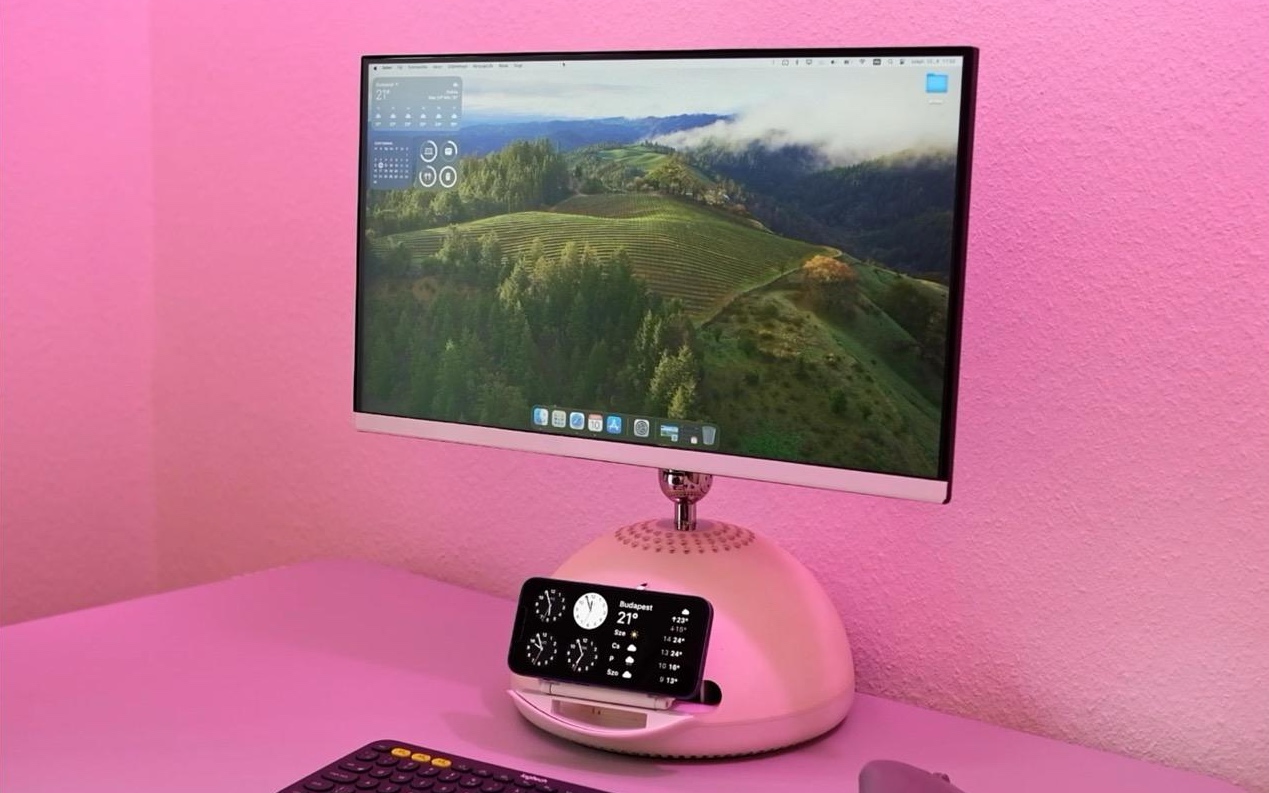

Some computers retire quietly. Others get turned into desk art. And then there is the G4 iMac, Apple’s unforgettable “desk lamp” Mac, which apparently looked at retirement and said, “No thanks, I still have one more trick hidden in my optical drive.”
The idea behind the project is wonderfully simple: take a vintage iMac G4, convert it into a usable external monitor, and hide a MagSafe charger inside the body so an iPhone can dock and charge in a way that feels almost factory-made. It is part restoration, part design tribute, part “because we can,” and 100 percent the kind of retro-computing project that makes a desk look smarter than its owner before coffee.
Why the G4 iMac Still Has a Cult Following
The iMac G4 arrived in 2002 as Apple moved away from the colorful CRT era of the iMac G3 and into flat-panel computing. Instead of placing every component behind the screen like modern all-in-one computers, Apple put the hardware inside a white hemispherical base and mounted the LCD on a polished, adjustable arm. The result looked less like a computer and more like a friendly robot lamp that had majored in graphic design.
That physical design is exactly why the G4 iMac remains so beloved. The screen can tilt, swivel, and float above the desk with a level of personality modern displays rarely attempt. Most monitors today are rectangles attached to sticks. Useful? Absolutely. Charming? About as charming as a tax form. The G4 iMac, by contrast, has character. It looks alive without being creepy, which is not easy for a machine shaped like a snowball with a neck.
A design built for the display age
Apple originally promoted the G4 iMac as a flat-panel breakthrough. Early models used 15-inch LCDs, while later versions expanded to 17-inch and 20-inch displays. Depending on the model, the machine included PowerPC G4 processors, FireWire, USB, optical drives, Apple Pro Speakers, and the kind of white plastic aesthetic that made early-2000s Apple products look like they had been raised in a very clean spaceship.
In 2026, the internal PowerPC hardware is no longer practical for modern everyday computing. Web browsing is limited, software support is ancient, and performance is best described as “historically meaningful.” But the enclosure, display arm, and overall industrial design are still fantastic. That makes the iMac G4 a perfect candidate for a retro Mac mod: preserve the look, replace or bypass the outdated electronics, and give the machine a job it can still do beautifully.
How a G4 iMac Becomes a Monitor
Turning an iMac G4 into an external display is not the same as using Target Display Mode on later iMacs. The G4 iMac predates that feature entirely. It was designed as a computer with a built-in LCD, not as a general-purpose external monitor. To use it with a modern Mac mini, MacBook, PC, or game console, modders usually need a controller board or replacement internal board that can accept a modern video signal.
One modern approach is a drop-in conversion board designed specifically for the 17-inch and 20-inch iMac G4 models. These boards can reuse the original display, power connections, and case layout while adding inputs like HDMI, USB-C, USB-A, and audio support. The goal is to make the old iMac behave like a regular monitor while keeping its iconic exterior intact.
The appeal of a reversible restomod
A good iMac G4 monitor conversion respects the machine instead of treating it like spare parts. Many enthusiasts prefer reversible upgrades, meaning the original logic board can theoretically be reinstalled later. That matters because vintage Apple hardware has cultural value. A dead or incomplete machine may be a great candidate for conversion; a fully working collector-grade example deserves more careful thought.
The best projects walk a fine line. They make the device useful without erasing what made it special. The G4 iMac monitor mod works because it does not try to disguise the computer as something new. It lets the machine be exactly what people already love: a floating Apple display with a dome base, only now it can connect to current hardware.
The MagSafe Secret Hidden in Plain Sight
The most delightful part of the project is not just that the G4 iMac becomes a monitor. It is that the mod hides a MagSafe charging system inside the old optical drive area. Instead of leaving the iMac’s disc slot as a decorative fossil from the DVD age, the builder turns that space into a clever phone dock.
The concept feels unusually appropriate. The iMac G4 came from the era of CDs, DVDs, iTunes, iPhoto, and the original digital hub strategy. A hidden MagSafe charger updates that idea for the phone-first age. The old slot that once accepted optical media now becomes a place where a modern iPhone can rest, charge, and look like it belongs there.
Why MagSafe makes sense for this mod
MagSafe is useful here because magnetic alignment solves one of the classic problems with wireless charging: placing the device slightly wrong. With a magnetic charging puck or Qi2-style magnetic charger, the phone can snap into position more reliably. That makes the charger feel less like a hidden add-on and more like an integrated feature.
A normal wireless charging pad could work in theory, but MagSafe brings a cleaner experience. The phone does not simply sit somewhere on the desk; it docks into the converted iMac. That small difference changes the whole mood of the project. Suddenly, the vintage computer is not just a monitor. It is a workstation centerpiece with a secret modern convenience built into its retro shell.
What Makes This iMac G4 Mod So Clever?
Many retro computer projects are impressive because they are technically difficult. This one is impressive because the idea feels obvious after someone else has done it. Of course the G4 iMac should become a monitor. Of course the disc drive bay should hide a charger. Of course the phone should sit at an ergonomic angle instead of lying flat like it gave up on life.
1. It preserves the best part of the original machine
The G4 iMac’s greatest asset is not its processor or memory. It is the design. The adjustable display arm remains useful even today because it lets the screen move naturally into the user’s line of sight. When the iMac becomes an external monitor, that mechanical elegance finally gets a second life.
2. It turns dead space into useful space
The optical drive slot is one of the most obvious reminders that the G4 iMac came from a different computing era. Many modern users do not need a DVD drive on their desk, but everyone needs a place to charge a phone. Repurposing that area for MagSafe is a smart example of functional nostalgia: keep the old visual language, but make the function relevant again.
3. It creates a cleaner desk setup
A converted G4 iMac monitor can reduce visual clutter by combining display, stand, USB hub potential, audio possibilities, and phone charging into one sculptural object. Is it the most practical monitor money can buy? No. A budget 4K display will beat it on resolution, brightness, and warranty. But that budget 4K display will not make visitors stop and ask, “Wait, is that an iMac G4?”
4. It celebrates repair culture
The project also reflects a broader movement in technology: people want to reuse good hardware instead of sending every outdated device into retirement. Not every vintage computer should be modified, but many broken or incomplete machines can live again through thoughtful restoration. A G4 iMac monitor conversion is a practical love letter to design longevity.
Important Things to Know Before Attempting a Similar Project
This kind of iMac G4 monitor conversion is not the same as plugging in a cable and pressing a keyboard shortcut. It involves opening vintage hardware, handling delicate display connections, and working around internal power components. Anyone considering a similar project should treat it as electronics work, not weekend furniture assembly with better branding.
Choose the right iMac G4 model
Compatibility matters. Some modern drop-in boards are designed for specific 17-inch and 20-inch iMac G4 models and may not support the 15-inch version. Screen size, internal connectors, and model generation can affect whether a conversion is straightforward or a headache wearing an Apple logo. Before buying parts, verify the exact model using the serial number or model identifier.
Think carefully about collector value
A non-working iMac G4 with a good screen is an ideal candidate. A complete, excellent-condition, fully functioning unit may be better preserved, repaired, or sold to someone who wants the original experience. Retro mods are fun, but destroying a rare working machine for a casual experiment can make collectors wince hard enough to hear it in another room.
Respect electrical safety
Any project involving old computers should be approached with caution. Unplug the machine, avoid poking around power components, and do not attempt internal electrical work without proper knowledge. For readers who simply want the finished result, a predesigned conversion kit or help from an experienced technician is much safer than improvising around power supplies and display wiring.
Performance: Beautiful, Useful, but Not Perfect
A converted iMac G4 monitor is not going to compete with a modern 27-inch 5K display. The LCD panels are old. Brightness, contrast, viewing angles, and color accuracy are limited by early-2000s technology. A 17-inch or 20-inch G4 iMac can still be usable, but expectations should be realistic.
That said, not every monitor has to be a color-grading powerhouse. For writing, messaging, reference windows, music controls, dashboards, retro gaming, or a secondary Mac display, the converted iMac G4 can be charming and practical. It is especially attractive for users who already have a main high-resolution display and want a second screen with personality.
Best uses for a converted G4 iMac monitor
The most sensible use is as a secondary display. Put notes, email, chat, music apps, system monitoring tools, or a calendar on it. Use the main modern monitor for demanding work, and let the iMac G4 handle the supporting role. This keeps the experience enjoyable rather than frustrating.
The MagSafe dock adds another layer of utility. A phone can sit in view while charging, making it useful for calls, timers, messages, or smart home controls. In a clean desk setup, that matters. The fewer loose chargers crawling around like cable spaghetti, the better.
Why This Project Feels So Apple
Ironically, this unofficial mod feels very aligned with Apple’s own design philosophy. It takes a familiar object, hides the complexity, and makes the final interaction feel simple. A user sees an iMac, plugs in a modern computer, docks a phone, and gets a display plus charger. The messy part is invisible.
The G4 iMac was always about making technology feel approachable. Its floating screen invited adjustment. Its dome base softened the look of a desktop computer. Its speakers looked like tiny crystal orbs from a friendly sci-fi movie. Adding a hidden MagSafe charger continues that tradition because the feature is useful without shouting for attention.
The best mods look inevitable
A great restomod should make people say, “Apple should have done that.” Obviously, Apple could not have added iPhone MagSafe to a computer released nearly two decades before MagSafe for iPhone existed. But visually and conceptually, the feature fits. That is why the project is memorable. It does not feel random. It feels like the G4 iMac accidentally traveled through time and picked up a modern party trick.
Experience: Living With a G4 iMac Monitor and Hidden MagSafe Dock
Using a G4 iMac as a modern monitor is a strange experience in the best possible way. The first surprise is emotional, not technical. You expect an old computer to feel outdated, but the physical design still feels premium. The screen floats. The arm moves with intention. The dome base gives the whole setup a sense of balance. It is not just a display sitting on a desk; it is a small sculpture that happens to show your desktop.
The second surprise is how naturally the MagSafe dock fits into the routine. Instead of placing a phone somewhere random, you dock it in the old optical drive area and it becomes part of the workstation. That sounds minor until you live with it. A dedicated charging spot reduces clutter, keeps the phone visible, and makes the setup feel organized without adding another accessory to the desk.
In daily use, the converted iMac works best when expectations are reasonable. It is not the monitor for high-end photo editing, fast gaming, or pixel-perfect design review. The panel is old, and time is undefeated. But as a second display, it has a sweet spot. Writing notes on it feels great. Keeping a playlist there feels natural. Monitoring email, chat, or a calendar works beautifully. The screen’s limitations matter less when it is not carrying the entire workload.
There is also a social effect. A normal monitor disappears into the background. A G4 iMac monitor starts conversations. People recognize it even if they do not know the model name. Someone will inevitably say, “I remember those,” followed by a story about school computer labs, early iTunes libraries, or the first time they saw an Apple Store. That nostalgia is part of the value. The machine carries memories as much as pixels.
The MagSafe secret adds a little theater. When the phone slides out from where the disc drive used to be, the reaction is usually a grin. It is a clever transformation because it respects the original shape instead of fighting it. The iMac does not look hacked together. Done cleanly, it looks like the old design was waiting for this new purpose all along.
The main drawback is practicality. A converted G4 iMac takes effort, costs money, and delivers a display experience that modern budget monitors can outperform on paper. But that is missing the point. This project is not about winning a spec sheet contest. It is about making technology feel personal again. It is about choosing charm over maximum efficiency, reuse over disposal, and delight over another black rectangle on a desk.
After spending time with the idea, the biggest lesson is simple: good design ages differently than fast hardware. Processors become obsolete. Ports change. Operating systems move on. But a thoughtful physical object can remain desirable for decades. The G4 iMac monitor with a hidden MagSafe charger proves that vintage tech does not have to stay frozen in the past. Sometimes it just needs a new job, a modern input, and one very sneaky charging puck.
Conclusion
The G4 iMac becomes a monitor with a MagSafe secret because the original design still has more to give. By transforming the old all-in-one into an external display and hiding a wireless charger where the optical drive once lived, the project blends nostalgia, usability, and clever modern convenience.
It is not the cheapest monitor upgrade. It is not the sharpest display. It is not the most practical path for everyone. But as a retro Mac mod, it succeeds brilliantly because it understands the assignment: preserve the magic, update the purpose, and make the desk a little more fun.
For anyone fascinated by vintage Apple hardware, iMac G4 monitor conversions, hidden MagSafe charger builds, or sustainable tech restoration, this project is a reminder that old devices do not always need to disappear. Sometimes they just need a second actand maybe a secret phone charger tucked behind the curtain.
SEO Tags
Note: This article is written for editorial and informational purposes. Hardware conversions involving vintage electronics should be handled carefully, and readers should avoid internal electrical work unless they have the proper skills or professional support.