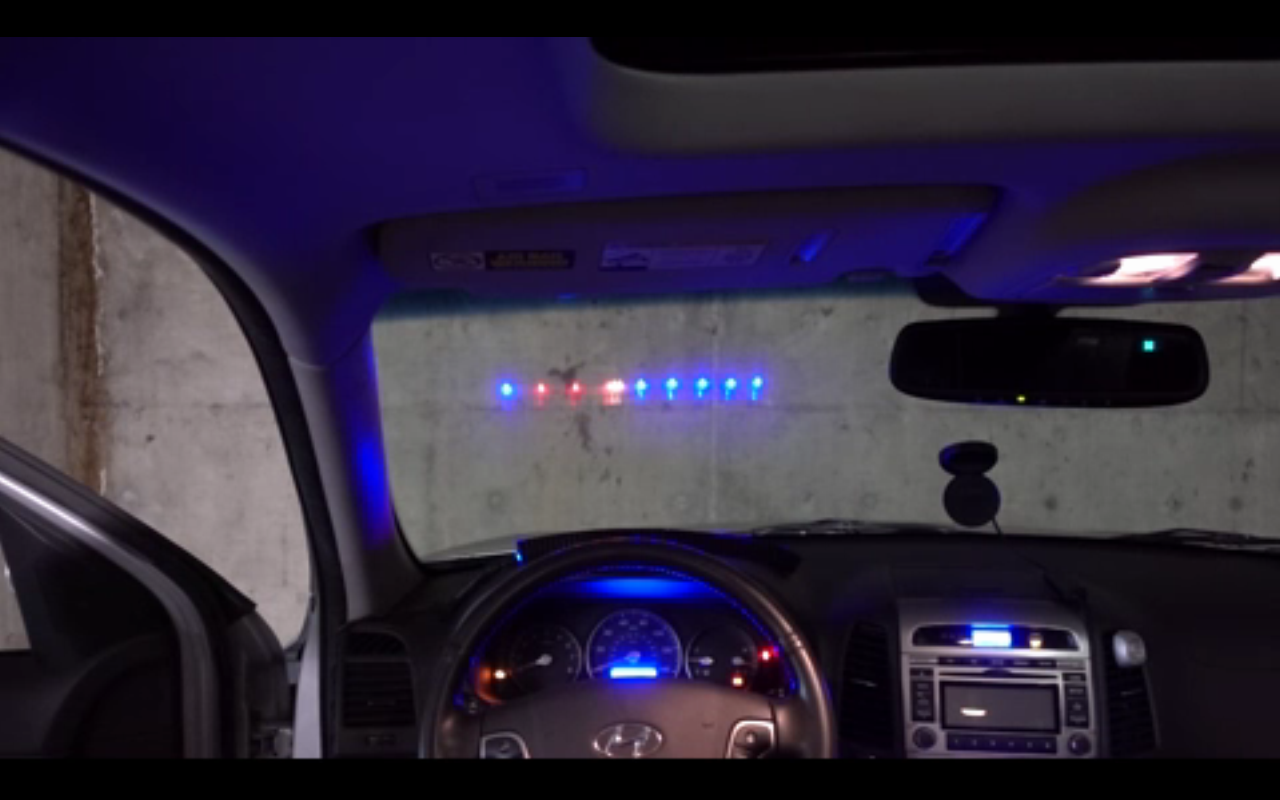

A heads-up display in a car is one of those gadgets that makes a perfectly normal commute feel slightly illegal in the best possible way. You are still obeying traffic laws, stopping for pedestrians, and waiting behind a delivery truck that has apparently chosen your lane as its final resting place. But now your speed, RPM, navigation prompts, and warning lights hover in your field of view like you are taxiing an F-16 to the grocery store.
The idea behind a car heads-up display, or HUD, is simple: show key driving information without forcing the driver to look down at the instrument cluster or sideways at a screen. The technology started in aviation, where pilots needed speed, altitude, targeting, and attitude data while keeping their eyes forward. In cars, the goal is less “lock missile target” and more “do not miss the freeway exit while arguing with the GPS lady.”
The phrase “Heads-Up Display Turns Car Into Fighter Jet” captures both the cool factor and the practical value of the technology. A well-designed automotive HUD can make driving feel more futuristic, but it can also reduce unnecessary glances away from the road. The best systems are not about showing off; they are about placing useful information where your eyes already want to be.
What Is a Heads-Up Display in a Car?
A car head-up display projects information onto the windshield or onto a small transparent panel, sometimes called a combiner. Instead of looking down at the dashboard, the driver sees floating digital data near the road ahead. Common HUD information includes vehicle speed, turn-by-turn navigation, cruise-control settings, lane warnings, speed-limit signs, battery status in EVs, and performance data such as RPM or shift indicators.
Traditional HUDs use mirrors, lenses, and a display source hidden inside the dashboard. The image reflects off the windshield in a way that makes it appear farther ahead than the glass itself. That optical trick matters because drivers do not want to constantly refocus from the road to a close screen. A good HUD should feel like a quiet co-pilot, not a neon billboard taped to your face.
The DIY Project That Inspired the Fighter Jet Feeling
The original maker-style version of this concept is wonderfully direct. Instead of waiting for a luxury automaker to add a futuristic cockpit, a builder created a homemade HUD using an LED strip placed on the dashboard. The strip shines upward, and the windshield reflects a small amount of that light back toward the driver. The result is a simple transparent display that can show vehicle status without blocking the view of the road.
The clever part is not just the reflection. The system can read vehicle data from the car’s CAN bus, the internal communication network that lets modules inside the vehicle exchange information. With the right electronics and programming, a DIY HUD can display data such as speed, engine RPM, and voltage. In other words, the windshield becomes a low-budget cockpit display, and the driver gets a taste of fighter-jet style without needing a helmet, a flight suit, or permission from an air base.
This kind of project explains why HUD technology has such a strong appeal among car enthusiasts. It combines optics, electronics, coding, and automotive data. It is part science project, part dashboard upgrade, and part childhood dream. The car does not actually become a fighter jet, of course. It still has cupholders, road noise, and probably a mysterious rattle near the glovebox. But the emotional effect is real.
How Automotive HUDs Actually Work
Windshield Reflection
Most factory HUD systems project an image from the dashboard onto a specially designed area of the windshield. The windshield acts like a partially reflective surface. It lets the driver see the road while also reflecting the digital image. Because a windshield is curved and laminated, automakers must carefully calibrate brightness, angle, image distance, and distortion correction.
Combiner Displays
Some aftermarket HUDs use a separate transparent panel mounted above the dashboard. This approach can be easier to install because the device does not rely as heavily on the windshield’s exact shape or coating. A combiner HUD may look less seamless than a factory windshield system, but it can be practical for older cars or budget-conscious drivers.
Augmented Reality HUDs
Augmented reality head-up displays, often called AR-HUDs, go beyond basic speed numbers. They can place navigation arrows, lane guidance, and driver-assistance cues so they appear aligned with the real road. Instead of telling you “turn right in 300 feet,” an AR-HUD can make the lane or turn appear visually obvious. That is the difference between reading instructions and having the road politely point at itself.
Why HUDs Feel So Futuristic
Part of the magic comes from the aviation connection. Fighter jets use HUDs because pilots need immediate access to critical information while looking outside the cockpit. Automotive HUDs borrow the same basic idea, even if the stakes are usually merging onto I-95 instead of dogfighting over the clouds.
The visual style also matters. Floating numbers, glowing icons, and translucent navigation arrows create a cockpit-like atmosphere. A regular dashboard says, “Here is your speed.” A HUD says, “Welcome, commander.” That tiny difference is enough to make even a minivan feel like it has entered a science-fiction franchise.
However, the best HUDs resist the temptation to become too dramatic. A fighter jet may need a dense display full of mission data. A driver needs only the right information at the right moment. When a car HUD becomes too busy, it can defeat its own purpose. Good design is not about showing everything; it is about showing what matters before the driver has to go hunting for it.
The Safety Argument: Eyes Up, Less Looking Down
Driver distraction is a major concern in modern vehicles. Touchscreens, phone notifications, navigation menus, climate controls, and voice assistants all compete for attention. A HUD can help by reducing the number of times a driver looks away from the road to check speed, route guidance, or alerts.
That does not mean every HUD is automatically safe. Poorly designed displays can become visual clutter. Bright graphics at night, constant notifications, or entertainment-style content in the driver’s view can increase distraction instead of reducing it. The safest HUDs are selective, readable, and calm. They provide information that supports driving, not digital confetti because the car felt lonely.
The sweet spot is simple: speed, navigation, important warnings, and driver-assistance cues. A HUD should not be a social media ticker, a movie screen, or a tiny stock market terminal. Nobody needs to check a meme at 65 miles per hour. The road already provides enough live content.
Factory HUDs vs. Aftermarket HUDs
Factory HUDs
Factory-installed HUDs are usually better integrated. They can access more vehicle data, adjust brightness automatically, align with driver-assistance systems, and project cleaner images. Luxury brands such as BMW and Mercedes-Benz have pushed the technology into more immersive territory, especially with panoramic and augmented-reality concepts. Some newer systems are designed to place information across a wider area of the windshield and combine navigation, assistance, and vehicle status into one driver-focused interface.
Aftermarket HUDs
Aftermarket HUDs are cheaper and easier to add to cars that did not come with the feature. Many plug into the OBD-II port to read speed, engine RPM, coolant temperature, battery voltage, and other basic data. Others mirror smartphone navigation. These systems can be useful, but quality varies. Some are too dim in daylight, too bright at night, or too cluttered for comfortable driving.
For a clean experience, buyers should look for adjustable brightness, simple graphics, stable mounting, accurate speed display, and minimal lag. A HUD that slides across the dashboard every time you brake is not a technology upgrade. It is a small haunted appliance.
What Information Should a Car HUD Show?
The best automotive head-up displays focus on essential driving information. Speed is the obvious starting point. Speed-limit recognition is also useful because it helps drivers notice when the limit changes. Navigation prompts are valuable when they are simple and timed well. Driver-assistance warnings, such as lane-departure alerts or forward-collision warnings, can also make sense when they are visually clear and not overly dramatic.
Performance cars may add RPM, gear position, and shift lights. EVs may show battery range, regenerative braking status, and charging-related information. Hybrid vehicles may display efficiency cues. The key is context. A sports car driver on a track may appreciate a tachometer-style HUD. A parent driving to soccer practice probably needs speed, navigation, and maybe a reminder that the left lane is not a meditation retreat.
When a HUD Becomes Too Much
There is a thin line between helpful and distracting. A clean arrow showing an upcoming turn is helpful. A floating animated dragon telling you to turn right is memorable, but possibly not ideal for defensive driving. Automakers and app designers must treat the windshield as sacred space. It is not a second dashboard. It is the driver’s window into the real world.
Too much brightness can cause glare. Too many colors can slow recognition. Too many alerts can create alarm fatigue. A HUD should be designed with the same discipline as road signs: quick, clear, and easy to understand. The driver should be able to process the information in a glance, not decode it like an ancient tablet discovered in a glove compartment.
Augmented Reality: The Next Big Leap
Augmented reality is where the fighter-jet comparison becomes even stronger. AR-HUD systems can visually connect digital information to objects and lanes outside the car. Imagine a navigation arrow that appears to sit on the correct lane, or a warning marker that highlights a vehicle ahead. That type of display can make complex driving situations easier to understand.
BMW’s panoramic display direction and Mercedes-Benz’s AR navigation features show where the industry is heading. Instead of treating the dashboard as the only place for information, automakers are exploring windshields as a broader digital canvas. The challenge is restraint. The windshield can become smarter, but it must not become busier than Times Square on New Year’s Eve.
Future systems may use larger fields of view, better depth perception, eye tracking, adaptive brightness, and AI-assisted alerts. The most advanced versions could understand what the driver is looking at and present information only when it is useful. That would move the HUD from a static display to an intelligent co-driver.
Practical Buying Tips for Drivers
If you are shopping for a car with a head-up display, test it during the day and at night. Make sure the image is bright enough in sunlight but not harsh after dark. Sit in your normal driving position and check whether the display is easy to see. Some HUDs offer height and rotation adjustments, which can make a big difference.
Drivers who wear polarized sunglasses should also test visibility. Some HUD images can become faint or disappear depending on lens polarization and windshield reflection. That is not a small issue if you drive in sunny areas. A futuristic cockpit is less impressive when it vanishes every time you put on sunglasses.
For aftermarket systems, choose simplicity over fireworks. A basic HUD that shows speed clearly is better than a flashy unit that displays twelve items badly. Also consider installation. A cable draped across the dashboard can ruin the clean cockpit vibe. Nothing says “fighter jet” like a loose wire dangling into the cupholder.
DIY HUDs: Fun, Smart, and Not for Everyone
A DIY car HUD can be a rewarding project for people who enjoy electronics, coding, and automotive experimentation. Reading data from OBD-II or CAN bus systems allows a builder to create a customized display. The project can teach valuable lessons about vehicle networks, microcontrollers, LED brightness, optics, and user-interface design.
But DIY systems should be built responsibly. Anything mounted on or near the dashboard must be secure. The display should not block the driver’s view. Wiring should be safe, fused when appropriate, and kept away from pedals, airbags, and steering components. The goal is to create a useful display, not to turn the interior into a rolling science fair accident.
For most drivers, an aftermarket plug-in HUD is easier. For hobbyists, the DIY route is the fun one. It offers the satisfaction of turning raw vehicle data into a custom cockpit experience. It also gives you the right to say, “I built my own head-up display,” which is a sentence that instantly improves any garage conversation.
Real-World Driving Experience: What a HUD Feels Like Over Time
The first time you drive with a good HUD, it feels like a novelty. You check your speed just because it is floating there. You watch the navigation arrow appear and think, “This is unnecessary, but I love it.” After a week, the novelty fades and the usefulness becomes obvious. You stop looking down as often. You catch speed changes more naturally. You follow turns with less last-second panic.
On highways, the benefit is especially clear. Speed, adaptive cruise settings, and lane guidance can stay in the driver’s view while traffic flows around you. In unfamiliar cities, a HUD can reduce the stress of navigation. Instead of glancing between road signs, the center screen, and your instrument cluster, you can keep more attention forward. It does not make traffic pleasant, but it does make it slightly less like being trapped in a group project with strangers.
At night, a well-calibrated HUD can feel elegant. The cabin stays darker, the road remains the focus, and essential data appears softly in front of you. A bad HUD, however, can feel like a tiny arcade machine shouting from the windshield. That is why brightness adjustment and clean graphics are critical.
In spirited driving, a HUD can add excitement. RPM, gear position, and shift indicators bring the fighter-jet feeling to life. You do not have to be reckless to enjoy it. Even on a winding road at legal speeds, having the right information forward can make the car feel more connected and intentional.
Experience Notes: Living With a Fighter-Jet-Style HUD
After spending time with cars that have head-up displays, the most surprising thing is how quickly the feature becomes normal. At first, it feels like a premium trick. Then it becomes a convenience. Eventually, driving without it feels oddly old-fashioned, like using a paper map or manually rolling down a window while pretending it builds character.
The best experience comes when the HUD disappears into the act of driving. You are not staring at it. You are simply aware of it. Speed sits in your lower field of view. The next turn appears when needed. A warning shows up only when something deserves attention. That is the correct balance. The display should support the driver, not compete with the road.
On long trips, a HUD can reduce tiny moments of fatigue. Looking down at the speedometer is not difficult, but doing it hundreds of times adds up. A head-up display removes many of those micro-glances. It also helps when road conditions are busy. In heavy rain or fast-moving traffic, keeping the eyes forward feels more natural and less stressful.
Navigation is where AR-HUD systems shine. Traditional navigation sometimes gives instructions that sound clear until you meet a five-lane intersection designed by someone who apparently disliked humanity. A good HUD arrow can make the correct lane obvious earlier. That can prevent awkward lane changes, missed exits, and the classic “recalculating” shame spiral.
There are downsides. Some drivers may find the display distracting at first. Others may struggle with visibility if the windshield, seating position, or sunglasses do not play nicely with the projection. Aftermarket units can look messy if installed poorly. Factory systems can be expensive and sometimes locked behind luxury trim packages. The fighter-jet feeling is fun, but automakers know fun can be monetized.
The biggest lesson is that a HUD is not valuable because it looks futuristic. It is valuable when it makes driving simpler. A clean speed display is useful. A clear turn prompt is useful. A timely safety warning is useful. A windshield full of animated icons, weather widgets, text messages, and bouncing mascots is not useful. That is not a HUD. That is a Times Square windshield, and nobody asked for that.
For enthusiasts, a DIY HUD adds another layer of enjoyment. Building one forces you to think like both an engineer and a driver. What data matters? How bright should the display be? Where should it appear? How much is too much? Those questions are exactly why cockpit design is harder than it looks. A great HUD is not just a screen. It is a decision about attention.
In the end, the phrase “Heads-Up Display Turns Car Into Fighter Jet” works because it captures a fantasy rooted in real engineering. The driver gets a cleaner view of important information. The car feels more advanced. The windshield becomes part of the interface. And for a moment, even the dullest commute gets a little Top Gun energy, minus the afterburners, danger zone soundtrack, and extremely expensive government equipment.
Conclusion
A heads-up display can transform the driving experience by placing key information directly in the driver’s line of sight. From simple DIY LED reflections to advanced augmented-reality windshield systems, HUD technology blends safety, convenience, and undeniable cool factor. The best versions do not overwhelm the driver. They reduce distraction, simplify navigation, and make the car feel more intelligent.
The fighter-jet comparison is fun, but the real win is practical. A car HUD helps drivers keep their eyes up, their attention forward, and their dashboard glances to a minimum. Whether installed by an automaker or built by a clever hobbyist, the head-up display is one of the rare car technologies that can feel futuristic while solving a real problem. That is a pretty good trick for something made of light, glass, and a little bit of cockpit daydreaming.