
Deleting a dating app should be simple. You open the app, tap a few buttons, say goodbye, and ride into the sunset with your digital privacy cape fluttering behind you. But with Happn, there is one very important detail many users miss: deleting the app from your phone is not the same as deleting your Happn account.
If you only uninstall Happn, your account may still exist, your profile may still be visible, and your messages, Crushes, and account information may still be waiting for you the next time you log in. In other words, your phone may be clean, but your Happn profile is still out there doing social cardio.
This guide explains how to delete a Happn account properly, what to do before you tap the final button, how to cancel Happn Premium, and what happens after account deletion. Whether you are taking a break from dating apps, switching platforms, protecting your personal data, or simply tired of seeing familiar faces pop up like surprise guests at a grocery store, these seven steps will help you close your account the right way.
Before You Delete Your Happn Account: Know What Actually Happens
Before jumping into the seven-step process, it helps to understand the difference between three common actions: uninstalling Happn, pausing your Happn account, and deleting your Happn account.
Uninstalling Happn
Uninstalling the app removes Happn from your phone, but it does not delete your account. Your profile, messages, Crushes, and other account details may remain linked to your profile. Your location may stop updating after the app is removed, but account deletion requires action inside the app or through Happn support.
Pausing Your Happn Account
Pausing is the “I need space, but I might come back” option. It hides your profile while keeping your account information available for later. This is useful if you want a temporary break without deleting matches, messages, or profile details.
Deleting Your Happn Account
Deleting your Happn account is the permanent option. It removes your profile from the app and deletes account data from Happn’s active service, although some information may be retained where legally required or for security, fraud prevention, or compliance reasons. Once confirmed, deletion cannot usually be undone.
How to Delete a Happn Account in 7 Steps
The steps below work for both iPhone and Android users, although wording and screen layout may vary slightly depending on your app version. The general path is the same: open Happn, go to your profile, enter settings, open your data section, and choose account deletion.
Step 1: Check Whether You Have an Active Happn Premium Subscription
Before you delete your Happn account, check whether you are paying for Happn Premium. This matters because deleting your account does not automatically cancel a paid subscription. That tiny billing detail is the digital equivalent of leaving the oven on before going on vacation.
If you subscribed through Apple, open your iPhone or iPad settings, tap your Apple ID, choose Subscriptions, select happn, and tap Cancel Subscription. If you subscribed through Google Play, open the Google Play Store, tap your profile icon, go to Payments & subscriptions, select Subscriptions, choose happn, and tap Cancel subscription.
Canceling a subscription usually lets you keep Premium features until the end of the current billing period. It simply stops the renewal. To avoid surprise charges, cancel before the renewal date, ideally at least 24 hours early.
Step 2: Open the Happn App
After handling any active subscription, open the Happn app on your phone. Make sure you are logged into the account you want to delete. This sounds obvious, but people sometimes have more than one login method, such as phone number, Facebook, Google, or Apple. Deleting the wrong account is not a fun plot twist.
If you cannot log in, try the recovery method connected to your original sign-up option. If that fails, contact Happn support and explain that you want to delete your account but cannot access it. You may need to verify your identity before support can help.
Step 3: Tap Your Profile Picture
From the Happn home screen, tap your profile picture, usually located at the top right of the screen. This opens your personal area, where you can manage your account, preferences, profile details, and settings.
This is also a good moment to review whether you really want to delete everything. If you have important conversations, phone numbers, or details you want to keep, save them before going further. Once an account is deleted, your profile and app history are not meant to be restored.
Step 4: Go to Settings
Scroll through your profile area until you find Settings. Tap it. This section controls the practical side of your Happn account, including privacy-related options, account management, notifications, and data settings.
If you do not immediately see the right option, update the app and check again. App menus can shift over time. Happn may also test small layout changes, so the button could move slightly while keeping the same basic label.
Step 5: Open the “My Data” Section
Inside Settings, look for a section called My Data. This is where Happn places account information controls, including account deletion. Tap My Data to continue.
This step is important because account deletion is usually tied to privacy and data rights. Dating apps hold sensitive personal information, including profile photos, preferences, conversations, approximate location-related data, and account identifiers. Deleting your account is not just a cosmetic change; it is also a data-management action.
Step 6: Choose “Delete My Account”
In the My Data section, choose Delete my account. Happn may show an alternative option to pause your account instead. If you only want a temporary break, pausing might be enough. If you want to leave permanently, continue with deletion.
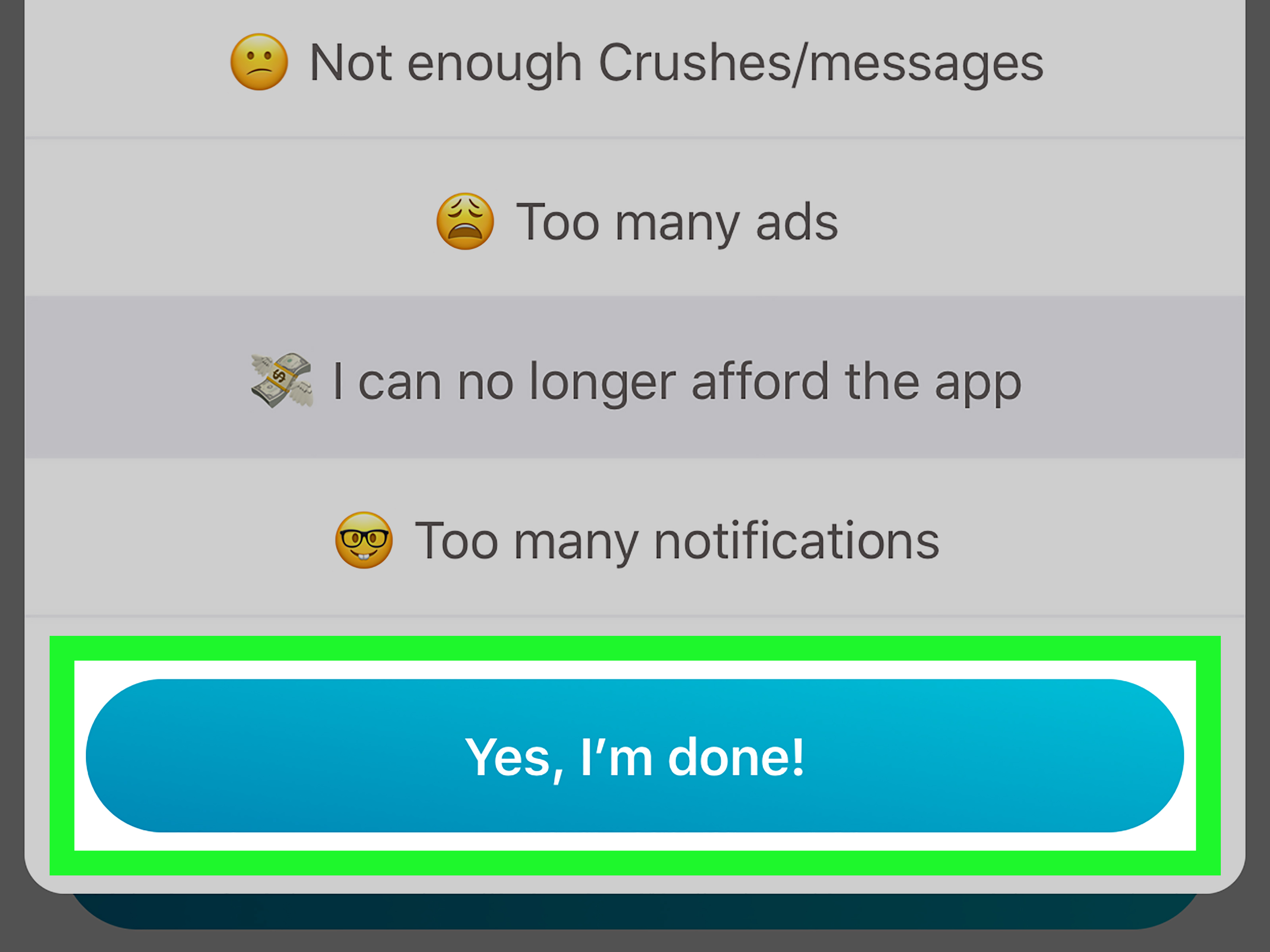
Happn may ask why you are leaving. You can usually select up to several reasons, such as not using the app anymore, meeting someone, privacy concerns, or not enjoying the experience. This feedback helps the app improve, but it should not prevent you from deleting your account.
Step 7: Confirm the Deletion
After choosing your reason, follow the final prompts and tap Confirm deletion. Read the warning carefully before confirming. Account deletion is intended to be permanent. Once complete, your profile should be removed from Happn, and you will no longer use the account as before.
After deletion, you can uninstall the app from your phone. This order matters: delete the account first, then uninstall the app. Doing it backward is like throwing away your house key and then realizing you still needed to go inside to turn off the lights.
How to Cancel Happn Premium Before Deleting Your Account
If you use Happn Premium, take care of billing before deleting your account. Subscriptions are usually managed by the platform where you purchased them, not directly by the app after the fact. That means Apple handles App Store subscriptions, while Google handles Google Play subscriptions.
Cancel Happn Premium on iPhone
- Open the Settings app on your iPhone or iPad.
- Tap your name or Apple ID at the top.
- Tap Subscriptions.
- Select happn.
- Tap Cancel Subscription and confirm.
If you do not see a cancel button, the subscription may already be canceled, or you may be signed into a different Apple ID than the one used for the purchase.
Cancel Happn Premium on Android
- Open the Google Play Store.
- Tap your profile icon.
- Go to Payments & subscriptions.
- Tap Subscriptions.
- Select happn.
- Tap Cancel subscription and follow the prompts.
If Happn does not appear in your subscriptions, check whether you are logged into the correct Google account. Many “mystery subscriptions” are not mysteries at all; they are just hiding in another account like a raccoon in a garage.
Does Deleting Happn Delete Your Messages and Crushes?
Deleting your Happn account removes your profile from the app and ends your account activity. Your Crushes, conversations, and profile visibility are tied to that account, so you should not expect to recover them after deletion.
However, remember that messages you sent may have been seen, saved, or screenshotted by another person before deletion. Account deletion can remove your access and profile presence, but it cannot erase someone else’s memory, camera roll, or unusually organized screenshot folder. For privacy, avoid sharing sensitive information in dating app chats in the first place.
Can You Delete Happn Without Logging In?
If you cannot log in to your Happn account, you may still be able to request help from Happn support. Be ready to provide enough information to identify the account, such as the email address, phone number, or login method associated with it. Support may request identity verification for security reasons.
This extra step protects users from unauthorized deletion requests. After all, nobody wants an ex, a prankster, or a bored roommate deleting an account without permission. Account security may feel annoying in the moment, but it is there for a reason.
Common Mistakes to Avoid When Deleting a Happn Account
Mistake 1: Only Deleting the App
Uninstalling Happn does not delete your account. Always delete the account from inside the app first, then remove the app from your device.
Mistake 2: Forgetting to Cancel Premium
Deleting the account does not necessarily cancel the subscription. Cancel Happn Premium through Apple or Google before deleting your account.
Mistake 3: Ignoring the Renewal Date
Subscriptions may renew automatically. Cancel before the next billing date to reduce the risk of another charge.
Mistake 4: Expecting an Instant Refund
Canceling a subscription stops future billing, but it does not automatically refund past payments. Refunds depend on Apple, Google, or Happn’s applicable policy and timing.
Mistake 5: Not Saving Important Information
If you want to keep a conversation, contact detail, or personal note, save it before deleting your account. Once deleted, your account history is not meant to be restored.
Should You Pause or Delete Your Happn Account?
Choose pause if you only want a temporary break. Pausing hides your profile while keeping your account available for later. This is useful if you are busy, overwhelmed, traveling, dating someone new, or simply tired of swiping through humanity like it is a very emotional restaurant menu.
Choose delete if you want a permanent exit. Deletion is better if you no longer use Happn, want to reduce your digital footprint, are concerned about privacy, or do not want your profile connected to the platform anymore.
Privacy Tips Before Leaving Happn
Deleting a dating app account is a good time to do a quick privacy cleanup. Remove profile photos you do not want associated with the app, review linked login methods, and check whether any subscriptions remain active. If you used Apple, Google, or Facebook to sign in, you may also want to review connected apps in those account settings.
For extra digital hygiene, check your email for Happn receipts, account confirmations, or support messages. These can help if you later need proof of subscription cancellation or refund timing. Keep important billing emails until you are sure everything is settled.
Troubleshooting: What If the Delete Button Is Missing?
If you cannot find Delete my account, try these fixes:
- Update Happn to the latest version.
- Restart the app and log in again.
- Check under Profile, Settings, and My Data.
- Make sure you are using the official Happn app.
- Contact Happn support if the option still does not appear.
Sometimes app layouts change, especially after updates. The setting may not be gone; it may just be wearing a new outfit.
Experience-Based Advice: What Users Often Learn When Deleting a Happn Account
From a practical user-experience perspective, deleting a Happn account is usually not difficult, but it is easy to do in the wrong order. Many people start by uninstalling the app because that feels like deletion. On a phone, removing an icon feels final. The problem is that app removal only affects the device. It does not necessarily tell the company, “Please close my account and remove my profile.”
A better approach is to treat account deletion like moving out of an apartment. First, cancel any automatic payments. Then collect anything important. Then formally close the account. Finally, remove the app. This order prevents the most common headaches.
One common experience is subscription confusion. A user may delete the Happn profile, feel relieved, and then see another App Store or Google Play charge days later. This does not always mean Happn ignored the deletion. It usually means the subscription was still active through Apple or Google. App subscriptions are often controlled outside the app, so the billing system keeps going until canceled at the store level.
Another common experience is hesitation at the pause-or-delete screen. This is where users realize they may not want a permanent goodbye. If you are deleting Happn because dating apps feel overwhelming, pausing can be a smart first move. It gives you space without erasing everything. But if your goal is privacy, reducing app clutter, or ending your relationship with the platform completely, deletion is the cleaner choice.
Some users also discover they have forgotten which login method they used. They may try their phone number, then email, then Apple, then Google, while the app looks back silently like a locked suitcase. To avoid this problem in the future, keep a simple note of which login method you use for major apps. You do not need to write down passwords in unsafe places, but knowing whether you used Apple ID, Google, Facebook, or a phone number can save time.
People deleting dating apps often underestimate the emotional side, too. Deleting Happn can feel refreshing, awkward, final, or weirdly satisfying. Dating apps are not just software; they hold conversations, hopes, compliments, disappointments, and occasionally messages that make you stare into the distance like you are in a dramatic music video. Before deleting, give yourself a minute to decide whether you need any information from old chats. Once you confirm deletion, assume the door is closed.
There is also a privacy lesson here: dating apps collect personal information because they need it to function. Happn’s concept is based on crossing paths and meeting people nearby, so location-related features are central to the experience. That makes account management especially important. If you are no longer using the service, deleting the account is better than leaving an inactive profile floating around online.
Finally, a good post-deletion habit is to check your phone, subscriptions, and email a few days later. Make sure the app is gone, the subscription is canceled, and no new billing notice appears. This small follow-up takes only a few minutes, but it can prevent the classic “Why am I still paying for this?” moment that arrives with the subtle emotional violence of a surprise receipt.
Final Thoughts
Deleting a Happn account is straightforward once you know where to look. The key path is simple: cancel any paid subscription first, open Happn, tap your profile picture, go to Settings, open My Data, choose Delete my account, and confirm. After that, you can uninstall the app with confidence.
The biggest takeaway is this: uninstalling Happn is not account deletion. If you want your profile removed, use the in-app deletion option. If you pay for Happn Premium, cancel it through Apple or Google before closing the account. With the right order, you can leave Happn cleanly, avoid unwanted renewals, and keep your digital life a little more organized.
Note: App menus can change slightly by version and device, but the standard deletion route is Profile → Settings → My Data → Delete my account. Always cancel any active paid subscription separately before deleting the account.